Geekzone: technology news, blogs, forums
Guest
Welcome Guest.
You haven't logged in yet. If you don't have an account you can register now.


Filter this topic showing only the reply marked as answer View this topic in a long page with up to 500 replies per page Create new topic
1 | 2 | 3 
Qazzy03
546 posts

Ultimate Geek
+1 received by user: 492


  #3021660 15-Jan-2023 16:09
Send private message

I think you both have merit, the RAM is going to be easier upgrade compared to an NVME drive.  


However DDR4 is basically at end of life and the cheapest it is going to be, as DDR5 will start to become more main stream.


Getting 16GB now and say upgrading another 16GB in say a years time could be costly as DDR4 supply starts to drop/no longer in stock.


Right now OP has 32GB of DDR4 ram 3600 clocked for approx $220.00.


My suggestion would be get this slightly lower clocked ram 32GB of DDR4 ram 3200 for $159 and put the extra money towards a better boot drive.


P.S i don't know what makes a better boot drive but i personally don't think DDR4 clock speed 3200 vs 3600 is worth the extra $60.


Admittedly i could be way wrong like my BIOS comment.... think this is my 6cents so far


https://www.computerlounge.co.nz/shop/components/memory/desktop/corsair-vengeance-lpx-32gb-2x16gb-ddr4-3200-cl16-11584


networkn
Networkn
32871 posts

Uber Geek
+1 received by user: 15468

ID Verified
Trusted
Lifetime subscriber

  #3021669 15-Jan-2023 16:42
Send private message

100% there is no value in 3600 vs 3200 memory (for the type of gaming this rig is likely to be asked to do) and yes, that $60 could be better spent on a bigger/better boot drive. 


toejam316
1516 posts

Uber Geek
+1 received by user: 888

Trusted
Lifetime subscriber

  #3021678 15-Jan-2023 17:17
Send private message

In terms of bang for your buck, the latest build you posted is pretty good. Consider saving a little cash by getting DDR4 3200Mhz CL14 or even CL16 RAM, it'll be fast enough, and spending a little more to get a Samsung SSD if possible. Otherwise, I wouldn't fault any of those parts. The only other consideration might be looking at a used 3080 vs the 6800XT if you care about Raytracing performance, but I'd personally choose the new GPU.


Join Quic Broadband with my referral - no sign up fee and gives me account credit


Anything I say is the ramblings of an ill informed, opinionated so-and-so, and not representative of any of my past, present or future employers, and is also probably best disregarded.


Handle9
11927 posts

Uber Geek
+1 received by user: 9683

Trusted
Lifetime subscriber

  #3021691 15-Jan-2023 18:11
Send private message

Jase2985:

networkn:


An extra 16GB of memory would make more difference day to day than the NVME Drive, especially if his needs expand.


unless you are running a heap of stuff all at once you dont need 32GB of ram. Sitting here with my browser and 15 tabs, outlook, synology backup and about a dozen programs running in the background im using 8GB/16GB


The NVME drive they have there has no DRAM cache, has a lot lower total read/writes than other drives out there, i would rather spend an extra $30-40 given its where all my data lives


Way easier to upgrade RAM than an HDD down the line


Agreed. 16GB Is totally fine for a gaming machine and more than 90% of people. You’ll know quickly enough if you need more. That’s what the extra ram slots are for. DDR4 will be around for a long time. You can still buy DDR3 new from Pbtech.

The DRAM cache is a bit the same. I’d generally go for a drive with a DRAM cache as it will generally be a better quality drive but there’s not a huge difference in the real world.

Jase2985
13735 posts

Uber Geek
+1 received by user: 6216

ID Verified
Lifetime subscriber

  #3022287 16-Jan-2023 20:13
Send private message

if you havent brought already look into these 2, pretty much what you are looking for and leaves you room to upgrade things


https://www.geekzone.co.nz/forums.asp?forumid=77&topicid=303047


https://www.geekzone.co.nz/forums.asp?forumid=77&topicid=303098


networkn
Networkn
32871 posts

Uber Geek
+1 received by user: 15468

ID Verified
Trusted
Lifetime subscriber

  #3022379 16-Jan-2023 22:25
Send private message

Agreed. Both are pretty excellent machines.


For my money I'd *probably* lean to the 3900x, but for you, I actually think the 5600x would be totally fine.


Shop now for Lego sets and other gifts (affiliate link).
Chace

10 posts

Wannabe Geek


  #3030248 1-Feb-2023 11:51
Send private message


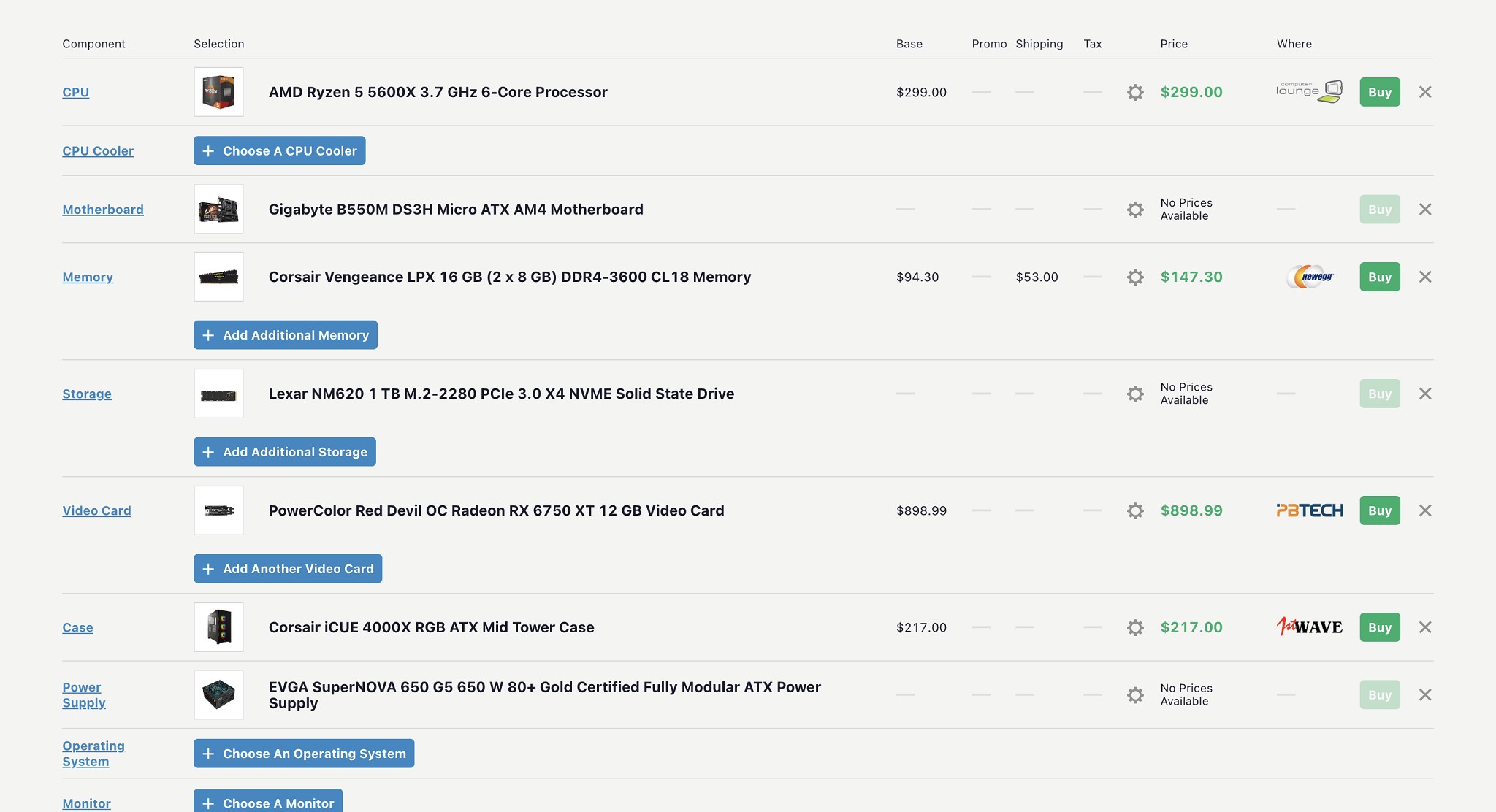
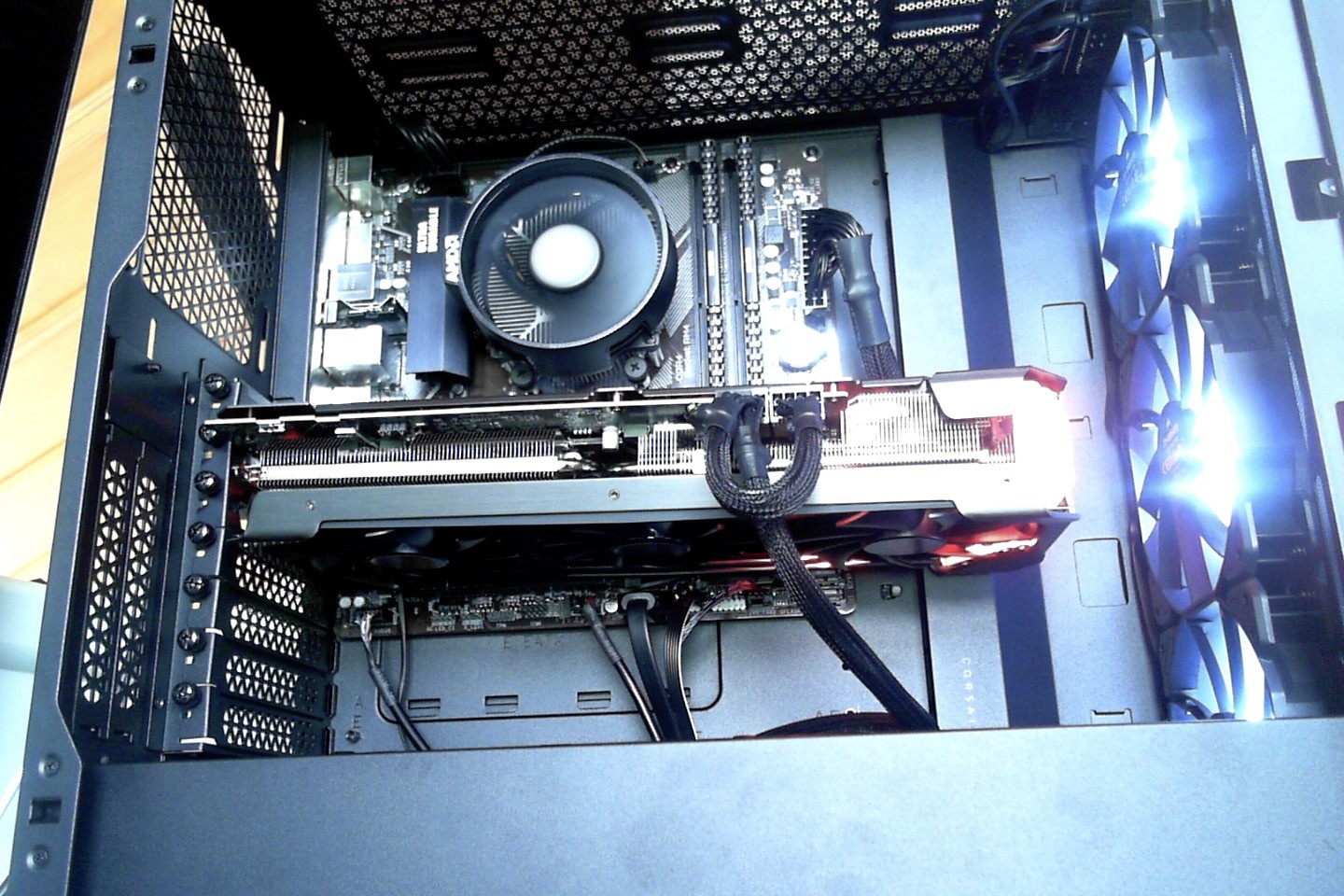
Here is the completed list. I've finished my build, and everything works and is good to go. 


I changed the 6750xt due to newegg cancel the order and we got the 3600mhz lpx 16gb kit for 108 instead of 147. 


The cpu idles at around 55-60 degrees C with a few chrome tabs open. Graphics card around 30-35 ish. The cpu cooler that the 5 5600x is the one im using and its a bit too loud for me. 


Currently only two of the front panel fans are spinning due to my motherboard only have 3 fan headers and I don't have any exhaust fans. We've bought a Y-splitter for the fan headers recently and should be on its way. I'm a bit worried about not having any exhaust fans. 


I haven't tried any benchmarking yet but I'll post again here when I do get the results.


Chace

10 posts

Wannabe Geek


  #3030337 1-Feb-2023 12:53
Send private message

I simply chose 3600 over 3200 because it was only 8 dollars more at the time we bought it. 


1 | 2 | 3 
Filter this topic showing only the reply marked as answer View this topic in a long page with up to 500 replies per page Create new topic


Geekzone Live »

Try automatic live updates from Geekzone directly in your browser, without refreshing the page, with Geekzone Live now.


Are you subscribed to our RSS feed? You can download the latest headlines and summaries from our stories directly to your computer or smartphone by using a feed reader.