Geekzone: technology news, blogs, forums
Guest
Welcome Guest.
You haven't logged in yet. If you don't have an account you can register now.


AKT

AKT

335 posts

Ultimate Geek
+1 received by user: 15

ID Verified
Lifetime subscriber

#270623 18-May-2020 22:26
Send private message

Hi,  


I’m hoping for a quick answer to this query, although I appreciate it’s more complex than I’d like it to be!  I have wired our old home with Cat6a and have a 24 port switch to terminate it all into.  My question relates to terminating the cable.


1.  568A or 568B or does it not matter?  I have googled and found opinions that could go either way.


2.  Is a regular RJ45 fine, or do you need a specific type for the ‘earth’ wire?  Any tips on where to get them/ which ones?  I have a crimp tool already but the prices seem to vary wildly on cablesdirect and I don’t really know what the differences are.  Any pointers?  I need around 30-50.


I have 1GB broadband and getting 10G is not really on the cards for now, the 6a was the same price as 6 so went for it as future-proofing more than necessity.


Thanks


A


View this topic in a long page with up to 500 replies per page Create new topic
 1 | 2
billgates
4718 posts

Uber Geek
+1 received by user: 681

Trusted

  #2485988 18-May-2020 22:54
Send private message

1. Does not matter which standard you pick. Just remember that both ends of the cable termination need to be same standard.


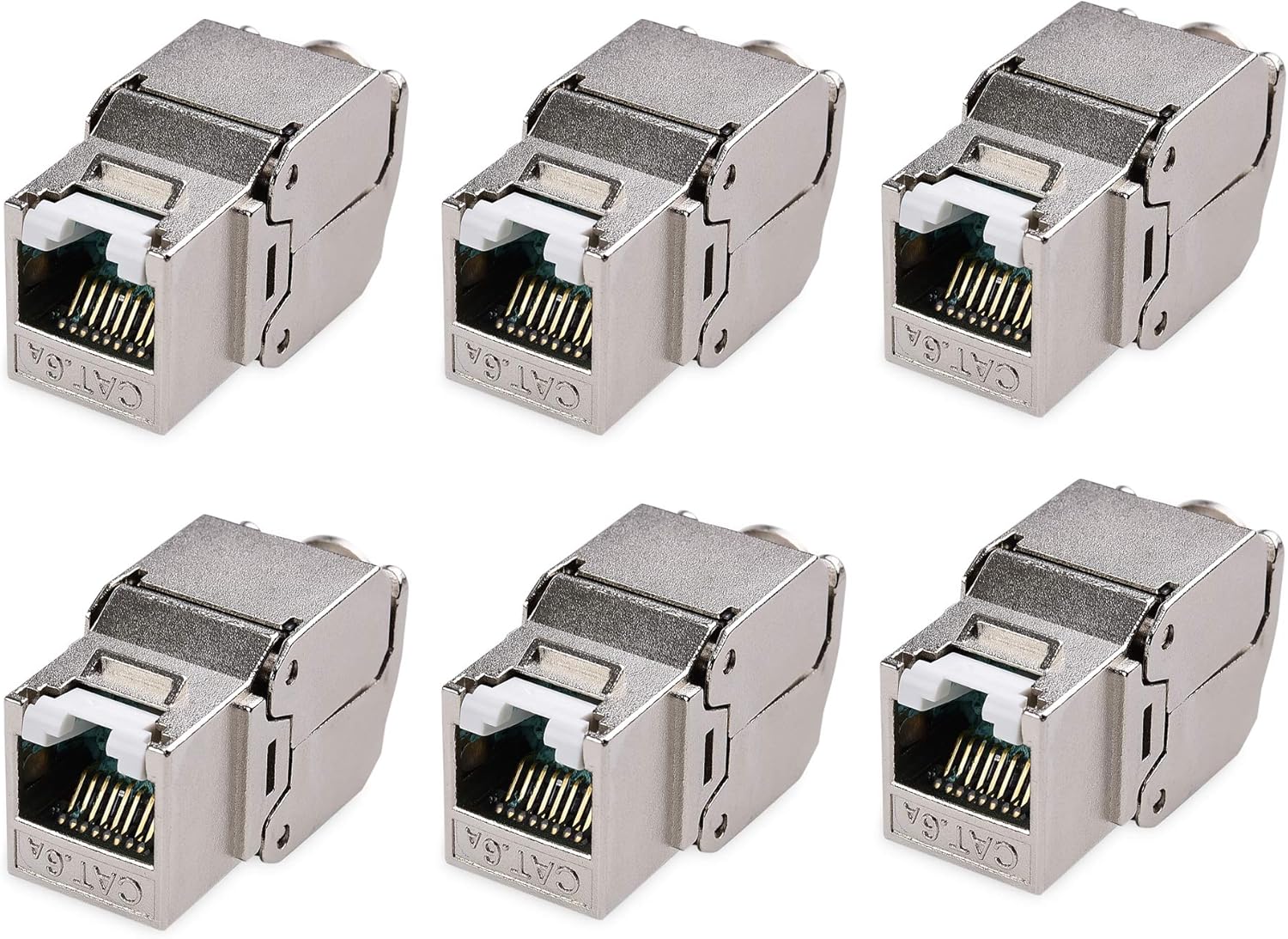
2. If you buy CAT6A specific keystone or field termination plug then it comes with shielding tape for the earth wire. I recently went through this exercise on a new build with a just over 40 CAT7A cable runs and bought the Cable Matters keystone and field termination plugs from Amazon late last year before COVID-19 was a thing along with their termination tool which made the job so much easier. These have now gone up in price since COVID-19 and you are looking at almost $10 for just one keystone/field termination plug.


https://www.amazon.com/gp/product/B074HH9RHW/ref=ox_sc_act_title_4?smid=A1AMUYYA3CT6HJ&psc=1


https://www.amazon.com/gp/product/B074HHWNVN/ref=ox_sc_act_title_3?smid=A1AMUYYA3CT6HJ&psc=1


https://www.amazon.com/Cable-Matters-Crimp-Shielded-Keystone/dp/B074HG3VW3/ref=pd_bxgy_img_3/131-2822851-9625059?_encoding=UTF8&pd_rd_i=B074HG3VW3&pd_rd_r=67c00f2a-085d-4e41-b31d-514c8611e2de&pd_rd_w=MxW5R&pd_rd_wg=T7p3z&pf_rd_p=7a6bc5c0-cfeb-4154-b2f9-fb32e87e9c63&pf_rd_r=2A190N9M3T2WDWVTN07F&psc=1&refRID=2A190N9M3T2WDWVTN07F


Do whatever you want to do man.


Zeon
3927 posts

Uber Geek
+1 received by user: 759

Trusted

  #2486004 18-May-2020 23:44
Send private message

In Cat6A there is no "earth wire" AFAIK. The shielding of the cable should be connected to earth and (at least in the Dynamix cat6a cable) there is a non-insulated wire inside the cable which is against the shielding and would be used.


I don't think switches are connected to earth so you will need somewhere to do this, typically on a patch panel - cat6A patch panels should connect to shielding on the cable and then have an earth connection. I suppose you could also do this at the outlet and grab the earth from a nearby power point but don't think this is the "official way".


I used CableMatters cat6a patch panels and keystones and they are easy enough to work with. The cat6a keystones from cable matters don't require a crimper.


If you need I can upload some photos of the CableMatters patch panels with the earth connected.


Speedtest 2019-10-14


nztim
4071 posts

Uber Geek
+1 received by user: 2783

ID Verified
Trusted
TEAMnetwork
Subscriber

  #2486031 19-May-2020 06:40
Send private message

I have wired with 'A" wiring (starting with green/white) in my 22 years in the IT industry but there is no right or wrong way as long as your entire network is consistent


the whole A and B wiring concept came about when you had to "cross over" the green and orange pairs between devices when there was no switch involved (or hub in those days)


Now days most devices will auto negotiate so if you wired one end A and one end B it will still work..... but that is not good practice :)


Any views expressed on these forums are my own and don't necessarily reflect those of my employer. 


sbiddle
30853 posts

Uber Geek
+1 received by user: 9998

Retired Mod
Trusted
Biddle Corp
Lifetime subscriber

  #2486061 19-May-2020 08:35
Send private message

If you have purchased shielded cable you need to ensure you are using shielded RJ45 keystone jacks at both ends, and that the frame and all hardware is appropriately earthed.


Using shielded cable that isn't earthed correctly can theoretically introduce significant issues, and shielded cable is something that IMHO should really only be used if there is a genuine need for it.


Jase2985
13773 posts

Uber Geek
+1 received by user: 6254

ID Verified
Lifetime subscriber

  #2486088 19-May-2020 09:34
Send private message

Anyone got a Platinumtools 10G Termination Kit or similar i could borrow in a few weeks time? Im in auckland.


AKT

AKT

335 posts

Ultimate Geek
+1 received by user: 15

ID Verified
Lifetime subscriber

  #2486276 19-May-2020 12:40
Send private message

sbiddle:


If you have purchased shielded cable you need to ensure you are using shielded RJ45 keystone jacks at both ends, and that the frame and all hardware is appropriately earthed.


Using shielded cable that isn't earthed correctly can theoretically introduce significant issues, and shielded cable is something that IMHO should really only be used if there is a genuine need for it.


I bought DYNAMIX 305m Cat6A Blue S/FTP Cable Roll, 500MHz, 23AWGx4P PVC Jacket from a recommendation on a different thread so I need shielded Keystone/RJ45 jacks then.  Any pointers on where to get them?  Like I said in the OP there seems to be a wild difference in price for not much percievable difference in the products ($1-2 per jack to $17 per jack)  I may of course be missing something.


Thanks to the other posters too for helping clarify 568a/b


A


Support Geekzone with one-off or recurring donations Donate via PressPatron.
dolsen
1484 posts

Uber Geek
+1 received by user: 320

Trusted
Lifetime subscriber

  #2486368 19-May-2020 14:49
Send private message

As others have said, not much difference between 568A and 568B for std network use. I wired my network (against NZ standards) as 568B. The reason for that is, some hdmi over Cat6 devices I have seen have a different distance limitation between the two standards. I don't have a link, but, it was something like 50M for 568A and 60M for 568B. Presumably, that difference is as a result of more critical signals being sent over pairs with a higher twist rate.


Zeon
3927 posts

Uber Geek
+1 received by user: 759

Trusted

  #2486369 19-May-2020 14:50
Send private message

AKT:


sbiddle:


If you have purchased shielded cable you need to ensure you are using shielded RJ45 keystone jacks at both ends, and that the frame and all hardware is appropriately earthed.


Using shielded cable that isn't earthed correctly can theoretically introduce significant issues, and shielded cable is something that IMHO should really only be used if there is a genuine need for it.


I bought DYNAMIX 305m Cat6A Blue S/FTP Cable Roll, 500MHz, 23AWGx4P PVC Jacket from a recommendation on a different thread so I need shielded Keystone/RJ45 jacks then.  Any pointers on where to get them?  Like I said in the OP there seems to be a wild difference in price for not much percievable difference in the products ($1-2 per jack to $17 per jack)  I may of course be missing something.


Thanks to the other posters too for helping clarify 568a/b


A


I used these keystones:


https://www.amazon.com/gp/product/B00CLVAJCK/ref=ppx_yo_dt_b_asin_title_o00_s02?ie=UTF8&psc=1


And this patch panel:


https://www.amazon.com/Cable-Matters-Rackmount-Wallmount-Shielded/dp/B00AQL46TY/ref=sr_1_5?dchild=1&keywords=cable+matters+cat6a&qid=1589856582&s=electronics&sr=1-5


Speedtest 2019-10-14


chevrolux
4962 posts

Uber Geek
+1 received by user: 2638
Inactive user


  #2486377 19-May-2020 15:04
Send private message

dolsen:


As others have said, not much difference between 568A and 568B for std network use. I wired my network (against NZ standards) as 568B. The reason for that is, some hdmi over Cat6 devices I have seen have a different distance limitation between the two standards. I don't have a link, but, it was something like 50M for 568A and 60M for 568B. Presumably, that difference is as a result of more critical signals being sent over pairs with a higher twist rate.


The only difference between 568A and B are where the orange/green pairs are. The supported speed/length etc has nothing to do with the wiring standard, but rather the link standard like Class D, E or Ea etc


Paging @cyril7


cyril7
9075 posts

Uber Geek
+1 received by user: 2499

ID Verified
Trusted
Subscriber

  #2486500 19-May-2020 17:45
Send private message

Hi as Sam said a and b just swap green and orange pairs, your signals are colour blind so don't care.

And before someone says, ah but by mixing the pairs may advantage or disadvantage the situation due to different twist rates between pairs, but the answer is which is right or wrong as each manufacturer applies twist rates differently to pairs and often different per batch, so it's random too.

So sorry hdmi better on a or b, nah, maybe this cable, but no guarantee the next, its a lottery

Cyril

AKT

AKT

335 posts

Ultimate Geek
+1 received by user: 15

ID Verified
Lifetime subscriber

  #2486504 19-May-2020 17:50
Send private message

I may be missing something here but do you need a patch panel? Can you not terminate everything with RJ45 and put it into the switch directly?

A


Shop now for Lenovo laptops and other devices (affiliate link).
cyril7
9075 posts

Uber Geek
+1 received by user: 2499

ID Verified
Trusted
Subscriber

  #2486508 19-May-2020 18:03
Send private message

Hi that's not very professional and prone to poor mechanical performance a patch panel is the correct solution.

Cyril

Zeon
3927 posts

Uber Geek
+1 received by user: 759

Trusted

  #2486514 19-May-2020 18:15
Send private message

cyril7: Hi that's not very professional and prone to poor mechanical performance a patch panel is the correct solution.

Cyril


How would you earth without a patch panel? It would have to be most likely at the keystone if you have a plug nearby.... You would need to rig something up.


Speedtest 2019-10-14


dolsen
1484 posts

Uber Geek
+1 received by user: 320

Trusted
Lifetime subscriber

  #2486585 19-May-2020 18:54
Send private message

cyril7: Hi as Sam said a and b just swap green and orange pairs, your signals are colour blind so don't care.

And before someone says, ah but by mixing the pairs may advantage or disadvantage the situation due to different twist rates between pairs, but the answer is which is right or wrong as each manufacturer applies twist rates differently to pairs and often different per batch, so it's random too.

So sorry hdmi better on a or b, nah, maybe this cable, but no guarantee the next, its a lottery

Cyril


Interesting. I always thought that the twist rates were part of the standard, and therefore, there could be some optimum pair for particular signals to reduce cross-talk, so, there could be a physical reason as to why the manufactures recommendations made sense. 


Looking here, that does not seem to be the case. "As for twist rate, it simply says under Section 4.3.3.2 Pair Assembly: " The pair twist lengths shall be chosen to ensure compliance with the transmission requirements of this Standard." In other words, it's left to manufacturers to innovate. It is NOT specified."


Therefore, statements like this


"This product was designed for use with CAT-6a (Augmented CAT-6)
cabling that is terminated according to the ANSI/TIA/EIA-568B specification. CAT5e and CAT-6 cable can be used but distance ratings will be shortened. ANSI/
TIA/EIA-568A termination can be used but may cause marginal distance loss" (emphasis added) - https://www.gefen.com/sites/default/files/_/Downloads/discontinued-extenders/gtv-hdmi1.3-cat6.pdf


And the product that I can no longer find, that had a table with less range using the 568A standard, does not seem to be based in repeatable standards.


Using a crossover cable at both ends would have had the same effect anyway.


cyril7
9075 posts

Uber Geek
+1 received by user: 2499

ID Verified
Trusted
Subscriber

  #2486596 19-May-2020 19:13
Send private message

Hi, exactly, re twist rates, essentially there is a a range pairs must fit within, other than that, its what you find.


Cyril


 1 | 2
View this topic in a long page with up to 500 replies per page Create new topic


Geekzone Live »

Try automatic live updates from Geekzone directly in your browser, without refreshing the page, with Geekzone Live now.


Are you subscribed to our RSS feed? You can download the latest headlines and summaries from our stories directly to your computer or smartphone by using a feed reader.