Geekzone: technology news, blogs, forums
Guest
Welcome Guest.
You haven't logged in yet. If you don't have an account you can register now.


Brend

97 posts

Master Geek
+1 received by user: 21


#317899 25-Nov-2024 14:42
Send private message

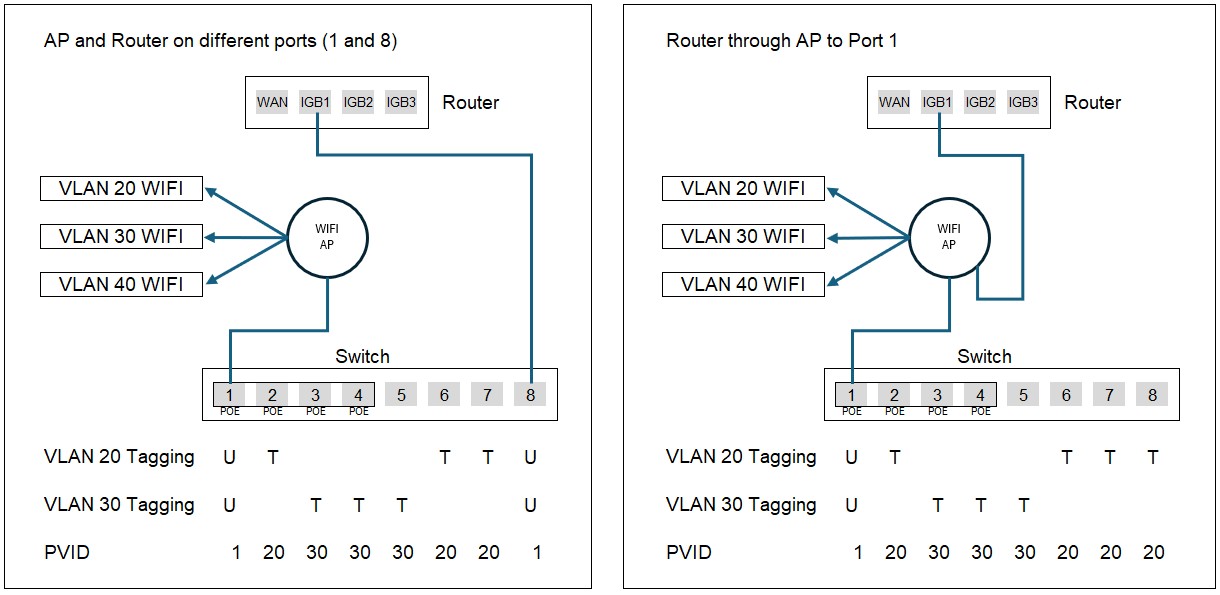
Here are 2 of the options I am considering (Getting it to work will be a learning curve)


The left is probably the logical way for my setup, but I am keen on the one on the right as it frees up a port on the switch. The AP has 2 ports, each with POE. Will it work? Thanks


More questions might follow if I get stuck with the setup. Please be patient with me - I am learning


PS: Helpful posts will be most welcome 😉



I am the reason idiot's guides exist


Create new topic
Spyware
3818 posts

Uber Geek
+1 received by user: 1366

Lifetime subscriber

  #3312717 25-Nov-2024 15:10
Send private message

I would grade D-


Spark Max Fibre using Mikrotik CCR1009-8G-1S-1S+, CRS125-24G-1S, Unifi UAP, U6-Pro, UAP-AC-M-Pro, Apple TV 4K (2022), Apple TV 4K (2017), iPad Air 1st gen, iPad Air 4th gen, iPhone 13, SkyNZ3151 (the white box). If it doesn't move then it's data cabled.


nzkc
1634 posts

Uber Geek
+1 received by user: 1041


  #3312722 25-Nov-2024 15:22
Send private message

I dont think you can use your Granstream AP as a switch. So I dont think the second option will work at all.


skewt
752 posts

Ultimate Geek
+1 received by user: 215


  #3312783 25-Nov-2024 16:28
Send private message

What model AP is it?


On my GWN7625 I can set the LAN port as a Trunk port which I think should do what you are after


But on my GWN7603 I can only specifiy a VLAN ID for the other ports


Brend

97 posts

Master Geek
+1 received by user: 21


  #3312785 25-Nov-2024 16:31
Send private message

I have a GWN7665. 


I am the reason idiot's guides exist


cyril7
9075 posts

Uber Geek
+1 received by user: 2499

ID Verified
Trusted
Subscriber

  #3312842 25-Nov-2024 19:26
Send private message

Hi, sorry but your understanding of vlans and how to deploy them needs more work, none of your diagrams make any sense to me, and yes my employer pays me to know this stuff.

When I get a moment I will detail how it should look, if someone else does not before then.

Cyril

Brend

97 posts

Master Geek
+1 received by user: 21


  #3312853 25-Nov-2024 20:17
Send private message

Yeah it's new to me. Started dealing with it this past weekend. Appreciate the help Cyril


I am the reason idiot's guides exist


Shop now for Dell laptops and other devices (affiliate link).
nitro
759 posts

Ultimate Geek
+1 received by user: 336


  #3312985 26-Nov-2024 10:22
Send private message

nzkc:


I dont think you can use your Granstream AP as a switch. So I dont think the second option will work at all.


Option 1 won't work either, with Switchport 1 'untagged'.


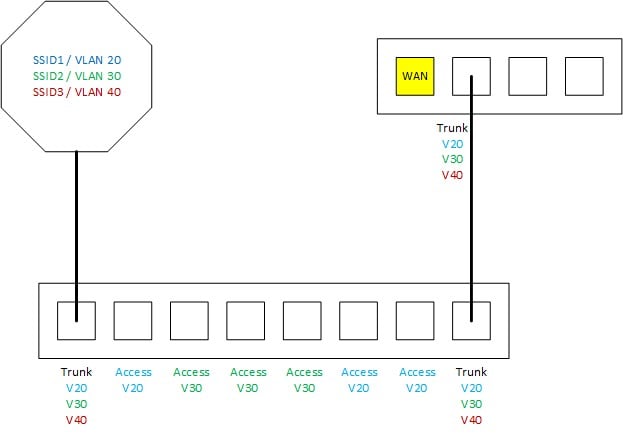
This might be closer to what you want to do. Perhaps more accurately, this is how I would opt to do it.


I obviously made some assumptions, particularly about the switch ports being access ports, unless you're connecting another switch or vlan-capable device to them. The SSIDs are themselves access ports (packets get tagged on ingress). This also does not indicate the management plane - are you using any of the identified VLANs for management or will it be untagged / yet another VLAN?


Brend

97 posts

Master Geek
+1 received by user: 21


  #3313004 26-Nov-2024 11:27
Send private message

nitro:


I obviously made some assumptions, particularly about the switch ports being access ports, unless you're connecting another switch or vlan-capable device to them. The SSIDs are themselves access ports (packets get tagged on ingress). This also does not indicate the management plane - are you using any of the identified VLANs for management or will it be untagged / yet another VLAN?


Thanks nitro. My switch is a Grandstream GWN7711p. I am not connecting any other switches to this one. My "rejected" pics 😉 in my OP is pretty much my setup - I will only connect a NAS and a PC or two to the switch.


 I prefer not to have another VLAN. I want VLAN20 to be the management VLAN. I have assigned 192.168.2.0/24 to IGB1. Right or wrong, I gave the AP a static address of 192.168.2.3 and the switch 192.168.2.5


I am the reason idiot's guides exist


Tinkerisk
4798 posts

Uber Geek
+1 received by user: 3660


  #3313011 26-Nov-2024 11:51
Send private message

Why do you want to tag VLAN20? It's easier if the AP and the switch see their management untagged - at least that's how I did it.


VLAN 20 becoming Mgmnt - 192.168.2.0/24 untagged


VLAN 10 - 192.168.10.0/24 tagged


VLAN 30 becoming VLAN 20 - 192.168.20.0/24 tagged


- NET: FTTH & VDSL, OPNsense, 10G backbone, GWN APs
- SRV: 12 RU HA server cluster, 0.1 PB storage on premise
- IoT:   thread, zigbee, tasmota, BidCoS, LoRa, WX suite, IR
- 3D:    two 3D printers, 3D scanner, CNC router, laser cutter


Create new topic


Geekzone Live »

Try automatic live updates from Geekzone directly in your browser, without refreshing the page, with Geekzone Live now.


Are you subscribed to our RSS feed? You can download the latest headlines and summaries from our stories directly to your computer or smartphone by using a feed reader.