Geekzone: technology news, blogs, forums
Guest
Welcome Guest.
You haven't logged in yet. If you don't have an account you can register now.


View this topic in a long page with up to 500 replies per page Create new topic
1 | 2 
JonoNZ

274 posts

Ultimate Geek
+1 received by user: 43


  #1050128 20-May-2014 21:27
Send private message

sbiddle: Your masquerade rule should be using your internet connection as the out interface, which in this case will be the PPPoE


Cheers Steve, I thought that after I'd uploaded the image, so like this?

NAT 2


sbiddle
30853 posts

Uber Geek
+1 received by user: 9996

Retired Mod
Trusted
Biddle Corp
Lifetime subscriber

  #1050132 20-May-2014 21:35
Send private message

Except that's red now so it means there is an error. Is your PPPoE session up?


JonoNZ

274 posts

Ultimate Geek
+1 received by user: 43


  #1050133 20-May-2014 21:37
Send private message

sbiddle: Except that's red now so it means there is an error. Is your PPPoE session up?


No PPPoE unfortunately, I've decided to do this the hard way (helping a friend) and configuring offline at my house which has VDSL, not fibre. 


nitrotech
1285 posts

Uber Geek
+1 received by user: 168


  #1050137 20-May-2014 21:38
Send private message

+ firewall drop rule should be pppoe too.

Trying to understand your config - why do you have no bridge?

sbiddle
30853 posts

Uber Geek
+1 received by user: 9996

Retired Mod
Trusted
Biddle Corp
Lifetime subscriber

  #1050139 20-May-2014 21:42
Send private message

So are you trying to configure it now as the router or merely as a bridge to do VLAN tagging?


JonoNZ

274 posts

Ultimate Geek
+1 received by user: 43


  #1050140 20-May-2014 21:43
Send private message

sbiddle: So are you trying to configure it now as the router or merely as a bridge to do VLAN tagging?


Merely as a PPPoE bridge (to the AirPort Extreme) for VLAN tagging.


Want to support Geekzone and browse the site without the ads? Subscribe to Geekzone now (monthly, annual and lifetime options).
nitrotech
1285 posts

Uber Geek
+1 received by user: 168


  #1050142 20-May-2014 21:50
Send private message

I know it's been mentioned before but the airport works great if you let the mikrotik do the routing and then just bridge the airport that's how most people run it.


sbiddle
30853 posts

Uber Geek
+1 received by user: 9996

Retired Mod
Trusted
Biddle Corp
Lifetime subscriber

  #1050146 20-May-2014 21:55
Send private message

If it's just a bridge your setup is totally wrong. You shouldn't have any PPPoE stuff in there.

You'll need to fully reset the device config and simply create VLAN10 and bridge that to another ethernet port.

JonoNZ

274 posts

Ultimate Geek
+1 received by user: 43


  #1050148 20-May-2014 21:57
Send private message

sbiddle: If it's just a bridge your setup is totally wrong. You shouldn't have any PPPoE stuff in there.

You'll need to fully reset the device config and simply create VLAN10 and bridge that to another ethernet port.


Oh ok, I was just being guided by the posts on this thread.

JonoNZ

274 posts

Ultimate Geek
+1 received by user: 43


  #1050157 20-May-2014 22:18
Send private message

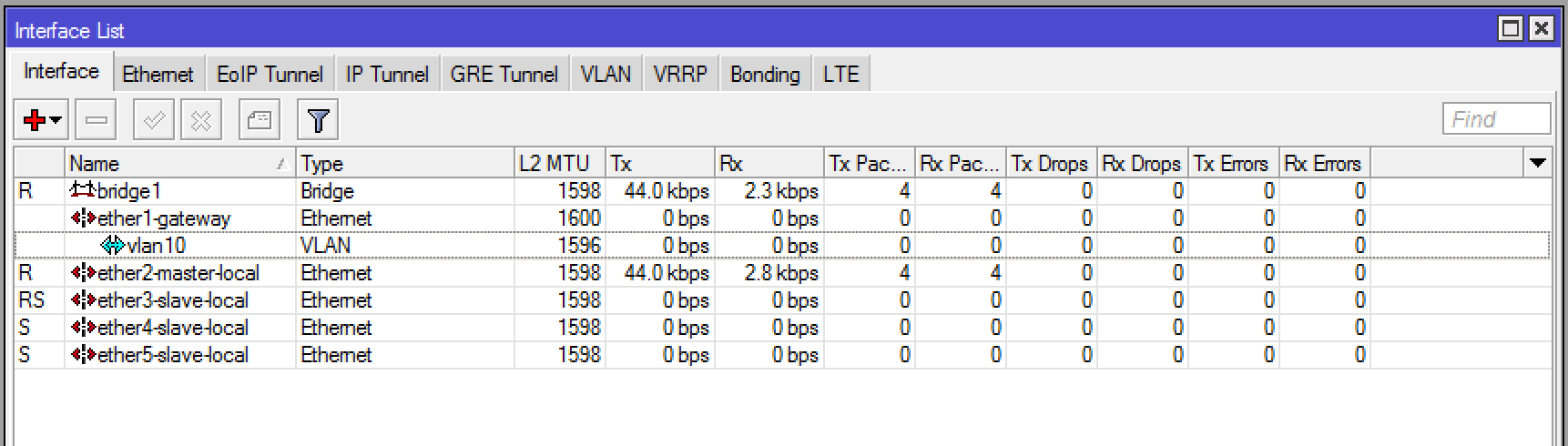
Ok, to achieve a PPPoE bridge to the AirPort (ONT <-> Microtik - <-> AirPort Extreme (plus extended Wi-Fi)) it would look like this?

1

2

3

4

chevrolux
4962 posts

Uber Geek
+1 received by user: 2638
Inactive user


  #1050170 20-May-2014 22:59
Send private message

wow... confusion has ensued, probably my fault.

My guidance was based on using the Mikrotik as the main router for everything and just using the airport for wireless.

Edit:
You are confusing PPPoE bridging, like what is done with a DSL modem, with just standard Ethernet/VLANs.


Move to New Zealand's best fibre broadband service (affiliate link). Free setup code: R587125ERQ6VE. Note that to use Quic Broadband you must be comfortable with configuring your own router.
JonoNZ

274 posts

Ultimate Geek
+1 received by user: 43


  #1059816 5-Jun-2014 13:54
Send private message

chevrolux: wow... confusion has ensued, probably my fault.

My guidance was based on using the Mikrotik as the main router for everything and just using the airport for wireless.

Edit:
You are confusing PPPoE bridging, like what is done with a DSL modem, with just standard Ethernet/VLANs.


Ok, I'm just getting back into this

So with the bridge setup as Steve suggested above, is this being used as a bridge between the Technicolor and the AirPort, or does it replaced the Technicolor.

Currently with the Technicolor and the AirPort I have double nat

Thanks

1 | 2 
View this topic in a long page with up to 500 replies per page Create new topic


Geekzone Live »

Try automatic live updates from Geekzone directly in your browser, without refreshing the page, with Geekzone Live now.


Are you subscribed to our RSS feed? You can download the latest headlines and summaries from our stories directly to your computer or smartphone by using a feed reader.