Geekzone: technology news, blogs, forums
Guest
Welcome Guest.
You haven't logged in yet. If you don't have an account you can register now.


View this topic in a long page with up to 500 replies per page Create new topic
1 | 2 
richms
29109 posts

Uber Geek
+1 received by user: 10225

Trusted
Lifetime subscriber

  #2039178 17-Jun-2018 18:04
Send private message

If you turn on allowing access from the wan side whihc some routers allow you to do that would let you get to it from both sides, still hidden from the internet by the other router so not the huge security problem it sounds like by name.


Richard rich.ms


yitz
2240 posts

Uber Geek
+1 received by user: 594


  #2039180 17-Jun-2018 18:11
Send private message

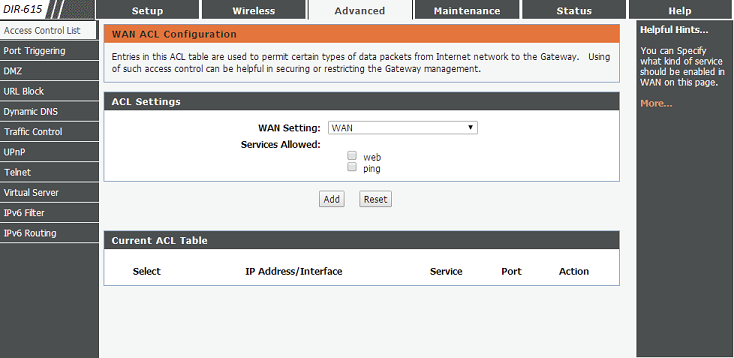
Relevant setting seems to be this one:


tick web and ping and you should be able to access the management UI and ping from the Fritzbox LAN.


Seems you can allow all of WAN interface (Fritzbox LAN) or restrict to particular IPs on the Fritzbox LAN.


timmmay

20860 posts

Uber Geek
+1 received by user: 5350

Trusted
Lifetime subscriber

  #2039240 17-Jun-2018 20:11
Send private message

@yitz what firmware is that? I just got 5.1.4 and it looks different from what you posted.


Click to see full size


I set up an inbound filter that I thought allowed traffic from the WAN, and set up port 8080 (the default). I can't even ping it, even though WAN ping is turned on.


Click to see full size


The traceroute shows those packets going out to the internet, not to the router. The router is actually connected to a switch in my office, same one as my PC, which is connected to the main router by Ethernet cable.


tracert 192.168.0.1


Tracing route to 192.168.0.1 over a maximum of 30 hops


1 <1 ms <1 ms <1 ms fritz.box [192.168.1.5]
2 2 ms 2 ms 3 ms x.x.x.x.static.snap.net.nz [y.y.y.y]
3 * * * Request timed out.
etc


Admin from my PC on the other subnet is a "nice to have" feature. I'm learning a bit about networking though, which is good :)


yitz
2240 posts

Uber Geek
+1 received by user: 594


  #2039247 17-Jun-2018 20:23
Send private message

You need to be using the WAN IP of the DIR-615 when accessing from the Fritzbox LAN


It should be 192.168.1.x


(whatever was statically assigned or if DHCP check what was assigned from the lease table on the Fritzbox)

timmmay

20860 posts

Uber Geek
+1 received by user: 5350

Trusted
Lifetime subscriber

  #2039276 17-Jun-2018 21:18
Send private message

Ah, I get it now. Yes, that works, thanks :)


Now I just have to put the router somewhere near the Roku. I have one network port beside my home entertainment system, but it goes from my Raspberry Pi media center to the Fritz on the 192.168.1.0/24 network. Given the DLink is on 192.168.0.0/24 and the PC it needs to access is on 192.168.1.0/24 I don't think I can plug the R.Pi into the DLink to access the PC - unless there's some way to bridge the networks I don't know about?


I have an Ethernet port in the ceiling above the Roku, which is fine. I don't mind if it doesn't last long.


richms
29109 posts

Uber Geek
+1 received by user: 10225

Trusted
Lifetime subscriber

  #2039277 17-Jun-2018 21:20
Send private message

See if you can flash openwrt onto the router, that may let you reconfigure the switch inside it to let you have 2 or 3 ports on the wan side and the rest on the lan side etc. Been so long since I have played with it I dont know what its support on currentish hardware is like.


Richard rich.ms


Shop now on AliExpress (affiliate link).
timmmay

20860 posts

Uber Geek
+1 received by user: 5350

Trusted
Lifetime subscriber

  #2039294 17-Jun-2018 21:55
Send private message

I have another router with ddrwt / open wrt support. Linksys 54HL, very old now though. Probably not worth the bother.

freakngeek
356 posts

Ultimate Geek
+1 received by user: 123


  #2039339 18-Jun-2018 07:18
Send private message

https://openwrt.org/toh/d-link/dir-615


timmmay

20860 posts

Uber Geek
+1 received by user: 5350

Trusted
Lifetime subscriber

  #2039348 18-Jun-2018 08:02
Send private message

freakngeek:


https://openwrt.org/toh/d-link/dir-615


Thanks, but I'd probably use the Linksys 54GL to start with if I need OpenWRT. It's old but solid, it's been in active use by myself or a friend for at least a decade.


freakngeek
356 posts

Ultimate Geek
+1 received by user: 123


  #2039784 18-Jun-2018 14:48
Send private message

https://wiki.dd-wrt.com/wiki/index.php/Linksys_WRT54GL
You are limited to small images <4MB


From memory Mrs Cafe is running DD-WRT on a v7 WRT54GS and has been for 8 years with no issues
Chosen as it had more Flash so could flash full sized images


timmmay

20860 posts

Uber Geek
+1 received by user: 5350

Trusted
Lifetime subscriber

  #2039809 18-Jun-2018 15:04
Send private message

The only reason to look at Open WRT would be to change the switching so I can have some on the WAN some on the LAN. Sounds like too much hassle to me, I'll just put it in the roof where I have a spare Ethernet cable that's connected to the main router.


1 | 2 
View this topic in a long page with up to 500 replies per page Create new topic


Geekzone Live »

Try automatic live updates from Geekzone directly in your browser, without refreshing the page, with Geekzone Live now.


Are you subscribed to our RSS feed? You can download the latest headlines and summaries from our stories directly to your computer or smartphone by using a feed reader.