|
|
|
JeremyNzl:No ads on youtube or tvnz, haven't tried FB yet.
<The parallel upstread dns looks good also.
If you go for the Pi 4 (which is probably overkill for just this one application) then I highly recommend you purchase a heat sink and fan. You will also need to make 100% sure you get a power supply that can consistently supply enough power, otherwise it will undervolt and that will just cause issues. The official one is a good choice.
gbwelly:JeremyNzl:
No ads on youtube or tvnz, haven't tried FB yet.
<
The parallel upstread dns looks good also.
Do you know if it blocks ads on YouTube for android tv? Can you configure your own dis forwarder? I chain mine off getflix so I get ad blocking and BBC iPlayer on my Nvidia Shield.
No it does not block ads within YouTube.
Yes you can use whatever DNS upstream you like - I use Getflix too.
With regards to some comments about some google links not working that is true - although it depends on the blocklists you choose (start with the default ones though!). I've whitelisted a couple of domains to get around that. Happy to share my whitelist if people want it. Most of the entries come from Origin though (so my daughter can play The Sims).
Another alternative for folks running pfsense is a package called Pfblocker-ng, it basically applies a set of blocklists to pfsense's internal unbound DNS server. It's a little more complex to set up, but IMO is a more elegant solution than having your DNS server, an essential part of your network infra, sitting on a raspberry pi dangling off a power cable.
Thanks for the feedback guys.
I can appreciate looking at just Pi-hole, there is no real need to go for a Pi 4 other than "shiny, new, cause I want to". I like the idea that I can re-use it for something else home-automation-ee later on if I go the way of unraid etc later on and move it to a container. Or go pfsense with the Pfblocker-ng, thanks @ripdog. Or just lose it all together for something else, you get the picture here.
I'm not a huge fan of second-hand, history unknown hardware, especially from something designed for people to be tinkering with. And for something performing a critical function like Pi-hole, I would rather just have brand new hardware anyway, since the cost difference isn't extravagant. I think I would probably stick to something like a Pi Zero, which works out to about $50-60 shipped here for a starter kit.
It is only me and my partner in my household, so I am fine running the entire network though it (and my partner is used to my tinkering breaking the internet now), as one thing I want to try to accomplish is also capture "chatty" devices trying to bypass the network DNS.
One thing I have been thinking would make it worth getting a Pi 4 is the ability to host more things than just Pi-hole. I don't know how smart it would be to run anything else off the same box, but if there were other functions that it could also host, would be nice to have that option.
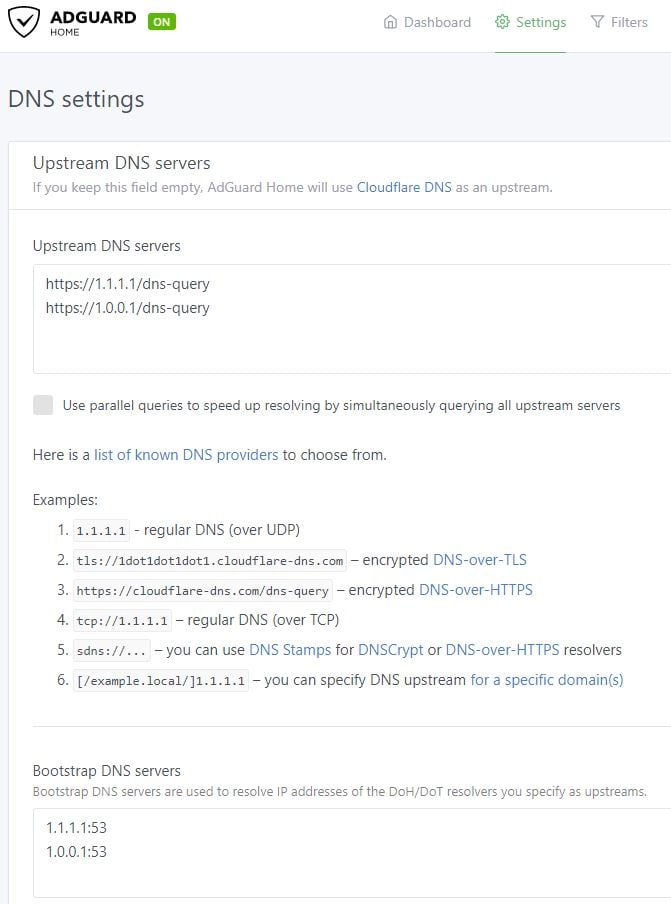
Looking at Adguard vs Pi-hole, it seems like Ad-guard is forcing you to use its own lists and upstream DNS, so I'm not sure I like the lack of configurability there. Effectively I am going to be using Cloudflare anyway, since I want to use DoH, but if local DNS providers implement it, it would be nice to have that control.
I run pi-hole on the original Raspberry Pi powered from the Fritzbox USB port, it works perfectly. I'd suggest you go second hand Pi 2, you really don't need a Pi 4 for this.
AdGuard looks interesting. Can people who've tried it expand a bit more on how they find it? Pi Hole is good, and I haven't had any problems with it at all, and I like that if I want to I can use it as a DCHP server and configure DNSMasq to allocate different DNS servers to each client. The downside to configuration is complexity. You use multiple external block lists, and on the rare occasion a website doesn't work properly it's not always clear how to fix it. I guess an advantage of AdGuard is it's a single consistent product. If you have to use their upstream DNS then it's a no-go for me.
ShinyChrome:
One thing I have been thinking would make it worth getting a Pi 4 is the ability to host more things than just Pi-hole. I don't know how smart it would be to run anything else off the same box, but if there were other functions that it could also host, would be nice to have that option.
I also use my Pi (that runs PiHole) as a VPN server too. So yep you can run more than one thing on it for sure. I only ever see CPU usage when I update the OS! The biggest drawback I've found, and its not a huge one, is that ARM and the fact Raspbian is 32bit can be a bit limiting in that some software just isnt supported on it. Thats changing and improving daily (especially now there's a 64bit kernel from the Raspberry Pi Foundation). I worked around it by running Ubuntu 64bit on it.
Saw some other comments about not running critical services/applications on a Pi. Find those comments a bit weird. Ive found the Pi to be as every bit as robust as every other computer equipment. Yep it'll fail at some point and so will my router and my PC etc. If it does, I can replace it quickly and very easily. Easier than other things! And they're cheap enough you can have a couple if you really want. They're good little computers.
AdGuard depends on their DNS service, which rules it out for me.
I've also found the R.Pi1 reliable. It sits in a fairly warm cupboard with the router and DC UPS and just works. When it fails I will log into the router and change DNS back to the ISP default while I fix or replace the Pi.
Some things you want to do with a Pi, such as running Kodi, are best on a dedicated Pi. Other things like running a VPN may be able to be shared, but if the VPN is outwards rather than inwards that might disrupt your DNS for example.
Running two Zeros with Pi-hole could be a good idea to manage those sensitive to an overzealous filter, while still keeping Pi-hole's benefits
Some folks (this is what I do), have two very different pihole setups running, and just hand out one "safe / default list" with their router automatically as a DNS to generic devices & guests...My second pihole is much, much more aggressively setup (more block lists loaded, and a pile domains that I've hand blocked for one reason or another) that is only issued intentionally to specific devices. The idea here is that if grandma visits she'll complain if farmville doesn't work VS "No, there is not a single Facebook (or Microsoft, or Google, or whomever you'd like to not scrape the living s*** out of your privacy, or whatever reason) domain in existence that needs to resolve to an external address from this set of devices. Not now. Not ever." That power exists within the user's hands.
timmmay:
AdGuard depends on their DNS service, which rules it out for me.
I've also found the R.Pi1 reliable. It sits in a fairly warm cupboard with the router and DC UPS and just works. When it fails I will log into the router and change DNS back to the ISP default while I fix or replace the Pi.
Some things you want to do with a Pi, such as running Kodi, are best on a dedicated Pi. Other things like running a VPN may be able to be shared, but if the VPN is outwards rather than inwards that might disrupt your DNS for example.
You can specify the DNS. If you chose not to it will use cloudfare.

With all the comments around reliability, I thought I'd share my experiences with PiHole on a Pi. Now I just had to have an over engineered, dual-redundant PiHole setup at home. I ended up running PiHole on a VM, but also a backup copy on an old Pi.
They use keepalived to share a virtual IP address (which DHCP on the router tells all devices to use for DNS queries).
If the VM goes down for any reason, the Pi picks up the virtual IP within around 3 seconds. Keepalived is great, the virtual IP runs automatically on the highest priority device that is up & took about 3 lines of config. Downtime is a little longer when going back to the VM, just shy of 10 seconds.
Although I have dual redundancy, the only outages have ever been due to my routine shutdown of VMs to take snapshots or do major OS updates to my VM host. The Pi is really solid. I use a POE extractor to power it from my network switch and I've yet to see it crash in the 6 months I've had it running PiHole.
I'll be trying out AdGuard tomorrow though, it sounds even better.
RmACK:
With all the comments around reliability, I thought I'd share my experiences with PiHole on a Pi. Now I just had to have an over engineered, dual-redundant PiHole setup at home. I ended up running PiHole on a VM, but also a backup copy on an old Pi.
They use keepalived to share a virtual IP address (which DHCP on the router tells all devices to use for DNS queries).
If the VM goes down for any reason, the Pi picks up the virtual IP within around 3 seconds. Keepalived is great, the virtual IP runs automatically on the highest priority device that is up & took about 3 lines of config. Downtime is a little longer when going back to the VM, just shy of 10 seconds.
Although I have dual redundancy, the only outages have ever been due to my routine shutdown of VMs to take snapshots or do major OS updates to my VM host. The Pi is really solid. I use a POE extractor to power it from my network switch and I've yet to see it crash in the 6 months I've had it running PiHole.
I'll be trying out AdGuard tomorrow though, it sounds even better.
Do you have a how to on the virtual ip. Sounds like a great setup,
JeremyNzl:
Do you have a how to on the virtual ip. Sounds like a great setup,
Sure, first install keepalived with apt-get, then edit /etc/keepalived/keepalived.conf and restart keepalived.
Here is my config file. Priority and interface name are the only lines that differ between the VM & Pi.
! Configuration File for keepalived
vrrp_instance VI_1 {
state MASTER
interface enp0s3
virtual_router_id 51
priority 150
advert_int 1
authentication {
auth_type PASS
auth_pass <PASSWORD HERE!>
}
virtual_ipaddress {
192.168.0.1
}
}
And if you have UFW enabled, add the following to /etc/ufw/before.rules:
# Allow keepalived Multicast
-A ufw-before-input -p igmp -d 224.0.0.0/4 -j ACCEPT
-A ufw-before-output -p igmp -d 224.0.0.0/4 -j ACCEPT
# Allow broadcasts from peer machines' SRC_IP:
ufw allow from SRC_IP to 224.0.0.18
RmACK:
I'll be trying out AdGuard tomorrow though, it sounds even better.
Please share with your impressions of AdGuard once you give it a go :)
|
|
|