Geekzone: technology news, blogs, forums
Guest
Welcome Guest.
You haven't logged in yet. If you don't have an account you can register now.


View this topic in a long page with up to 500 replies per page Create new topic
1 | 2 | 3 | 4
Jase2985
13735 posts

Uber Geek
+1 received by user: 6217

ID Verified
Lifetime subscriber

  #2545371 20-Aug-2020 16:20
Send private message

to be honest fitting a 19in rack mount 24 port patch panel in there will be a mish/impossible along with an ont and a router switch, and possibly a UPS of some description.


unless you plan on running a network rack where you can mount all the equipment like a 19in patch panel and switch etc i would go for a smaller mini 12 port one like this: https://cdlnz.com/PP-MINI12-C5E  and a small 8 port switch to go with the 3 spare network ports on your router giving you a total of 10 network ports available to equipment from your cabinet.


then there is power for the equipment, at least 3 power points


Stu1

1892 posts

Uber Geek
+1 received by user: 489

ID Verified
Subscriber

  #2545482 20-Aug-2020 17:32
Send private message

I can go bigger rack if needed it’s a study to be built so bit of room , i could get away with 12 connections but thought mabey go 24max which would hopefully be future proof for me for a few years the double stacking looks like a good option. Still learning with this there is soo much to consider

elpenguino
3577 posts

Uber Geek
+1 received by user: 2939


  #2545488 20-Aug-2020 17:44
Send private message

Ideally your cabinet would go in some in-between space not an office in case someone wants to use it as a bedroom.

Any space in a cupboard, laundry , garage etc?

Re your comment about a phone. You can run your phone over the ethernet cabling. You just need an adapter at each end. This saves having separate or different cabling.


Most of the posters in this thread are just like chimpanzees on MDMA, full of feelings of bonhomie, joy, and optimism. Fred99 8/4/21


Stu1

1892 posts

Uber Geek
+1 received by user: 489

ID Verified
Subscriber

  #2545513 20-Aug-2020 18:17
Send private message

elpenguino: Ideally your cabinet would go in some in-between space not an office in case someone wants to use it as a bedroom.

Any space in a cupboard, laundry , garage etc?

Re your comment about a phone. You can run your phone over the ethernet cabling. You just need an adapter at each end. This saves having separate or different cabling.


The study is just a nook 1.5 by 1.5 so I have a little bit of space on the side wall , good to know about the phone makes it easier


elpenguino
3577 posts

Uber Geek
+1 received by user: 2939


  #2546509 20-Aug-2020 19:02
Send private message

Ahh, pretty small bedroom 😁

Have you seen those 19 inch cabinets that can mount on a wall? Businesses use them, usually mount them above head height to save space.
Once you go full 19 inch you can access a whole extra range of gear ,or, use smaller gear on 19 inch shelves.

Fwiw I also reticulate TV signals at home and those cables are also brought back to my network cupboard.
It's just a matter of bringing your aerial cable (s) to the central location too.


Most of the posters in this thread are just like chimpanzees on MDMA, full of feelings of bonhomie, joy, and optimism. Fred99 8/4/21


Stu1

1892 posts

Uber Geek
+1 received by user: 489

ID Verified
Subscriber

  #2546540 20-Aug-2020 20:03
Send private message

elpenguino: Ahh, pretty small bedroom 😁

Have you seen those 19 inch cabinets that can mount on a wall? Businesses use them, usually mount them above head height to save space.
Once you go full 19 inch you can access a whole extra range of gear ,or, use smaller gear on 19 inch shelves.

Fwiw I also reticulate TV signals at home and those cables are also brought back to my network cupboard.
It's just a matter of bringing your aerial cable (s) to the central location too.


I was thinking of renting it out as air bnb :) I am open to ideas on cabinets the door to the nook will be Bifold so could mount a cabinet don’t have to worry about the door Swinging into the cabinet


Shop on-line at New World now for your groceries (affiliate link).
Zeon
3926 posts

Uber Geek
+1 received by user: 759

Trusted

  #2547918 23-Aug-2020 02:03
Send private message

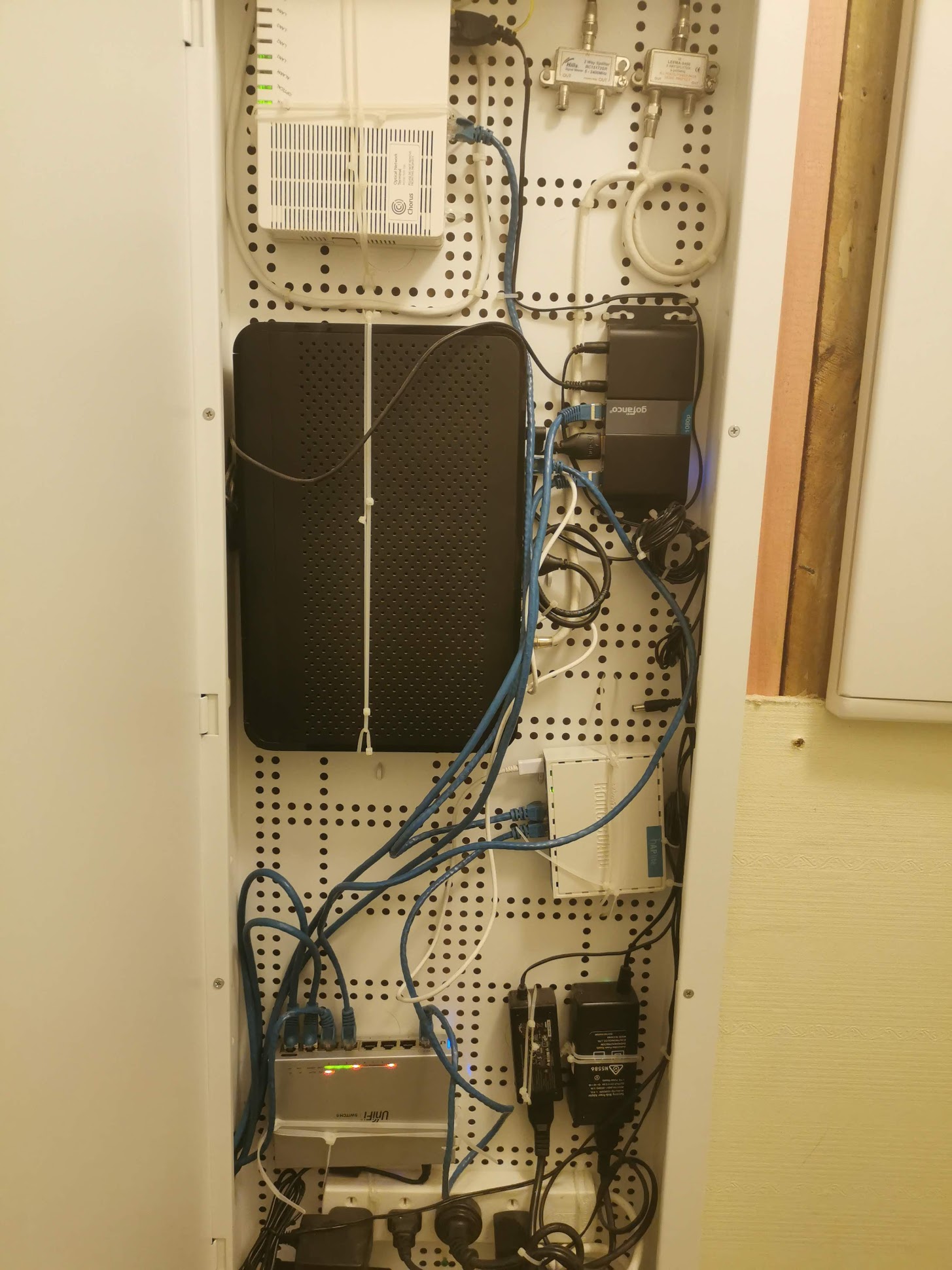
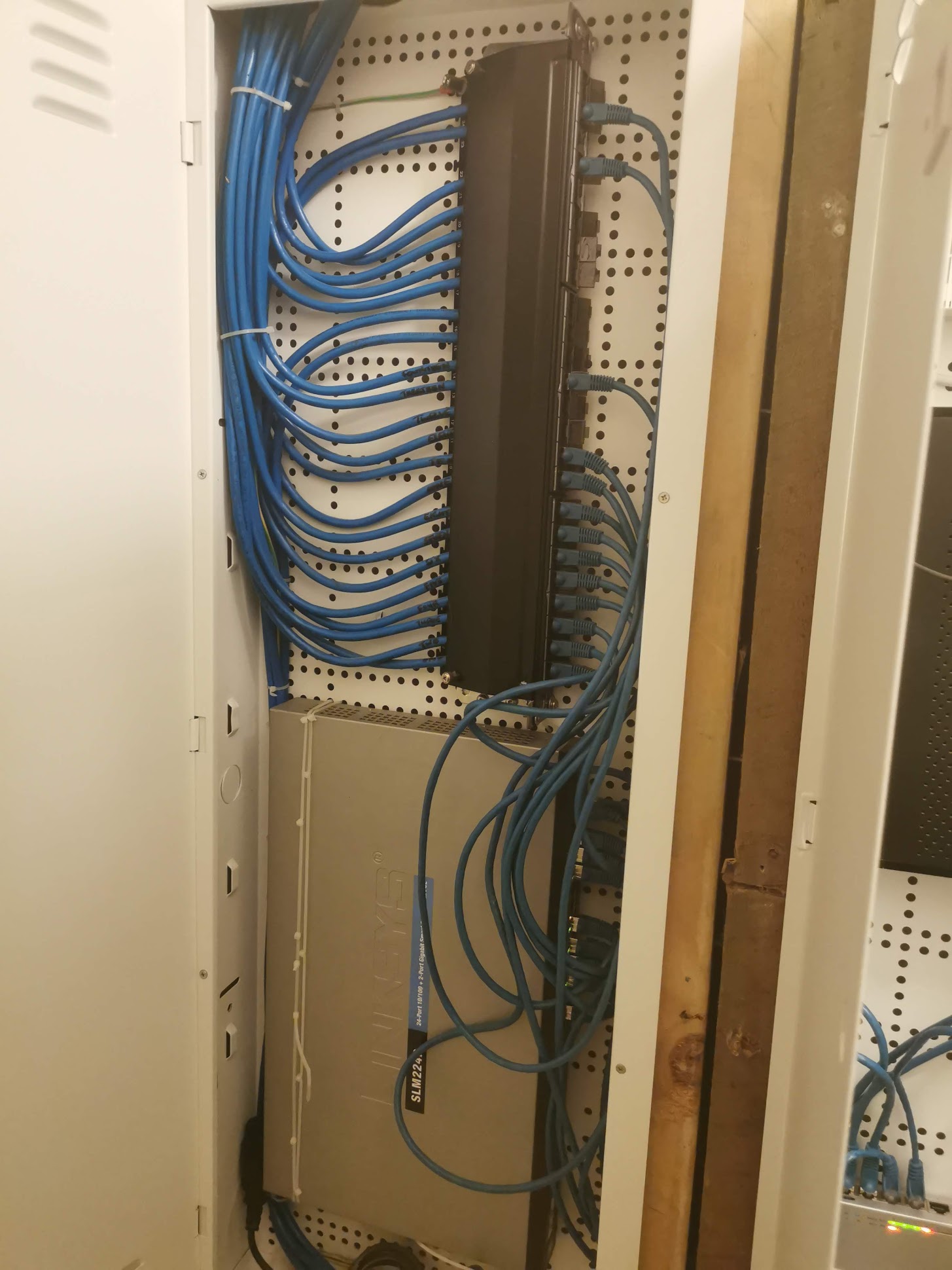
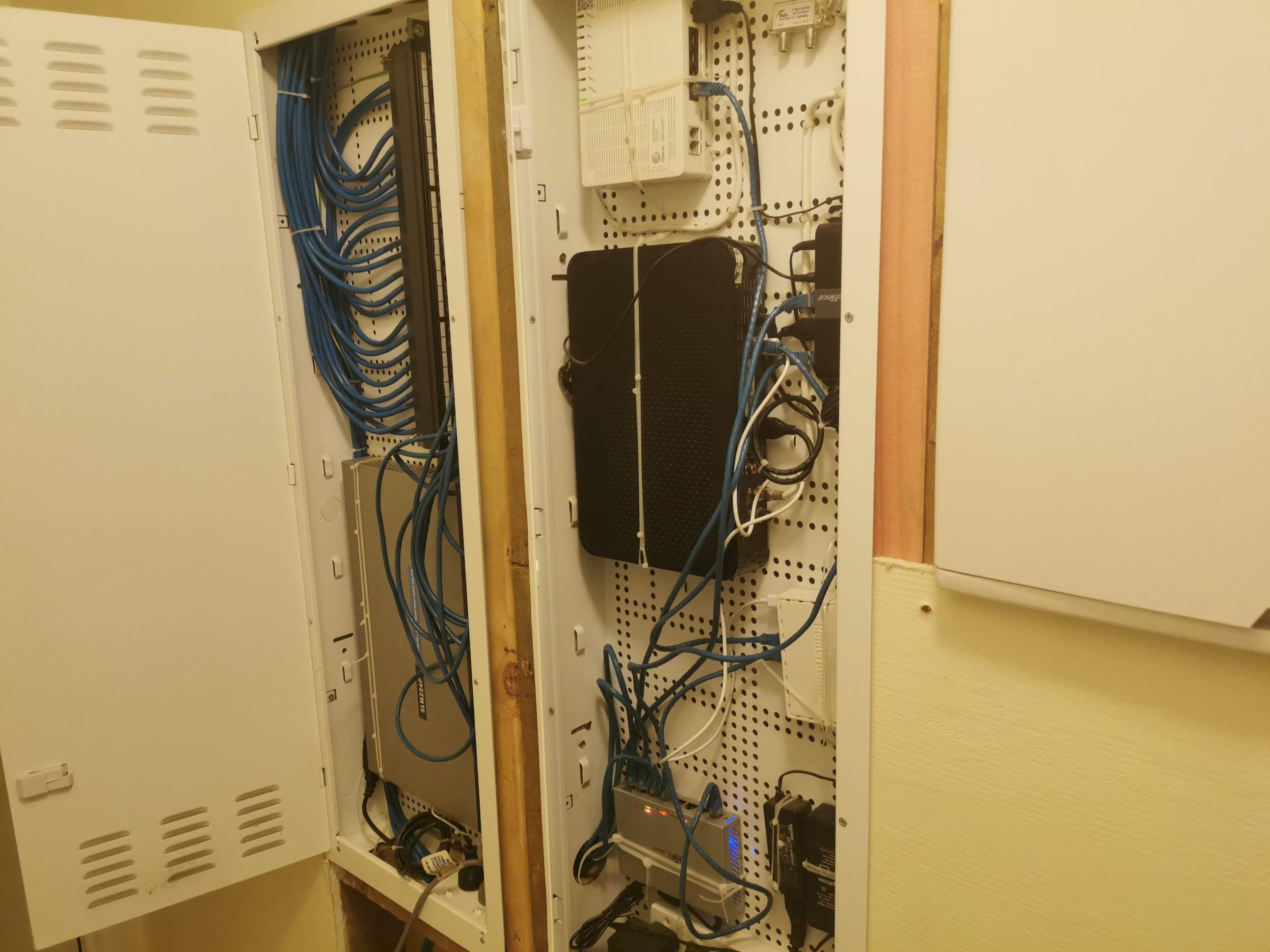
It's easy to get a 19" patch panel and switch inside a recessed wall cabinet. I put 2x of the biggest i could get side by side and easily run everything (including Sky and multi HDMI sender) inside them:


Click to see full size


Click to see full size


Click to see full size


Speedtest 2019-10-14


Jase2985
13735 posts

Uber Geek
+1 received by user: 6217

ID Verified
Lifetime subscriber

  #2547979 23-Aug-2020 09:48
Send private message

@zeon check the permissions on your images they don't appear to load


Stu1

1892 posts

Uber Geek
+1 received by user: 489

ID Verified
Subscriber

  #2547990 23-Aug-2020 10:23
Send private message

Zeon:

It's easy to get a 19" patch panel and switch inside a recessed wall cabinet. I put 2x of the biggest i could get side by side and easily run everything (including Sky and multi HDMI sender) inside them:


Could you please repost pic? I really would like to use a 28 inch recessed or worse case a 42 to save space

Zeon
3926 posts

Uber Geek
+1 received by user: 759

Trusted

  #2548443 23-Aug-2020 23:54
Send private message

Sorry guys, uploaded images to Geekzone CDN now and changed the links.


Speedtest 2019-10-14


cyril7
9075 posts

Uber Geek
+1 received by user: 2499

ID Verified
Trusted
Subscriber

  #2548468 24-Aug-2020 07:18
Send private message

Hi, so just for viewers, those are two 42" units, so clearly no issue installing a 24" patch panel, however if you want to put a 24" panel in a 28" panel that also is not a problem, I dont have a photo but you can vertically mount it, normally as close to the side as you can, there are angle brackets that support it, a link for those brackets is below, a pair is around $20


http://dynamix.co.nz/HWS-PPB


Cyril


Stream your favourite shows now on Apple TV (affiliate link).
Jase2985
13735 posts

Uber Geek
+1 received by user: 6217

ID Verified
Lifetime subscriber

  #2548470 24-Aug-2020 07:22
Send private message

cyril7:


Hi, so just for viewers, those are two 42" units, so clearly no issue installing a 24" patch panel, however if you want to put a 24" panel in a 28" panel that also is not a problem, I dont have a photo but you can vertically mount it, normally as close to the side as you can, there are angle brackets that support it, a link for those brackets is below, a pair is around $20


http://dynamix.co.nz/HWS-PPB


Cyril


the problem comes when you want to install a 24 port switch, router, ont and their power supplies as well.


cyril7
9075 posts

Uber Geek
+1 received by user: 2499

ID Verified
Trusted
Subscriber

  #2548472 24-Aug-2020 07:31
Send private message

True, which is why I normally limit in wall solutions to 16 ports, over that and its a wall frame or cabinet.

Currently have a new home job on and it's 12 outlets, which is about right for a 3bed I find, just using a pair or 8port panels in a 28" in wall. A 16port switch is 290 wide so easily fits in.

Cyril


bignose
143 posts

Master Geek
+1 received by user: 22


  #2548477 24-Aug-2020 07:54
Send private message

Zeon:

Sorry guys, uploaded images to Geekzone CDN now and changed the links.


that patch panel cracks me up - so much wasted space when you could just have used 3 of the correct surface mount patch units and saved a heap of space (espec with the cable routing)

https://www.pbtech.co.nz/product/CABDNX0354/Dynamix-HPP-1008-1SL-8-Port-Cat6-Slimline-Patch-Pa


Zeon
3926 posts

Uber Geek
+1 received by user: 759

Trusted

  #2548562 24-Aug-2020 10:59
Send private message

bignose:
Zeon:


Sorry guys, uploaded images to Geekzone CDN now and changed the links.


that patch panel cracks me up - so much wasted space when you could just have used 3 of the correct surface mount patch units and saved a heap of space (espec with the cable routing)

https://www.pbtech.co.nz/product/CABDNX0354/Dynamix-HPP-1008-1SL-8-Port-Cat6-Slimline-Patch-Pa


These are shielded cat6a patch panel and cables. THe patch panel is here:


https://www.cablematters.com/pc-445-162-rackmount-or-wallmount-24-port-cat6a-shielded-rj45-patch-panel-with-jack-shutter.aspx


Speedtest 2019-10-14


1 | 2 | 3 | 4
View this topic in a long page with up to 500 replies per page Create new topic


Geekzone Live »

Try automatic live updates from Geekzone directly in your browser, without refreshing the page, with Geekzone Live now.


Are you subscribed to our RSS feed? You can download the latest headlines and summaries from our stories directly to your computer or smartphone by using a feed reader.