
Geekzone: technology news, blogs, forums
Guest
Welcome Guest.
You haven't logged in yet. If you don't have an account you can register now.


Filter this topic showing only the reply marked as answer View this topic in a long page with up to 500 replies per page Create new topic
1 | 2 
freitasm
BDFL - Memuneh
80655 posts

Uber Geek
+1 received by user: 41052

Administrator
ID Verified
Trusted
Geekzone
Lifetime subscriber

  #2627034 26-Dec-2020 21:54
Send private message

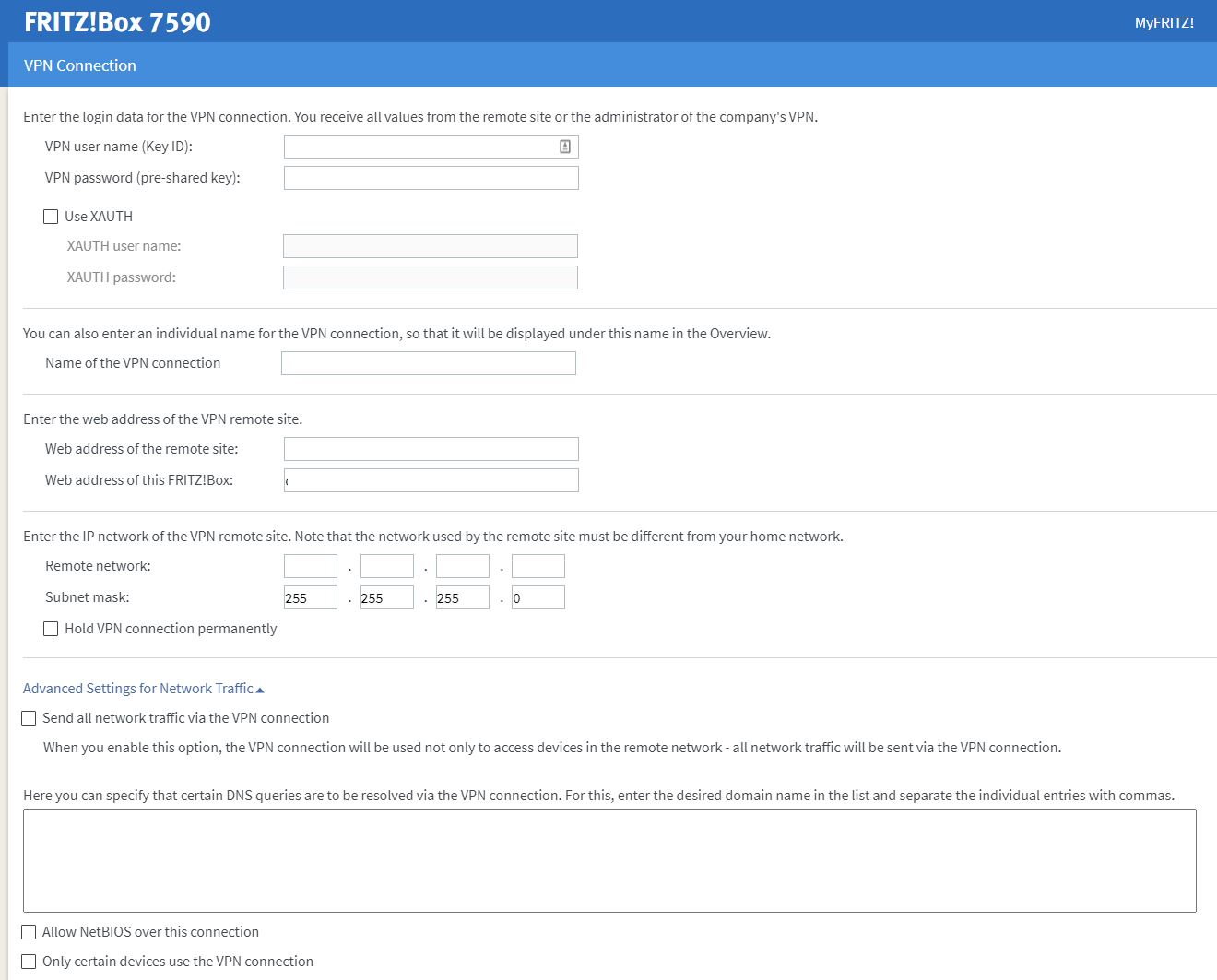
One option could be using a FritzBox as your main router as it supports VPN IPSEC PSK as a client. It even has an option to only use the VPN for some devices on the network so you could assign it to your TV or streaming box only, without affecting other devices. You obviously would be better borrowing a box to test (or have someone with a box test it for you) and make sure it works, before buying one. I would test but I don't have a VPN account anymore.



Referral links: Quic Broadband (free setup code: R587125ERQ6VE) | Samsung | AliExpress | Wise | Sharesies 


Support Geekzone by subscribing (browse ads-free), or making a one-off or recurring donation through PressPatron.


Pinpoint

50 posts

Geek
+1 received by user: 1


  #2627035 26-Dec-2020 22:01
Send private message

freitasm:

One option could be using a FritzBox as your main router as it supports VPN IPSEC PSK as a client. It even has an option to only use the VPN for some devices on the network so you could assign it to your TV or streaming box only, without affecting other devices. You obviously would be better borrowing a box to test (or have someone with a box test it for you) and make sure it works, before buying one. I would test but I don't have a VPN account anymore.


Cool!
I could be wrong and have trown it away. But I think I might have a fritzbox somewhere. Will have a look in the morning. Can't remember ever seeing a VPN option

What does IPSEC PSK client mean?


freitasm
BDFL - Memuneh
80655 posts

Uber Geek
+1 received by user: 41052

Administrator
ID Verified
Trusted
Geekzone
Lifetime subscriber

  #2627037 26-Dec-2020 22:03
Send private message

IPSEC is a type of VPN protocol. PSK means shared key. Most VPN providers will have an IPSEC server and your private account will have the shared key.


Your Fritzbox would need to be updated to the latest OS to be sure everything works fine. It's in Internet | Permit Access | Filter.


In this scenario, you would replace the Spark box with the FritzBox completely.


Referral links: Quic Broadband (free setup code: R587125ERQ6VE) | Samsung | AliExpress | Wise | Sharesies 


Support Geekzone by subscribing (browse ads-free), or making a one-off or recurring donation through PressPatron.


Pinpoint

50 posts

Geek
+1 received by user: 1


  #2627039 26-Dec-2020 22:12
Send private message

freitasm:

IPSEC is a type of VPN protocol. PSK means shared key. Most VPN providers will have an IPSEC server and your private account will have the shared key.


Your Fritzbox would need to be updated to the latest OS to be sure everything works fine. It's in Internet | Permit Access | Filter.


In this scenario, you would replace the Spark box with the FritzBox completely.


Don't think this is an option as it does not support fibre speeds? Also people mentioned earlier that a vpn on your modem would slow down the speed on all devices?

freitasm
BDFL - Memuneh
80655 posts

Uber Geek
+1 received by user: 41052

Administrator
ID Verified
Trusted
Geekzone
Lifetime subscriber

  #2627040 26-Dec-2020 22:15
Send private message

Pinpoint: Don't think this is an option as it does not support fibre speeds? Also people mentioned earlier that a vpn on your modem would slow down the speed on all devices?


Both the FritzBox 7490 and 7590 are gigabit capable - and the 7590 is superfast.


Second, I mentioned about the VPN slowing down the speed on devices because most routers would use the VPN for ALL devices in the connection. Note the last line in the FritzBox where you can select which devices will use the VPN, so other devices in the network won't be affected since their traffic will not go through the VPN.


Referral links: Quic Broadband (free setup code: R587125ERQ6VE) | Samsung | AliExpress | Wise | Sharesies 


Support Geekzone by subscribing (browse ads-free), or making a one-off or recurring donation through PressPatron.


michaelmurfy
meow
13580 posts

Uber Geek
+1 received by user: 10912

Moderator
ID Verified
Trusted
Lifetime subscriber

  #2627041 26-Dec-2020 22:16
Send private message

I'm going to be honest here - you're doing things the wrong way.


There are DNS-based providers available that'll do the job for you without going into VPN territory like dns4me that'll suit you better and will work with the Spark Smart Modem however we'll not go into detail on what services these providers unblock or how to set it up. I'm just simply pointing you in the right direction. Also read this: https://www.geekzone.co.nz/forums.asp?forumid=151&topicid=192306


VPN providers are seriously not the best for this and you'll be pumping all your internet traffic through one which is not ideal for a multitude of reasons - the main reason being you can trust your internet service provider more than a dodgy VPN provider. Also you'll have to constantly maintain it and have an understanding on how VPN's work.


Also related, read this: https://gist.github.com/joepie91/5a9909939e6ce7d09e29


Michael Murphy | https://murfy.nz
Referral Links: Quic Broadband (use R122101E7CV7Q for free setup)

Are you happy with what you get from Geekzone? Please consider supporting us by subscribing.
Opinions are my own and not the views of my employer.


Shop on-line at New World now for your groceries (affiliate link).
freitasm
BDFL - Memuneh
80655 posts

Uber Geek
+1 received by user: 41052

Administrator
ID Verified
Trusted
Geekzone
Lifetime subscriber

  #2627042 26-Dec-2020 22:20
Send private message

Agree with @michaelmurfy above. I just posted this because you seemed set on using a VPN (and the reason why I don't have a VPN account any longer is that there's no good reason to use one these days, at least not from home).


Referral links: Quic Broadband (free setup code: R587125ERQ6VE) | Samsung | AliExpress | Wise | Sharesies 


Support Geekzone by subscribing (browse ads-free), or making a one-off or recurring donation through PressPatron.


Pinpoint

50 posts

Geek
+1 received by user: 1


  #2627043 26-Dec-2020 22:20
Send private message

Thanks heaps for this guys!

I'll do some more reading on this

nztim
4013 posts

Uber Geek
+1 received by user: 2710

ID Verified
Trusted
TEAMnetwork
Subscriber

  #2627044 26-Dec-2020 22:24
Send private message

freitasm:


One option could be using a FritzBox as your main router as it supports VPN IPSEC PSK as a client. It even has an option to only use the VPN for some devices on the network so you could assign it to your TV or streaming box only, without affecting other devices. You obviously would be better borrowing a box to test (or have someone with a box test it for you) and make sure it works, before buying one. I would test but I don't have a VPN account anymore.


This is one of the feature requests on the sonicWALL for years, it supports tunnel interface IPSEC but no xauth so doesn't work with most VPN accounts


Any views expressed on these forums are my own and don't necessarily reflect those of my employer. 


richms
29100 posts

Uber Geek
+1 received by user: 10214

Trusted
Lifetime subscriber

  #2627046 26-Dec-2020 22:34
Send private message

Asus appears to do this in its stock firmware according to this how to. Get one, put its wan interface into your smart modem, and then hook the TV and whatever else up to its LAN ports and once the VPN is configured, it will all go out thru that. Disable VPN or connect the TV up to the normal network and you can "enjoy" the services available in NZ instead.


Richard rich.ms

1 | 2 
Filter this topic showing only the reply marked as answer View this topic in a long page with up to 500 replies per page Create new topic


Geekzone Live »

Try automatic live updates from Geekzone directly in your browser, without refreshing the page, with Geekzone Live now.


Are you subscribed to our RSS feed? You can download the latest headlines and summaries from our stories directly to your computer or smartphone by using a feed reader.