Geekzone: technology news, blogs, forums
Guest
Welcome Guest.
You haven't logged in yet. If you don't have an account you can register now.


Filter this topic showing only the reply marked as answer View this topic in a long page with up to 500 replies per page Create new topic
1 | 2 
itsme4you
3 posts

Wannabe Geek


  #3408913 31-Aug-2025 05:56
Send private message quote this post

Hi I had similar issue and today updated to beta version firmware but still having slow connection for 1gig connection getting hardly 100mbps.


From switch getting 2 vlans connected to 2.5gb port.


And configured2 ssid for each vlan , both are not exceeding 100mbps. Not sure what the issue but for the same setup with openwrt on belkin rt3200 getting nearly 850mbps speed.


Can you share what configuration you did on ssid. Can you share pls.


Thanks


Krish


freitasm
BDFL - Memuneh
80672 posts

Uber Geek
+1 received by user: 41123

Administrator
ID Verified
Trusted
Geekzone
Lifetime subscriber

  #3408915 31-Aug-2025 07:45
Send private message quote this post

Are you using the same cables with both Belkin and Grandstream?


Referral links: Quic Broadband (free setup code: R587125ERQ6VE) | Samsung | AliExpress | Wise | Sharesies 


Support Geekzone by subscribing (browse ads-free), or making a one-off or recurring donation through PressPatron.


itsme4you
3 posts

Wannabe Geek


  #3408924 31-Aug-2025 09:41
Send private message quote this post

Yes same cable.


nzkc

1634 posts

Uber Geek
+1 received by user: 1041


  #3408996 31-Aug-2025 13:35
Send private message quote this post

itsme4you:


Can you share what configuration you did on ssid. Can you share pls.


No VLAN on my main SSID


And VLAN 20 on my IOT SSID


Client IP Assignment set to bridge on both


Thats it. Nothing clever at all.


itsme4you
3 posts

Wannabe Geek


  #3409032 31-Aug-2025 17:45
Send private message quote this post

nzkc:


itsme4you:


Can you share what configuration you did on ssid. Can you share pls.


No VLAN on my main SSID


And VLAN 20 on my IOT SSID


Client IP Assignment set to bridge on both


Thats it. Nothing clever at all.


Are you using 2 wires to connect to wifi router?


One with out vlan and 2nd with vlan?


nzkc

1634 posts

Uber Geek
+1 received by user: 1041


  #3409044 31-Aug-2025 19:24
Send private message quote this post

itsme4you


Are you using 2 wires to connect to wifi router?


One with out vlan and 2nd with vlan?


No. Single ethernet cable to the AP.


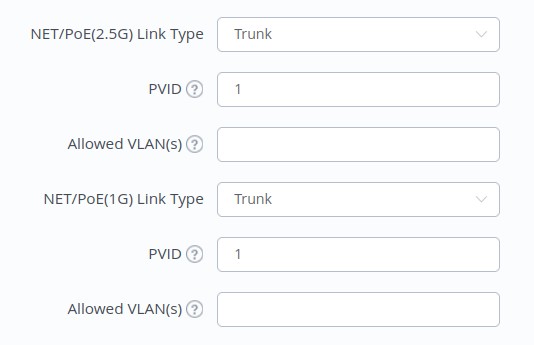
And settings are unchanged (as far as I can remember):


Shop now at Mighty Ape (affiliate link).
RunningMan
9195 posts

Uber Geek
+1 received by user: 4846


  #3418723 25-Sep-2025 13:23
Send private message quote this post

https://firmware.grandstream.com/Release_Note_GWNAP_1.0.25.41.pdf 


1.0.25.41 has been released with fixes for IPv6 & VLAN issues.


Fixed issue where IPv6 traffic was not occasionally tagged.
Fixed device performance degradation when VLANs are enabled.
Fixed client disconnection issue due to 802.1X un-authentication failure.
Fixed tagged traffic handling issue in access mode when DSCP is non-zero.
Fixed long reconnection time issue after client reconnects to office Wi-Fi AP.
Internal bug fixes


nzkc

1634 posts

Uber Geek
+1 received by user: 1041


  #3473699 25-Mar-2026 18:03
Send private message quote this post

So I have come to the conclusion this is still actually an issue. And I've been able to identify that RA packets leak across VLANs (I have a few now) with IPv6. Ive still got a ticket open (since July 2025) and have provided a stack of information to Grandstream. Unfortunately they seem to be dragging their heels a bit on it.


Best mitigation I have right now is to disable IPv6 on my VLANs. Thats frustrating, but manageable. Even then I still see RA into those VLANS (when connected over WiFi) from the non tagged LAN where I'm still running IPv6. This was causing no end of problems - mostly performance). Most of the IOT devices I have only get IPv4 addresses so not really noticeable there. However; I got some cameras and wanted them in their own VLAN and thats where my struggles grew and I eventually stumbled onto the packets leaking.


I would love to know if this is only on GWN7665 devices or is further but dont have other devices to confirm with. Anyone able to test and confirm?


I found this was a problem with both dedicated VLAN SSIDs and when using PPSK to set a VLAN for particular devices.


1 | 2 
Filter this topic showing only the reply marked as answer View this topic in a long page with up to 500 replies per page Create new topic


Geekzone Live »

Try automatic live updates from Geekzone directly in your browser, without refreshing the page, with Geekzone Live now.


Are you subscribed to our RSS feed? You can download the latest headlines and summaries from our stories directly to your computer or smartphone by using a feed reader.