Geekzone: technology news, blogs, forums
Guest
Welcome Guest.
You haven't logged in yet. If you don't have an account you can register now.


Filter this topic showing only the reply marked as answer View this topic in a long page with up to 500 replies per page Create new topic
1 | 2 
JetA1
65 posts

Master Geek
+1 received by user: 12


  #3386099 22-Jun-2025 06:53
Send private message

I'd suggest using a spare old cellphone permanently plugged into power as an access point.  It will have to be connected to the internet through a data connection, (requires a SIM and a Data pack deal), & running a permanent 'hotspot' from the phone.  That would give you a connection for the cameras independent of the 'house' connection.  Whether this is practical I'm not sure as the cams would need to be permanently connected to it. 


I have a couple of Xiaomi cameras and while they 'can' indeed backup all data to the cloud I don't do that I simply have an SD card in each.  The cam would work independant of whether there is an internet connection or not, (well i'm pretty sure of that), but you need a connection of some sort to remotely access the cam...........and to get alerts etc.


Sharing is Caring


nitro
757 posts

Ultimate Geek
+1 received by user: 335


  #3386149 22-Jun-2025 09:12
Send private message

JetA1:


I'd suggest using a spare old cellphone permanently plugged into power as an access point.  It will have to be connected to the internet through a data connection, (requires a SIM and a Data pack deal), & running a permanent 'hotspot' from the phone.  That would give you a connection for the cameras independent of the 'house' connection.  Whether this is practical I'm not sure as the cams would need to be permanently connected to it. 


how would this work? i've never seen wireless cameras that switch to a different wifi hotspot, when wifi goes down. and in most cases, the issue won't be with the wifi but the wan (internet connection).


if you meant the cameras permanently connected to the phone hotspot... i imagine UFB would be far more reliable than 4G/5G/FWA.


freitasm
BDFL - Memuneh
80646 posts

Uber Geek
+1 received by user: 41030

Administrator
ID Verified
Trusted
Geekzone
Lifetime subscriber

  #3386151 22-Jun-2025 09:19
Send private message

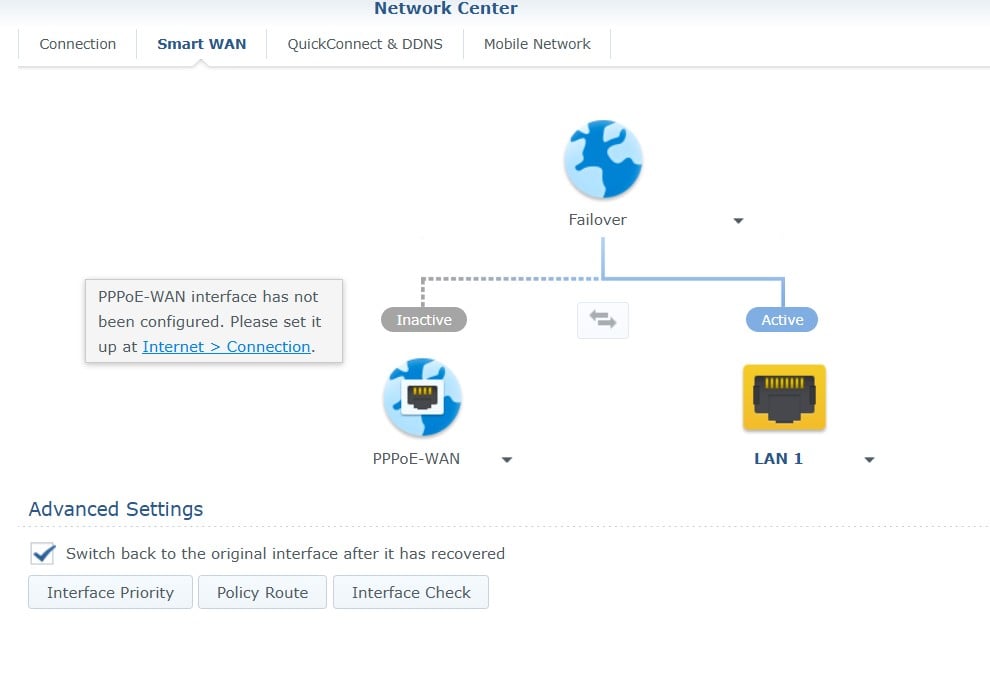
The best would be an automatic failover. A 4G router with both mobile and WAN, with WAN first, and if it goes down it switches to mobile. Or a router that will do failover between WAN and LAN, then plug a 4G router to the LAN port. If WAN goes down, the router switches to using LAN1 as connection. 


For example, I had a 4G router connected to my main fibre router and when that Chorus outage happened, my whole house was still connected, no change in WiFi or settings. 


But this discussion is now far away from the original question "Will Ring cameras work without Internet?"


Referral links: Quic Broadband (free setup code: R587125ERQ6VE) | Samsung | AliExpress | Wise | Sharesies 


Support Geekzone by subscribing (browse ads-free), or making a one-off or recurring donation through PressPatron.


JetA1
65 posts

Master Geek
+1 received by user: 12


  #3386206 22-Jun-2025 15:12
Send private message

GOOD plan !  What I was suggesting was a 4g phone as a hotspot for permanent connection which would negate any issue of powerfailure or loss of incoming Fibre/whatever........


Sharing is Caring

gnfb

2685 posts

Uber Geek
+1 received by user: 197

ID Verified

  #3386383 23-Jun-2025 12:52
Send private message

Once again thank you one and all I am going to go with the hotspot suggestion. Will now look at which company offers either high download data or rollover and store it up for that day when its needed


Is an English Man living in New Zealand. Not a writer, an Observer he says. Graham is a seasoned 'traveler" with his sometimes arrogant, but honest opinion on life. He loves the Internet!.


I have two shops online allshop.nz    patchpinflag.nz
Email Me


1 | 2 
Filter this topic showing only the reply marked as answer View this topic in a long page with up to 500 replies per page Create new topic


Geekzone Live »

Try automatic live updates from Geekzone directly in your browser, without refreshing the page, with Geekzone Live now.


Are you subscribed to our RSS feed? You can download the latest headlines and summaries from our stories directly to your computer or smartphone by using a feed reader.