
Geekzone: technology news, blogs, forums
Guest
Welcome Guest.
You haven't logged in yet. If you don't have an account you can register now.


Filter this topic showing only the reply marked as answer View this topic in a long page with up to 500 replies per page Create new topic
1 | 2 
Kookoo

869 posts

Ultimate Geek
+1 received by user: 407

Trusted

  #3448895 2-Jan-2026 11:31
Send private message quote this post

wonderferret:

I had a similar problem. POE access point would reboot. Turned out to be the power setting for the port. Defaulted to 6.5 watts and the access point would reboot when do
ing a speed test. Changed it to 13 watts and it all worked ok


Was that on a Grandstream? When you say port setting, do you mean on the router or the AP? If it's the AP, how did you change the settings?




Hello, Ground!


raytaylor
4076 posts

Uber Geek
+1 received by user: 1296

Trusted

  #3448905 2-Jan-2026 11:44
Send private message quote this post

For last 2 comments   


I have only dealt with the residential routers but yes it seems the GDMS isnt the best at managing them yet. Its improved a lot but I havent had much expierence. Most of the installations I do have an ONT+router combo unit so im mainly just doing access points which its really good at. 
Their proposition used to be that the router could also be the AP controller. But they have since learned that GDMS in the cloud is much more appealing so are transitioning across. 


In a grandstream POE switch, and i assume poe ports on a router, there is a wattage limit setting so you cant take down a network by plugging in a device that draws more power than the switch can consume. Its annoying but it must be set. 


Ray Taylor

There is no place like localhost

Spreadsheet for Comparing Electricity Plans Here


cddt
1965 posts

Uber Geek
+1 received by user: 1904


  #3448906 2-Jan-2026 11:46
Send private message quote this post

Kookoo:


Was that on a Grandstream? When you say port setting, do you mean on the router or the AP? If it's the AP, how did you change the settings?


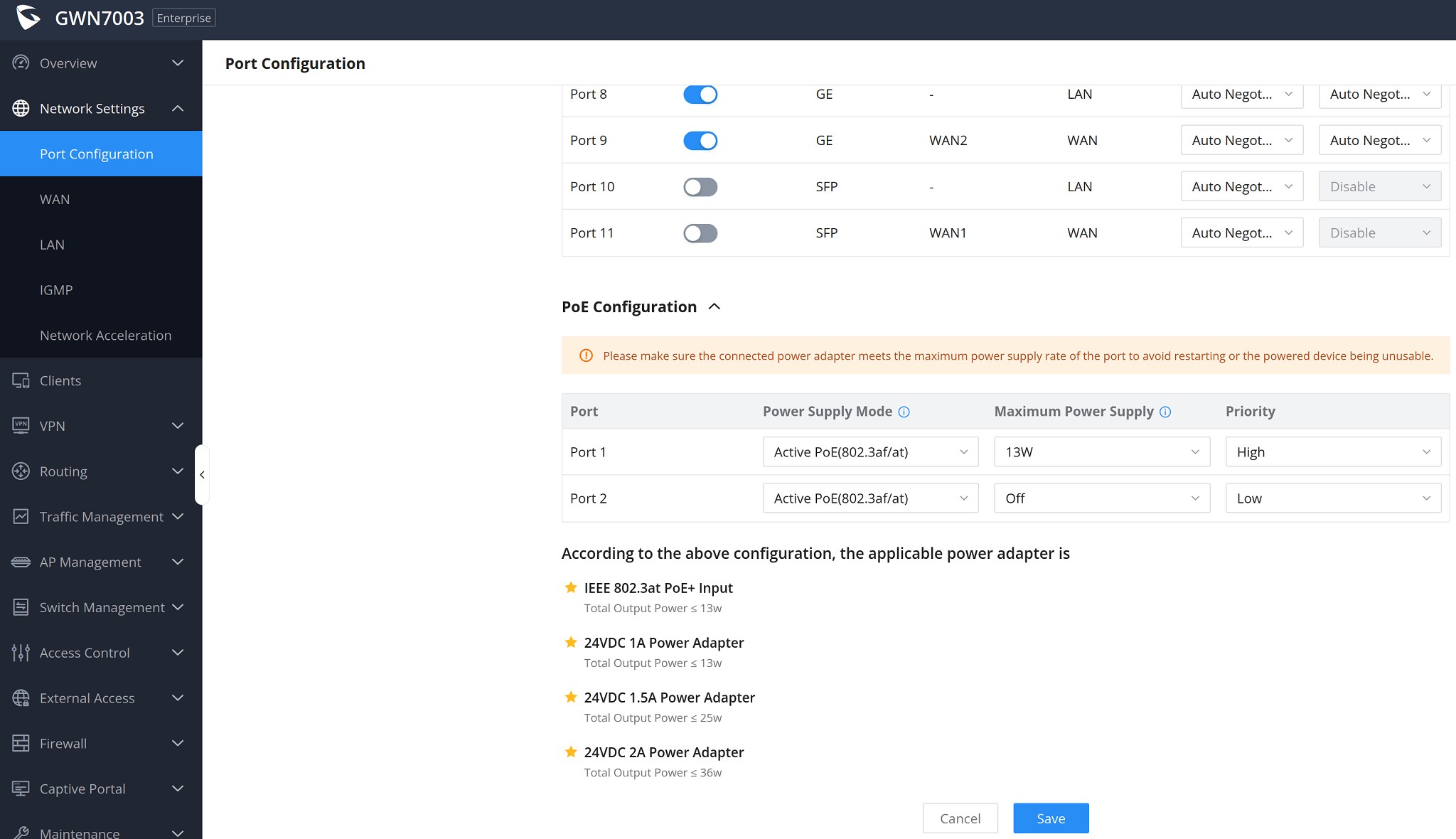
On the router under Network Settings > Port Configuration you can specify the maximum PoE power supply. 


Note that the default adapter for your router is probably 24V 1A, but you need a 24V 1.5A adapter to be able to run two PoE devices unless they are low power... 


Per the spec sheet max PoE budget: 


24V DC 1A: 12.8W
24V DC 1.5A: 24.8W


Also under maintenance > System Diagnostics there is a tab for "PoE Diagnostics" - take a look. 


Kookoo

869 posts

Ultimate Geek
+1 received by user: 407

Trusted

  #3448982 2-Jan-2026 13:48
Send private message quote this post

cddt:


On the router under Network Settings > Port Configuration you can specify the maximum PoE power supply. 


Note that the default adapter for your router is probably 24V 1A, but you need a 24V 1.5A adapter to be able to run two PoE devices unless they are low power... 


Per the spec sheet max PoE budget: 


24V DC 1A: 12.8W
24V DC 1.5A: 24.8W


Also under maintenance > System Diagnostics there is a tab for "PoE Diagnostics" - take a look. 


Got it, thank you. 


The live PoE port with AP hanging off it currently has Power: 4.6W, Max power: 5.2W, Priority: Low. That seems to be running fine.


The other port is configured to 9W, Priority: High. I'll see if playing around with it will change the other AP behaviour.


Update: Yep, changing the second port max power to 13W has stabilised the AP connected to it. Thank you @cddt.


Hello, Ground!

Kookoo

869 posts

Ultimate Geek
+1 received by user: 407

Trusted

  #3448991 2-Jan-2026 14:53
Send private message quote this post

For the life of me, I still don't understand how this is supposed to work.


I currently have: router + AP1 on PoE are online and working as expected. AP2 is hanging off the router's second PoE port not doing anything


  • Router web ui showing: Router + AP1 as online, and AP2 is only showing as a wired client not an AP. Mesh is enabled but under "mesh topology" it shows nothing.
  • GDMS is showing: Router + AP2 as online, and AP1 is showing offline. Mesh is enabled but under "network topology" it only shows Router + AP2 (with a big "-" on the their link line)

How do I get from here to the desired state: router + mesh where AP1 is on PoE and AP2 is on WiFi?


Hello, Ground!

wonderferret
141 posts

Master Geek
+1 received by user: 17

Lifetime subscriber

  #3449082 2-Jan-2026 18:16
Send private message quote this post

Kookoo:

wonderferret:

I had a similar problem. POE access point would reboot. Turned out to be the power setting for the port. Defaulted to 6.5 watts and the access point would reboot when do
ing a speed test. Changed it to 13 watts and it all worked ok


Was that on a Grandstream? When you say port setting, do you mean on the router or the AP? If it's the AP, how did you change the settings?


Grandstream 7003 with a 7670 AP. POE is in the network settings / port configuration


Shop now for Lego sets and other gifts (affiliate link).
Kookoo

869 posts

Ultimate Geek
+1 received by user: 407

Trusted

  #3449084 2-Jan-2026 18:23
Send private message quote this post

wonderferret:

Grandstream 7003 with a 7670 AP. POE is in the network settings / port configuration


Got it, thanks! Switched it to 13W and it seems to have worked like magic. No idea why - the AP doesn't need anywhere near as much.


Now I'm trying to get it to understand it actually has two APs and allow me to configure them in a mesh. Will wait till night time so the fam doesn't get too upset with me playing around with the network.


Hello, Ground!

cddt
1965 posts

Uber Geek
+1 received by user: 1904


  #3449095 2-Jan-2026 20:28
Send private message quote this post

Kookoo:


The live PoE port with AP hanging off it currently has Power: 4.6W, Max power: 5.2W, Priority: Low. That seems to be running fine.


The other port is configured to 9W, Priority: High. I'll see if playing around with it will change the other AP behaviour.


Update: Yep, changing the second port max power to 13W has stabilised the AP connected to it. Thank you @cddt.


According to the datasheet for GWN7604, maximum power draw should be 7.5 W (excluding any PoE draw), so each port needs to be configured to allow a higher level of power draw than this. 


My referral links: BigPipeMercury


Kookoo

869 posts

Ultimate Geek
+1 received by user: 407

Trusted

  #3449450 3-Jan-2026 23:02
Send private message quote this post

Done and dusted - thanks for your help everyone.


Removed both APs from GDMS - turns out Grandstream devices can only be controlled by either the router or the cloud, but not both. 


Factory reset both Aps, paired them to the router over PoE and then took one of them upstairs and hooked it up to a power adaptor. Took a about 5 minutes till it switched to wireless.


It's just a shame Grandstream don't make it clearer that you've got to choose one path upfront - the router or the cloud.


Hello, Ground!

Kookoo

869 posts

Ultimate Geek
+1 received by user: 407

Trusted

  #3456090 26-Jan-2026 14:05
Send private message quote this post

Reopening this thread with a new issue.


My Grandstream network keeps randomly kicking wifi clients, forcing them to reconnect - which annoys the family to no end. Affects both Android and iOS devices. At first I thought it was refreshing IPs so I gave them all static IPs. No difference. The APs are shown as up and running during the time the client is disconnected, so not an AP reboot issue. Coverage is strong throughout the house. If anyone has seen this happen before - any ideas what might be causing it?


Hello, Ground!

1 | 2 
Filter this topic showing only the reply marked as answer View this topic in a long page with up to 500 replies per page Create new topic


Geekzone Live »

Try automatic live updates from Geekzone directly in your browser, without refreshing the page, with Geekzone Live now.


Are you subscribed to our RSS feed? You can download the latest headlines and summaries from our stories directly to your computer or smartphone by using a feed reader.