Geekzone: technology news, blogs, forums
Guest
Welcome Guest.
You haven't logged in yet. If you don't have an account you can register now.


View this topic in a long page with up to 500 replies per page Create new topic
1 | 2 | 3 
NonprayingMantis
6434 posts

Uber Geek
+1 received by user: 1528


  #906116 2-Oct-2013 07:57
Send private message

pab:
NonprayingMantis:How do they login without the password?

Long press the reset button on the back of the modem/router.

ah yes.   maybe superglue that shut too then :P


lostangel
163 posts

Master Geek
+1 received by user: 1


  #906137 2-Oct-2013 08:48
Send private message

I too have a belkin wifi router, mines a N one though.

I have installed tomatousb firmware on it which has many features to control access to internet.

There's a video about how to set these restrictions up here http://www.polarcloud.com/v/screst.htm

Take a look, maybe your router already has something similar anyway that you could set up.

PJ48
302 posts

Ultimate Geek
+1 received by user: 106

Lifetime subscriber

  #906809 2-Oct-2013 23:37
Send private message

The OP said that he wanted something really easy to set up, and that he wasn't a really technical person. A lot of suggestions are great if you have the time and inclination to set all the parameters, but fiddly.

What about getting an Airport express for $159 which is incredibly user friendly, and is very simple to setup access times for each device MAC address? The current model has reasonable coverage, and is dual band for both 2.4 Ghz and 5 Ghz wifi. I would think that would make an excellent replacement for a pre-N Belkin router.


psychrn
1611 posts

Uber Geek
+1 received by user: 155

ID Verified
Trusted

  #906820 3-Oct-2013 00:29
Send private message

NonprayingMantis: what ISP/plan are you on at the moment?

you may find it a lot simpler to just pay an extra $10-$20 per month to get a bigger plan with your current provider rather than buying an expensive new router $200+, messing about with router settings which you don't really understand, and which your kids will probably be able to change back anyway.

almost every provider has pretty decent plans out there now 500GB+ which should be plenty for almost any household (notable exception being VF cable I think where the max is 150GB - if you are on that then you are pretty much screwed)
you could even try phoning up and threatening to leave if you don't give you a free plan upgrade or something.

OMG we are still managing on our original 30 Gb/month


GZMCC. Lenovo Yoga C640. 8 gb Ram and 256Gb SSD, Cam Am Spyder 2016 F3 LTD.  GoPro 5 Black, Samsung S22 Ultra, Huawei Watch D. Samsung S6 Lite Tablet, Amateur Radio Callsign ZL1CJH


michaelmurfy
meow
13586 posts

Uber Geek
+1 received by user: 10928

Moderator
ID Verified
Trusted
Lifetime subscriber

  #906834 3-Oct-2013 02:22
Send private message

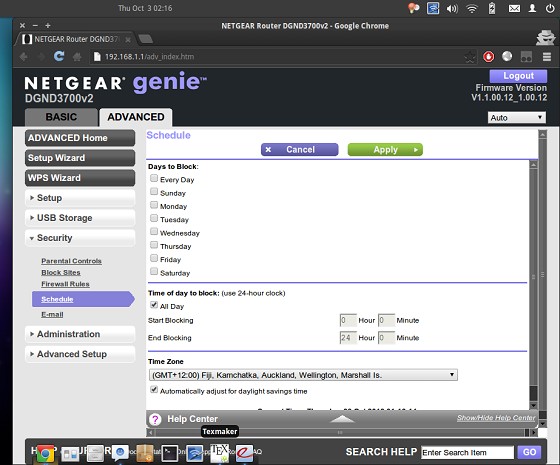
My Netgear DGND3700v2 has what you're after, as well as being an all in one device with Wireless a/n 2.4GHz / 5GHz (300mbit). You can pick these up at Noel Leemings for between $220 to $320 (depending on what salesperson you get) and it's simple to set up and manage. I'd recommend setting up a guest network with parental controls active on it so you can have unrestricted internet access on your devices.

Here's a screenshot of the routers "advanced" mode - there's a basic mode where parental controls is more prominent also.


Michael Murphy | https://murfy.nz
Referral Links: Quic Broadband (use R122101E7CV7Q for free setup)

Are you happy with what you get from Geekzone? Please consider supporting us by subscribing.
Opinions are my own and not the views of my employer.


Dodgy1

43 posts

Geek


  #906846 3-Oct-2013 06:58
Send private message

Thanks for the replies everyone. I found my way into the settings of my router. I can block devices registered on my network so with a bit of playing around I'm sure it'll all work out. All I have to do now is figure out how to set the time and date as it thinks its July 1970 !!!


Shop on-line at New World now for your groceries (affiliate link).
Dodgy1

43 posts

Geek


#911978 10-Oct-2013 11:13
Send private message

UPDATE. Well after trying everything,including Google, to convince my router that it was October 2013 and not January 1970 I phoned the Belkin support phone number. After explaining the problem and installing the latest firmware the tech says well it seems your router is faulty and they have a lifetime warranty, Whats your address sir we'll send you a new one!!! What??? That's right. They are sending me a nice new one free of charge. And because my one is obsolete the new one will be the latest model available. Result!! Thumbs up to you Belkin.

I would also like to thank all of you that responded to my post. You guys are extremely helpful when it comes to things  technical

Cheers

1 | 2 | 3 
View this topic in a long page with up to 500 replies per page Create new topic


Geekzone Live »

Try automatic live updates from Geekzone directly in your browser, without refreshing the page, with Geekzone Live now.


Are you subscribed to our RSS feed? You can download the latest headlines and summaries from our stories directly to your computer or smartphone by using a feed reader.