Geekzone: technology news, blogs, forums
Guest
Welcome Guest.
You haven't logged in yet. If you don't have an account you can register now.


Filter this topic showing only the reply marked as answer View this topic in a long page with up to 500 replies per page Create new topic
1 | 2 | 3 
jarledb
Webhead
3319 posts

Uber Geek
+1 received by user: 1983

Moderator
ID Verified
Trusted
Lifetime subscriber

  #1839399 5-Aug-2017 00:06
Send private message

I bought the Amplifi kit with 2 mesh points. (Got to trust Murfy ;) Only been in the apartment half a day now, so early days. But it looks to have been a serious upgrade from the Airport Extreme and Express that was covering the apartment before.


Do you run it in bridge mode @michaelmurfy or is it running as the only DHCP server for the whole network? If you run it in bridge mode, do you still get access to seing devices attached and all the other hoopla, or is there some drawback? As you understand its double NATing in my house at the moment, and that might not be ideal.




Jarle Dahl Bergersen | Referral Links: Want $50 off when you join Octopus Energy? Use this referral code
Are you happy with what you get from Geekzone? Please consider supporting us by making a donation or subscribing.


michaelmurfy
meow
13581 posts

Uber Geek
+1 received by user: 10914

Moderator
ID Verified
Trusted
Lifetime subscriber

  #1839427 5-Aug-2017 09:12
Send private message

@jarledb I got sent one by Ubiquiti but sent it to @l43a2 who has a large house and had massive WiFi issues (I only have a small 2 bedroom apartment style house). I believe he is running it as a full router and still gets all the WiFi stats. If you've got UFB then I would recommend doing it this way.


Something we also found out the Android app has more features than the iOS app.


Michael Murphy | https://murfy.nz
Referral Links: Quic Broadband (use R122101E7CV7Q for free setup)

Are you happy with what you get from Geekzone? Please consider supporting us by subscribing.
Opinions are my own and not the views of my employer.


l43a2
1784 posts

Uber Geek
+1 received by user: 591

ID Verified
Trusted

  #1839499 5-Aug-2017 12:57
Send private message

michaelmurfy:


@jarledb I got sent one by Ubiquiti but sent it to @l43a2 who has a large house and had massive WiFi issues (I only have a small 2 bedroom apartment style house). I believe he is running it as a full router and still gets all the WiFi stats. If you've got UFB then I would recommend doing it this way.


Something we also found out the Android app has more features than the iOS app.


Hey,


It most certainly does show Wireless Stats still in bridged mode


bignose
143 posts

Master Geek
+1 received by user: 22


  #1840653 7-Aug-2017 16:46
Send private message

michaelmurfy:


@jarledb I got sent one by Ubiquiti but sent it to @l43a2 who has a large house and had massive WiFi issues (I only have a small 2 bedroom apartment style house). I believe he is running it as a full router and still gets all the WiFi stats. If you've got UFB then I would recommend doing it this way.


Something we also found out the Android app has more features than the iOS app.


only thing to be aware of running the amplifi in router mode on UFB - it runs out of steam at about 600mbs, so if you're on a gigabit plan that's not ideal (hopefully it's cos they've not enabled hw accel for pppoe/vlan/nat and that will get fixed in firmware updates).


So for now if you're on a gigabit plan you're better off running it in 'bridged' mode (really just running it as an access point) and letting your ISP provided router do pppoe/vlan/nat


you still get full stats in bridged mode anyway, it's just annoying needing to have two boxes (it's still miles ahead of the spark supplied hg659b on the wifi side though - I did some testing testing using an ipad pro at 2m range on the 5ghz band to see how big the difference was, can hit 500mbs on speedtest with the afi-r in bridge mode, only 350mbs talking to the hg659b, that's quite a significant improvement)


jarledb
Webhead
3319 posts

Uber Geek
+1 received by user: 1983

Moderator
ID Verified
Trusted
Lifetime subscriber

  #1840695 7-Aug-2017 18:08
Send private message

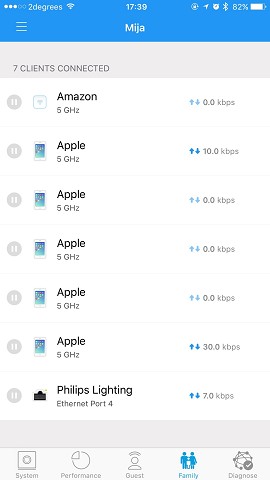
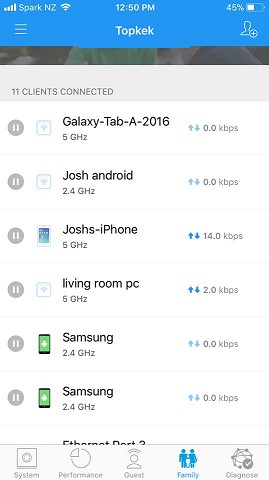
What I found switching from DHCP setup to bridge setup is that it lost all the information about the Apple devices:


I was able to look at the Mac addresses and input my own names for the devices, but still not ideal.


Jarle Dahl Bergersen | Referral Links: Want $50 off when you join Octopus Energy? Use this referral code
Are you happy with what you get from Geekzone? Please consider supporting us by making a donation or subscribing.


cadman
1014 posts

Uber Geek
+1 received by user: 557
Inactive user


  #1840716 7-Aug-2017 18:33
Send private message

Kookoo:...these constant reboots are pissing me off...


My mate's Asus N12U does that too. It nearly drove me around the twist trying to configure it.


1 | 2 | 3 
Filter this topic showing only the reply marked as answer View this topic in a long page with up to 500 replies per page Create new topic


Geekzone Live »

Try automatic live updates from Geekzone directly in your browser, without refreshing the page, with Geekzone Live now.


Are you subscribed to our RSS feed? You can download the latest headlines and summaries from our stories directly to your computer or smartphone by using a feed reader.