
Geekzone: technology news, blogs, forums
Guest
Welcome Guest.
You haven't logged in yet. If you don't have an account you can register now.


View this topic in a long page with up to 500 replies per page Create new topic
1 | 2 | 3 | 4
thinkingtrex8848

541 posts

Ultimate Geek
+1 received by user: 57

ID Verified
Lifetime subscriber

  #2467231 21-Apr-2020 17:19
Send private message

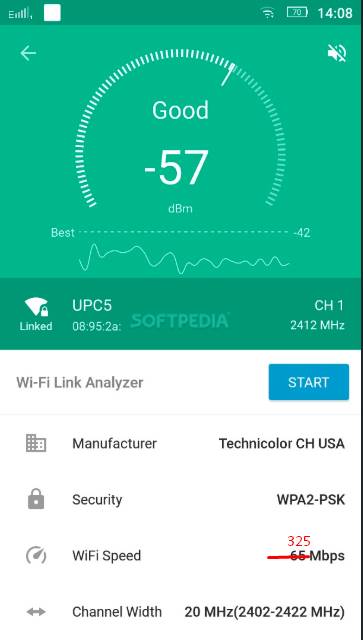
Just tested the wifi signal strength again and it is consistent at 325mbps. I'm not super techy but this is 3 x times the speeds of ethernet 100mbps and from quick calculation, a 2hr 140gb file should be fine streaming within 300mbps bandwidth. So a little confused where the issue is. Same file can play without any lag if played from USB.



RunningMan
9186 posts

Uber Geek
+1 received by user: 4840


  #2467240 21-Apr-2020 17:35
Send private message

Except WiFi is half duplex, so drop your theoretical maximum by half. All devices share the same bandwidth, unlike a physical ethernet switch where each port can get the full capacity. WiFi is also subject to external interference. Which direction is that connect rate - upstream or downstream?


thinkingtrex8848

541 posts

Ultimate Geek
+1 received by user: 57

ID Verified
Lifetime subscriber

  #2467246 21-Apr-2020 17:49
Send private message

RunningMan:


Except WiFi is half duplex, so drop your theoretical maximum by half. All devices share the same bandwidth, unlike a physical ethernet switch where each port can get the full capacity. WiFi is also subject to external interference. Which direction is that connect rate - upstream or downstream?


Not sure but I can explain what I did to test. I installed the app "Wifiman" on the MiBox S and tested the wifi signal strength coming to the device. Please check screenshot below which is from the web but it looked exactly like that with around 325mbps.


cyril7
9075 posts

Uber Geek
+1 received by user: 2499

ID Verified
Trusted
Subscriber

  #2467250 21-Apr-2020 17:55
Send private message

So all this makes me think there is something excessive about the material you are moving, 4k BD maxs out at 100Mb/s and is typically quarter to half that, so is there something amiss in the way you have ripped them, and if you ripped them correctly would only require data rates half or less of what you claim to need.

Just thinking out loud here, I could be wrong

Cyril

cyril7
9075 posts

Uber Geek
+1 received by user: 2499

ID Verified
Trusted
Subscriber

  #2467252 21-Apr-2020 17:57
Send private message

And now you are looking at 2.4ghz connections and talking 802.11ax in the same breath?????

thinkingtrex8848

541 posts

Ultimate Geek
+1 received by user: 57

ID Verified
Lifetime subscriber

  #2467258 21-Apr-2020 18:07
Send private message

cyril7: And now you are looking at 2.4ghz connections and talking 802.11ax in the same breath?????


Ok relax, that picture is just from the internet like I said earlier when I posted it :) Just to explain about the kind of test I did, picture says 1000words right. Same app, same interface but on the MiBox. And no it wasn't connected to 2.4, it was connected to 5ghz. Didn't know that 2.4 goes up to 325mbps anyway.


Support Geekzone with one-off or recurring donations Donate via PressPatron.
thinkingtrex8848

541 posts

Ultimate Geek
+1 received by user: 57

ID Verified
Lifetime subscriber

  #2467260 21-Apr-2020 18:09
Send private message

cyril7: So all this makes me think there is something excessive about the material you are moving, 4k BD maxs out at 100Mb/s and is typically quarter to half that, so is there something amiss in the way you have ripped them, and if you ripped them correctly would only require data rates half or less of what you claim to need.

Just thinking out loud here, I could be wrong

Cyril


I agree with you, there is something wrong and I thought it was the Wifi signals not strong enough from the router. So basically the options are to look into Ubiquiti gear in the long run. Considering this is just 2nd TV set up, can't justify going all out when the main set up don't have any of these issues.


landcruiserguy
775 posts

Ultimate Geek
+1 received by user: 137


  #2467261 21-Apr-2020 18:09
Send private message

325mbps is all good until someone turns on the microwave or other devices switch over to that mesh point.

In my experience most of the plex issues are at the park plex server end.

Wifi 6 brings two benefits. Higher total throughput and better handling of network congestion. The latter does benefit legacy devices.

Having said all that a decent mesh system will do the same thing and you can buy one now.

sud0
283 posts

Ultimate Geek
+1 received by user: 117

ID Verified
Lifetime subscriber

  #2470923 25-Apr-2020 12:58
Send private message

Check out this thread as well.


I've been using the Asus RT-AX88U router. It is quite expensive, but dude.. it works pretty well! I have +30 devices all connected on the WIFI simultaneously and the router is performing well. I have a two stories house and with only one router, the signal is strong everywhere.


I game too and have a Gigabit connection from Orcon. Pretty good and it works with IPV6 too. My SpeedTest results now on my Gaming PC.


Lucas


lpossamai.me


Jase2985
13732 posts

Uber Geek
+1 received by user: 6207

ID Verified
Lifetime subscriber

  #2471016 25-Apr-2020 14:02
Send private message

im guessing you have a gigabit connection? if so thats a pretty poor result for your gaming PC


michaelmurfy
meow
13581 posts

Uber Geek
+1 received by user: 10914

Moderator
ID Verified
Trusted
Lifetime subscriber

  #2471076 25-Apr-2020 14:21
Send private message

@sud0 this is what I mean by complete waste of money. My wireless access point which cost less than half the cost of your router can achieve better speeds to my 2 year old phone than what you can to your gaming PC...


But at-least you're happy... There are better, and cheaper options out there for the OP.


I've moved this thread out of the offers and wanted subforum as it has more turned into a discussion.


Michael Murphy | https://murfy.nz
Referral Links: Quic Broadband (use R122101E7CV7Q for free setup)

Are you happy with what you get from Geekzone? Please consider supporting us by subscribing.
Opinions are my own and not the views of my employer.


Shop now at Mighty Ape (affiliate link).
thinkingtrex8848

541 posts

Ultimate Geek
+1 received by user: 57

ID Verified
Lifetime subscriber

  #2471084 25-Apr-2020 14:32
Send private message

michaelmurfy:


@sud0 this is what I mean by complete waste of money. My wireless access point which cost less than half the cost of your router can achieve better speeds to my 2 year old phone than what you can to your gaming PC...


But at-least you're happy... There are better, and cheaper options out there for the OP.


I've moved this thread out of the offers and wanted subforum as it has more turned into a discussion.


Totally get your point, however I'm still looking for an option for upgrade.


AX88u for a second hand price wouldn't be too bad. Same goes for any 'overpriced' wifi-6 routers but the point is I'm posting here so someone would want to get rid of their overpriced junk well here I am! On trademe Wifi-6 routers go for $250 which is more than reasonable, 60% less than their retail.


Anyway, you reckon I should create another post in FS/WTB? Just thought that if I don't specify what I want, then it might not generate many options. I'm happy to consider wireless AP or even a mesh set up that comes highly recommended.


Delorean
673 posts

Ultimate Geek
+1 received by user: 343

ID Verified
Trusted
Lifetime subscriber

  #2471096 25-Apr-2020 14:52
Send private message

sud0:


Check out this thread as well.


I've been using the Asus RT-AX88U router. It is quite expensive, but dude.. it works pretty well! I have +30 devices all connected on the WIFI simultaneously and the router is performing well. I have a two stories house and with only one router, the signal is strong everywhere.


I game too and have a Gigabit connection from Orcon. Pretty good and it works with IPV6 too. My SpeedTest results now on my Gaming PC.


These results are very poor considering you have a gigabit connection. The best results I have seen is with the ISP provided Router. The FritzBox I had on 950/450 connection with 2D on WiFi 5 gave me 600/800 down and 300/500.


The main ISP's (Spark, 2Degrees, Voyager etc) spend $$$ optimising their own network so the modems provided will always give you the best performance. plus if anything does go wrong, you are on your own!


As everyone has said, what you have got is fine and is much simpler than what you previously had, however you could have got a much better setup for much less with better performance. This isn't a dig, I just get frustrated when people ask experts in this forum for advice then do the complete opposite. 


You maybe should have read the blog that @michaelmurfy had written. I did read this recently when i was switching my ISP to voyager. Michael also did respond to my post and I did take his advice on board. As a result, I am more than happy with Voyager and my speeds. 


my $0.5c 


Referral Link: | Quic Broadband (use R142206E0L2CR for free setup)


michaelmurfy
meow
13581 posts

Uber Geek
+1 received by user: 10914

Moderator
ID Verified
Trusted
Lifetime subscriber

  #2471099 25-Apr-2020 14:54
Send private message

For you I think the point everyone is making is WiFi 6 won't help your problem. Getting a decent access point will.


I'm not kidding - every WiFi 6 router I've tested have not been worthy of a review or even mention. They've all actually performed rather poorly compared to even cheaper Ubiquiti access points. Your devices are still only going to talk via 802.11ac or 802.11n (in regards to your TV) anyway. The AX88u actually performed worse with most devices than the Vodafone Ultrahub believe it or not.


If you want the absolute best chance of succeeding then here are my 2 picks for your needs:
UniFi NanoHD: https://unifi-nanohd.ui.com/ (costs slightly more, but very impressive performance for the price).
Ubiquiti AMPLIFI AFi-HD (PBTech): This is a mesh solution which has worked really well in all my testing also.
Ubiquiti Dream Machine (Review), (PBTech): An all in one router that can outperform the AX88u in many situations and can be expanded on. I'm also giving away one of these (https://www.geekzone.co.nz/forums.asp?forumid=48&topicid=270046)


There have been many professionals in this area (including myself) who have recommended cheaper solutions to you so you don't waste your money. I also personally run a Plex media server with 4K content on it and have not once run into any issues with any of my devices (even on WiFi) with the NanoHD.


I do test and review many routers on here - here is my guide on that: https://www.geekzone.co.nz/forums.asp?forumid=66&topicid=197871


Michael Murphy | https://murfy.nz
Referral Links: Quic Broadband (use R122101E7CV7Q for free setup)

Are you happy with what you get from Geekzone? Please consider supporting us by subscribing.
Opinions are my own and not the views of my employer.


sud0
283 posts

Ultimate Geek
+1 received by user: 117

ID Verified
Lifetime subscriber

  #2471105 25-Apr-2020 15:03
Send private message

michaelmurfy:


@sud0 this is what I mean by complete waste of money. My wireless access point which cost less than half the cost of your router can achieve better speeds to my 2 year old phone than what you can to your gaming PC...


But at-least you're happy... There are better, and cheaper options out there for the OP.


I've moved this thread out of the offers and wanted subforum as it has more turned into a discussion.


My problem now is my WIFI Adapter on my gaming PC (i think). Will need to upgrade. 


Lucas


lpossamai.me


1 | 2 | 3 | 4
View this topic in a long page with up to 500 replies per page Create new topic


Geekzone Live »

Try automatic live updates from Geekzone directly in your browser, without refreshing the page, with Geekzone Live now.


Are you subscribed to our RSS feed? You can download the latest headlines and summaries from our stories directly to your computer or smartphone by using a feed reader.