Geekzone: technology news, blogs, forums
Guest
Welcome Guest.
You haven't logged in yet. If you don't have an account you can register now.


View this topic in a long page with up to 500 replies per page Create new topic
1 | 2 | 3 | 4
fe31nz
1294 posts

Uber Geek
+1 received by user: 423


  #3446113 20-Dec-2025 23:02
Send private message

Tinkerisk:


The discussion gave me an idea, and I ordered a 2-bay DXP2800 tonight, replacing the standard 8GB RAM with a 16GB module. That's significantly better than those cheap ARM chip NAS devices, and I'm going to add two 4TB WD red drives that are lying around here unused as spare parts. The manufacturer's firmware will not be used. I will make the device available to reliable, advanced commercial customers as part of our services for exactly 6 months free of charge, and we will administer it remotely. After that, the device will be returned to us in any case (we do not sell hardware), and the customer is free to decide what he would like to purchase next (no NAS, 2-bay, 4-bay, etc.) and what should happen to their data accumulated up to that point.


Thanks! 🙂


Just be aware that older 4 and 6 Tbyte WD Red drives do not seem to last very well.  All of mine that I bought when those sizes first came out have died.  Maybe the newer ones are better, but I gave up on WD Red drives and have been buying enterprise class Seagate and WD drives, which do seem to last a long time.


networkn
Networkn
32864 posts

Uber Geek
+1 received by user: 15454

ID Verified
Trusted
Lifetime subscriber

  #3446115 20-Dec-2025 23:54
Send private message

fe31nz:


Just be aware that older 4 and 6 Tbyte WD Red drives do not seem to last very well.  All of mine that I bought when those sizes first came out have died.  Maybe the newer ones are better, but I gave up on WD Red drives and have been buying enterprise class Seagate and WD drives, which do seem to last a long time.


I have 4 of them and they are at 60K hours and no bad sectors. 


Handle9
11925 posts

Uber Geek
+1 received by user: 9675

Trusted
Lifetime subscriber

  #3446117 21-Dec-2025 04:27
Send private message

networkn:


fe31nz:


Just be aware that older 4 and 6 Tbyte WD Red drives do not seem to last very well.  All of mine that I bought when those sizes first came out have died.  Maybe the newer ones are better, but I gave up on WD Red drives and have been buying enterprise class Seagate and WD drives, which do seem to last a long time.


I have 4 of them and they are at 60K hours and no bad sectors. 


I had problems with WD Red drives as well. I stopped using them a couple of years ago. They have used SMR drives, which really are not good for NAS use, in the 2TB - 6TB range.


If you use drives 10TB or bigger you won't get SMR.


Tinkerisk
4798 posts

Uber Geek
+1 received by user: 3660


  #3446123 21-Dec-2025 08:04
Send private message

fe31nz:


Tinkerisk:


The discussion gave me an idea, and I ordered a 2-bay DXP2800 tonight, replacing the standard 8GB RAM with a 16GB module. That's significantly better than those cheap ARM chip NAS devices, and I'm going to add two 4TB WD red drives that are lying around here unused as spare parts. The manufacturer's firmware will not be used. I will make the device available to reliable, advanced commercial customers as part of our services for exactly 6 months free of charge, and we will administer it remotely. After that, the device will be returned to us in any case (we do not sell hardware), and the customer is free to decide what he would like to purchase next (no NAS, 2-bay, 4-bay, etc.) and what should happen to their data accumulated up to that point.


Thanks! 🙂


Just be aware that older 4 and 6 Tbyte WD Red drives do not seem to last very well.  All of mine that I bought when those sizes first came out have died.  Maybe the newer ones are better, but I gave up on WD Red drives and have been buying enterprise class Seagate and WD drives, which do seem to last a long time.


They are indeed WD red plus drives and no shingle dingles. 😉


- NET: FTTH & VDSL, OPNsense, 10G backbone, GWN APs
- SRV: 12 RU HA server cluster, 0.1 PB storage on premise
- IoT:   thread, zigbee, tasmota, BidCoS, LoRa, WX suite, IR
- 3D:    two 3D printers, 3D scanner, CNC router, laser cutter


dafman
4054 posts

Uber Geek
+1 received by user: 2652

Trusted

  #3446152 21-Dec-2025 08:42
Send private message

networkn:


fe31nz:


Just be aware that older 4 and 6 Tbyte WD Red drives do not seem to last very well.  All of mine that I bought when those sizes first came out have died.  Maybe the newer ones are better, but I gave up on WD Red drives and have been buying enterprise class Seagate and WD drives, which do seem to last a long time.


I have 4 of them and they are at 60K hours and no bad sectors. 


I have been running WD Red for five years in my Synology - no issues.


networkn
Networkn
32864 posts

Uber Geek
+1 received by user: 15454

ID Verified
Trusted
Lifetime subscriber

  #3446153 21-Dec-2025 08:46
Send private message

It's also worth noting that we have dozens of clients running synology and wd red drives with 4tb being the usual size and failure rates and performance were within expected tolerances. I'd go so far as to say our failure rates were very low. 


Shop now for Dyson appliances (affiliate link).
networkn
Networkn
32864 posts

Uber Geek
+1 received by user: 15454

ID Verified
Trusted
Lifetime subscriber

  #3446190 21-Dec-2025 13:17
Send private message

Handle9:


they have the right attitude towards their users


For now. Synology started out that way too. What is your assurance you won't see differently from Ugreen in 3 years time? My concern is that Ugreen has burned through a number of product ranges, and isn't an expert in any. If this isn't profitable enough for them, expect them to drop it.


Tinkerisk
4798 posts

Uber Geek
+1 received by user: 3660


  #3446193 21-Dec-2025 17:41
Send private message

Synology had its chance, just as Ubiquiti had its chance. Since I rely almost exclusively on OSS anyway, I don't care about the ‘ecosystem’ at all – just as I don't with my (two) Apple devices. One chooses the lesser and more valuable (not cheaper) evil. 🙂


(If Linux runs stably according to my criteria on the Mac mini, I won't hesitate to use it as a NUC replacement in a cluster. 😉)


I have also installed Terramaster, Qnap and Synology NAS for clients – just not with their firmware, but with our stack for remote support. This is not a problem as long as the customer understands this mandatory requirement for our „Susy carefree“ package.


- NET: FTTH & VDSL, OPNsense, 10G backbone, GWN APs
- SRV: 12 RU HA server cluster, 0.1 PB storage on premise
- IoT:   thread, zigbee, tasmota, BidCoS, LoRa, WX suite, IR
- 3D:    two 3D printers, 3D scanner, CNC router, laser cutter


Handle9
11925 posts

Uber Geek
+1 received by user: 9675

Trusted
Lifetime subscriber

  #3446194 21-Dec-2025 17:50
Send private message

networkn:


Handle9:


they have the right attitude towards their users


For now. Synology started out that way too. What is your assurance you won't see differently from Ugreen in 3 years time? My concern is that Ugreen has burned through a number of product ranges, and isn't an expert in any. If this isn't profitable enough for them, expect them to drop it.


The beauty of ugreen is its unlocked hardware. You aren’t locked in to their software. 


The best thing you can do to ensure longevity is decoupling the hardware from the software. That’s not suitable for everyone of course. 


sir1963
3428 posts

Uber Geek
+1 received by user: 3756

Subscriber

  #3446242 22-Dec-2025 09:15
Send private message

Tinkerisk:


Synology had its chance, just as Ubiquiti had its chance. Since I rely almost exclusively on OSS anyway, I don't care about the ‘ecosystem’ at all – just as I don't with my (two) Apple devices. One chooses the lesser and more valuable (not cheaper) evil. 🙂


(If Linux runs stably according to my criteria on the Mac mini, I won't hesitate to use it as a NUC replacement in a cluster. 😉)


I have also installed Terramaster, Qnap and Synology NAS for clients – just not with their firmware, but with our stack for remote support. This is not a problem as long as the customer understands this mandatory requirement for our „Susy carefree“ package.


My setup at home is I have 2x 2012 Mac Minis running OSX server.


I have a 9TB RAID + a 4x 2TB JBOD


It works for me, I really wish Apple would bring back its OSX Server software, I would love to throw an M series Mac mini running Jellyfin into the mix


Mehrts
1112 posts

Uber Geek
+1 received by user: 984

Trusted

  #3446243 22-Dec-2025 09:26
Send private message

Slightly offtopic:

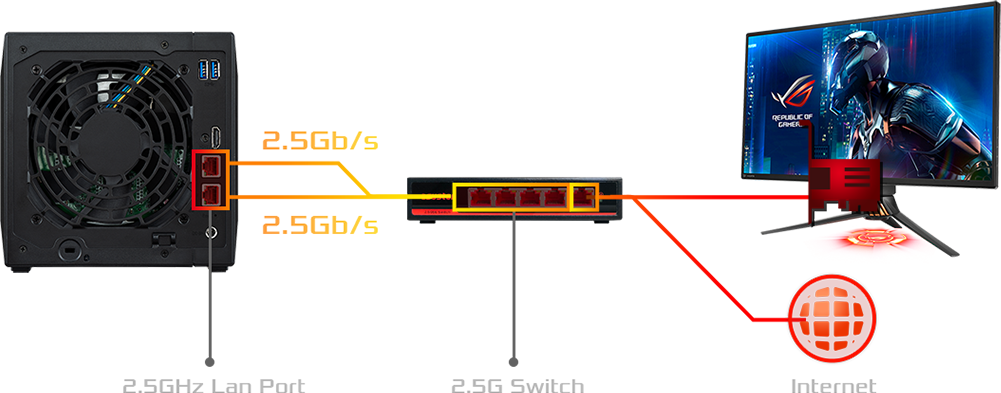
I thought I'd have a look around at general NAS offerings, as I'd also like to make the move from my janky TrueNAS setup to a low-power dedicated NAS machine at some stage in the future.


And I stumbled across this, which cracked me up. "2.5 GHz LAN port"!


Move to New Zealand's best fibre broadband service (affiliate link). Free setup code: R587125ERQ6VE. Note that to use Quic Broadband you must be comfortable with configuring your own router.
Tinkerisk
4798 posts

Uber Geek
+1 received by user: 3660


  #3446341 22-Dec-2025 11:22
Send private message

But that's nothing special these days. Nearly all 4-bay intel based NAS devices have 2x2.5Gb/s, and some pro models even have 10Gb/s.


- NET: FTTH & VDSL, OPNsense, 10G backbone, GWN APs
- SRV: 12 RU HA server cluster, 0.1 PB storage on premise
- IoT:   thread, zigbee, tasmota, BidCoS, LoRa, WX suite, IR
- 3D:    two 3D printers, 3D scanner, CNC router, laser cutter


freitasm
BDFL - Memuneh
80653 posts

Uber Geek
+1 received by user: 41045

Administrator
ID Verified
Trusted
Geekzone
Lifetime subscriber

  #3446343 22-Dec-2025 11:51
Send private message

@Tinkerisk:


But that's nothing special these days. Nearly all 4-bay intel based NAS devices have 2x2.5Gb/s, and some pro models even have 10Gb/s.


He's referring to the image showing "2.5 GHz LAN port" in one place (bottom left), instead of 2.5 Gbps.


Referral links: Quic Broadband (free setup code: R587125ERQ6VE) | Samsung | AliExpress | Wise | Sharesies 


Support Geekzone by subscribing (browse ads-free), or making a one-off or recurring donation through PressPatron.


richms
29099 posts

Uber Geek
+1 received by user: 10210

Trusted
Lifetime subscriber

  #3446352 22-Dec-2025 12:17
Send private message

Mehrts:


And I stumbled across this, which cracked me up. "2.5 GHz LAN port"!


Worse is trying to find things that are 5 gigabit because they all get mixed up with 5g cellular and 5ghz wifi.


Richard rich.ms

Tinkerisk
4798 posts

Uber Geek
+1 received by user: 3660


  #3446473 22-Dec-2025 18:34
Send private message

freitasm:


@Tinkerisk:


But that's nothing special these days. Nearly all 4-bay intel based NAS devices have 2x2.5Gb/s, and some pro models even have 10Gb/s.


He's referring to the image showing "2.5 GHz LAN port" in one place (bottom left), instead of 2.5 Gbps.


Missed approach. That is indeed a special feature. I suspect that two WLAN cables are even included. 🙂


- NET: FTTH & VDSL, OPNsense, 10G backbone, GWN APs
- SRV: 12 RU HA server cluster, 0.1 PB storage on premise
- IoT:   thread, zigbee, tasmota, BidCoS, LoRa, WX suite, IR
- 3D:    two 3D printers, 3D scanner, CNC router, laser cutter


1 | 2 | 3 | 4
View this topic in a long page with up to 500 replies per page Create new topic


Geekzone Live »

Try automatic live updates from Geekzone directly in your browser, without refreshing the page, with Geekzone Live now.


Are you subscribed to our RSS feed? You can download the latest headlines and summaries from our stories directly to your computer or smartphone by using a feed reader.