
Geekzone: technology news, blogs, forums
Guest
Welcome Guest.
You haven't logged in yet. If you don't have an account you can register now.


View this topic in a long page with up to 500 replies per page Create new topic
1 | 2 | 3 | 4 
JimmyH
2898 posts

Uber Geek
+1 received by user: 1554


  #1492234 14-Feb-2016 20:25
Send private message

I moved my most of network to ethernet over powerline using AV500 kit a few years ago, as the WiFi congestion was pretty bad around here and I was getting lots of drop outs streaming video etc. Cheap and effective, and works well. 75-85 megabit rock-solid transfer rates, tested transferring large files.


I still need WiFi for two phones and tablet. I have moved the phones to the 5GHz band, which works better but seems to lack range (the tablet won't do 5GHz).  But I have just discovered powerline units that you can apparently set up as dual-band access points - connecting back to the router over powerline and extending the WiFi coverage. Two on order, so I will see how it goes for extending WiFi coverage when they arrive.


Crowdie
228 posts

Master Geek
+1 received by user: 87


  #1494352 17-Feb-2016 20:31
Send private message

sbiddle:


Remember 802.11ad is now official with the first kit on display at CES. Seeing 2Gbps on a speed test was pretty impressive!


60GHz means every room in the house will need an AP, I can just see the problems when people start complaining their WiFi is bad because they're not willing to do this.


The 802.11ad-2012 amendment is being targeted at wireless docking, wired equivalent data transfers and streaming of uncompressed video.  There is some debate about the use of 60 GHz signals in high density deployments (lecture halls in universities, for example) but I can't see a residential deployment with an access point in each room.  You may have a 802.11ad compliant access point in a multi-media room specifically for video streaming though. 


edc

edc
31 posts

Geek


  #1496511 21-Feb-2016 11:34
Send private message

I have 5 of these virtual interfaces, with RTS/CTS enabled enabled.


Virtual Interfaces ath0.5 SSID [AP5] HWAddr []


I then have one interface I actually use without RTS/CTS.


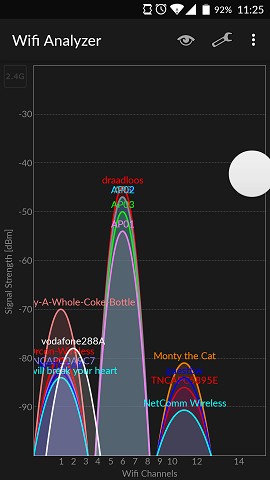
The other APs scans the area, determines channel 6 isn't useable for anything (even though only 1 AP/SSID has any traffic on it) and go to the other channels.


Clear skies for me (if I choose to keep it going, which I won't as everyone else must have a pretty bad time on the other channels).


Gordy7
gordy7
2001 posts

Uber Geek
+1 received by user: 505

ID Verified
Lifetime subscriber

  #1496553 21-Feb-2016 14:17
Send private message

Just got 2 friends off a nightmare 2.4GHz WiFi. They were seated only 3 to 4 metres from the router.


They each just got new laptops with 2.4GHz b/g/n and couldn't understand why they had even more dropouts and very slow WiFi compared to their old laptops (which also had poor WiFi issues).


I counted 8  2.4GHz Wifi devices:


2x Laptops


TV


Mobile phone


Printer


and 3x neigbours with strong signals.


They spent hours trying to get Vodafone help desk to solve the dropouts etc. They ended up being given a replacement router from Vodafone. That did not fix the problem.


Luckily the new router had 5GHz WiFi.


Fitted dual band dongles on their laptops and linked them to the 5GHz network.


They are very happy with stable WiFi... 


Gordy


My first ever AM radio network connection was with a 1MHz AM crystal(OA91) radio receiver.


darylblake
1172 posts

Uber Geek
+1 received by user: 410

Trusted

  #1496708 21-Feb-2016 21:46
Send private message

Crowdie:


sbiddle:


Remember 802.11ad is now official with the first kit on display at CES. Seeing 2Gbps on a speed test was pretty impressive!


60GHz means every room in the house will need an AP, I can just see the problems when people start complaining their WiFi is bad because they're not willing to do this.


The 802.11ad-2012 amendment is being targeted at wireless docking, wired equivalent data transfers and streaming of uncompressed video.  There is some debate about the use of 60 GHz signals in high density deployments (lecture halls in universities, for example) but I can't see a residential deployment with an access point in each room.  You may have a 802.11ad compliant access point in a multi-media room specifically for video streaming though. 


It may take some time to become cheap enough to pull off but imagine if 802.11ad is as good as they say and having tiny AP's inside power sockets or network jacks which are patched will probably make the product feasible for a residential set up. And you wont have interference from the neighbours cuz the range will be low. 


hio77
'That VDSL Cat'
13036 posts

Uber Geek
+1 received by user: 3896

ID Verified
Trusted
Lizard Networks
Subscriber

  #1496712 21-Feb-2016 22:00
Send private message

darylblake:


Crowdie:


sbiddle:


Remember 802.11ad is now official with the first kit on display at CES. Seeing 2Gbps on a speed test was pretty impressive!


60GHz means every room in the house will need an AP, I can just see the problems when people start complaining their WiFi is bad because they're not willing to do this.


The 802.11ad-2012 amendment is being targeted at wireless docking, wired equivalent data transfers and streaming of uncompressed video.  There is some debate about the use of 60 GHz signals in high density deployments (lecture halls in universities, for example) but I can't see a residential deployment with an access point in each room.  You may have a 802.11ad compliant access point in a multi-media room specifically for video streaming though. 


It may take some time to become cheap enough to pull off but imagine if 802.11ad is as good as they say and having tiny AP's inside power sockets or network jacks which are patched will probably make the product feasible for a residential set up. And you wont have interference from the neighbours cuz the range will be low. 


http://www.gowifi.co.nz/ubiquiti-networks/ubiquiti-networks-unifi/ubiquiti-unifi-ap-150mbps-in-wall-access-point.html


the idea of doing that is certainly already out there so it would be good example of where 802.11ad could be implemented well.


#include <std_disclaimer>


Any comments made are personal opinion and do not reflect directly on the position my current or past employers may have. 


HP


Shop now for HP laptops and other devices (affiliate link).
kiwirock
694 posts

Ultimate Geek
+1 received by user: 141


  #1496725 22-Feb-2016 00:29
Send private message

hio77:


darylblake:


Crowdie:


sbiddle:


Remember 802.11ad is now official with the first kit on display at CES. Seeing 2Gbps on a speed test was pretty impressive!


60GHz means every room in the house will need an AP, I can just see the problems when people start complaining their WiFi is bad because they're not willing to do this.


The 802.11ad-2012 amendment is being targeted at wireless docking, wired equivalent data transfers and streaming of uncompressed video.  There is some debate about the use of 60 GHz signals in high density deployments (lecture halls in universities, for example) but I can't see a residential deployment with an access point in each room.  You may have a 802.11ad compliant access point in a multi-media room specifically for video streaming though. 


It may take some time to become cheap enough to pull off but imagine if 802.11ad is as good as they say and having tiny AP's inside power sockets or network jacks which are patched will probably make the product feasible for a residential set up. And you wont have interference from the neighbours cuz the range will be low. 


http://www.gowifi.co.nz/ubiquiti-networks/ubiquiti-networks-unifi/ubiquiti-unifi-ap-150mbps-in-wall-access-point.html


the idea of doing that is certainly already out there so it would be good example of where 802.11ad could be implemented well.


Wall's not a bad idea. I prefer to put a 1-4 Watt AP centrally mounted in the roof cavity for a whole house better reception. Then the xDSL routers built in AP I use for the media player on to TV in the same room on a different channel.


Crowdie
228 posts

Master Geek
+1 received by user: 87


  #1496801 22-Feb-2016 08:57
Send private message

sbiddle:


Sounds like you need a new high power AP.


To increase a radio's coverage area you should increase the antenna gain not increase the radio transmit power.  Increasing the radio transmit power can cause asymmetric power issues resulting in increased retries and CRC errors.


edc:


Is channel 13, 14 legal in NZ?


There are two commonly used channel allocation systems in the world - ETSI (Europe) and FCC (US).


The ETSI system uses the centre channels 1, 5, 9 and 13 which has the advantage of an additional 20 MHz wide channel over the FCC system but can result in higher adjacent channel interference due to the increased channel overlap.


The FCC system uses the centre channel 1, 6 and 13.  With the transmit powers utilised in most deployments there should be no channel overlap but the tradeoff is that there are only three 20 MHz channels available.


As a general rule the FCC system is used in New Zealand.


richms:


You may find that it has forced 40MHz off when you went to ch 13, which is why it is working so much better.


A standards based wireless device with disable 40 MHz channels in the 2.4 GHz spectrum when it detects the 40 MHz Intolerant bit set in an association request from a wireless client.  The association request may be for a neighbouring wireless network or your own.  The 40 MHz Intolerant bit is set in association requests when this option is enabled in the wireless driver.


sbiddle
30853 posts

Uber Geek
+1 received by user: 9996

Retired Mod
Trusted
Biddle Corp
Lifetime subscriber

  #1496806 22-Feb-2016 09:03
Send private message

Crowdie:


sbiddle:


Sounds like you need a new high power AP.


To increase a radio's coverage area you should increase the antenna gain not increase the radio transmit power.  Increasing the radio transmit power can cause asymmetric power issues resulting in increased retries and CRC errors.


I'm well aware of this - it was a joke aimed at richms who's also well aware of WiFi related issues.


jonb
1796 posts

Uber Geek
+1 received by user: 545

Trusted

  #1498837 24-Feb-2016 21:48
Send private message

NetSpotApp is now available for Windows, and is currently free.


http://www.netspotapp.com/netspot-windows.html


1 | 2 | 3 | 4 
View this topic in a long page with up to 500 replies per page Create new topic


Geekzone Live »

Try automatic live updates from Geekzone directly in your browser, without refreshing the page, with Geekzone Live now.


Are you subscribed to our RSS feed? You can download the latest headlines and summaries from our stories directly to your computer or smartphone by using a feed reader.