Geekzone: technology news, blogs, forums
Guest
Welcome Guest.
You haven't logged in yet. If you don't have an account you can register now.


Lizard1977

2137 posts

Uber Geek
+1 received by user: 632

ID Verified

#324741 19-May-2026 09:48
Send private message quote this post

After getting frustrated with some of my Aqara smart buttons continually becoming "unavailable" in Home Assistant, I thought I would try something different - the Tapo S200B.  I picked up the H100 hub to go with it, and figured if it worked out then I could replace all of my Aqara smart buttons with new buttons that also included what looked to be a nifty rotary dial.


I added both devices to the Tapo app and then installed the Tapo integration in HA, but for some weird reason it didn't show me the button entities that I was expecting - single press, double press, long press, or the dial spin.  A quick google (what I should have done before buying) and it seems like the official integration doesn't allow for those entities.  So I installed a different integration from HACS, which showed me two "events" - a button event and a dial event.  But the automation I created (with a little help from ChatGPT) was incredibly slow - around 5 seconds to activate from a button press.  I also wasn't able to do anything with the dial event.  For that, I had to create a workaround with Alexa where I created a routine to increase brightness for a bulb entity that I had exposed from HA to my Alexa integration.  But again, it's pretty slow.


I understand there is another HACS integration for Tapo (CamControl?) which seems like it will work with buttons, but when I try to login (same as with the other integrations), it shows "unknown error" - super helpful.  I even changed to port 80 (which it said to do for anything other than cameras), but it still wouldn't login.


Does anyone have any advice on how to get these buttons and dials working properly within HA, or is it a lost cause?  If I had a bunch of Tapo bulbs then perhaps it would make sense, and I could just use the Tapo app (though I'd prefer to stick with HA), but I'm not going to replace all my bulbs for the sake of this button.


Create new topic
richms
29253 posts

Uber Geek
+1 received by user: 10361

Trusted
Lifetime subscriber

  #3493717 19-May-2026 11:15
Send private message quote this post

The most reliable wireless buttons I have had have been 433MHz ones. No pairing, just a fixed code they send each time.


All the "smart" ones with pairing like the ikea, tuya zigbee ones and some other that I have tried cannot handle you moving them or the conditions of the mesh network changing when they are idle and will either not respond on the first press, or be very very laggy. I was wanting one in the car to trigger the lights when I get to the carport as a sensor light was on and off all night with the cats and wind.


Hopeless. Leave the area and come back and no response for 3-4 presses of it, and then they would all get thru. Same thing but not as bad happened with the ones in the house.


Now I have a carefully curated thread network, and new ikea buttons they are a lot more reliable but I still get lag from them sometimes.


Richard rich.ms


Lizard1977

2137 posts

Uber Geek
+1 received by user: 632

ID Verified

  #3493733 19-May-2026 11:39
Send private message quote this post

Do you have a link to the 433Mhz buttons you've had success with?


richms
29253 posts

Uber Geek
+1 received by user: 10361

Trusted
Lifetime subscriber

  #3493734 19-May-2026 11:56
Send private message quote this post

The receiver was a sonoff bridge that I fumbled thru a esphome tutorial about 2 years back that had me putting codes into the yaml file for what each remote sent which was a real pain. I lost that HA install and have not bothered to recreate it, but I should do as I am now getting home late enough that the lights would be nice to have. Only just got around to putting up the replacement sensor light that I control last weekend. Most tutorials seemed to be for people wanting to use it to control 433MHz devices rather than receiving the commands, and the only other one I found was just sending all the crap it got into HA rather than just my remotes.


The remotes I have are both keychain style ones in a wood finish with a sliding cover and a cute little telescoping antenna that doesn't help range, and some stick on square wall switch style ones. 


Richard rich.ms


fe31nz
1304 posts

Uber Geek
+1 received by user: 430


  #3493891 20-May-2026 00:09
Send private message quote this post

When I first started using Zigbee devices with HA, I had problems with various things being unavailable at times.  I suspected that it was simply that they were too far away from my Zigbee coordinator device through too many walls or the old chimney or the hot water heater.  Since I wanted to use some smart sockets, I just went ahead with that and wound up with four Philips Hue Smart Plug devices running from mains around the house.  Almost all mains powered Zigbee devices act as a Zigbee router, and since I put in the Smart Plug devices, I have not had any communication problems.  I do have one in the sitting room that is not actually being used to switch power - it is just acting as a router to cover that part of the house.  The result is that my Zigbee mesh map now has multiple redundant paths in it and powering off any one of the Smart Plugs does not degrade communications at all.  So it is rock solid and button presses result in virtually instantaneous actions from HA.


Also, you have to watch out for the problem of USB 3 interference with Zigbee.  Plugging a Zigbee coordinator directly into a USB 3 socket on a PC is a bad idea - you need to have it on a cable some way away from the PC and its USB 3 sockets.  A metre or so is enough.  I also have mine on top of the dining table that the PC sits underneath, so it has 10 mm or so of wood in between to block some more of the interference.


Similarly I had problems with receiving data from my Bluetooth temperature/humidity sensors that I have scattered around the place inside and outside.  They were not communicating well using the Bluetooth on my HA PC, which is understandable as Zigbee and Bluetooth are very similar at the hardware level - they can use the same transceivers with different firmware.  So the same constraints of too many walls and other things in the way also apply.  And after a bit of research, I also discovered that on top of the usual distance problems, PC Bluetooth tends to be used by the PC for things that conflict with HA using it, so it is actually a bad idea to use PC Bluetooth with HA.  So I got two of the ESPHome Bluetooth proxy devices recommended on the HA site and since I installed them on Ethernet ports at opposite ends of the house the Bluetooth communications have also been rock solid.  The the proxy devices were not so cheap, but I think they were worth it as they really solved the problem.  I do think that two of them might have been overkill though.


fearandloathing
545 posts

Ultimate Geek
+1 received by user: 212

ID Verified
Lifetime subscriber

  #3493902 20-May-2026 07:02
Send private message quote this post


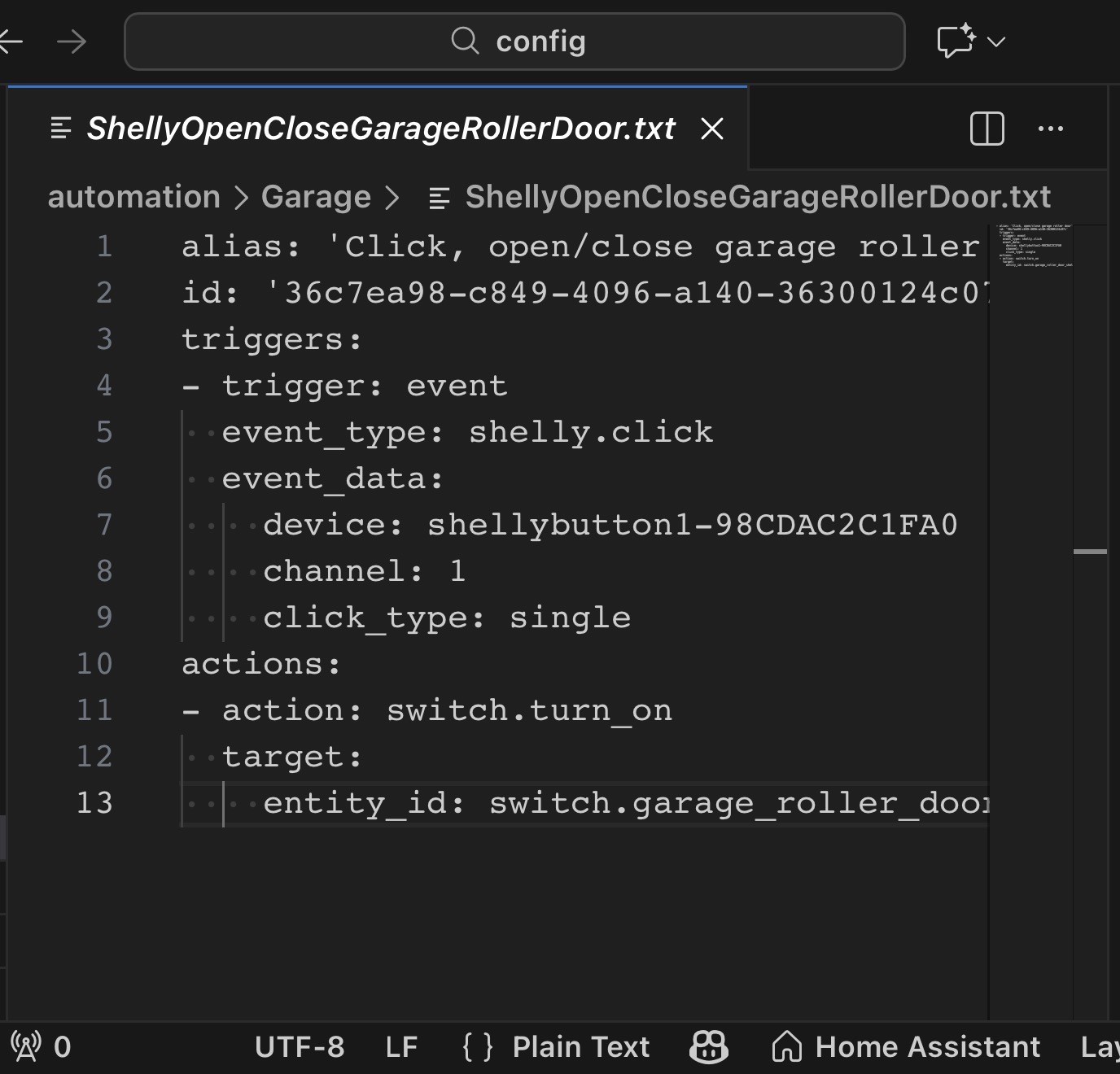
Not sure if Tapo is the same, for Zigbee you subscribe to the event, the button clicks do not show up as entitles.   
The following screen grab shows an automation subscribed to an event click  


Create new topic


Geekzone Live »

Try automatic live updates from Geekzone directly in your browser, without refreshing the page, with Geekzone Live now.


Are you subscribed to our RSS feed? You can download the latest headlines and summaries from our stories directly to your computer or smartphone by using a feed reader.