Geekzone: technology news, blogs, forums
Guest
Welcome Guest.
You haven't logged in yet. If you don't have an account you can register now.


Filter this topic showing only the reply marked as answer View this topic in a long page with up to 500 replies per page Create new topic
1 | ... | 5 | 6 | 7 | 8 | 9 | 10 | 11
mentalinc
3384 posts

Uber Geek
+1 received by user: 1023

Trusted

  #2176303 11-Feb-2019 12:45
Send private message

Putting in an order for 1....


I have a Mitsubishi electric heatpump...


CPU: AMD 5900x | RAM: GSKILL Trident Z Neo RGB F4-3600C16D-32GTZNC-32-GB | MB:  Asus X570-E | GFX: EVGA FTW3 Ultra RTX 3080Ti| Monitor: LG 27GL850-B 2560x1440


Quic: https://account.quic.nz/refer/473833 R473833EQKIBX 


ajobbins
5053 posts

Uber Geek
+1 received by user: 1279

Trusted

  #2189349 1-Mar-2019 12:22
Send private message

Ok the pigtales I ordered have arrived from the US. If you wan't me to make you up one of these, please send me a DM. I need to order the boards (but they usually arrive in a day or two), and have a go at tweaking the software so it's more configurable without needing each of you upload your own sketches. 


Price of the boards has gone up a bit since I last ordered some, so the pricing is going to need to be about $75 inc. postage. 


Twitter: ajobbins


technician14
122 posts

Master Geek
+1 received by user: 9


  #2222086 22-Apr-2019 12:10
Send private message

hi, what are you trying to achieve with automation, just turning heatpump off or on, or are you wanting to know if the heatpump is turned on? most basic infrared is one direction, broadlink is a good cheap automation and use the free app e-control not ihc unless your running alexa etc, you can control 100000 appliances from the rm mini or rm pro i also don't recommend pebbles either they are a pain to install and expensive, there are also wifi controller ONLY to the brand they are not universal there lots of different home automations out there, I also install heatpumps, security and automation


Shoyu
16 posts

Geek
+1 received by user: 1


  #2248479 30-May-2019 13:45
Send private message

Hey all,


We are entering Winter time soon and I would like to automate our bedroom heatpumps by asking it to turn on (say set to 22 degrees C) when (a) I tell my Google Home Hub "bedtime" and (b) but only if the room temperature is below 20 degrees C at the time. If the room temperature at the time is not below 20 degrees C then only turn on the heatpump when it drops below 20 degrees C between then and say 8am or sunrise. Ideally if it was smart enough, it should know to turn off the heatpump when the room isn't going to drop below 20 degrees C with it turned off anyway (to save power). This could be due to sunrise or due to a warm evening outside. "Bedtime" is currently just a routine in the Google Home app that turns off the bedroom lights and turns on a desktop night light. Separately I'm using the Hue app to turn off the night light after midnight.


Does anyone have any advice for me? I think the closest solution for me is either the Ambi Climate 2 or the Sensibo Sky - which one is better I'm not sure but I'm thinking the Ambi Climate 2 might be slightly smarter. Whether I can set them up for exactly what I would like to achieve above is also an unknown at this stage.


I see HN is currently selling the Sensibo Sky for $185 + shipping while Meridian Energy is selling the Ambi Climate 2 for $229 free shipping. If anyone is currently a Meridian Energy customer you might have access to a discount code to take 20% off the price of the Ambi Climate 2 too - unfortunately I'm not with Meridian :(


Hope someone sees this and could share some of their experiences! Cheers!


ajobbins
5053 posts

Uber Geek
+1 received by user: 1279

Trusted

  #2248483 30-May-2019 13:53
Send private message

Shoyu:


Hey all,


We are entering Winter time soon and I would like to automate our bedroom heatpumps by asking it to turn on (say set to 22 degrees C) when (a) I tell my Google Home Hub "bedtime" and (b) but only if the room temperature is below 20 degrees C at the time. If the room temperature at the time is not below 20 degrees C then only turn on the heatpump when it drops below 20 degrees C between then and say 8am or sunrise. Ideally if it was smart enough, it should know to turn off the heatpump when the room isn't going to drop below 20 degrees C with it turned off anyway (to save power). This could be due to sunrise or due to a warm evening outside. "Bedtime" is currently just a routine in the Google Home app that turns off the bedroom lights and turns on a desktop night light. Separately I'm using the Hue app to turn off the night light after midnight.


Does anyone have any advice for me? I think the closest solution for me is either the Ambi Climate 2 or the Sensibo Sky - which one is better I'm not sure but I'm thinking the Ambi Climate 2 might be slightly smarter. Whether I can set them up for exactly what I would like to achieve above is also an unknown at this stage.


I see HN is currently selling the Sensibo Sky for $185 + shipping while Meridian Energy is selling the Ambi Climate 2 for $229 free shipping. If anyone is currently a Meridian Energy customer you might have access to a discount code to take 20% off the price of the Ambi Climate 2 too - unfortunately I'm not with Meridian :(


Hope someone sees this and could share some of their experiences! Cheers!


The solutions you mention are one-way push only, so you won't know the state of the HP if someone has changed with the remote. This might be OK, but there might be a better option if you want 2-way control.


What brand HPs do you have?


Twitter: ajobbins


Shoyu
16 posts

Geek
+1 received by user: 1


  #2248486 30-May-2019 14:11
Send private message

ajobbins:


The solutions you mention are one-way push only, so you won't know the state of the HP if someone has changed with the remote. This might be OK, but there might be a better option if you want 2-way control.


What brand HPs do you have?


Mitsubishi Electric - 2 x FB35VA and 1 x GL25VGD. True, I'm sort of expecting noone to touch the remotes and expecting the external device to have a really good and strong IR blaster to always get the HPs set correctly, good point!


HP


Shop now for HP laptops and other devices (affiliate link).
trig42
5889 posts

Uber Geek
+1 received by user: 2094

ID Verified

  #2248517 30-May-2019 14:44
Send private message

ajobbins:


Shoyu:


Hey all,


We are entering Winter time soon and I would like to automate our bedroom heatpumps by asking it to turn on (say set to 22 degrees C) when (a) I tell my Google Home Hub "bedtime" and (b) but only if the room temperature is below 20 degrees C at the time. If the room temperature at the time is not below 20 degrees C then only turn on the heatpump when it drops below 20 degrees C between then and say 8am or sunrise. Ideally if it was smart enough, it should know to turn off the heatpump when the room isn't going to drop below 20 degrees C with it turned off anyway (to save power). This could be due to sunrise or due to a warm evening outside. "Bedtime" is currently just a routine in the Google Home app that turns off the bedroom lights and turns on a desktop night light. Separately I'm using the Hue app to turn off the night light after midnight.


Does anyone have any advice for me? I think the closest solution for me is either the Ambi Climate 2 or the Sensibo Sky - which one is better I'm not sure but I'm thinking the Ambi Climate 2 might be slightly smarter. Whether I can set them up for exactly what I would like to achieve above is also an unknown at this stage.


I see HN is currently selling the Sensibo Sky for $185 + shipping while Meridian Energy is selling the Ambi Climate 2 for $229 free shipping. If anyone is currently a Meridian Energy customer you might have access to a discount code to take 20% off the price of the Ambi Climate 2 too - unfortunately I'm not with Meridian :(


Hope someone sees this and could share some of their experiences! Cheers!


The solutions you mention are one-way push only, so you won't know the state of the HP if someone has changed with the remote. This might be OK, but there might be a better option if you want 2-way control.


What brand HPs do you have?


The sensibo does know what you've done with the remote. The Sensibo unit itself sits under your Heat Pump and if you use the remote, it picks it up and adjusts accordingly.


For example, you use Sensibo to turn the Heat Pump on then pick up the remote and change from heat to cool - it will instantly be reflected in the Sensibo App.


I don't know how clever Google Home is with Sensibo skills. Alexa can turn on the heatpump, turn it off, change temp, change heating/cooling but I don't think it has conditional settings - so you couldn't tell it to only turn on if it's below a temp. In the Sensibo App, you can set those things - set a timer, set it to come on above/below a certain temp. It will send you a notification when it does the auto sense (so if you are away from home, you can then turn it off if you don't need it to be heating an empty house when you're not going to be there).


Blanch
254 posts

Ultimate Geek
+1 received by user: 19


  #2248523 30-May-2019 15:15
Send private message

Yep, Google has full control of the Sensibo, wife has even stopped using the remotes and prefers the Sensibo App


Check out Sensibo web site 3x incl free shipping $327usd


kobiak
1615 posts

Uber Geek
+1 received by user: 551

Trusted

  #2248604 30-May-2019 17:12
Send private message

offtopic/


Just found that fujitsu controlled heat pump using FGLair app, got google home support! Just search and add FGLair account


Turn on/off. Nothing fancy :(


helping others at evgenyk.nz


Shoyu
16 posts

Geek
+1 received by user: 1


  #2248639 30-May-2019 18:17
Send private message

Blanch:


Yep, Google has full control of the Sensibo, wife has even stopped using the remotes and prefers the Sensibo App


Check out Sensibo web site 3x incl free shipping $327usd


Thanks! Subsequent to your input I found the Sensibo Sky for sale at JB Hifi for $159 NZD at the moment, so I intend to purchase one and if successful, I will report back!


Shoyu
16 posts

Geek
+1 received by user: 1


  #2248644 30-May-2019 18:26
Send private message

Shoyu:


We are entering Winter time soon and I would like to automate our bedroom heatpumps by asking it to turn on (say set to 22 degrees C) when (a) I tell my Google Home Hub "bedtime" and (b) but only if the room temperature is below 20 degrees C at the time. If the room temperature at the time is not below 20 degrees C then only turn on the heatpump when it drops below 20 degrees C between then and say 8am or sunrise. Ideally if it was smart enough, it should know to turn off the heatpump when the room isn't going to drop below 20 degrees C with it turned off anyway (to save power). This could be due to sunrise or due to a warm evening outside. "Bedtime" is currently just a routine in the Google Home app that turns off the bedroom lights and turns on a desktop night light. Separately I'm using the Hue app to turn off the night light after midnight.


In speaking with a mate over what I'm wanting to achieve he suggested that I can just set our heat pumps on a 7 day schedule between the hours of the expected 'bedtimes' and let the heat pumps idle when the room is up to temperature since it works based on its own thermostat. I.e. he is suggesting that let's say we set the heat pumps to "Heat mode @ 20 deg C", it will idle and draw almost no power when the room is up to temperature anyway. He suggests buying an appliance like Sensibo that runs 24/7 uses the same amount of power an idling heat pump would be using. Does that make sense?


How would we work out how much an idling (turned on but not actually pumping out warm air) heat pump uses in power? It seems my googling skills aren't up to scratch for this particular question.


Shop now at Mighty Ape (affiliate link).
timant
2 posts

Wannabe Geek


  #2474200 30-Apr-2020 17:29
Send private message

Hi all, sorry to reignite an old thread.
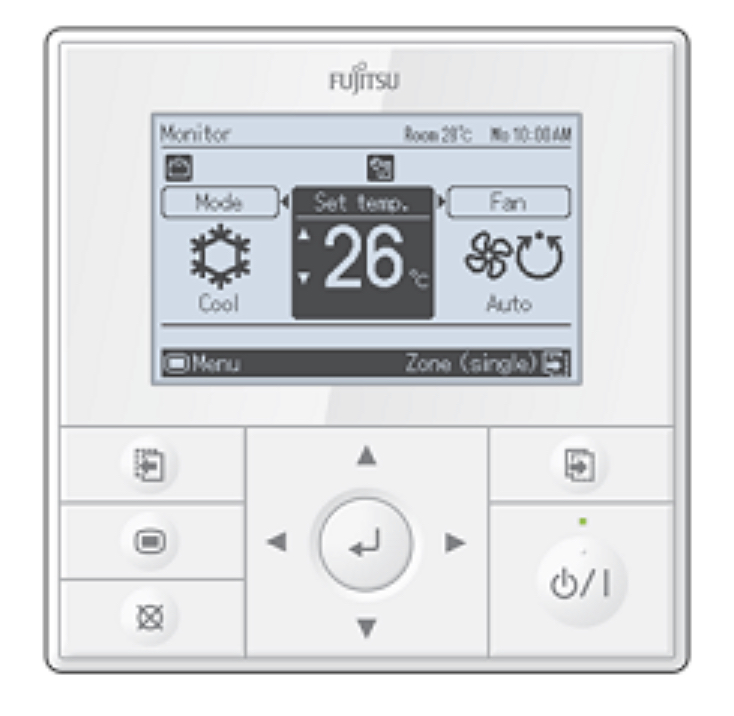
I have a Fujitsu Ducted heatpump unit that works well. However, the controller is useless.

Would love to make it Homekit compatible if possible.
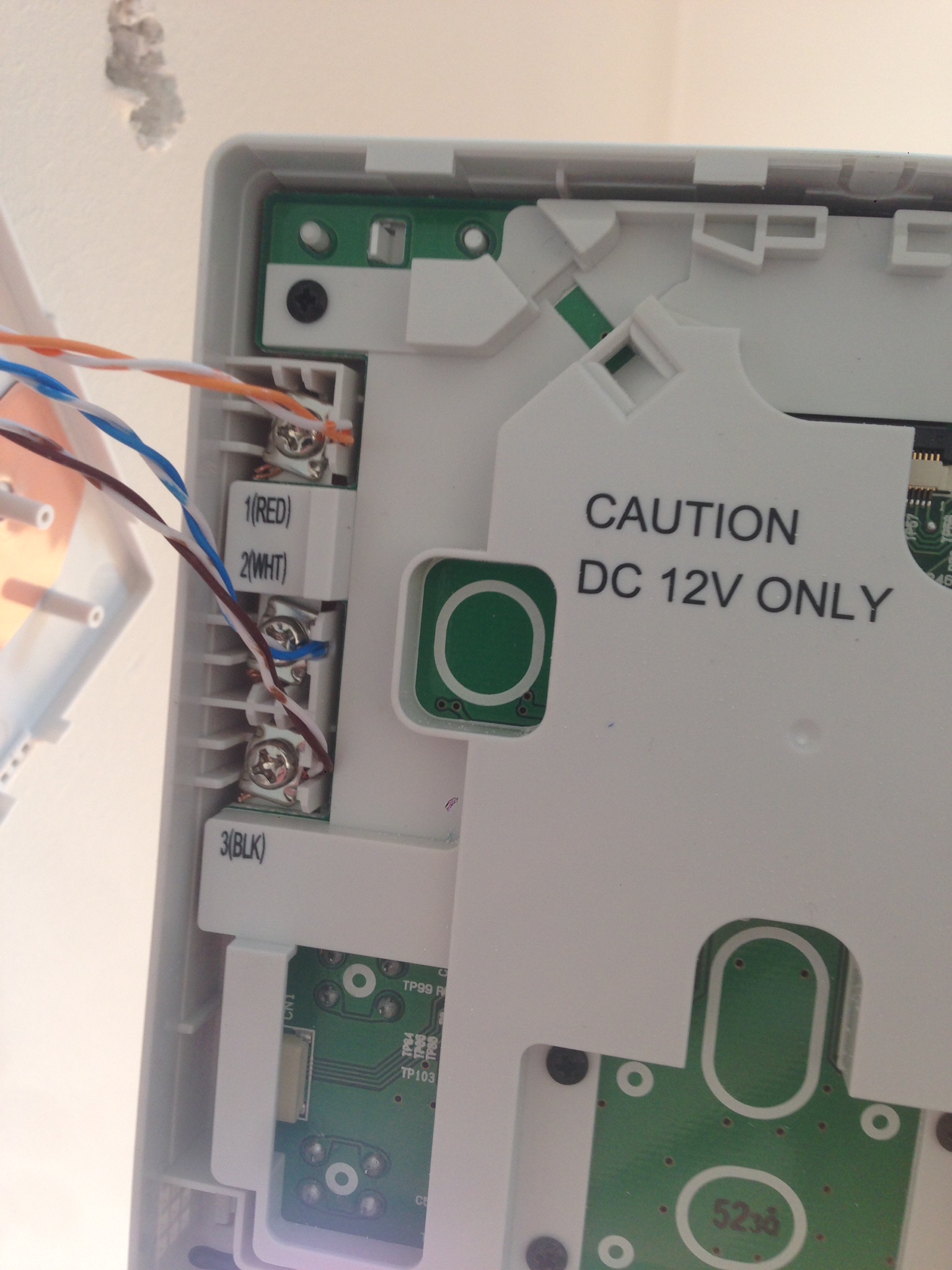
The controller seems to run off Cat6 though. Which I thought was a bit unusual.

Would anyone have any suggestions. Just want to be able to turn it on and off and adjust the temp via an app.
I figure now is a better time than ever to take up a project like this due to the Lockdown.
Fujitsu NZ told me the only option would be a pebble air. I don’t know if I believe them. Also that looks like junk.

My controller


Cat6 into the back


Thanks I’m advance!

Cheers Tim

amanzi
Amanzi
1355 posts

Uber Geek
+1 received by user: 335

ID Verified
Trusted
Lifetime subscriber

  #2474217 30-Apr-2020 17:42
Send private message

If it works with Pebble Air, there's a good chance it works with the myriad of other similar infrared controllers like Sensibo, Broadlink and others. I have an obscure WiFi controller from Europe called the AirPatrol and that controls my Fujitsu heatpump nicely.


jnimmo
1098 posts

Uber Geek
+1 received by user: 255


  #2474233 30-Apr-2020 18:36
Send private message

Hey Tim, the IntesisHome box is best for these. You can buy an IR controller to wire in then add a Pebble etc but from memory you would be looking at around the same cost.


I purchased mine from manufacturer directly I think as I'm not sure there is a dealer in NZ.


timant
2 posts

Wannabe Geek


  #2474319 30-Apr-2020 21:38
Send private message

@jnimmo This is awesome! Thank you so much. I have messaged them and It looks to be compatible. 


I have actually been looking for something like this for years. 


If you don't mind me asking do you remember the cost?


Also not sure if you are running iOS but I have searched to see if it is compatible with Homebridge. And sure enough it is!


Thanks again! I really appreciate it!


Tim


1 | ... | 5 | 6 | 7 | 8 | 9 | 10 | 11
Filter this topic showing only the reply marked as answer View this topic in a long page with up to 500 replies per page Create new topic


Geekzone Live »

Try automatic live updates from Geekzone directly in your browser, without refreshing the page, with Geekzone Live now.


Are you subscribed to our RSS feed? You can download the latest headlines and summaries from our stories directly to your computer or smartphone by using a feed reader.