Geekzone: technology news, blogs, forums
Guest
Welcome Guest.
You haven't logged in yet. If you don't have an account you can register now.


View this topic in a long page with up to 500 replies per page Create new topic
1 | 2 | 3
Talkiet

4819 posts

Uber Geek
+1 received by user: 3934

Trusted

  #1871233 22-Sep-2017 21:50
Send private message

Yes. All very easy and works as intended except the light sensor is a threshold not continuous sensor. I have some new light sensors on a table to install.

Basically they are perfect and cheap. I just need to get the enclosures sorted.

I have 7 or 8 operating in the house now.

Cheers N


Please note all comments are from my own brain and don't necessarily represent the position or opinions of my employer, previous employers, colleagues, friends or pets.


eluSiveNZ
192 posts

Master Geek
+1 received by user: 42


  #1871236 22-Sep-2017 21:54
Send private message

Which light sensor did you have and what did you replace it with?


eluSiveNZ
192 posts

Master Geek
+1 received by user: 42


  #1871433 23-Sep-2017 12:43
Send private message

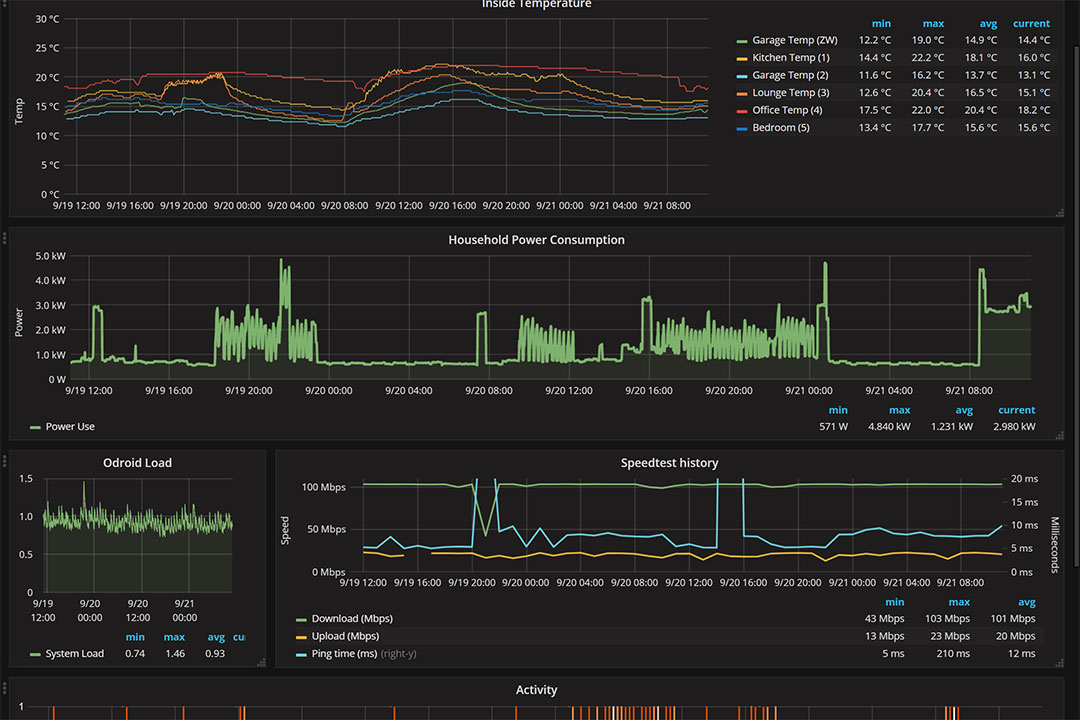
Great, I'm building the same multisensor too, but thankfully ordered the TEMT6000. Is your Grafana pulling from Home Assistant ?


Talkiet

4819 posts

Uber Geek
+1 received by user: 3934

Trusted

  #1871434 23-Sep-2017 12:49
Send private message

Yes. Homeassistant saving to influxdb and Grafana pulling from influxdb directly

Cheers N


Please note all comments are from my own brain and don't necessarily represent the position or opinions of my employer, previous employers, colleagues, friends or pets.


phrozenpenguin
868 posts

Ultimate Geek
+1 received by user: 90


  #1875698 1-Oct-2017 20:35
Send private message

Talkiet: Yes. Homeassistant saving to influxdb and Grafana pulling from influxdb directly


Just wondering how you are pulling your "Household energy consumption"? The plots look good!


Stream your favourite shows now on Apple TV (affiliate link).
Talkiet

4819 posts

Uber Geek
+1 received by user: 3934

Trusted

  #1875702 1-Oct-2017 20:39
Send private message

phrozenpenguin:


Talkiet: Yes. Homeassistant saving to influxdb and Grafana pulling from influxdb directly


Just wondering how you are pulling your "Household energy consumption"? The plots look good!


That's not quite standard. I have a CurrentCost (clamp power meter) connected to the odroid C2 running Homeassistant (and the database)... I wrote a small python script to pick up and parse the serial output and store it directly into the database. (And from there it's trivial to display with Grafana)... It clamps on the main feed to the house. After a couple of months I'll be able to compare it's numbers to the usage I am actually billed for and if there's a difference I can add a scaling factor into the python code to correct.


Cheers - N


Please note all comments are from my own brain and don't necessarily represent the position or opinions of my employer, previous employers, colleagues, friends or pets.


phrozenpenguin
868 posts

Ultimate Geek
+1 received by user: 90


  #1876383 2-Oct-2017 22:11
Send private message

OK thanks, thats interesting. Do you know a NZ supplier for the CurrentCost, or did you import (or get it from a supplier that no longer has a website)?


Talkiet

4819 posts

Uber Geek
+1 received by user: 3934

Trusted

  #1876387 2-Oct-2017 22:18
Send private message

phrozenpenguin:


OK thanks, thats interesting. Do you know a NZ supplier for the CurrentCost, or did you import (or get it from a supplier that no longer has a website)?


I can't remember where I got it from. I have had it for ages! Sorry.


Cheers - N


Please note all comments are from my own brain and don't necessarily represent the position or opinions of my employer, previous employers, colleagues, friends or pets.


Talkiet

4819 posts

Uber Geek
+1 received by user: 3934

Trusted

  #1876389 2-Oct-2017 22:19
Send private message

Actually, a search of my email shows I bought it in 2010 from http://www.smartnow.com.au/


Cheers - N


Please note all comments are from my own brain and don't necessarily represent the position or opinions of my employer, previous employers, colleagues, friends or pets.


phrozenpenguin
868 posts

Ultimate Geek
+1 received by user: 90


  #1876404 2-Oct-2017 22:21
Send private message

Talkiet:


Actually, a search of my email shows I bought it in 2010 from http://www.smartnow.com.au/ 


Thanks, appreciated.


Move to New Zealand's best fibre broadband service (affiliate link). Free setup code: R587125ERQ6VE. Note that to use Quic Broadband you must be comfortable with configuring your own router.
chevrolux
4962 posts

Uber Geek
+1 received by user: 2638
Inactive user


  #1876425 2-Oct-2017 23:24
Send private message

I see your ping has massive spikes in it. That must give you really low bars on call of duty. Definitely looks like you are being throttled by your ISP. I would start a thread and complain about it!

Seriosuly though, great thread. Never realised there was a decent DIY multisensor option.

linw
2893 posts

Uber Geek
+1 received by user: 1205


  #1877361 4-Oct-2017 16:17
Send private message

Thought I would give HA a try as I had a rasp pi 3 sitting in a box. Loaded a 2GB SD with etcher and started the pi. It seems to be sort of working but there is a DNS issue stopping me from accessing it via a browser with http://hassio.;local:8123


I can see it on my network with address 192.168.20.27 and it knows it is a rasp pi called hassio. I can ping it by IP addr but not by name.


Any ideas? The instructions I followed didn't cover this behaviour!


Talkiet

4819 posts

Uber Geek
+1 received by user: 3934

Trusted

  #1877363 4-Oct-2017 16:19
Send private message

linw:


Thought I would give HA a try as I had a rasp pi 3 sitting in a box. Loaded a 2GB SD with etcher and started the pi. It seems to be sort of working but there is a DNS issue stopping me from accessing it via a browser with http://hassio.;local:8123


I can see it on my network with address 192.168.20.27 and it knows it is a rasp pi called hassio. I can ping it by IP addr but not by name.


Any ideas? The instructions I followed didn't cover this behaviour!


No idea sorry... My idea of Name resolution is remembering the IP address :-)


Plus I am using an Odroid C2 with Ubuntu...


Cheers- N


Please note all comments are from my own brain and don't necessarily represent the position or opinions of my employer, previous employers, colleagues, friends or pets.


eluSiveNZ
192 posts

Master Geek
+1 received by user: 42


  #1877374 4-Oct-2017 16:48
Send private message

linw:


Thought I would give HA a try as I had a rasp pi 3 sitting in a box. Loaded a 2GB SD with etcher and started the pi. It seems to be sort of working but there is a DNS issue stopping me from accessing it via a browser with http://hassio.;local:8123


I can see it on my network with address 192.168.20.27 and it knows it is a rasp pi called hassio. I can ping it by IP addr but not by name.


Any ideas? The instructions I followed didn't cover this behaviour!


Try accessing http://192.168.20.27:8123, also the first time setup takes about 20-30mins. So the web interface wont be ready until this completes.


1 | 2 | 3
View this topic in a long page with up to 500 replies per page Create new topic


Geekzone Live »

Try automatic live updates from Geekzone directly in your browser, without refreshing the page, with Geekzone Live now.


Are you subscribed to our RSS feed? You can download the latest headlines and summaries from our stories directly to your computer or smartphone by using a feed reader.