Geekzone: technology news, blogs, forums
Guest
Welcome Guest.
You haven't logged in yet. If you don't have an account you can register now.


View this topic in a long page with up to 500 replies per page Create new topic
1 | 2 | 3

neb

neb
11294 posts

Uber Geek
+1 received by user: 10018

Trusted
Lifetime subscriber

  #2730309 17-Jun-2021 17:37
Send private message

mdf: For the wiring on the dome cameras at least, the cameras allow either connecting from behind the soffit/wall wherever it is mounted, and from the side. I didn't have access immediately behind any of my cameras and ended up side mounting. I got a waterproof junction box from an electrical wholesaler and stuck all the connections in there and then ran ethernet along the face of the house to where it needed to go.


Connecting from behind is a royal pain if you've only got the ability to feed a PoE cable to it because they typically come with Ethernet, a 12V barrel jack connector, optional audio and trigger cables, and who knows what else. The way to deal with this is to mount it on a camera junction box and coil the various cables up inside it. Even then it's a very tight fit, I ended up with a 90 degree bend between the Cat6 and the RJ45 where it was crimped onto the cable to get it to fit:
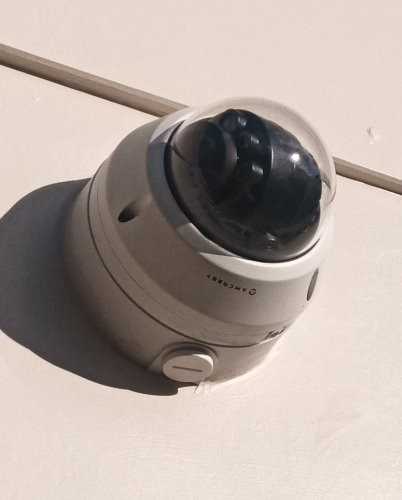


If you're running cable to an external junction box, get some extruded aluminium rail and use acrylic sealant to attach it over the top of the cable run, then paint over it. Both makes it cleaner visually and makes the cable resistant to damage and insects building nests in/around it.


neb

neb
11294 posts

Uber Geek
+1 received by user: 10018

Trusted
Lifetime subscriber

  #2730311 17-Jun-2021 17:40
Send private message

jonathan18:

TBH, I'd rather go with all dome cameras simply due to their lower profile compared to the bullet type, but wasn't sure how flexible they were in terms of mounting orientation. Have you mounted any of yours on a wall (ie, a vertical surface) as opposed to a soffit or other horizontal surface? And, if so, is there enough movement allowed with the camera mount to orientate and angle the camera to capture the desired area? (I'd hate to buy them only to find out it wasn't feasible to capture what I needed to.)


What MDF said, I've got one mounted on a wall and one hanging off the soffit, so essentially upside down, you just rotate/tilt the camera to where you want it, then tell the software to orient the image whichever way you need it to be, for the soffit one it's rotated 90 degrees.

neb

neb
11294 posts

Uber Geek
+1 received by user: 10018

Trusted
Lifetime subscriber

  #2730312 17-Jun-2021 17:42
Send private message

jonathan18:

I wonder if the lack of a dome may mean one less layer of plastic to get dirty/discoloured


The dome camera in the previous photo is several years old, never really had any problems with it, give it a wipe once a year or so and that's it. It's in direct sunlight in a coastal location. The only issue you get is occasional false triggers in heavy rain when a large raindrop hits right in front of it, but that's no big deal.


Mehrts
1112 posts

Uber Geek
+1 received by user: 984

Trusted

  #2730804 18-Jun-2021 17:49
Send private message

I've been messing with the idea of setting up PoE IP cameras around home for a while now.


I purchased a couple of second-hand Dahua cameras to test out with various PC software recording solutions. For a total novice who'd never touched a camera before, this was all a bit daunting with so many options to understand with camera features/lens sizes/ONVIF settings etc, plus each software had its own limitations & hurdles.


In the end, I decided I was a bit out of my depth, and didn't want to muck around much more, so I recently purchased this Reolink four-camera & NVR kit from Amazon. Shipping from the US was very fast (Ordered Thursday afternooon, delivered Monday morning!). PB Tech sell the same kit, but for much more. Total cost including freight from Amazon was around $870nzd.


It was simple to get up & running, it's very user-friendly, and there's plenty of options & settings available to fine-tune the cameras & NVR.


Reolink cameras get a lot of flak from folks on the pro-based IP camera forums, however, for home use I think they're fine. Daytime quality is awesome, however night footage requires some tweaks to reduce ghosting, but this is well documented. Plus for the price, I'm not complaining.


One thing I realised very quickly with "normal" motion detection on any camera/NVR, is that it can easily be triggered by changes in light levels (e.g. sun coming out from behind clouds, wind blowing trees etc). These Reolink cameras have built-in "smart" motion detection, which only picks up vehicles & people movement. This massively reduces the number of false motion triggers. Plus you can filter by type of motion during playback. It's actually very effective.


In time, I'll most likely purchase individual cameras, as I begin to understand the limitations of the cheaper ones, plus I'll delve into the deep waters of Blue Iris, which is hailed as one of the best IP camera recording softwares available for custom setups.


jonathan18
7419 posts

Uber Geek
+1 received by user: 2850

ID Verified
Trusted

  #2748187 22-Jul-2021 14:30
Send private message

I’m finally getting around to ordering four Amcrest cameras - and I’m thinking of ordering them directly from Amcrest Direct, primarily to avoid supporting some rich guy’s exploitation of his workers to support his aeronautical p!ssing contest… Has anyone ordered via this means, and if so how have they found delivery times etc?


Also, in regards to the junction boxes - I’m assuming I can purchase Dahua-branded ones like this model from PB Tech? (Though I note the part number is PFA137, vs PFA136 on the Amcrest site.)  Or are there other generic junction boxes that’ll do the job just as well? @neb and @mdf, what model of junction boxes did you use in your installs?


Thanks again for your collective help…


neb

neb
11294 posts

Uber Geek
+1 received by user: 10018

Trusted
Lifetime subscriber

  #2748444 23-Jul-2021 00:19
Send private message

I order stuff through the Amcrest store on Amazon, since that gives you the benefits of Amazon's very cheap international shipping.


In terms of junction boxes, I can't remember the exact model number but I got a Dahua one from a local supplier, just be sure the exact dimensions match because there are a number of different sizes, but otherwise since Amcrest == Dahua they fit exactly.

HP


Shop now for HP laptops and other devices (affiliate link).
sbiddle
30853 posts

Uber Geek
+1 received by user: 9998

Retired Mod
Trusted
Biddle Corp
Lifetime subscriber

  #2748522 23-Jul-2021 07:33
Send private message

PFA136 and PFA137 are different sizes for different Dahua cameras. Many newer Dahua cameras also use the PFA130 which is a more generic multi fit design for multiple turret camera models (but those that fit the PFA136 and PFA137 will not fit the PFA130)


jonathan18
7419 posts

Uber Geek
+1 received by user: 2850

ID Verified
Trusted

  #2748539 23-Jul-2021 08:38
Send private message

sbiddle:


PFA136 and PFA137 are different sizes for different Dahua cameras. Many newer Dahua cameras also use the PFA130 which is a more generic multi fit design for multiple turret camera models (but those that fit the PFA136 and PFA137 will not fit the PFA130)


Thanks, @sbiddle - given I’m looking at getting the IP5M-D1188EW-28MM cameras, it’s the PFA136 I’ll need going by Amcrest’s page for that box.


What NZ firms sell a product like the PFA136 to the public at an ok price? (Most I’ve seen don’t give a price.) 


sbiddle
30853 posts

Uber Geek
+1 received by user: 9998

Retired Mod
Trusted
Biddle Corp
Lifetime subscriber

  #2748541 23-Jul-2021 08:44
Send private message

jonathan18:


sbiddle:


PFA136 and PFA137 are different sizes for different Dahua cameras. Many newer Dahua cameras also use the PFA130 which is a more generic multi fit design for multiple turret camera models (but those that fit the PFA136 and PFA137 will not fit the PFA130)


Thanks, @sbiddle - given I’m looking at getting the IP5M-D1188EW-28MM cameras, it’s the PFA136 I’ll need going by Amcrest’s page for that box.


What NZ firms sell a product like the PFA136 to the public at an ok price? (Most I’ve seen don’t give a price.) 


Zero idea where you'd get one - I'm aware of several distributors here (that we get stuff from at work) that won't sell mounts without cameras anyway because they know people are just buying cheaper or hacked Dahua cameras overseas and then using them for the mounts.


mdf

mdf
mdf
3569 posts

Uber Geek
+1 received by user: 1527

Trusted
Lifetime subscriber

  #2748564 23-Jul-2021 09:09
Send private message

jonathan18:

I’m finally getting around to ordering four Amcrest cameras - and I’m thinking of ordering them directly from Amcrest Direct, primarily to avoid supporting some rich guy’s exploitation of his workers to support his aeronautical p!ssing contest… Has anyone ordered via this means, and if so how have they found delivery times etc?


Also, in regards to the junction boxes - I’m assuming I can purchase Dahua-branded ones like this model from PB Tech? (Though I note the part number is PFA137, vs PFA136 on the Amcrest site.)  Or are there other generic junction boxes that’ll do the job just as well? @neb and @mdf, what model of junction boxes did you use in your installs?


Thanks again for your collective help…


I didn't actually know that there were ones designed to fit. I just have a generic square one from Cory's. Works fine, but Neb's solution is a lot neater.

jonathan18
7419 posts

Uber Geek
+1 received by user: 2850

ID Verified
Trusted

  #2748574 23-Jul-2021 09:25
Send private message

mdf: I didn't actually know that there were ones designed to fit. I just have a generic square one from Cory's. Works fine, but Neb's solution is a lot neater.


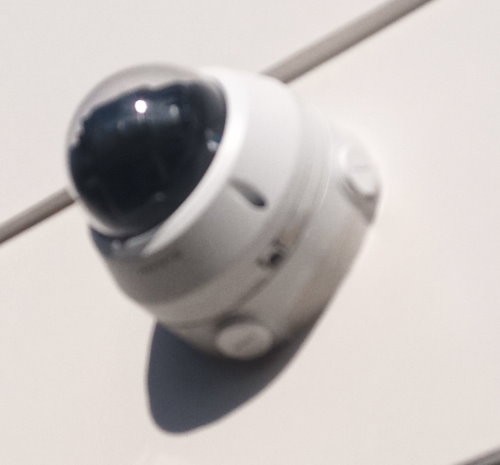
@neb - would there be any chance you could post a photo the install of one of your cameras? I’d be interested in seeing how it looks with a generic box. Thanks so much if this is possible.


Support Geekzone with one-off or recurring donations Donate via PressPatron.
jonathan18
7419 posts

Uber Geek
+1 received by user: 2850

ID Verified
Trusted

  #2748643 23-Jul-2021 09:53
Send private message

Has anyone got recommendations for WiFi outdoor security cameras?

I’ve worked out that a single WiFi camera on the garage will be way easier to install than, and cover the same area as, two PoE cameras.

Requirements are:

* waterproof
* decent field of view (100 degrees or more)
* compatible with Synology Surveillance Station
* ok with dome or bullet design, but needs to be flexible in where it can be pointed
* powered via mains (not battery) to provide 24/7 recording (locally and to the NAS)

I’m thinking of this Reolink, noting a few people here are happy with this brand; in particular, this model: https://www.amazon.com/Reolink-Outdoor-Security-Camera-Dual/dp/B08PYN7TS2/


Edit: oops, the FOV on that particular Reolink is only 80 degrees, which isn't great for that location - ideally looking for something wider.

Thanks…

networkn
Networkn
33022 posts

Uber Geek
+1 received by user: 15610

ID Verified
Trusted
Lifetime subscriber

  #2748644 23-Jul-2021 09:53
Send private message

I was looking at the Amcrest also had recommended by a search engine Reolink. The Reolink has Human and Vehicle detection. I am not sure if that's a gimmick or something that other cameras do but don't specifically mention? I am going to pair with Synology Surveillence station, has anyone had any issues getting either of these brands working? Our requirements are pretty simple. Good quality picture day or night, easy to install and use, not too expensive.


neb

neb
11294 posts

Uber Geek
+1 received by user: 10018

Trusted
Lifetime subscriber

  #2748734 23-Jul-2021 14:39
Send private message

jonathan18:
mdf: I didn't actually know that there were ones designed to fit. I just have a generic square one from Cory's. Works fine, but Neb's solution is a lot neater.


@neb - would there be any chance you could post a photo the install of one of your cameras? I’d be interested in seeing how it looks with a generic box. Thanks so much if this is possible.


Here it is, slightly blurry due to zoom, sorry. It's an Amcrest camera on the matching Dahua box, I got it for about $20 from whichever location came up on a Google NZ search, can't remember the details sorry.


jonathan18
7419 posts

Uber Geek
+1 received by user: 2850

ID Verified
Trusted

  #2748827 23-Jul-2021 17:16
Send private message

Thanks, neb, for the photo; going by that, I decided to stick with the same official junction box.


So I have finally pushed buy on the equipment; ended up going with two of the Amcrest 5MB PoE dome cameras with the PFA136 junction boxes for the front of the house, and a 5MB WiFi Reolink for the rear - this one ended up costing less than $100 shipped, whereas the Amcrest stuff came to just less than $300 (junction boxes $25 USD each, damn it; cheaper on Amazon).


I'd have been happy to have gone for Reolinks for the fronts as well, but the 80 degree FOV on their cameras is just too narrow for our needs - I've got Wyzecam Outdoors at the moment and they're 110 degrees, so at 103 degrees the Amcrests are closer. (I worked out that 80 degrees was fine for the rear.)


Given I'll be using them with Synology Surveillance Station, I can't see any particular pit-falls for mixing brands - and it's too late now if there are!


Thanks for all the advice; hopefully the install goes smoothly, once they arrive and I get the Ethernet cable in place...


1 | 2 | 3
View this topic in a long page with up to 500 replies per page Create new topic


Geekzone Live »

Try automatic live updates from Geekzone directly in your browser, without refreshing the page, with Geekzone Live now.


Are you subscribed to our RSS feed? You can download the latest headlines and summaries from our stories directly to your computer or smartphone by using a feed reader.