Geekzone: technology news, blogs, forums
Guest
Welcome Guest.
You haven't logged in yet. If you don't have an account you can register now.


View this topic in a long page with up to 500 replies per page Create new topic
1 | 2 


timmmay

20858 posts

Uber Geek
+1 received by user: 5349

Trusted
Lifetime subscriber

  #3427454 23-Oct-2025 13:54
Send private message

Thanks, didn't know third generation my box existed I only looked on PB tech. It's still only has 2GB RAM and no Ethernet, and the Google box is available locally so I think I'll get that. 


stevesumner
46 posts

Geek


  #3447560 28-Dec-2025 11:20
Send private message

I have seen some posts online stating that the Google TV Streamer 4K has ads. Is that correct?


robjg63
4161 posts

Uber Geek
+1 received by user: 1425

Subscriber

  #3447565 28-Dec-2025 12:03
Send private message

Not sure what you are using Kodi for, but I switched to Nova media player on my Amazon Fire TV sticks and am very happy with it.


https://play.google.com/store/apps/details?id=org.courville.nova&hl=en_NZ


In my case, I only use the media player to access a shared folder on my main PC. This is where I have all the content that I stream.


Nova media player was a doddle to set up - It just saw the shares and did a really good job of looking up the media details all by itself.


It doesnt seem to use much space either - KODI was a hog.


EDIT: added google play store link


Nothing is impossible for the man who doesn't have to do it himself - A. H. Weiler


farcus
1625 posts

Uber Geek
+1 received by user: 437


  #3447574 28-Dec-2025 12:47
Send private message

stevesumner:


I have seen some posts online stating that the Google TV Streamer 4K has ads. Is that correct?


No, that isn't correct.
Like everything running TV OS (including Mi Box and most smart TVs) - it displays show recommendations on the "Home" page.


amanzi
Amanzi
1354 posts

Uber Geek
+1 received by user: 331

ID Verified
Trusted
Lifetime subscriber

  #3447614 28-Dec-2025 18:42
Send private message

farcus:


stevesumner:


I have seen some posts online stating that the Google TV Streamer 4K has ads. Is that correct?


No, that isn't correct.
Like everything running TV OS (including Mi Box and most smart TVs) - it displays show recommendations on the "Home" page.


I would say that it is correct that it shows ads. I see recommendations for shows that are only available on Apple TV and Disney+. I don't subscribe to these services and don't have these apps installed. I've tried to do everything possible to get rid of these "recommendations", but they remain there dominating my home screen. That meets my definition of "ads". Really ruins the experience. 


Shop now for Dyson appliances (affiliate link).
timmmay

20858 posts

Uber Geek
+1 received by user: 5349

Trusted
Lifetime subscriber

  #3447618 28-Dec-2025 19:36
Send private message

I've turned off recommendations, but it stills shows one on the home screen - which is better than the 5+ it showed before. Overall the device is fine, the recommendations is the worst part. For some reason Kodi isn't working as well as on the Mi Box, I've had to disable scan the library on startup because it never seems to end and do that manually, but that might've been a misconfiguration I fixed recently. The remote is fine, not a fan of the button placement but it's ok. Once you hit play it works well.


SCUBADOO
206 posts

Master Geek
+1 received by user: 65


  #3447641 28-Dec-2025 21:07
Send private message

No adverts on my Dish TV, Mi Box S gen2 or Google Streamer boxes. 😉
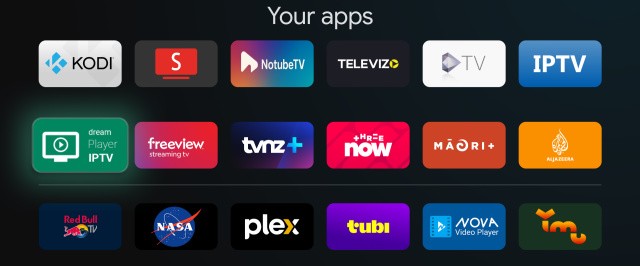
Either "Apps only mode" or in my case by using the free version of the tvQuickActions key mapping app.


Google Streamer homescreen:


My Xiaomi MiBox S remote control also has a dedicated apps only button.


Kodi v21.3 has been faultless on the Streamer for both media playing and TV streaming.


1 | 2 
View this topic in a long page with up to 500 replies per page Create new topic


Geekzone Live »

Try automatic live updates from Geekzone directly in your browser, without refreshing the page, with Geekzone Live now.


Are you subscribed to our RSS feed? You can download the latest headlines and summaries from our stories directly to your computer or smartphone by using a feed reader.