Geekzone: technology news, blogs, forums
Guest
Welcome Guest.
You haven't logged in yet. If you don't have an account you can register now.


View this topic in a long page with up to 500 replies per page Create new topic
1 | 2 | 3 | 4 | 5 | 6
kelly42
44 posts

Geek
+1 received by user: 4

ID Verified

  #2887014 16-Mar-2022 11:03
Send private message

A good point - I had used a green rather than a black wire for that portion. I'll go change that right now.


Everyone is new sometime.


robfish
693 posts

Ultimate Geek
+1 received by user: 156

Lifetime subscriber

  #2887173 16-Mar-2022 14:40
Send private message

Two ways to save space on the flush box, rather than have to jam it all in:-


1/ Only use the minimum number of connectors
(You can get two or three conductors into the light switch terminals)


2/ Cut out the back of the flush box and use longer conductors
to the Shelly switch allowing it to be in the wall behind the flush box


Rob

Lizard1977

2134 posts

Uber Geek
+1 received by user: 624

ID Verified

  #2887619 17-Mar-2022 15:45
Send private message

robfish:


Electricity can kill you or burn your house down.


Electrical apprenticeships are about 4 years.


If you think that you will become competent by looking over a shoulder for an hour you should also ask your loved ones before putting them at risk.


That's a fair point.  I wasn't suggesting that I would be competent, merely that a "like for like" substitution is something I can manage, but I would never attempt something like this without be 100% sure of safety.


At any rate, I've decided to get an electrician in to handle the installation.  I've checked out the various switches around the house, and there's enough stuff there that I don't understand, that I would rather have an expert handle it.


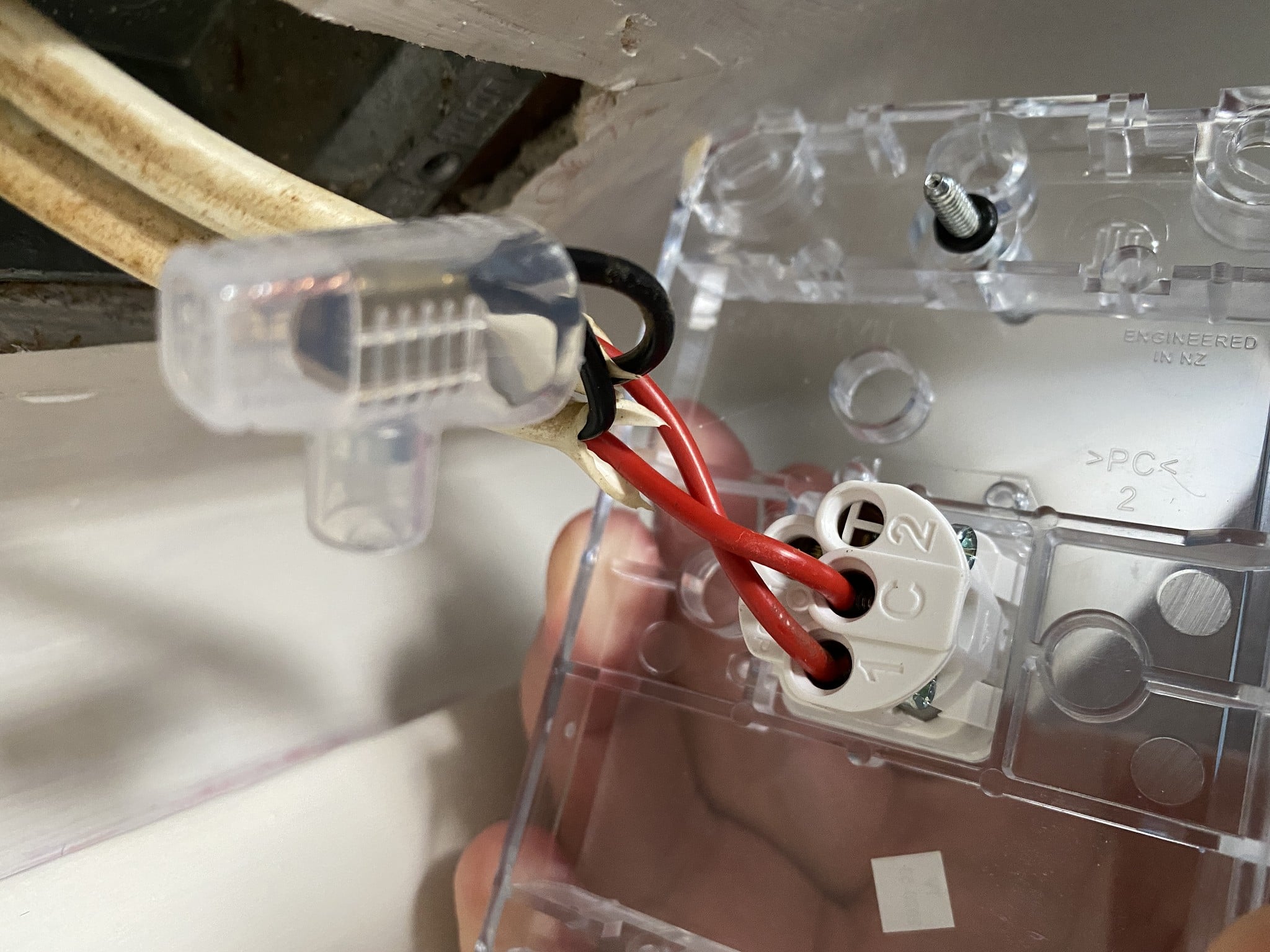
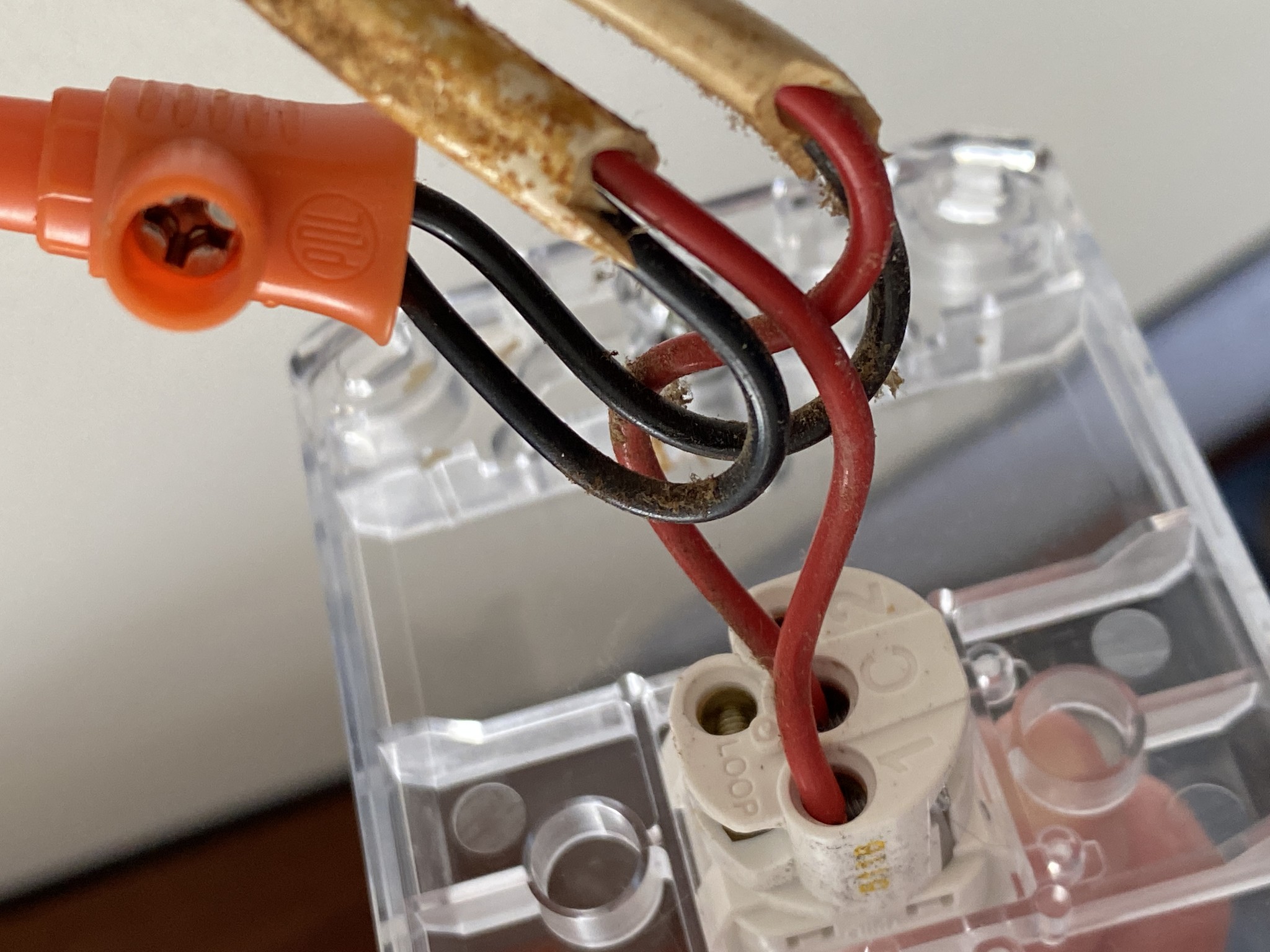
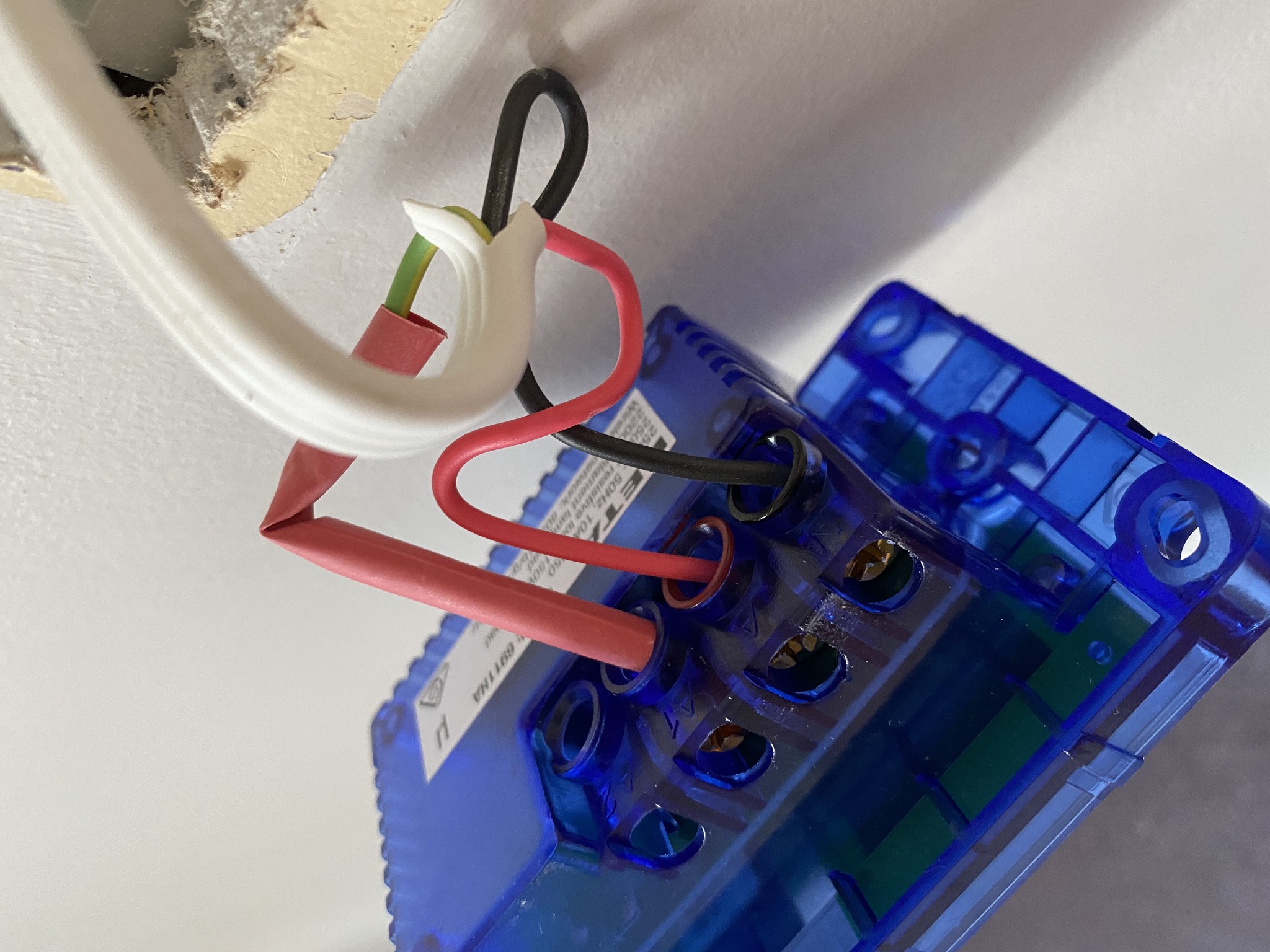
Now I just need to work out how many Shelly's to buy, and which type.  I had been working on the basis that the 1L would be best, as I believed my switches had no neutral wire (also based on the age of the house being 1960s), but looking at the switches I'm not so sure.  See pics below to illustrate:


This one is from my spare room.  Only black and red wires, with the black wires connected together, and the two red wires connected to 1 and C.


This one is from the bathroom.  The top switch is the light - this time, the black wires are going into the Loop, with red in 1 and C; the bottom switch is the extractor fan, and it looks like there is a green wire in 1, and red wires in C.


This one is from the toilet.  Same as the bathroom light switch.


This one is from my bedroom.  Again, the black wires are connected together rather than in loop, and both red wires are in 1 and C.


This one is for the kitchen lights, and is a little more unsual.  It's the Deta switch that I bought to try out, and asked the electrician to install when he replaced the downlights in the lounge.  The previous configuration had the kitchen lights controlled by a switch in the lounge and in the hallway.  I think the electrician mentioned something about a strap line from the lounge to the hall to connect these two lights.  When he installed this Deta switch (and a similar one in the lounge) he separated them so that the switch in the hallway (pictured) is the only switch to control the kitchen lights (and the switch in the lounge just controls the lounge lights).  He's put a piece of red sheath over the green wire.


Now - my understanding is that for a house of this age, the neutral wire is black.  In all of these switches there is a black wire (sometimes connected to itself, sometimes in the Loop), which makes me think there is a neutral wire?  But in all but two places there are no green wires which I understand to be Earth.  Shouldn't there be an Earth in each switch?  And for the hallway switch, why is the green wire now coded to be red?


My real question here is, for each of these switches, what kind of Shelly relay should I be getting?  Is it the 1L, or something different?  I'm planning to either re-locate the Deta switches I've already got, or just replace them with a Shelly for consistency, so you can ignore those for the purposes of this question.


SpookyAwol
639 posts

Ultimate Geek
+1 received by user: 54


  #2887738 17-Mar-2022 16:31
Send private message

*Disclaimer - not a sparky.
You have neutral and live, so Id stick with the standard relays. Id guess the linked switch has a traveler wire hence the red sheath

If it were me, Id go for the Plus 1PM over the Plus 1 due to simpler wiring (1 less line input) but slightly more expensive.
For any double switch, just use one 2.5 relay


richms
29099 posts

Uber Geek
+1 received by user: 10214

Trusted
Lifetime subscriber

  #2887922 17-Mar-2022 22:35
Send private message

That deta switch? An electrician did it? Really? Sleeving the green like that is not on, and hasn't been for a very very long time. I wouldn't be using them again if they're pulling crap like that.


Also green as a switch wire here:


Again, not acceptable. Someone has at some point changed the hardware over to PDL from whatever it had and left the wiring a mess.


Richard rich.ms

robfish
693 posts

Ultimate Geek
+1 received by user: 156

Lifetime subscriber

  #2887942 18-Mar-2022 03:55
Send private message

Before proper "strap" cable was available it was legal to put coloured sleeving on green wires. If a switch needs changing in an old house, I don't think it is compulsory to also change the wiring.
It is compulsory to at least sleeve any potentially live green wires though.

If you have a flush box with no neutral (like for a two way switch) you will need a Shelly switch witch does not need a neutral.
Be aware though that some electricians wire two way switching different than the way I was taught (with a live common) so you would need to change both ends.


Rob


Stream your favourite shows now on Apple TV (affiliate link).
Lizard1977

2134 posts

Uber Geek
+1 received by user: 624

ID Verified

  #2887967 18-Mar-2022 08:07
Send private message

So, just to check my understanding, the wiring in the pictures are neutral and live, with no earth.  Is that right?  If that's the case, then Shelly 1 relays should be okay, because I believe they need a neutral wire, whereas the Shelly 1L don't need a neutral wire.


robfish
693 posts

Ultimate Geek
+1 received by user: 156

Lifetime subscriber

  #2888002 18-Mar-2022 08:54
Send private message

In your photos you have neutral, live and load wires so yes the Shelly 1's will be fine.
You seem to have one photo with 2 switches though so you could use a  2.5 there.


Rob

kelly42
44 posts

Geek
+1 received by user: 4

ID Verified

  #2888021 18-Mar-2022 09:40
Send private message

Lizard1977:


So, just to check my understanding, the wiring in the pictures are neutral and live, with no earth.  Is that right?


Your green wires are earth wires. So, you have them, even though the Shellys won't need them. You can leave them where they are.


Lizard1977:


If that's the case, then Shelly 1 relays should be okay, because I believe they need a neutral wire, whereas the Shelly 1L don't need a neutral wire.


Indeed, as @robfish says, you can use the Shelly 1 or, in cases where you have two switches in one flush box and you want to control both of them (independently) you can use a Shelly 2.5 for this. The advantages of the 2.5 are that a) you only need to cram one unit into the back there instead of two, and b) you only need to wire in the load/live/red wire _once_, not twice.


Everyone is new sometime.


Lizard1977

2134 posts

Uber Geek
+1 received by user: 624

ID Verified

  #2888024 18-Mar-2022 09:49
Send private message

Thanks for clarifying that.  Appreciate it.


Just out of interest, why don't most of my switches have a green (earth) wire?


kelly42
44 posts

Geek
+1 received by user: 4

ID Verified

  #2888026 18-Mar-2022 09:53
Send private message

My naïve understanding here is that the NZ light switches just do not require the earth wire. Similarly, the DETA smart switches don't require a common wire on each of the separate switch mechanisms (just the one live 'in' and the 'in' for each item to be controlled by the switch).


I am sure an electrician like @robfish can clarify further :)


Everyone is new sometime.


Shop now at Mighty Ape (affiliate link).
robfish
693 posts

Ultimate Geek
+1 received by user: 156

Lifetime subscriber

  #2888034 18-Mar-2022 10:13
Send private message

kelly42:

Lizard1977:


So, just to check my understanding, the wiring in the pictures are neutral and live, with no earth.  Is that right?


Your green wires are earth wires. So, you have them, even though the Shellys won't need them. You can leave them where they are.


Incorrect.
The green wires shown are not earth wires. They should be sleeved appropriately (at both ends)


Rob

robfish
693 posts

Ultimate Geek
+1 received by user: 156

Lifetime subscriber

  #2888042 18-Mar-2022 10:23
Send private message

I have to say that some of the questions and comments in this thread suggest that some of you should not be performing electrical work.
I don't say this to protect "the trade".
I say it to protect the innocent.

Share this post with your loved ones and ask what they think.


Rob

Lizard1977

2134 posts

Uber Geek
+1 received by user: 624

ID Verified

  #3153653 30-Oct-2023 12:25
Send private message

It's been over a year since I've spent any time on my smart home stuff, due to being too busy to really think about it.  I bought four Shelly 1 relays in the hope of getting a sparky to install them, but never got around to it. But an opportunity has arisen where I will have an electrician on site this week, and they've offered to take a look and install them for me.  I'm just planning on using them in light switches, and seeing how that works.  I already have smart lights in most of my rooms, so I suspect what I will end up with a weird hybrid situation - smart switch + smart lights, as opposed to smart switch + dumb lights.  Once I work it out, I may modify my approach, but I figure it will be easier to see once it's in action.


Any advice for how to integrate a small number of Shelly relays into Home Assistant?  I've seen a basic tutorial and how to connect to the Shelly Cloud, but I'm also curious if there is a way to make it "local" rather than in the cloud (similar to the Local Tuya method).


Another question (which may be hard to answer) is integrating things like a house alarm system into Home Assistant.  Though a local buglary prevention programme I'm getting a free house alarm system installed.  It's not monitored, but it has the potential to be.  I wondered if there is an easy way to integrate it into Home Assistant so I get notifications if a sensor is tripped or if the alarm is going off?  


Similarly, the installers will also be installing a couple of sensor security lights.  Is there any way to integrate the sensors into Home Assistant, or will that be dependent on the hardware?


SpookyAwol
639 posts

Ultimate Geek
+1 received by user: 54


  #3153678 30-Oct-2023 12:44
Send private message

The Shellys are controlled locally via HA, so once they are on the local wifi network, its quite straightforward and automatically detected.

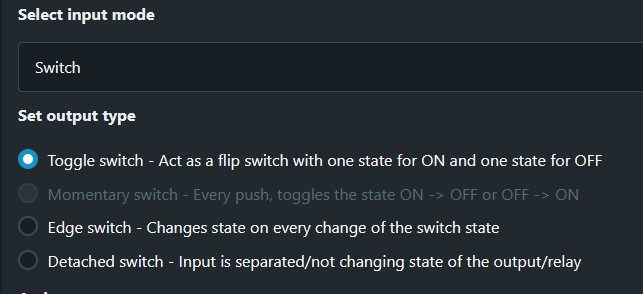
I use shellys on a few light switches, and whilst it may not be intuitive to have a mechanical on/off switch that is in the wrong position, mine are typically multiple switches in different locations that operate one set of lights, so the switch is never in one orientation anyway. There are switching options within shelly though


A shelly i4 may be best to detect sensor and alarm inputs, unless you are using some form of smart sensor lighting


1 | 2 | 3 | 4 | 5 | 6
View this topic in a long page with up to 500 replies per page Create new topic


Geekzone Live »

Try automatic live updates from Geekzone directly in your browser, without refreshing the page, with Geekzone Live now.


Are you subscribed to our RSS feed? You can download the latest headlines and summaries from our stories directly to your computer or smartphone by using a feed reader.