Geekzone: technology news, blogs, forums
Guest
Welcome Guest.
You haven't logged in yet. If you don't have an account you can register now.
To post in this sub-forum you must have made 100 posts or have Trust status or have completed our ID Verification


Talkiet

4819 posts

Uber Geek
+1 received by user: 3934

Trusted

#281216 5-Feb-2021 18:38
Send private message

The transmitter from my unit has failed and I am hoping someone has one they aren't using and are prepared to let go cheap... Don't even need the display - just the transmitter... Worth asking I guess :-)
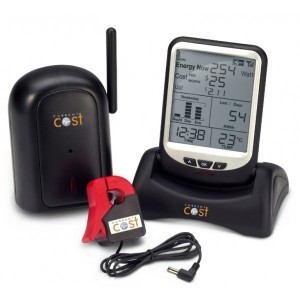


Yes I could make something up to do the job but what I had worked great.


Saying that - if anyone knows of a simple replacement product please let me know. I don't need a screen, just serial or mqtt type output.


Cheers - N



Please note all comments are from my own brain and don't necessarily represent the position or opinions of my employer, previous employers, colleagues, friends or pets.


Create new topic
russelo
332 posts

Ultimate Geek
+1 received by user: 43


  #2648374 5-Feb-2021 18:55
Send private message

I have the same setup, data from Envi-R transmitter converted to MQTT.


I had two sets, but the first transmitter broke due to water ingress.  I'm now using my remaining transmitter.


Hope you find a  replacement.


yumcimil
179 posts

Master Geek
+1 received by user: 14


  #2648651 6-Feb-2021 12:51
Send private message

Hey, I might have the clamp meter sitting around in a box somewhere. Give me a day or two to see if I can find anything.


ratsun81
516 posts

Ultimate Geek
+1 received by user: 183


  #2649370 8-Feb-2021 11:16
Send private message

I have the transmitter, it hasnt been in use in some time so i dont know if its still operational.


It was when i last used it. 


You can have it. Pickup North Shore Auckland or pay for shipping. 


Quic Broadband


Use R212389ELFLL2 promo code for free setup at checkout.


Talkiet

4819 posts

Uber Geek
+1 received by user: 3934

Trusted

  #2649414 8-Feb-2021 12:34
Send private message

ratsun81:


I have the transmitter, it hasnt been in use in some time so i dont know if its still operational.


It was when i last used it. 


You can have it. Pickup North Shore Auckland or pay for shipping. 


That's amazing thanks! I have just sent you a PM. Much appreciated.


Cheers - N


Please note all comments are from my own brain and don't necessarily represent the position or opinions of my employer, previous employers, colleagues, friends or pets.


phrozenpenguin
868 posts

Ultimate Geek
+1 received by user: 90


  #2650114 9-Feb-2021 11:28
Send private message

Glad you are sorted.


Can I ask how you are interfacing the signal from this to mqtt/serial? Are you using the display and adaptor > USB, or SDR, or something else?


I have a similar setup but am looking to streamline.


Thanks 


Talkiet

4819 posts

Uber Geek
+1 received by user: 3934

Trusted

  #2650123 9-Feb-2021 11:36
Send private message

I checked again and I am actually running a python script on my homeassistant box getting the data by serial and dumping it straight into an Influx database.


#!/usr/bin/python


# Reads data from a Current Cost device via serial port.
# Parses the XML to extract the temperature and the electricity consumption
# Adds data to InfluxDB database.


import os
import serial
import re
from xml.dom.minidom import parseString


# open the Serial port at 57600 baud, with a timeout of 3 seconds
# /dev/ttyUSB0 is normally the first (lower) USB connection on the Raspberry Pi
# Check ls -l /dev/ttyUS* after plugging in the RJ45 to USB cable and
# ammend accordingly


ser = serial.Serial(port='/dev/ttyUSB0',
                    baudrate=57600,
                    bytesize=serial.EIGHTBITS,
                    parity=serial.PARITY_NONE,
                    stopbits=serial.STOPBITS_ONE,
                    timeout=3)


while 1:
        line = ser.readline()
        if line:
                try:
                        dom = parseString(line)
                except:
                        continue  # if we get a corrupted XML line then ignore and continue (wait for next one)


                # get the temperature <tmpr>
                try:
                        xmlTagTemp = dom.getElementsByTagName('tmpr')[0].toxml()
                        xmlDataTemp = xmlTagTemp.replace('<tmpr>','').replace('</tmpr>','')
                except:
                        continue


                # get channel 1 and then the watts
                # you may need to change the occurences of "ch1" to "ch2" for your display.
                try:
                        xmlTagWatts = dom.getElementsByTagName('ch1')[0].toxml()
                        xmlDataWatts = xmlTagWatts.replace('<ch1><watts>','').replace('</watts></ch1>','')
                except:
                        continue


                influxstring = "curl -i -XPOST 'http://[DBip]:8086/write?db=poweruse' --data-binary 'kwh value=" + xmlDataWatts + "'"
                os.system(influxstring)


Please note all comments are from my own brain and don't necessarily represent the position or opinions of my employer, previous employers, colleagues, friends or pets.


HP


Shop now for HP laptops and other devices (affiliate link).
russelo
332 posts

Ultimate Geek
+1 received by user: 43


  #2650208 9-Feb-2021 12:10
Send private message

In my case, I hooked up an SDR to RPi and use some opensource 433Mhz library to receive and process the data and then throw it as MQTT.


Create new topic


Geekzone Live »

Try automatic live updates from Geekzone directly in your browser, without refreshing the page, with Geekzone Live now.


Are you subscribed to our RSS feed? You can download the latest headlines and summaries from our stories directly to your computer or smartphone by using a feed reader.