|
|
|
As MM said, internet is complex....
So basically on BigPipe your route to a game server might be A, B ,C,D, whereas on Voyager, its A, B, H, M, Z, D, on 2D A,B, N, T, Z, D. Each "hop" can increase latency (your ping) depending on where those routes go.... and just because its a "NZ" server, does not mean its hosted in NZ - could be in someones barn in Russia on a dialup connection :)
XPD / Gavin

Done this, struggling to find where to get servers for apex, warzone, nba 2k etc
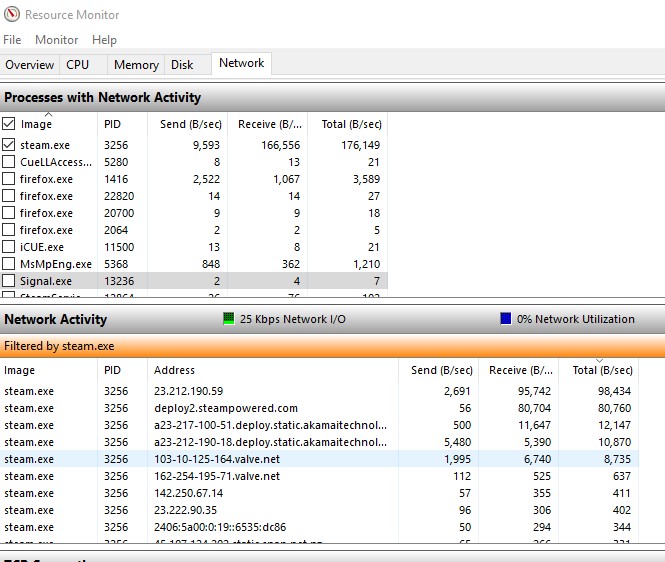
While playing a match, open Resource Monitor, go to the network tab and then check the TCP Connections area for your game's exe and use the IP in the Remote Address column and perform a tracert on that IP. It's probably more meaningful to tracert the game servers over ping servers. Also do any of the games give your NAT status? Is it "Open" or something else?
Also, assuming you got a new modem; then enable UPnP on the modem, add some port forwarding for the relevant games on the modem.
Probably won't hurt to flush your PC's DNS.
Stevecad: Done this, struggling to find where to get servers for apex, warzone, nba 2k etc
If you open Resource Monitor and look at the Network tab (you may need to filter it to only show the game .exe's connections) while you're connected to one of the servers you should be able to see its IP address or hostname.
Example below:


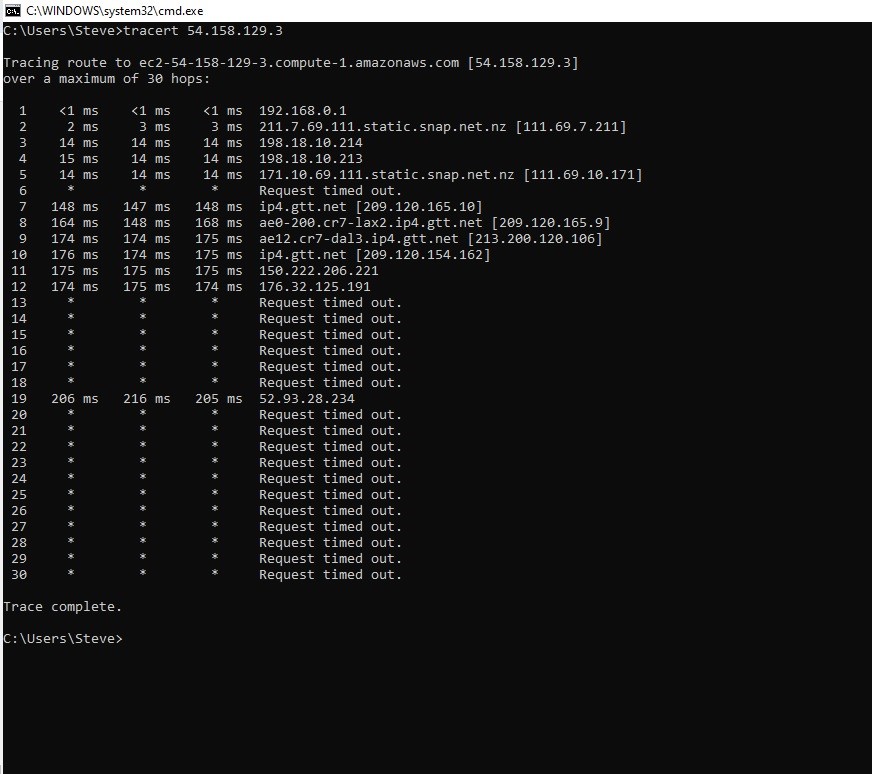
Got this. Im in talks with them now about it and have seen a bunch of trace routes to them also
Im with OP on this aswel. Switching ISP and going from 30-60 makes it near on impossible to be competitive. If you are playing FPS just switch back to orcon and get a static IP so you don't end up on CGNAT.
Could be worth pursuing depending on where you are in the country as based on traceroutes you are hitting their Wellington CG-NAT. Perhaps there is a lower latency aggregation path your connection could be mapped to.
Different ISPs route traffic differently across the country, there was a thread a few months or year back where Spark or Bigpipe routed traffic from Hawkes Bay (or was it Bay of Plenty?) via the lower North Island before leaving out Auckland.
Linux you're not being particularly helpful. 🤷♂️
@stevecad where in NZ are you? Just as a reference, I'm in the top of the South Island, on 2D Fibre (with a Static IP) and ran a trace route to those two IPs you posted screenshots of, my results are within about 5ms of yours.
wratterus:
Linux you're not being particularly helpful. 🤷♂️
@stevecad where in NZ are you? Just as a reference, I'm in the top of the South Island, on 2D Fibre (with a Static IP) and ran a trace route to those two IPs you posted screenshots of, my results are within about 5ms of yours.
@wratterus This is not a fault / issue, As others have mentioned routing is not the same across all providers in NZ and routing is not static and carriers change routing
Packets could go A -> B --> C - D one week then 6 months later go A-> C-> J -> K to get to the same location
Stevecad: It’s just weird how it went from 20-30 to 50-60. It could be just how they route it.
@Stevecad It is not weird and 100% expected
Lets say we both travel from NZ AKL airport to Iceland I might go via Sydney then Canada onto Iceland and you might go via Perth direct to Iceland we both end up at the same location different times
Hiya,
Firstly, 2degrees - A Practical Guide to (Correctly) - Troubleshooting with Traceroute & ICMP (ping) is a good read to understand the concepts of ICMP (ping) and Traceroutes. This shares how traffic is deprioritised by most service provides as it's low value traffic compared to the data people are actually trying to move/consume.
Are you able to find someone with an Orcon fibre connection that can run a Trace Route to the same server and repeat the same test on 2degrees in order to share the outputs with 2degrees to troubleshoot. Service Providers may peer locally or internationally at different locations, and therefore you may experience some fluctuations in latency. That said, if you're original note is correct and valid, ~30ms different is significant.
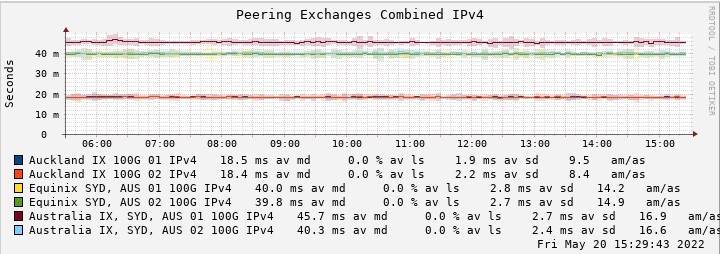
Looking at my graphs on traffic to AWS (where the game appears to be delivered from) - 2degrees peering in Auckland (IX), Sydney (Equinix) and Sydney IX looks solid and consistent. https://smokeping.thenet.gen.nz/smokeping/smokeping.cgi?target=peering.paws
There maybe something specific to the game hosting where peering isn't optimal, this is why sharing traceroutes from both 2degrees and Orcon to the server/s will really help them understand and work with the appropriate peering partners and investigate.

Latency to Australia is consistently @40ms round trip - https://smokeping.thenet.gen.nz/smokeping/smokeping.cgi?target=2degreesspeedtest.statler
Latency from Australia to NZ is similar -( I chose the Vocus speedtest server in CHCH as that's where i'm based as 2degrees don't have a speedtest server here any more) - https://au.smokeping.thenet.gen.nz/smokeping/?target=vocusspeedtest.chcvocusst
Nick.
https://nick.mackechnie.co.nz | NZ ISP latency monitoring - https://smokeping.thenet.gen.nz
Linux:
Stevecad: It’s just weird how it went from 20-30 to 50-60. It could be just how they route it.
@Stevecad It is not weird and 100% expected
Lets say we both travel from NZ AKL airport to Iceland I might go via Sydney then Canada onto Iceland and you might go via Perth direct to Iceland we both end up at the same location different times
its not expected, it can happen yes but most people wouldnt expect to change ISP;s and double their ping to AUS.
It looks like they are going from palmy to wellington to Auckland to Sydney, where as they may have gone straight to Auckland before. that adds latency to the connection.
And where could the Route as you put it go to double the connection? it would likely be a lot worse if it were routing elsewhere.
|
|
|