Geekzone: technology news, blogs, forums
Guest
Welcome Guest.
You haven't logged in yet. If you don't have an account you can register now.


datahawk

256 posts

Ultimate Geek
+1 received by user: 30

Lifetime subscriber

#322633 6-Sep-2025 15:38
Send private message

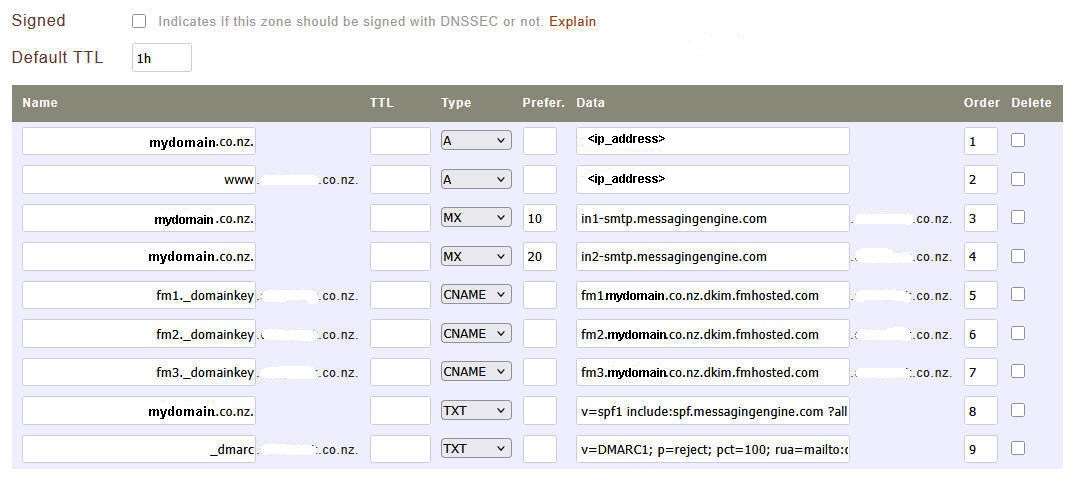
Hi There, I need a sanity check with a change of email provider to Fastmail on a domain at Metaname. Can anyone confirm that this MX, DKIM and SPF config is correctly input?


Is it also safe to DNSSEC sign this zone?


Thanks in advance as this subject is not my area of expertise.


Edit: Spelling.


Filter this topic showing only the reply marked as answer Create new topic
freitasm
BDFL - Memuneh
80657 posts

Uber Geek
+1 received by user: 41063

Administrator
ID Verified
Trusted
Geekzone
Lifetime subscriber

  #3411916 6-Sep-2025 16:57
Send private message

Where did you get the domainkey values from?


Are you using a CNAME option, as in a DKIM key provided by a third-party?


Referral links: Quic Broadband (free setup code: R587125ERQ6VE) | Samsung | AliExpress | Wise | Sharesies 


Support Geekzone by subscribing (browse ads-free), or making a one-off or recurring donation through PressPatron.


KiwiSurfer
1722 posts

Uber Geek
+1 received by user: 993

ID Verified
Lifetime subscriber

  #3411974 6-Sep-2025 17:04
Send private message

If you're not confident, a better option may be to use Fastmail DNS for your domain -- then you can just point your domains NS records to Fastmail.


This is what I do with my domain -- registered with Metaname with the NS pointing to Fastmail. Fastmail can then manage the MX, SPF, DomainKeys, etc automatically -- and it is all optional so you can pick and choose what Fastmail manages. For example my Fastmail DNS is configured so that Fastmail only manages the records for mail delivery-- leaving everything else up to me. I add my own DNS records for the A/AAAA/etc records that point to my website and other servers.


It's not for everyone though but just pointing this out in case you weren't aware.


fearandloathing
537 posts

Ultimate Geek
+1 received by user: 206

ID Verified
Lifetime subscriber

  #3412016 6-Sep-2025 17:53
Send private message

You need to put a trailing dot after com in your mx and dkim records. 


validate your records using. https://mxtoolbox.com


datahawk

256 posts

Ultimate Geek
+1 received by user: 30

Lifetime subscriber

  #3412020 6-Sep-2025 17:57
Send private message

freitasm:


Where did you get the domainkey values from?


Are you using a CNAME option, as in a DKIM key provided by a third-party?


Fastmail supplies the detailed instructions for those DNS settings when the email account is created based on this url...


https://www.fastmail.help/hc/en-us/articles/1500000280261-Setting-up-your-domain-MX-only


Their format is confusing me because there is no simple A record for 'mail.mydomain.co.nz' pointing to a fastmail email server IP address as I have have right now.


At present I have email with Crazy Domains and a single MX record to their mail server along with normal TXT, default._domainkey DKIM, SPF and _dmarc records with no confusion.

Maybe that layout is all correct and ready to go but I was hoping someone is already using fastmail with DNS hoasted at Metaname to just tick it off for me to 'pull the trigger' as such.


datahawk

256 posts

Ultimate Geek
+1 received by user: 30

Lifetime subscriber

  #3412023 6-Sep-2025 18:02
Send private message

fearandloathing:


You need to put a trailing dot after com in your mx and dkim records. 


validate your records using. https://mxtoolbox.com


Ah Ha! - Is that the key I'm missing? - They do mention that may be required in the help files depending on the DNS host config rules. This is why I was looking for someone with a working Metaname config.


datahawk

256 posts

Ultimate Geek
+1 received by user: 30

Lifetime subscriber

  #3412034 6-Sep-2025 18:31
Send private message

fearandloathing:


You need to put a trailing dot after com in your mx and dkim records. 
validate your records using. https://mxtoolbox.com


Thank you! - Confirmed - Fastmail has validated the DNS.


HP


Shop now for HP laptops and other devices (affiliate link).
fearandloathing
537 posts

Ultimate Geek
+1 received by user: 206

ID Verified
Lifetime subscriber

  #3412054 6-Sep-2025 19:26
Send private message

Your domain being appended to the end of the record was the giveaway. DNS on the face of it, appears to be easy, but in reality dns records are nuanced depending on the platform. Many professionals (including myself ) have made your mistake. 


you will be fine to enable dnssec


You can validate the config using:


https://dnssec-debugger.verisignlabs.com


freitasm
BDFL - Memuneh
80657 posts

Uber Geek
+1 received by user: 41063

Administrator
ID Verified
Trusted
Geekzone
Lifetime subscriber

  #3412056 6-Sep-2025 19:29
Send private message

Or use https://dmarctester.com/


It is a great tool for testing this.


Referral links: Quic Broadband (free setup code: R587125ERQ6VE) | Samsung | AliExpress | Wise | Sharesies 


Support Geekzone by subscribing (browse ads-free), or making a one-off or recurring donation through PressPatron.


fearandloathing
537 posts

Ultimate Geek
+1 received by user: 206

ID Verified
Lifetime subscriber

  #3412058 6-Sep-2025 19:30
Send private message

Btw you spf should be ~all or -all not ?all


datahawk

256 posts

Ultimate Geek
+1 received by user: 30

Lifetime subscriber

  #3412061 6-Sep-2025 19:37
Send private message

fearandloathing:


Btw you spf should be ~all or -all not ?all


Thanks, yes, I've previously always used -all but just pasted in fastmail's default.


Thanks again for the solution.


Filter this topic showing only the reply marked as answer Create new topic


Geekzone Live »

Try automatic live updates from Geekzone directly in your browser, without refreshing the page, with Geekzone Live now.


Are you subscribed to our RSS feed? You can download the latest headlines and summaries from our stories directly to your computer or smartphone by using a feed reader.

