Geekzone: technology news, blogs, forums
Guest
Welcome Guest.
You haven't logged in yet. If you don't have an account you can register now.


DodgyForeigner

24 posts

Geek
+1 received by user: 1


#116855 12-May-2013 11:15
Send private message

Hi there,

I've had my One X for 11 months and now the battery holds a charge for only 12 hours with little or no use.

Typical use up to then has been moderate and I'd usually get an average of a day and a half per charge. I always let it run down to below 20 percent before fully charging it.

I thought that maybe a particular app was running in the background and sucking the battery dry, but all seems normal.

So, my question is... is the battery stuffed, and if so how much of a drama is it to get replaced? As my phone is nearly out of warranty, can I get a battery and do it myself?

Cheers.

Create new topic
Dingbatt
6804 posts

Uber Geek
+1 received by user: 3694

Lifetime subscriber

  #816156 12-May-2013 13:16
Send private message

A couple of things to try.

Under Settings > Power > Usage is there anything that has used a big chunk of power?

Try the equivalent of a 'Battery Pull' (cold reboot) by pressing and holding the power button until it reboots. Not a factory reset which wipes all your data and settings (by holding volume down as well).

I found with my HOX that the battery stats sometimes 'lose their way' and a proper shutdown and restart seems to recover things.

If it does need the battery replacing, there are guides posted as to how to diy, with the usual caveats, particularly since it's not really a user replaceable item. Might I suggest you investigate putting a One X+ battery in it if you do need to follow this course.


“We’ve arranged a society based on science and technology, in which nobody understands anything about science technology. Carl Sagan 1996


DodgyForeigner

24 posts

Geek
+1 received by user: 1


  #816222 12-May-2013 14:51
Send private message

Thanks dingbatt,

The only thing that's using the majority of power is the Android OS.

If it does need replacing, I've already though about the One X + battery.

Cheers, much appreciated.

DodgyForeigner

24 posts

Geek
+1 received by user: 1


  #816479 13-May-2013 06:23
Send private message

Just an update... I've performed a cold reboot and so far this has solved the problem. Thanks Dingbatt for your help!


DodgyForeigner

24 posts

Geek
+1 received by user: 1


  #823381 22-May-2013 09:32
Send private message

OK... further update...

This problem has appeared again. It's on charge a the moment, but seems to be taking ages to charge. If I reboot my phone, all of a sudden it will jump up 20 percent or so.

Am I right in saying that it's not a battery issue, but a software one?

My phone's still under warranty, so would it be advisable to take it back and get it checked out?

Cheers.

eXDee
4033 posts

Uber Geek
+1 received by user: 1070

Trusted

  #823750 22-May-2013 20:28
Send private message

Factory reset your device first. If the issue persists, take it back and itll go away for repair inspection for 1-3 weeks.

DodgyForeigner

24 posts

Geek
+1 received by user: 1


  #823917 23-May-2013 06:31
Send private message

Thanks eXDee...

I'm not keen on a factory reset just yet... I've gone to HTC direct to see if they can shed any light on the situation, so will wait till I hear from them (I hope!).

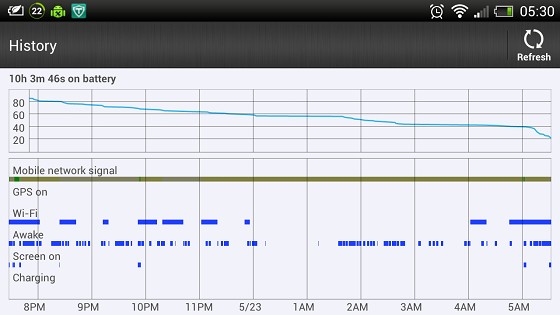
In the meantime, I've taken a screenshot this morning of my power consumption... interesting how it's intermittently awake and using power, even though I'm asleep... and the drastic use of 20 percent of power in the last half hour from when the alarm went off at 5 this morning.

Cheers.


Shop now on AliExpress (affiliate link).
eXDee
4033 posts

Uber Geek
+1 received by user: 1070

Trusted

  #824047 23-May-2013 11:46
Send private message

Factory reset is the first thing that is done when you send it away. Everything is wiped to eliminate software installed on the device as the issue. IMO you may as well check this yourself to potentially save some hassle.

Personally i have no issues wiping my device at any time. Everything on there is synced to google or dropbox. Even Helium backup backs up to my dropbox.

DodgyForeigner

24 posts

Geek
+1 received by user: 1


  #824558 24-May-2013 09:29
Send private message

Not long after I got my phone, it died and wouldn't turn on. I sent it back for repair and apparently it was a known software issue and was fixed.

I'm a bit worried that performing a factory reset will overwrite this fix and the same issue will re-appear.

jeffnz
2870 posts

Uber Geek
+1 received by user: 666

Trusted
Lifetime subscriber

  #824563 24-May-2013 09:41
Send private message

DodgyForeigner: Thanks eXDee...

I'm not keen on a factory reset just yet... I've gone to HTC direct to see if they can shed any light on the situation, so will wait till I hear from them (I hope!).

In the meantime, I've taken a screenshot this morning of my power consumption... interesting how it's intermittently awake and using power, even though I'm asleep... and the drastic use of 20 percent of power in the last half hour from when the alarm went off at 5 this morning.

Cheers.


thats a lot of wake time, install CPU spy and see how long it is in deep sleep for, also Betterbatterystats will show what apps are hogging your battery.

I would suspect its an app or 2, check to see whats running in background.

I'm assuming you aren't on custom rom or have root access but this may be a route you go down as I'm sure it will help, it doesn't look lie a bad battery or hardware IMHO


Galaxy S10


Garmin  Fenix 5


DodgyForeigner

24 posts

Geek
+1 received by user: 1


  #827531 29-May-2013 09:09
Send private message

Thanks guys for all your help and comments.

I've performed a factory reset and that has solved the problem.

Cheers.

Create new topic


Geekzone Live »

Try automatic live updates from Geekzone directly in your browser, without refreshing the page, with Geekzone Live now.


Are you subscribed to our RSS feed? You can download the latest headlines and summaries from our stories directly to your computer or smartphone by using a feed reader.