Geekzone: technology news, blogs, forums
Guest
Welcome Guest.
You haven't logged in yet. If you don't have an account you can register now.


gargar669

13 posts

Geek
+1 received by user: 6


#277036 22-Sep-2020 21:46
Send private message

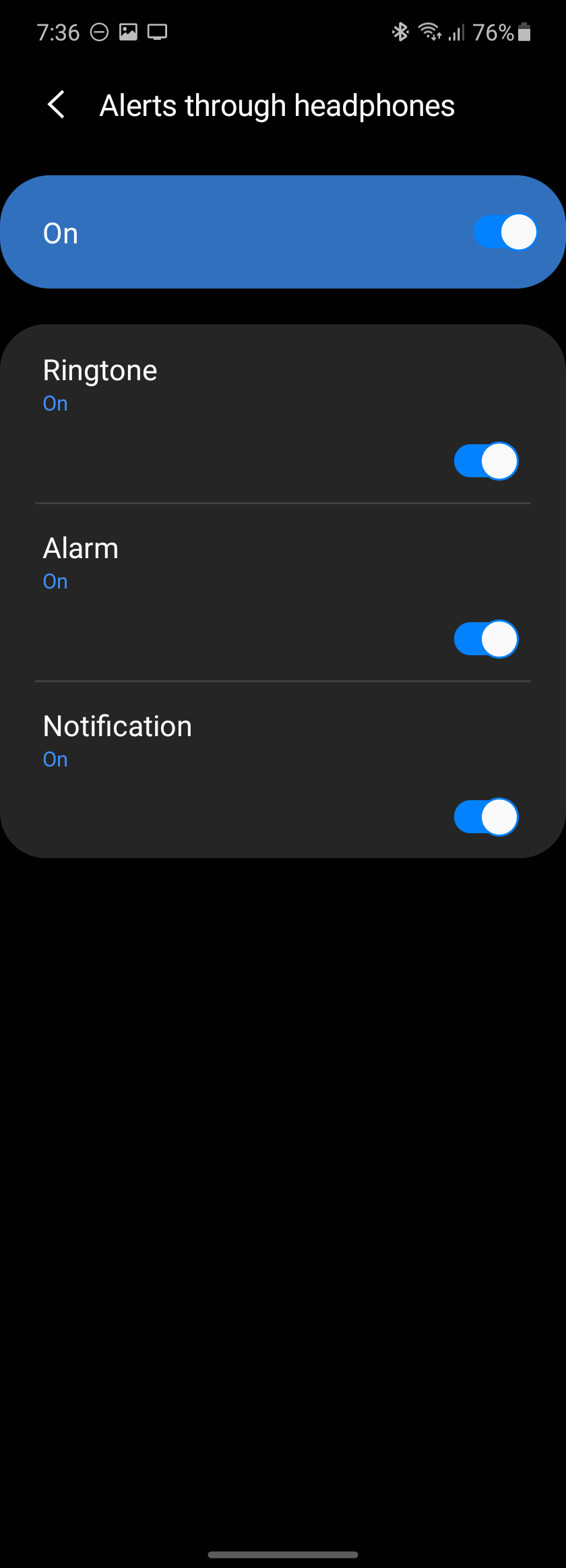
Do any Android gurus here know how you can pair to a Bluetooth audio device (in this case Bluetooth enabled hearing aids) and have all notifications, ringtones etc go only to the Bluetooth device and not through the mobiles speaker?
Both my wife's S7 and my S20 output the sound to both phone speaker and hearing aid.
My wife's old Huewai Y6 pro disabled the speaker by default as soon as the hearing aids were paired.
If it's a setting it's certainly well hidden.


Create new topic
kinginvercargill
126 posts

Master Geek
+1 received by user: 33

ID Verified
Lifetime subscriber

  #2572975 23-Sep-2020 17:07
Send private message

On my S9 under Accessibility, Hearing Enchantments there is a Hearing Aid Support feature with Bluetooth Hearing Aid as an option. I've never used it but it might be worth a look. Not sure if it'll be on the S7, but should be in a similar place in the S20


Click to see full size


gargar669

13 posts

Geek
+1 received by user: 6


  #2573003 23-Sep-2020 19:18
Send private message

Thanks for that. Yes, it's the same on the S20, and a bit less feature rich on the older S7. The problem is that the hearing aids work fine but, unlike with the Huawei phone, the phones speaker is not inhibited once the hearing aids are paired. One of the few advantages of hearing aids is that you can still keep your ringing and notifications on in environments where everyone else has to mute theirs. No so useful when the phones speaker still stays active. I'm starting to think this is the Samsung default, where as Huawei default to speaker off when paired. Still hopeing to find a setting in there somewhere.

pcman2000
87 posts

Master Geek
+1 received by user: 17


  #2573015 23-Sep-2020 19:39
Send private message

Hmm... I think the Samsung SoundAssistant app appears to do what you need it to do: SoundAssistant – Apps on Google Play


Galaxy Tab S7+, Galaxy Fold, Galaxy Z Fold2


gargar669

13 posts

Geek
+1 received by user: 6


  #2573098 23-Sep-2020 21:42
Send private message

Brilliant, works perfectly. On the S20 works just as you showed. On the S7 it's all 3 (alarms, notifications, ringing) on or all off, but we want them all on so thank you very much.

Create new topic


Geekzone Live »

Try automatic live updates from Geekzone directly in your browser, without refreshing the page, with Geekzone Live now.


Are you subscribed to our RSS feed? You can download the latest headlines and summaries from our stories directly to your computer or smartphone by using a feed reader.