|
|
|
Installed on mine yesterday.
Any news on fixing the Wi-Fi issues?
Android Auto & lost GPS?
Anybody out there use Android Auto a lot?
My 7+ seems to lose the GPS signal after 5-10min of AA usage. A swipe down of the control screen, "power cycle" Navigation & I'm good again until I start AA the next time. Anyboduy else experience something similar?
Please keep this GZ community vibrant by contributing in a constructive & respectful manner.
Looking at maybe getting the Nokia 7 Plus again for my partner.
Does anyone use Android Auto and can confirm it works fine?
She will be using it everyday for most of the day for work.
ANglEAUT:
Android Auto & lost GPS?
Anybody out there use Android Auto a lot?
My 7+ seems to lose the GPS signal after 5-10min of AA usage. A swipe down of the control screen, "power cycle" Navigation & I'm good again until I start AA the next time. Anyboduy else experience something similar?
- This happened even before the Jan-2019 update
- I have not searched on-line for any other occurrence or solution. Enough of a p.i.t.a. to post here, but not enough to go trawling pages & pages of forums.
Wow that's not good at all, um Tried deleting Google Maps App data?
ANglEAUT:
Android Auto & lost GPS?
Anybody out there use Android Auto a lot?
My 7+ seems to lose the GPS signal after 5-10min of AA usage. A swipe down of the control screen, "power cycle" Navigation & I'm good again until I start AA the next time. Anyboduy else experience something similar?
- This happened even before the Jan-2019 update
- I have not searched on-line for any other occurrence or solution. Enough of a p.i.t.a. to post here, but not enough to go trawling pages & pages of forums.
You may wish to try turning off battery optimisation for the app: go to Settings -> Apps -> Android Auto -> Battery optimisation. I had a similar problem with an app called GPS Keeper being closed down after 10 mintes or so, and this fixed it for me.
TG09:
Installed on mine yesterday.
Any news on fixing the Wi-Fi issues?
The talk on XDA is that this is just a security patch. A second, leaked, maintenance release tried by some users had largely positive reports that the wifi issue was fixed afterwards. But the leaked release is not publicly available, although slated for February.
KevinF:
You may wish to try turning off battery optimisation for the app: go to Settings -> Apps -> Android Auto -> Battery optimisation. I had a similar problem with an app called GPS Keeper being closed down after 10 minutes or so, and this fixed it for me.
Now disabled. I'd initially gone & switched off a bunch of apps, but I guess at the time I skipped this because I thought I'd not use it.
[rant] What's with this battery optimisation that stops timers? If there is one thing that I want to keep running in the background, then it would be something like a timer. This should never be suspended[/rant]
Please keep this GZ community vibrant by contributing in a constructive & respectful manner.
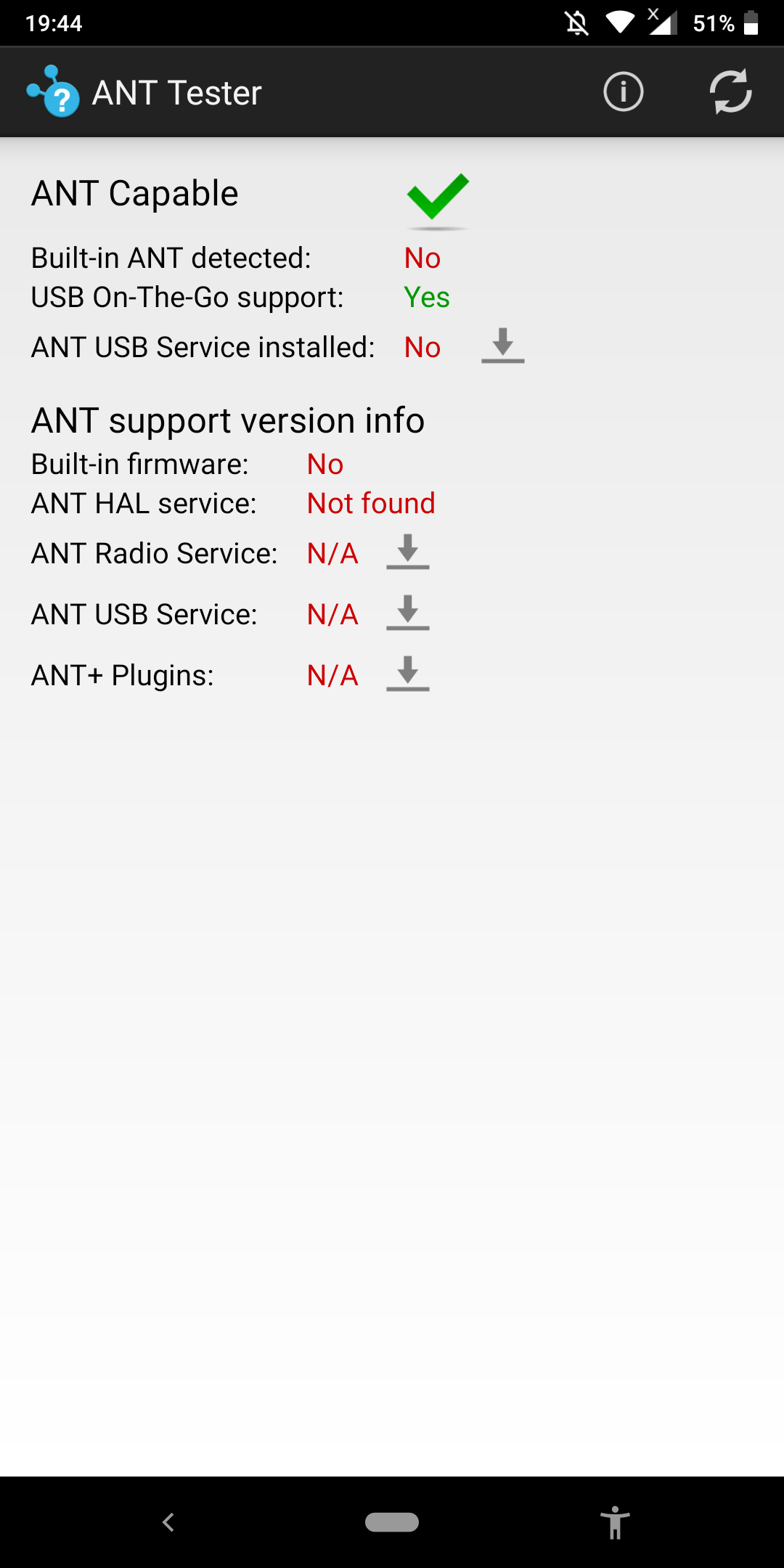
Can anyone with a 7 plus confirm whether or not it has built in ANT+ capabilities (other than USB on the go support). My own reading of the specs in various places shows its not listed however I have come across Nokia forums where owners of the 7 plus (and other models) have been discussing failure of previously working ANT+ after a Pie update. I ask as I am looking for a phone with ANT/firmware and the 7 Plus ticked a lot of other boxes
according to this directory only the Nokia 8 has it.
Common sense is not as common as you think.
vexxxboy:
according to this directory only the Nokia 8 has it.
https://www.thisisant.com/directory/filter/~/60/~/
Yes, I have seen that but don't know how complete it is. Apart from the 7 plus I have also seen in other forums owners of Nokia 6 saying their ANT services were disrupted by upgrades. Its possible the capability is built in and activated if the appropriate services are installed. Then again they may just be referring to ANT support with an attached "dongle" i.e. through USB on the go as I understand it.
ANglEAUT:
KevinF:
You may wish to try turning off battery optimisation for the app: go to Settings -> Apps -> Android Auto -> Battery optimisation. I had a similar problem with an app called GPS Keeper being closed down after 10 minutes or so, and this fixed it for me.
Now disabled. I'd initially gone & switched off a bunch of apps, but I guess at the time I skipped this because I thought I'd not use it.
Thank you @KevenF, that seems to have helped.
Please keep this GZ community vibrant by contributing in a constructive & respectful manner.
just tested my sons Nokia 7 plus and this is what it shows

Common sense is not as common as you think.
Thanks a lot for testing your sons 7 Plus. I guess that confirms that any support for ANT is only USB support
ANglEAUT:
KevinF:
You may wish to try turning off battery optimisation for the app: go to Settings -> Apps -> Android Auto -> Battery optimisation. I had a similar problem with an app called GPS Keeper being closed down after 10 minutes or so, and this fixed it for me.
Now disabled. I'd initially gone & switched off a bunch of apps, but I guess at the time I skipped this because I thought I'd not use it.
[rant] What's with this battery optimisation that stops timers? If there is one thing that I want to keep running in the background, then it would be something like a timer. This should never be suspended[/rant]
I have ended up emailing Nokia and they said do this, havent done it as of yet.
In the meantime, we can suggest you a workaround in order to sort it out:
1. - Please go to settings > network and internet > 3 dots on the top > reset network preferences. Keep in mind that this will erase all the Wi Fi passwords. - After that, please do a Soft reset: Press the Power button and Volume UP button simultaneously for at least 10 seconds, release them when you feel the phone vibrate and you see "Powered by Android" on the screen.
2. Check in safe mode: - Press and hold the Power button. - In the window that will appear on the screen, select and hold the "Power off" option. - It will appear a new window called "Safe Mode". Then, press OK.
The device will restart in safe mode. An inscription about this will appear at the bottom left of the screen. After going into safe mode, use the device as usual. Check if the problem has disappeared. Remember that only preinstalled applications are available to you. If you want to go back to the normal mode, you just need to restart the device.
Turning off battery optimization won't help. Nokia phones run kind of vanilla Android which under the hood is not. Nokia bundles info their firmware packages from 3rd party provider Evenwell. One of the Evenwell services improves battery life by killing non-system background apps, it ignores any battery optimization settings. I had similar issues on Nokia 6(2017) and Nokia 5.1.
On Snapdragon devices it's enough to uninstall com.evenwell.powersaving.g3 from user space via adb, while on Mediatek devices com.evenwell.emm, e.g.
adb shell
pm uninstall --user 0 com.evenwell.powersaving.g3
or
adb shell
pm uninstall --user 0 com.evenwell.emm
Though If you'd like to reinstall that evenwell crap back factory reset required
Thank you qwery123. Your option seems better than the safe mode suggested by TG09 as Android Auto & my navigation app are not pre-installed.
Please keep this GZ community vibrant by contributing in a constructive & respectful manner.
|
|
|