
Geekzone: technology news, blogs, forums
Guest
Welcome Guest.
You haven't logged in yet. If you don't have an account you can register now.


View this topic in a long page with up to 500 replies per page Create new topic
1 | 2 

mjb

mjb
996 posts

Ultimate Geek
+1 received by user: 67

Trusted

  #870415 2-Aug-2013 06:46
Send private message

myopinion: ....which way is the right way up so it would be in 4 places.


2 places.


I have a nexus 7, and an S3. I almost exclusively use the power button on the S3 to wake, and have to do the same on the nexus 7 - but I do agree it can be a little frustrating finding the power button on the 7. Not so difficult on the S3, as it has a case which helps to identify orientation, as well as the samsung logo, and the fact that you tend to be very particular about which way around your phone is when you put it in your pocket, or on the desk.

To be honest, I actually rarely use the home button on the S3 - more common for me to use the back button in an app, unless the backstack is huge, and then I'll use the home button. Almost to the level that I wish the S3 didn't have one. The N7 screen is very very nice to watch videos on, without hardware buttons visible.


contentsofsignaturemaysettleduringshipping


jeffnz
2870 posts

Uber Geek
+1 received by user: 666

Trusted
Lifetime subscriber

  #870419 2-Aug-2013 07:19
Send private message

My last 5 phones have had a home button and none have broken or even looked like breaking so wouldn't use that argument against them.

We get used to what we have, but it doesn't take long to get used to something else you just have to be happy with what you have and not buy because the grass looks greener or everyone else has one.


Galaxy S10


Garmin  Fenix 5


timmmay

20858 posts

Uber Geek
+1 received by user: 5350

Trusted
Lifetime subscriber

  #870422 2-Aug-2013 07:25
Send private message

jeffnz: My last 5 phones have had a home button and none have broken or even looked like breaking so wouldn't use that argument against them.

We get used to what we have, but it doesn't take long to get used to something else you just have to be happy with what you have and not buy because the grass looks greener or everyone else has one.


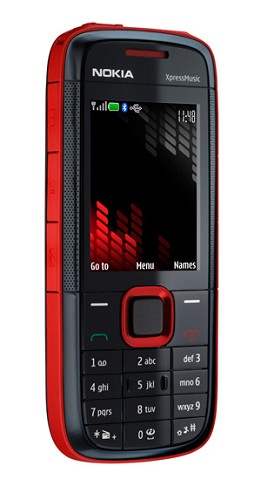
I have one of these - it has lots of physical buttons!


old3eyes
9158 posts

Uber Geek
+1 received by user: 1364

Subscriber

  #870434 2-Aug-2013 08:22
Send private message

I went from a Galaxy S2 to a Nexus 4 . I do miss the home button for the ability to just press it and see the time at nite or going home just being able to press it to see what the traffic cameras are at. Having to reach round the side to unlock is a pain especially when it's in a car cradle..


Regards,

Old3eyes


jeffnz
2870 posts

Uber Geek
+1 received by user: 666

Trusted
Lifetime subscriber

  #870441 2-Aug-2013 08:33
Send private message

timmmay:
jeffnz: My last 5 phones have had a home button and none have broken or even looked like breaking so wouldn't use that argument against them.

We get used to what we have, but it doesn't take long to get used to something else you just have to be happy with what you have and not buy because the grass looks greener or everyone else has one.


I have one of these - it has lots of physical buttons!


ahh yes the old Nokia's, can't recall how many of those I've had from places I've worked.


Galaxy S10


Garmin  Fenix 5


timmmay

20858 posts

Uber Geek
+1 received by user: 5350

Trusted
Lifetime subscriber

  #870456 2-Aug-2013 08:51
Send private message

They're a great phone. I can call people, nice physical keyboard to text quickly and without looking at it, useful calendar for reminders, and an alarm clock. It probably does other things but not that I use. Most people these days really want a multifunction device to play games, get email, surf the web, check facebook, that also works as a phone. I just need a phone, but the utility of a multifunction device comes in handy occasionally.


Support Geekzone with one-off or recurring donations Donate via PressPatron.
nzkiwiman
2585 posts

Uber Geek
+1 received by user: 390

Subscriber

  #870458 2-Aug-2013 08:53
Send private message

My two Androids have not had a home button, I just use the power button (biggest issue was the change when I went to the Nexus 4 and going from the top to the side)

In contrast my getting very close to 4 years old iPod Touch the home button on that has become a problem.

1eStar
1604 posts

Uber Geek
+1 received by user: 375


  #871002 2-Aug-2013 22:14
Send private message

Dingbatt: which smart cover app do you use? I tried a couple on my note2 and they drained the battery. Tia

Etcman
87 posts

Master Geek
+1 received by user: 4


  #871187 3-Aug-2013 13:05
Send private message

Some modifications exist out there where you can swipe the screen to wake it up. Haven't tried it myself, but will require a custom kernel.


Dingbatt
6804 posts

Uber Geek
+1 received by user: 3694

Lifetime subscriber

  #871293 3-Aug-2013 17:32
Send private message

1eStar: Dingbatt: which smart cover app do you use? I tried a couple on my note2 and they drained the battery. Tia


'Smart Cover Lite' by Skyarmy. Anecdotally it doesn't appear to have a huge affect on my battery.
I use it in conjunction with 'No Lock' by BoD which does away with the lockscreen so when I want to use NFC tags all I have to do is open the cover and touch the tag.
I reinstate the lockscreen when out and about.
So the only time I use the power button on my One is to shutdown or reboot the phone.


“We’ve arranged a society based on science and technology, in which nobody understands anything about science technology. Carl Sagan 1996


1eStar
1604 posts

Uber Geek
+1 received by user: 375


  #871390 3-Aug-2013 21:06
Send private message

Thanks. I've been trying another auto screen of of today and it seems ok on the battery too. I avoided the one you suggested based on the reviews and broken English. Hard to judge one free app from another. I tend not to use my hard key on the note 2 much, the back key is good for closing apps, I use it mostly for the long press app switching.


Move to New Zealand's best fibre broadband service (affiliate link). Free setup code: R587125ERQ6VE. Note that to use Quic Broadband you must be comfortable with configuring your own router.
Technofreak
6657 posts

Uber Geek
+1 received by user: 3477

Trusted

  #871418 3-Aug-2013 22:21
Send private message

I have one phone with a Home button and one without, neither are Android being a Nokia E7 and N9.  They both have their pluses and minuses and personal preference really dictates which one is best.

If I were to choose I'd probably prefer the physical Home button option like the E7 as it is a quick way to the Home screen from any app and it doesn't take up any screen real estate.  

The N9 doesn't even have a "soft" home button yet it still works very well as you're only ever one swipe away from either the notification screen, the app tray, or the open apps screen.


Sony Xperia XA2 running Sailfish OS. https://sailfishos.org The true independent open source mobile OS 
Samsung Galaxy Tab S6
Dell Inspiron 14z i5


1 | 2 
View this topic in a long page with up to 500 replies per page Create new topic


Geekzone Live »

Try automatic live updates from Geekzone directly in your browser, without refreshing the page, with Geekzone Live now.


Are you subscribed to our RSS feed? You can download the latest headlines and summaries from our stories directly to your computer or smartphone by using a feed reader.