Geekzone: technology news, blogs, forums
Guest
Welcome Guest.
You haven't logged in yet. If you don't have an account you can register now.


View this topic in a long page with up to 500 replies per page Create new topic
1 | 2 | 3
Dingbatt
6804 posts

Uber Geek
+1 received by user: 3694

Lifetime subscriber

  #1100735 2-Aug-2014 17:26
Send private message

LazyDr: People expecting lots of customisation I don't think really understand what the Google Launcher is aiming to do. It's essentially Google's version of a standard launcher, meant to be a potential substitute for things like TouchWiz and Sense, not Nova/Apex/Go etc. The idea being it has a simple easy to use interface, and easy access to Googles standout features e.g. Google Now

That's my opinion anyway


No, not expecting much. But it's even a stretch to compare it to sense or touchwiz. It is very basic and simple to use, but I couldn't even see how to add shortcuts to the home screen. I can only assume you have to push them from the browser.
I discovered that you add extra homescreens by dragging things to the right, and it automatically delete them when you remove the last item from them.
So, okay to test drive, but as I said earlier, Apex is my daily driver still.


“We’ve arranged a society based on science and technology, in which nobody understands anything about science technology. Carl Sagan 1996


LazyDr
262 posts

Ultimate Geek
+1 received by user: 31


  #1100759 2-Aug-2014 17:59
Send private message

Adding shortcuts is the same as in Sense, and I believe other stock launchers also: Long press on them in the app drawer and then you'll be able to place them on your homescreen.

I personally find it intuitive, but I'm a simple guy

freitasm

BDFL - Memuneh
80646 posts

Uber Geek
+1 received by user: 41030

Administrator
ID Verified
Trusted
Geekzone
Lifetime subscriber

  #1100766 2-Aug-2014 18:14
Send private message

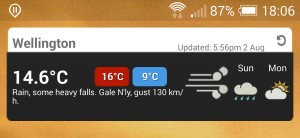
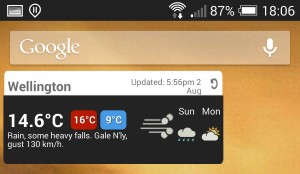
I like the simplicity and easy acess to search but... I don't like how widgets are not layout the same as HTC Sense.

For example with HTC Sense the Metroservice widget uses four across  one line (4 x 1) and the same widget on Google Launcher actually uses three across:


Referral links: Quic Broadband (free setup code: R587125ERQ6VE) | Samsung | AliExpress | Wise | Sharesies 


Support Geekzone by subscribing (browse ads-free), or making a one-off or recurring donation through PressPatron.


JaseNZ
2576 posts

Uber Geek
+1 received by user: 1489

ID Verified
Lifetime subscriber

  #1100787 2-Aug-2014 18:41
Send private message

I noticed that on my GS4 , so went on the hunt for a new weather app and found Go Weather EX , nice app and great transparent widget.


Ding Ding Ding Ding Ding : Ice cream man , Ice cream man


Dingbatt
6804 posts

Uber Geek
+1 received by user: 3694

Lifetime subscriber

  #1100864 2-Aug-2014 20:42
Send private message

LazyDr: Adding shortcuts is the same as in Sense, and I believe other stock launchers also: Long press on them in the app drawer and then you'll be able to place them on your homescreen.

I personally find it intuitive, but I'm a simple guy


Yeah sorry, not app launch shortcuts (just called 'apps' in the drawer in the likes of sense and touchwiz, if you long press on the homescreen) I meant shortcuts to browser bookmarks, file manager folders, music player albums, image galleries, tasker/trigger actions, etc. These look like they need to be pushed from the parent apps to the homescreens rather than being selected from the homescreen via a long press.

And Mauricio, will that widget not just allow a resize with a long press?


“We’ve arranged a society based on science and technology, in which nobody understands anything about science technology. Carl Sagan 1996


jarj
35 posts

Geek
+1 received by user: 9


  #1101161 3-Aug-2014 15:46
Send private message

Looks like shortcuts have been merged in to the widgets page, in line with what Samsung's skin does.


Shop now on Samsung phones, tablets, TVs and more (affiliate link).
pinkbellbird
210 posts

Master Geek
+1 received by user: 3


  #1101205 3-Aug-2014 17:01
Send private message

can anyone report back what this launcher is like in regards to battery consumption & phone speed?

My note 2 seems to slow up alot when I use other launchers, so am a lil skeptical tbh, although I do have alot of apps. but still.


📱 - I love Big Phones & I can not lie! #notelove


Samsung Galaxy Note II, Note 4, S7 Edge, Note 8, S22 Ultra


Dingbatt
6804 posts

Uber Geek
+1 received by user: 3694

Lifetime subscriber

  #1101219 3-Aug-2014 17:48
Send private message

jarj: Looks like shortcuts have been merged in to the widgets page, in line with what Samsung's skin does.


Quite right. Must have missed that as I tried to flick though about 20 pages of widgets. Has anyone discovered a way to get to the last page of widgets quickly? Bit of a PITA if you have to flick manually from the beginning to get to UCCW or Zooper widgets.
As to the power drain. My M7 battery seemed to deplete pretty quickly. But that was possibly due to it being used a lot while playing with GNL. Discussion online suggests that nexus devices must use a single core at low power when listening. I wonder what the power state is on others. Certainly it is only listening when the screen is on and in a homescreen. As mentioned earlier "okay google everywhere" doesn't work with NZ English as the default.
The biggest advantage I can see is handsfree in the car if you've got it set up to have the screen always on when docked/charging or always listening when docked/charging.


“We’ve arranged a society based on science and technology, in which nobody understands anything about science technology. Carl Sagan 1996


Dingbatt
6804 posts

Uber Geek
+1 received by user: 3694

Lifetime subscriber

  #1101983 4-Aug-2014 19:11
Send private message

I am grateful for this launcher to have been publicised, if for no other reason than it made me research the "okay Google" voice function. I have discovered that my launcher of choice, Apex, has had this capability since it's last two updates (mid June). It would seem the likes of ADW, Action, Nova, etc also have it. So instead of farting around for the last month trying different ways of triggering Google Now using gestures, I could have just activated the function.

So now the best of both worlds from my perspective.


“We’ve arranged a society based on science and technology, in which nobody understands anything about science technology. Carl Sagan 1996


1eStar
1604 posts

Uber Geek
+1 received by user: 375


  #1102237 4-Aug-2014 23:03
Send private message

I've been using home2shortcut for donkey's ages to trigger Google voice search instead of stupid s-voice on my note 2. And bluetooth launch to do it from the handsfree kit. The loss of touchwiz on my note would not be worth my while to use this crippled google now launcher. Mind you my note 2 does have google now baked in as a shortcut (long press) on the menu button from homescreen.

qraider
374 posts

Ultimate Geek
+1 received by user: 10


  #1103197 6-Aug-2014 12:13
Send private message

freitasm: I like the simplicity and easy acess to search but... I don't like how widgets are not layout the same as HTC Sense.

For example with HTC Sense the Metroservice widget uses four across  one line (4 x 1) and the same widget on Google Launcher actually uses three across:


I use Eye in Sky for my home screen weather - has customisable icons
Beautiful Widgets is another

Both have a range of widget sizes and icon packs


Current Phone:
- Android: Samsung SM-G900F Galaxy S5 (XT)
- Win Phone 8: Samsung ATIV S (XT)

Current Tablet:


- Acer Iconia 7" Android Tablet


Twitter: qraider


Shop now on Samsung phones, tablets, TVs and more (affiliate link).
Dairyxox
1595 posts

Uber Geek
+1 received by user: 455


  #1104031 7-Aug-2014 13:18
Send private message

I really like this launcher. Its made my Samsung Tab2 7.0 feel like a new device, and seems like a nice relief from touchwiz.
I'm not sure what it's missing from touchwiz (anyone know?), but all my normal stuff is there.

QUESTION:
The tab2 doesnt have a physical options button, it relies on on-screen buttons, BUT there is no on-screen button for options in the google launcher, so I cant (for example) un-hide hidden apps (unless I install yet another 3rd party app).
Am I missing something, wheres the options button in the app drawer?

NikT
1710 posts

Uber Geek
+1 received by user: 730

Trusted

  #1104230 7-Aug-2014 16:46
Send private message

Dairyxox: I really like this launcher. Its made my Samsung Tab2 7.0 feel like a new device, and seems like a nice relief from touchwiz.
I'm not sure what it's missing from touchwiz (anyone know?), but all my normal stuff is there.

QUESTION:
The tab2 doesnt have a physical options button, it relies on on-screen buttons, BUT there is no on-screen button for options in the google launcher, so I cant (for example) un-hide hidden apps (unless I install yet another 3rd party app).
Am I missing something, wheres the options button in the app drawer?


It's missing a lot that Touchwiz has - badge counters, Samsung widgets, infinite scrolling, overview of all pages + the ability to rearrange them, a widget menu in the app drawer, & a fair few other things (I am really not a fan of the Google Now launcher). You can long-press on an empty area of homescreen to bring up the settings, however.


Product Manager @ PB Tech

Smartphones @ PB Tech | Headphones @ PB Tech


Dairyxox
1595 posts

Uber Geek
+1 received by user: 455


  #1104305 7-Aug-2014 19:18
Send private message

Some of those touchwiz features are more gimmicks (like infinite scrolling). But thanks, its niceto know what im missing out on.

My question still stands though. Long pressing the home screen brings up settings. But the same does not work for the app draw, which I believe has different "options" to the home screen when the options button is pressed.

lchiu7
6521 posts

Uber Geek
+1 received by user: 543

Trusted

  #1104803 8-Aug-2014 12:19
Send private message

I "found" it because I follow Nexus on Google+

But since I have a N5 I have always been using it. My son has my old GN and he installed it and so far he likes it.

I hate Touchwiz which my wife has on her S4 but she is fine with it so I won't install it for her.


Staying in Wellington. Check out my AirBnB in the Wellington CBD.  https://www.airbnb.co.nz/h/wellycbd  PM me and mention GZ to get a 15% discount and no AirBnB charges.


1 | 2 | 3
View this topic in a long page with up to 500 replies per page Create new topic


Geekzone Live »

Try automatic live updates from Geekzone directly in your browser, without refreshing the page, with Geekzone Live now.


Are you subscribed to our RSS feed? You can download the latest headlines and summaries from our stories directly to your computer or smartphone by using a feed reader.