Geekzone: technology news, blogs, forums
Guest
Welcome Guest.
You haven't logged in yet. If you don't have an account you can register now.


View this topic in a long page with up to 500 replies per page Create new topic
1 | 2 
timmmay
20858 posts

Uber Geek
+1 received by user: 5350

Trusted
Lifetime subscriber

  #1405426 14-Oct-2015 09:09
Send private message

S4, custom ROM, it shows it's rarely awake - but that's since I charged last night. It's not continuous. I turn WiFi/4G off when I don't need them.


djtOtago
1181 posts

Uber Geek
+1 received by user: 605


  #1405452 14-Oct-2015 09:32
Send private message

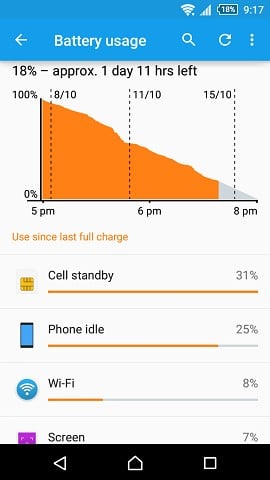
Sony has a custom view for battery usage.
But I assume with 31% standby I wouldn't have a solid line either.


Sony Z1 Compact.

edit: added phone model.

Batman
Mad Scientist
30012 posts

Uber Geek
+1 received by user: 6217

Trusted
Lifetime subscriber

  #1405515 14-Oct-2015 10:10
Send private message

In my experience with Android, if you want it to sleep, don't install ANY programs or run ANYTHING in the system (eg exchange mail). If you do, it doesn't sleep. I've given up on it :)


kiwifidget
"Cookie"
3640 posts

Uber Geek
+1 received by user: 1969

Lifetime subscriber

  #1405517 14-Oct-2015 10:14
Send private message

djtOtago: Sony has a custom view for battery usage.
But I assume with 31% standby I wouldn't have a solid line either.


Sony Z1 Compact.

edit: added phone model.

If you tap where it says "use since last full charge" you will get the other data which shows Awake etc.


Delete cookies?! Are you insane?!


1eStar

1604 posts

Uber Geek
+1 received by user: 375


  #1407541 16-Oct-2015 00:23
Send private message

Thanks guys. After taking a step back from my issue which was driving me barmy, I uninstalled the app giving me the greatest number of wakelocks, which solved the problem. Then have reinstalled. Problem still solved. The app was gravity screen, an awesome app! Not sure what the problem was.
I have two spare batteries, and was managing to go thru them in a day!

Now my android can sleep

1 | 2 
View this topic in a long page with up to 500 replies per page Create new topic


Geekzone Live »

Try automatic live updates from Geekzone directly in your browser, without refreshing the page, with Geekzone Live now.


Are you subscribed to our RSS feed? You can download the latest headlines and summaries from our stories directly to your computer or smartphone by using a feed reader.