Geekzone: technology news, blogs, forums
Guest
Welcome Guest.
You haven't logged in yet. If you don't have an account you can register now.


View this topic in a long page with up to 500 replies per page Create new topic
1 | 2 | 3 | 4 | 5 | 6 | 7 | 8
andrew027
1286 posts

Uber Geek
+1 received by user: 557


  #2387261 8-Jan-2020 11:20
Send private message

OVER: I don't think it's worth getting a 3XL over a 4XL unless you really were going to miss the fingerprint sensor. Like you say, the 4XL has a better screen, newer processor, better camera and will see longer support. Also the 3XL has a horribly ugly notch 😋

My 4XL is purchased from JB HiFi AU and works perfectly on Spark.


Thanks @OVER - appreciate the extremely prompt and helpful response!


I was in Singapore a couple of months ago and there were a few places that had big in-store displays of the 4XL. I got about 5 minutes with one in hand and was very tempted, but just couldn't afford it then as I was on the way home from five weeks in Europe and didn't have enough funds left on my cards to spend on a new phone.


lchiu7
6521 posts

Uber Geek
+1 received by user: 543

Trusted

  #2387341 8-Jan-2020 13:02
Send private message

I got my 4XL for Christmas :-)  Been playing with it since then and have the following obversations. 


It's certainly much faster than the moto Z2 I was using (Snapdragon 825) running Android 8 and much faster camera.


I don't like gesture navigation so turned it off and back to the former back home and task keys. But having used Android 9 on my Nexus 6 with a hacked ROM, I liked the way when you pressed the task button it showed full screen images of the running task. So I am enjoying that feature on the XL. Also when you are editing using Gboard, having the magnifying glass come up is nice.


The camera is pretty good. Was out with the family with dinner the other night in a darkened restaurant and my wife normally takes pics with her Iphone 10XR. But I took some with the XL and we all agreed the pics were better, Not a scientific test but there it is.


Things I don't like or don't work


Soli - that has been widely documented and I don't really care


Face Unlock - I don't like that as the only biometric unlocking option. It's fast enough but it has broken two of my NZ banking apps (ANZ and Westpac) and one US banking app. The only apps that it supports are another US bank I use, Ebay and I think Microsoft Authenticator but since I am between assignments I can't check that one until I get back into a corporate environment. I don't use Authenticator for my personal Microsoft account since at home when I use it, the phone isn't always near me.


On my Z2 I could long press the finger print reader to lock the phone. On the XL I have to press the power button which is slightly annoying.,


Driving Mode doesn't seem to work. On the Z2 I could have Android Auto startup on the phone when it connected to the car's BT. On the XL no matter what settings I have AA won't start. In fact this is a real strange on since this morning when I went out I saw for the first time a notification that Driving Mode was enabled and then AA started.  That's the only time I have ever seen that notification and when Driving Mode is enabled, I have the option set to start AA. So I was thinking that AA not starting was an AA issue but it appears to be the XL not detecting Driving Mode.


Any others with this experience?


But in summary as a Google phone it's going to get all the updates so I am pretty happy.


Staying in Wellington. Check out my AirBnB in the Wellington CBD.  https://www.airbnb.co.nz/h/wellycbd  PM me and mention GZ to get a 15% discount and no AirBnB charges.


everettpsycho
668 posts

Ultimate Geek
+1 received by user: 270


  #2387391 8-Jan-2020 14:27
Send private message

I have similar issues with Android auto on my pixel 3xl. It used to work fine then the December update wrecked the phone so I had to reset it and I've not managed to get it working since. I've not looked in to it too much but it's a weird issue I can't see any reason for, set up wise it's identical to how I had it before the reset.


andrew027
1286 posts

Uber Geek
+1 received by user: 557


  #2387461 8-Jan-2020 15:17
Send private message

lchiu7: Driving Mode doesn't seem to work. On the Z2 I could have Android Auto startup on the phone when it connected to the car's BT. On the XL no matter what settings I have AA won't start. In fact this is a real strange on since this morning when I went out I saw for the first time a notification that Driving Mode was enabled and then AA started.  That's the only time I have ever seen that notification and when Driving Mode is enabled, I have the option set to start AA. So I was thinking that AA not starting was an AA issue but it appears to be the XL not detecting Driving Mode.


everettpsycho: I have similar issues with Android auto on my pixel 3xl. It used to work fine then the December update wrecked the phone so I had to reset it and I've not managed to get it working since. I've not looked in to it too much but it's a weird issue I can't see any reason for, set up wise it's identical to how I had it before the reset.


I wonder if this is an Android Auto thing with the bluetooth connection, rather than a Pixel thing? My car has a wireless charging mat in the centre console but my old HTC phone doesn't support wireless charging, so on longer trips I plug the phone into a USB socket to keep the charge up (it will discharge from 100 to 0% in about six hours, even with almost no use at all). When I plug my phone into the USB it starts AA straight away. If I don't plug the phone in, it connects to the car's bluetooth but never starts AA.


lchiu7
6521 posts

Uber Geek
+1 received by user: 543

Trusted

  #2387465 8-Jan-2020 15:34
Send private message

andrew027:


lchiu7: Driving Mode doesn't seem to work. On the Z2 I could have Android Auto startup on the phone when it connected to the car's BT. On the XL no matter what settings I have AA won't start. In fact this is a real strange on since this morning when I went out I saw for the first time a notification that Driving Mode was enabled and then AA started.  That's the only time I have ever seen that notification and when Driving Mode is enabled, I have the option set to start AA. So I was thinking that AA not starting was an AA issue but it appears to be the XL not detecting Driving Mode.


everettpsycho: I have similar issues with Android auto on my pixel 3xl. It used to work fine then the December update wrecked the phone so I had to reset it and I've not managed to get it working since. I've not looked in to it too much but it's a weird issue I can't see any reason for, set up wise it's identical to how I had it before the reset.


I wonder if this is an Android Auto thing with the bluetooth connection, rather than a Pixel thing? My car has a wireless charging mat in the centre console but my old HTC phone doesn't support wireless charging, so on longer trips I plug the phone into a USB socket to keep the charge up (it will discharge from 100 to 0% in about six hours, even with almost no use at all). When I plug my phone into the USB it starts AA straight away. If I don't plug the phone in, it connects to the car's bluetooth but never starts AA.


Well with my Moto Z2 whether it was charging or not, as soon as it connected to BT, AA would start. As I mentioned in the original post, just once when I started driving, I saw the Driving Mode notification come on and then AA started. The option for Driving Mode on the Pixel 4 is 1) Open AA (which I have chosen)  2) Turn on Dot Not Disturb 3) Nothing.  But I have only seen Driving Mode come on that once so I suspect the issue is Driving Mode is not being detected so AA won't start. There are tons of message on the AA forums relating the same issue with no definite answer.


Staying in Wellington. Check out my AirBnB in the Wellington CBD.  https://www.airbnb.co.nz/h/wellycbd  PM me and mention GZ to get a 15% discount and no AirBnB charges.


GoogleGeek88
124 posts

Master Geek
+1 received by user: 51


  #2387636 8-Jan-2020 21:13
Send private message

My AA (on phone) driving mode worked pretty reliably with my P2XL but has been less so on my XL.

Anyhow, I if it was a choice between a 4XL (the smaller 4 has average battery life) then definitely get the newer model.

The 4 has an excellent camera and the on-device Assistant and the extra processing horsepower is definitely a must have.

I got the 64GB orange model and I'm not unhappy with the reduced space at all given my usage.

All in all, I would definitely recommend the 4XL.


Shop now for Lego sets and other gifts (affiliate link).
lchiu7
6521 posts

Uber Geek
+1 received by user: 543

Trusted

  #2389357 9-Jan-2020 22:34
Send private message

Has anybody got driving mode working on the 4 XL?  These are the settings from inside AA


Click to see full size


Then when you choose 


Click to see full size


Then when you chose more options you can tell the 4XL to ask you to confirm Driving Mode.  For me I have only ever seen that message come up once but I have driven my car with the phone many times. That would explain why AA doesn't start up but creates a different questions - why is the 4XL not detecting driving mode. It can't be using Soli since that would mean Driving Mode would only work in a few countries.


Staying in Wellington. Check out my AirBnB in the Wellington CBD.  https://www.airbnb.co.nz/h/wellycbd  PM me and mention GZ to get a 15% discount and no AirBnB charges.


andrew027
1286 posts

Uber Geek
+1 received by user: 557


  #2389503 10-Jan-2020 09:26
Send private message

lchiu7: These are the settings from inside AA ...


Click to see full size


Then when you chose more options you can tell the 4XL to ask you to confirm Driving Mode.  For me I have only ever seen that message come up once... 


I don't own a 4XL yet - as mentioned earlier in the thread I'm going to pick one up in Australia in a couple of months' time - so this is just speculation, but... a couple of thoughts:


What happens if you disable the "When driving is detected" option, so Driving Mode is only dependent on the phone connecting to the car's bluetooth system? Step #4 in these Google instructions seems to imply that's all you need to do. 


What happens if you disable the "Ask before turning on driving mode" option, so AA doesn't need you to respond to the message (that you're not seeing)? 


I also note that your bluetooth connection is to "AVH-X7800BT" (a Pioneer head unit?). Pioneer's website links to this list of Android Auto-compatible after-market stereos and the X7800BT isn't on it (unless your stereo was factory-installed by the vehicle manufacturer so isn't considered after-market?). Probably doesn't matter with regards to your phone entering Driving Mode though... 


[Edited to correct formatting]


lchiu7
6521 posts

Uber Geek
+1 received by user: 543

Trusted

  #2389649 10-Jan-2020 13:54
Send private message

Tried turning off the option to start Android Auto if driving mode is enabled to just Bluetooth and that didn't work either.

The unit I'm connecting to is not an Android Auto device in the car, it's just a JVC head unit that has Bluetooth connectivity. As I said in an earlier post my other phone would start up Android auto itself as soon as it connected to the JVC head unit. The Pixel 4 XL won't do it and that might be something to do with driving mode or some other Android 10 Pixel 4 XL feature.


While the Pixel 4XL is way faster than my previous phone, the loss of much functionality I had before (finger print unlock, AA starting) doesn't offer sufficient compensation to this loss of funcationality versus speed increase. Well IMHO. I might have been better getting a OnePlus 7T


Staying in Wellington. Check out my AirBnB in the Wellington CBD.  https://www.airbnb.co.nz/h/wellycbd  PM me and mention GZ to get a 15% discount and no AirBnB charges.


muppet
2644 posts

Uber Geek
+1 received by user: 1662

Trusted

  #2390800 13-Jan-2020 09:38
Send private message

Got my P4XL over Christmas when I was in Aus.


I love it, I agree that only Face Unlock is a bit annoying sometimes, but it does "just work" 99.9% of the time, but it's annoying now to have to put a PIN number into access my ASB App.  Hopefully as Face Unlock becomes more popular on new devices others might support it.


Going from my Pixel 1, mostly I just notice how much faster it is, and the camera is better (though the Pixel 1 still takes great photos, especially with the hacked Camera that supports Portrait photos).


Motion Sense was interesting to play with in Aus, but yea, I don't really miss it.


The other thing I like is the onboard Google Assistant, it's just so much faster than the old Pixel 1 version.  I can't really tell if that's just because of how slow the P1 is.  It didn't even seem slow to me, until I got the P4 and now it's night and day!


Was it worth what I paid for it? Probably not.  But it's not a Samsung.  The OnePlus would be a great phone, but the Pixel camera and nice stock Android apps (well, their Google apps now, the dialer, contacts etc, not stock Android) are what I'm used to, so this was a good upgrade.


GoogleGeek88
124 posts

Master Geek
+1 received by user: 51


  #2390955 13-Jan-2020 12:25
Send private message

muppet:

The other thing I like is the onboard Google Assistant, it's just so much faster than the old Pixel 1 version.  I can't really tell if that's just because of how slow the P1 is.  It didn't even seem slow to me, until I got the P4 and now it's night and day!


Actually that's something I didn't mention. The assistant is SO much better than previous Pixels because of the on-device processing.

It actually feels like a present assistant rather than a web query service.


Shop now on Samsung phones, tablets, TVs and more (affiliate link).
lchiu7
6521 posts

Uber Geek
+1 received by user: 543

Trusted

  #2390971 13-Jan-2020 13:01
Send private message

muppet:


Got my P4XL over Christmas when I was in Aus.


I love it, I agree that only Face Unlock is a bit annoying sometimes, but it does "just work" 99.9% of the time, but it's annoying now to have to put a PIN number into access my ASB App.  Hopefully as Face Unlock becomes more popular on new devices others might support it.


Going from my Pixel 1, mostly I just notice how much faster it is, and the camera is better (though the Pixel 1 still takes great photos, especially with the hacked Camera that supports Portrait photos).


Motion Sense was interesting to play with in Aus, but yea, I don't really miss it.


The other thing I like is the onboard Google Assistant, it's just so much faster than the old Pixel 1 version.  I can't really tell if that's just because of how slow the P1 is.  It didn't even seem slow to me, until I got the P4 and now it's night and day!


Was it worth what I paid for it? Probably not.  But it's not a Samsung.  The OnePlus would be a great phone, but the Pixel camera and nice stock Android apps (well, their Google apps now, the dialer, contacts etc, not stock Android) are what I'm used to, so this was a good upgrade.


Can see if driving mode works?  Turn on the facility set the feature to ask to turn it on, go for a drive and see if the option pops up?  It doesn't for me so that means I can never get Android Auto to work.


Staying in Wellington. Check out my AirBnB in the Wellington CBD.  https://www.airbnb.co.nz/h/wellycbd  PM me and mention GZ to get a 15% discount and no AirBnB charges.


muppet
2644 posts

Uber Geek
+1 received by user: 1662

Trusted

  #2391003 13-Jan-2020 13:42
Send private message

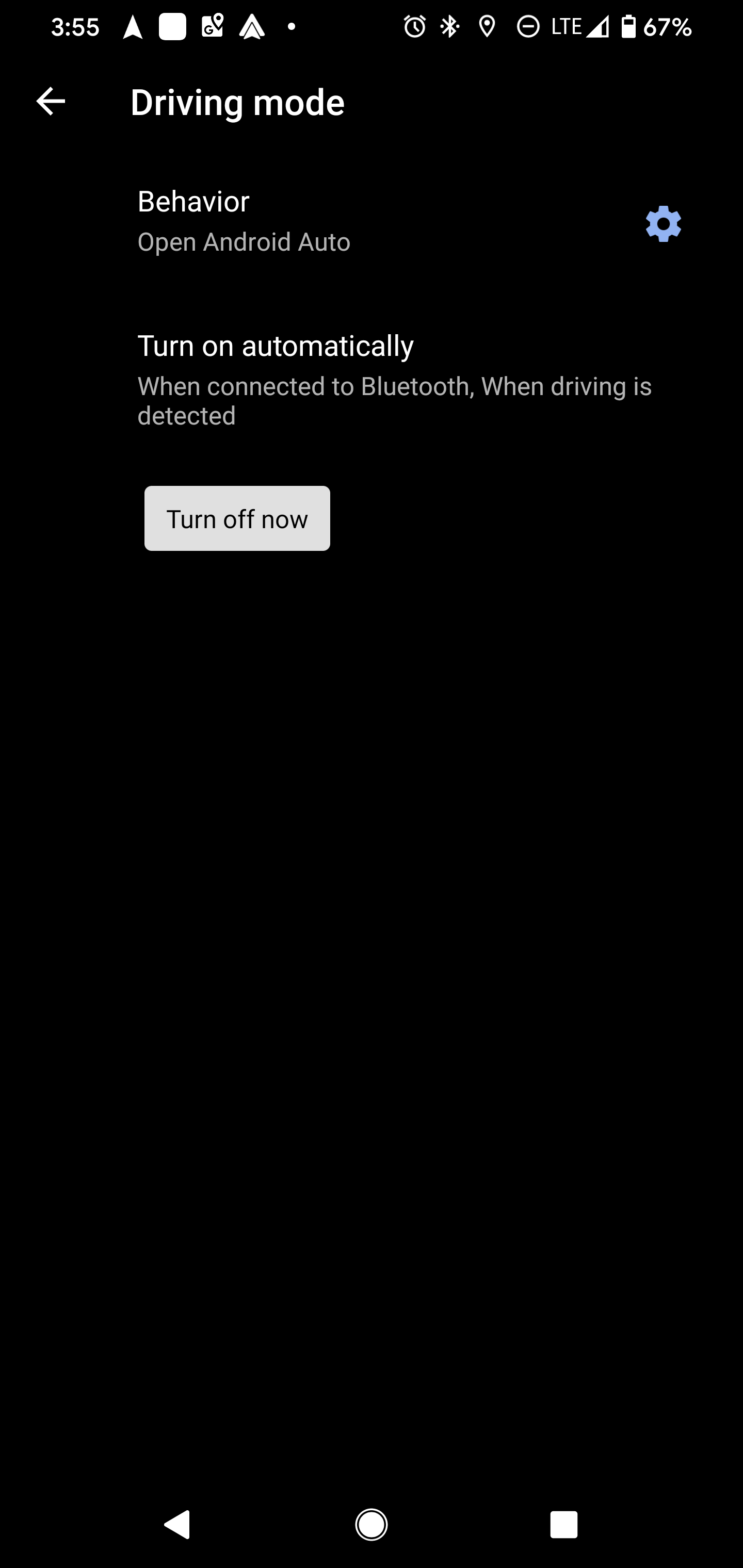
I don't have the settings you have.


I have 3 options:


"When connected to Bluetooth"


"When driving is detected"


"Turn on Bluetooth Automatically"


I don't have "Ask" or "Pocket Detection"


Cue spooky music.


I went for a drive yesterday and it seemed to go into DND with no problems.


lchiu7
6521 posts

Uber Geek
+1 received by user: 543

Trusted

  #2391018 13-Jan-2020 14:20
Send private message

I have the following settings from Android Auto


Click to see full size


Driving Mode never comes on so that means Android auto never starts up.  And I tried to set ask to turn on driving mode just to see if the phone detected it and it never asked the question so I presume it never detects it. How do you know driving mode is enabled when you're driving? Do you get a confirmation message?


Staying in Wellington. Check out my AirBnB in the Wellington CBD.  https://www.airbnb.co.nz/h/wellycbd  PM me and mention GZ to get a 15% discount and no AirBnB charges.


muppet
2644 posts

Uber Geek
+1 received by user: 1662

Trusted

  #2391085 13-Jan-2020 14:53
Send private message

I know it's working because Do Not Distrub turns on.


I don't have those bottom two settings on Android Auto.


1 | 2 | 3 | 4 | 5 | 6 | 7 | 8
View this topic in a long page with up to 500 replies per page Create new topic


Geekzone Live »

Try automatic live updates from Geekzone directly in your browser, without refreshing the page, with Geekzone Live now.


Are you subscribed to our RSS feed? You can download the latest headlines and summaries from our stories directly to your computer or smartphone by using a feed reader.