If you follow the instructions in our Bluetooth Guides and still can't get the LAN Access connection using Bluetooth, check the following:
The 3COM Bluetooth dongles do not support LAN Access profile
The Microsoft Bluetooth stack do not support LAN Access or Serial profiles
Personal firewall blocking localhost communication; you might want to deactivate the software and try connecting again. If it works your options is to create rules to allow the communication or change the software.
BT adapter on desktop/laptop without DNS entry: make sure there's a DNS entry on the Bluetooth Adapter, even if you're using DHCP.
ICS set the wrong way: ICS must be set from the adapter connected to the Internet to the Bluetooth adapter. Check the Bluetooth Guides again, if you have the other way around it won't work.
BT adapter on desktop/laptop must be 192.168.0.1: ICS requires this address. If you can't use it, try NAT32 and configure another address with this software.
Other NIC using 192.168.0.1 in your network (routers can give this address, in this case reserve this on the router): check the previous tip.
For Pocket PCs download VxUtil and try PING www.wired.com to check your connection is ok.
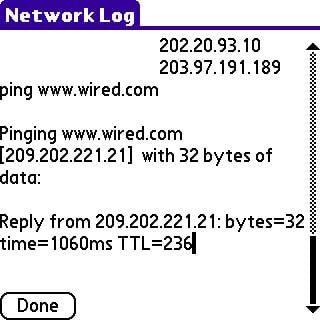
For Palm devices look in our Palm Bluetooth Guide for instructions on how to PING using the builtin utiity.
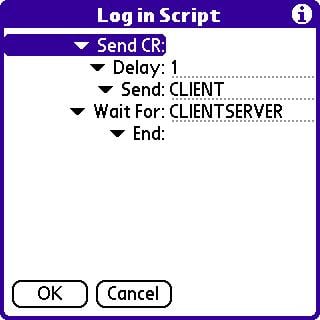
Still for Palm devices, if you get a "Error: PPP timeout 0x1231" you may need to enter a script. The script should be entered in your network configuration, tap the button Script and enter the following:
If e-mail works fine, MSN Messenger and PING are all ok, but Pocket Internet Explorer (on Pocket PC) can't find any page, run welcome.exe from \windows folder on Pocket PC to recreate configuration files used by this software.
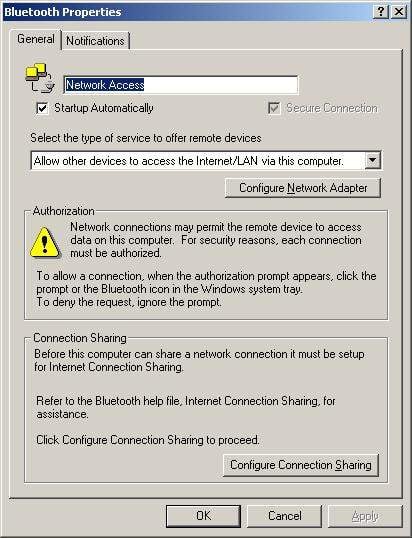
Check that your BT software (desktop/laptop) is configured to "Allow other devices to access the Internet/LAN via this computer", as in the image below (for widcomm versions 1.3.2.7 and up):