Geekzone: technology news, blogs, forums
Guest
Welcome Guest.
You haven't logged in yet. If you don't have an account you can register now.


rossmcm

111 posts

Master Geek
+1 received by user: 11


#303873 16-Mar-2023 13:50

I recently acquired a GPS pet tracker.  It relies on Vodafone 2G service for operation, which isn't so great longer-term, but it works for now.


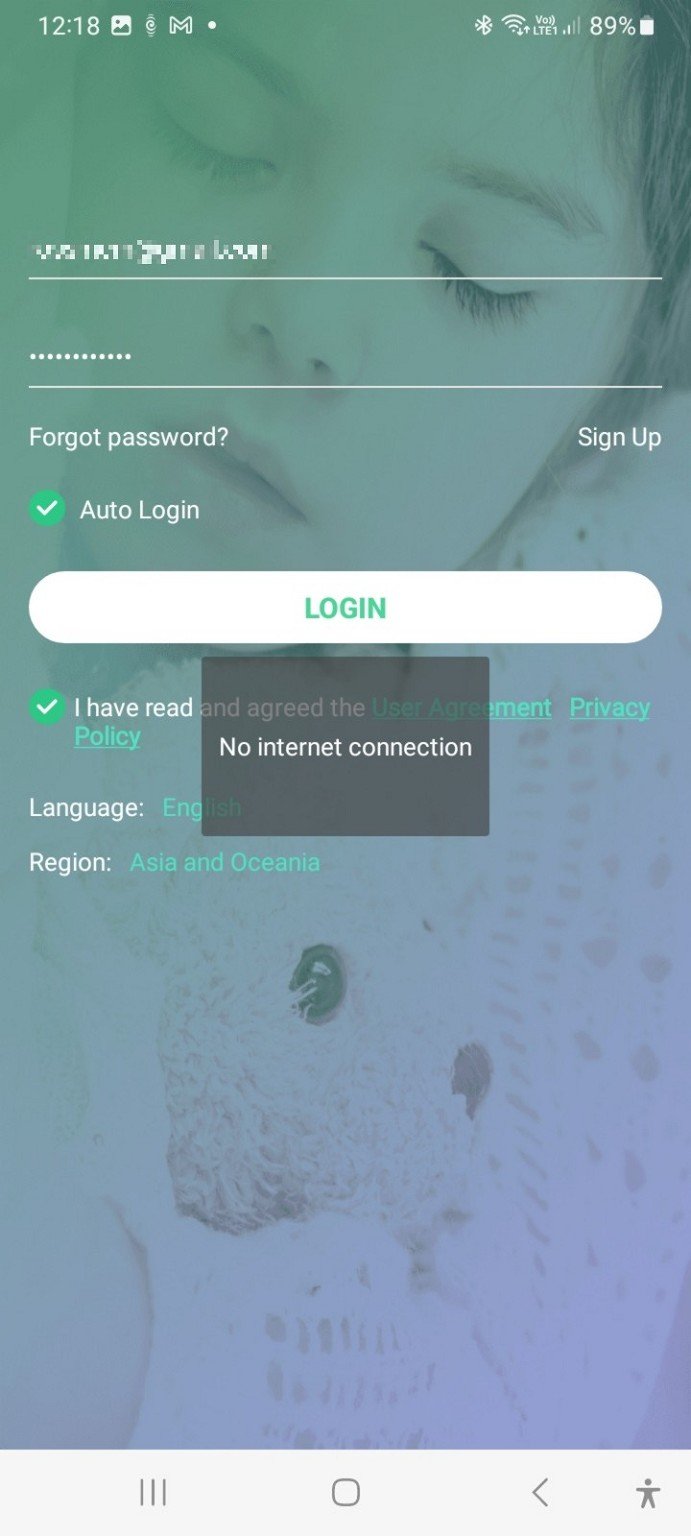
At least it was working.  About 5 days ago something major broke.  The [completely awful] SeTracker2 app suddenly started reporting "No Internet Connection" on both devices (phone, tablet) it was installed on.


After working with the supplier of the pet tracker, we have established the following:


It's not a mobile reception issue.  It's possible to send the device an SMS, and to call it (it has a microphone so when it answers you can listen to the surroundings) and that all works still.


The tracker is supplied with a vodafone SIM, but my home and work and mobile are all 2degrees.  This seems to be important.  The supplier has replicated the issue on her phone when she is connected to her wifi, but it works if she is out of Wifi coverage and using phone data.  Her wifi is 2degrees, her phone is with Vodafone.


I need to reiterate that this wasn't an issue last week, this week it is. 


This is becoming something of an epidemic problem for the supplier of the pet tracker - they have other customers reporting the same issue.


I'm thinking I need to be hassling 2 degrees but would be interested in hearing from anyone here who has an inkling of what is going on?





Filter this topic showing only the reply marked as answer View this topic in a long page with up to 500 replies per page Create new topic
 1 | 2
michaelmurfy
meow
13579 posts

Uber Geek
+1 received by user: 10910

Moderator
ID Verified
Trusted
Lifetime subscriber

  #3050861 16-Mar-2023 14:23
Send private message

2degrees does not have 2G service. Only Vodafone does these days.


Michael Murphy | https://murfy.nz
Referral Links: Quic Broadband (use R122101E7CV7Q for free setup)

Are you happy with what you get from Geekzone? Please consider supporting us by subscribing.
Opinions are my own and not the views of my employer.


Linux
12173 posts

Uber Geek
+1 received by user: 8469

Trusted
Lifetime subscriber

  #3050862 16-Mar-2023 14:28
Send private message

@rossmcm 2degrees turned off the 2G / GPRS network a few years back


Stop buying 2G / GPRS only devices!


Edit: 2018 was the close down


richms
29098 posts

Uber Geek
+1 received by user: 10208

Trusted
Lifetime subscriber

  #3050864 16-Mar-2023 14:34
Send private message

I believe that 2G suffers the same problem that 3G does where it only supports so many data sessions per site, which is why 4g is better.


You will find loads of posts about dysfunctional 3g data on here, and I don't think anyone is using 2g for anything anymore but I would expect the same problems to be posted if they were.


4G IOT chipsets have been available for years now, and yeah they are about 5x the price of a 2g one, but really there is no excuse for anyone selling something that is 2g these days as NZ is rare in that we still have the network here.


Richard rich.ms


wellygary
8810 posts

Uber Geek
+1 received by user: 5287


  #3050871 16-Mar-2023 15:04
Send private message

I'm confused, what has stopped working, the pet tracking device ?? or is it sometime the app reports no connection???


You appear to think its not the tracking device but the app that is the problem, 


iI would contact the developer, a "no internet" error, may simply be the default response if it cannot connect to the cloud server where the Devices are logged in to....


Your phone/ipad are  not likely using 2G anyway ... 


rossmcm

111 posts

Master Geek
+1 received by user: 11


  #3050898 16-Mar-2023 15:38

> I'm confused, what has stopped working, the pet tracking device ?? or is it sometime the app reports no connection???


The pet tracker itself I believe works, as far as I can tell - without being able to get into the app I'm a bit limited.  I can phone the tracker and listen to the surroundings.


The fact that the problem was reported by a number of users of the product at the same time tells me it's not a hardware issue. 


The app fails when I try to log in - it reports:  


If I try to log in with a different (deliberately incorrect) password the result is the same.


The supplier suggested I install and try another app known to work with the tracker.  Same result.


I am at a loss to explain how logging on to an app with a bad password could even involve the 2G Vodafone network the pet tracker is connected to.


Is it possible that 2degrees is blocking requests to the tracker app web server because it has found its way onto a blacklist (the app is riddled with advertisements for dodgy-sounding apps)?  


Linux
12173 posts

Uber Geek
+1 received by user: 8469

Trusted
Lifetime subscriber

  #3050904 16-Mar-2023 15:53
Send private message

No way it would be blocked by the carriers


Shop now for Dell laptops and other devices (affiliate link).
tripp
3848 posts

Uber Geek
+1 received by user: 1220

Trusted
Lifetime subscriber

  #3050905 16-Mar-2023 15:56
Send private message

have you uninstalled and re-installed the app?


You will have no luck at all with 2d as they will not waste time looking into it.  It may have something to do with a port that the app needs and if 2d has put more traffic / ips etc on CGNAT.


They won't undo this for a pet tracker, you need to talk to the supplier of the app / tracker and see if it needs some random port that 2d could be blocking now behind cgnat


richms
29098 posts

Uber Geek
+1 received by user: 10208

Trusted
Lifetime subscriber

  #3050909 16-Mar-2023 15:58
Send private message

Oh well that is different, you are not able to get logged in on the app over 4g, nothing to do with th 2g of the tracker.


Somewhere between you and their cloud server that you're logging into, its not getting thru. You would need to see what its trying to access or have the app vendors provide that information, then traceroute to the server on your phone and see if you're getting there. If they have it behind cloudflare or something then you may be coming from IP addresses that have a bad reputation and the app is not able to show the challenge to you in order to log in.


Richard rich.ms

wellygary
8810 posts

Uber Geek
+1 received by user: 5287


  #3050910 16-Mar-2023 16:00
Send private message

rossmcm:


If I try to log in with a different (deliberately incorrect) password the result is the same.


If other apps dont work and bad passords generate the same error my money is on a failure of the Cloud Server, 


Contact the device seller and get them to look into it, 


I'm assuming you pay some form of subscription to keep the thing alive??- if so they should respond,


If it was a once only purchase , Tney may have folded up shop 


yitz
2238 posts

Uber Geek
+1 received by user: 594


  #3050927 16-Mar-2023 16:45
Send private message

If we are to believe the server addresses listed on this page:
https://setracker.eu/faq 


The IP block for server address listed for "Asia and Australia"/"Asia and Oceania" is Amazon ap-southeast-1


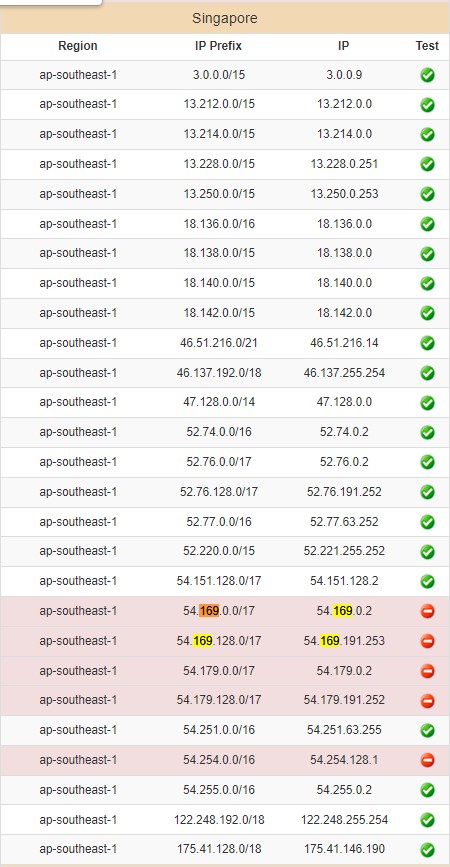
The Amazon reachability test IP for that ap-southeast-1 IP block is 54.169.0.2


2degrees seem to have trouble reaching that test IP.


2degrees dropped their Cogent upstream sometime on Monday as I recall Cogent carried a lot of traffic for the ap-southeast AWS region so could be some stale routes being propagated?


Another one for @Sounddude ?


SomeoneSomewhere
1882 posts

Uber Geek
+1 received by user: 1086

Lifetime subscriber

  #3051032 16-Mar-2023 21:30
Send private message

Can confirm that on a 2d fibre connection, that address is unreachable via ping, and traceroute shows it hitting the snap network then dying.


On a Kogan Mobile connection it works fine.


Shop now at Mighty Ape (affiliate link).
michaelmurfy
meow
13579 posts

Uber Geek
+1 received by user: 10910

Moderator
ID Verified
Trusted
Lifetime subscriber

  #3051033 16-Mar-2023 21:33
Send private message

Moved to 2degrees subforum and updated title.


Michael Murphy | https://murfy.nz
Referral Links: Quic Broadband (use R122101E7CV7Q for free setup)

Are you happy with what you get from Geekzone? Please consider supporting us by subscribing.
Opinions are my own and not the views of my employer.


rossmcm

111 posts

Master Geek
+1 received by user: 11


  #3051116 17-Mar-2023 10:22

I get this from tracert:


From my work (ISP 2deg):


> tracert 54.169.0.2


Tracing route to ec2-54-153-6-9.us-west-1.compute.amazonaws.com [54.153.6.9]
over a maximum of 30 hops:


  1     1 ms     1 ms     1 ms  fritz.box [192.168.178.1]
  2     *        *        *     Request timed out.
  3     *        *        *     Request timed out.
...


 30     *        *        *     Request timed out.


... (how come it gets no further than my FritzBox?) and this from another company (ISP Spark I think):


> tracert 54.169.0.2


Tracing route to ec2-54-169-0-2.ap-southeast-1.compute.amazonaws.com [54.169.0.2]
over a maximum of 30 hops:


  1     1 ms    <1 ms    <1 ms  my.firewall [10.239.1.254]
  2     3 ms     2 ms     3 ms  lo-vprn-100.br1.mdr.vygr.net [114.23.3.255]
  3    59 ms    67 ms     3 ms  ae-0-621.cr1.mdr.vygr.net [114.23.3.230]
  4     3 ms     3 ms     3 ms  ae9-143.akbr6.global-gateway.net.nz [122.56.118.157]
  5     3 ms     2 ms     3 ms  ae7-2.akbr7.global-gateway.net.nz [122.56.119.53]
  6    49 ms    26 ms    26 ms  xe7-0-3.sebr3.global-gateway.net.nz [122.56.119.130]
  7   122 ms   122 ms   122 ms  16509.sgw.equinix.com [27.111.228.87]
  8   121 ms   119 ms   120 ms  52.93.10.178
  9     *        *        *     Request timed out.
 10   122 ms   122 ms   121 ms  52.93.11.30
 11   121 ms   121 ms   122 ms  52.93.8.185
 12   123 ms   122 ms   122 ms  52.93.10.81
 13     *        *        *     Request timed out.
 14     *        *        *     Request timed out.
 15     *        *        *     Request timed out.
 16     *        *        *     Request timed out.
 17     *        *        *     Request timed out.
 18     *        *        *     Request timed out.
 19   122 ms   121 ms   121 ms  ec2-54-169-0-2.ap-southeast-1.compute.amazonaws.com [54.169.0.2]


Trace complete.


yitz
2238 posts

Uber Geek
+1 received by user: 594


  #3051128 17-Mar-2023 11:06
Send private message

rossmcm:


... (how come it gets no further than my FritzBox?)


Maybe the firewall turned right up blocking all external ICMP? Also your traceroute targets are different?


When you visit http://54.169.0.2/ do you instantly get a Not Found message or does it eventually time out?
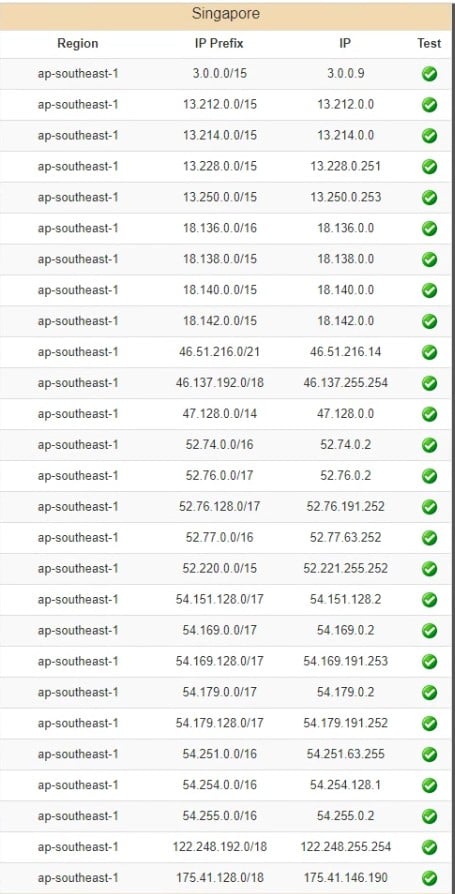
I suppose you can also check  http://ec2-reachability.amazonaws.com/ under ASIA PACIFIC Singapore in particular the IP block 54.169.0.0/17


rossmcm

111 posts

Master Geek
+1 received by user: 11


  #3051133 17-Mar-2023 11:29

Well spotted on the different targets! - my mistake but 54.169.0.2 gives the same result.


tracert to any other ip address is OK:


Tracing route to elecsyn.com [35.213.135.209]
over a maximum of 30 hops:


  1    <1 ms     1 ms    <1 ms  fritz.box [192.168.178.1]
  2     3 ms     5 ms     5 ms  41.7.69.111.static.snap.net.nz [111.69.7.41]
  3     3 ms     2 ms     5 ms  default-rdns.vocus.co.nz [101.98.5.230]
  4    27 ms    26 ms    25 ms  as9790.bdr04.syd03.nsw.vocus.network [175.45.103.17]
  5    26 ms    26 ms    27 ms  be1002.bdr04.syd03.nsw.vocus.network [175.45.103.16]
  6   121 ms   117 ms   120 ms  be114.cor02.syd04.nsw.vocus.network [114.31.192.44]
  7   120 ms   120 ms     *     be201.lsr01.brdg.nsw.vocus.network [103.1.77.8]
  8     *      117 ms     *     be803.lsr01.stpk.wa.vocus.network [103.1.76.145]
  9   119 ms   121 ms   118 ms  be201.cor01.per04.wa.vocus.network [103.1.77.105]
 10   120 ms   117 ms   118 ms  be201.bdr01.sin01.sin.vocus.network [114.31.206.51]
 11   118 ms   118 ms   120 ms  as15169.singapore.megaport.com [103.41.12.7]
 12   120 ms   120 ms   118 ms  209.135.213.35.bc.googleusercontent.com [35.213.135.209]


Trace complete.


but tracert to 54.169.0.2:


Tracing route to ec2-54-169-0-2.ap-southeast-1.compute.amazonaws.com [54.169.0.2]
over a maximum of 30 hops:


  1     *        1 ms     2 ms  fritz.box [192.168.178.1]
  2     *        *        *     Request timed out.
  3     *        *        *     Request timed out.
...


which I guess is snap refusing to play ball with that IP.


Browser request to http://54.169.0.2/  times out after 10 sec or so ("took too long to respond").


AWS reachability from my work (ISP 2deg) shows:


whereas via a Spark customer I get:


 1 | 2
Filter this topic showing only the reply marked as answer View this topic in a long page with up to 500 replies per page Create new topic


Geekzone Live »

Try automatic live updates from Geekzone directly in your browser, without refreshing the page, with Geekzone Live now.


Are you subscribed to our RSS feed? You can download the latest headlines and summaries from our stories directly to your computer or smartphone by using a feed reader.