Geekzone: technology news, blogs, forums
Guest
Welcome Guest.
You haven't logged in yet. If you don't have an account you can register now.


vting

10 posts

Wannabe Geek


#1642 31-May-2004 13:17
Send private message

Hello all!

I need help with setting my HP 2210 to connect to GPRS (internet) via bluetooth to my Panasonic X70 phone using Vodafone AU.

I can get the 2210 to connet to the phone via bluetooth with the help of the setting guide on Geekzone but after that the setting found on Geekzone does not connect to GPRS.

I rung Vodafone AU and was given a setting to try, I think it work but I need to enter a string in terminal screen every time I want to connect.

I want to know is there a way to connect without the terminal screen.

Thanks


Create new topic
freitasm
BDFL - Memuneh
80647 posts

Uber Geek
+1 received by user: 41030

Administrator
ID Verified
Trusted
Geekzone
Lifetime subscriber

#6188 31-May-2004 13:24
Send private message

What string you have to enter?


Referral links: Quic Broadband (free setup code: R587125ERQ6VE) | Samsung | AliExpress | Wise | Sharesies 


Support Geekzone by subscribing (browse ads-free), or making a one-off or recurring donation through PressPatron.


vting

10 posts

Wannabe Geek


#6189 31-May-2004 13:39
Send private message

This is what I was given...

atz (tap Enter)

at+cgdcont=1,"IP","vfinternet.au" (tap Enter)

atd*99***1# (tap Enter)


vting

10 posts

Wannabe Geek


#6190 31-May-2004 13:40
Send private message

if you want I can post the full setting I was from Vodafone AU.


freitasm
BDFL - Memuneh
80647 posts

Uber Geek
+1 received by user: 41030

Administrator
ID Verified
Trusted
Geekzone
Lifetime subscriber

#6200 31-May-2004 17:29
Send private message

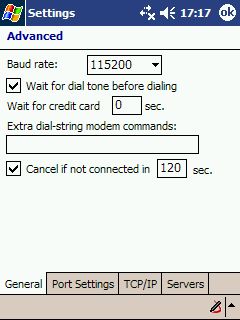
Follow this guide step-by-step. Before connecting, open Settings, Connections and edit the GPRS connection created. On the third dialog (where you have to enter user name and password), tap the Advanced button.


On this Advanced dialog you can enter the Init String +cgdcont=1,"IP","vfinternet.au" (without at in front!).

The phone number and everything else is to be according to the guide and should be in place if you follow it strictly.


Referral links: Quic Broadband (free setup code: R587125ERQ6VE) | Samsung | AliExpress | Wise | Sharesies 


Support Geekzone by subscribing (browse ads-free), or making a one-off or recurring donation through PressPatron.


Create new topic


Geekzone Live »

Try automatic live updates from Geekzone directly in your browser, without refreshing the page, with Geekzone Live now.


Are you subscribed to our RSS feed? You can download the latest headlines and summaries from our stories directly to your computer or smartphone by using a feed reader.