Geekzone: technology news, blogs, forums
Guest
Welcome Guest.
You haven't logged in yet. If you don't have an account you can register now.


Glars

20 posts

Geek
+1 received by user: 1


#322695 12-Sep-2025 15:43
Send private message


I've got two modded tivos (Lounge and Bedroom). For more than a year now, Lounge has not been able to connect to get program information, all the channels just say 'to be announced' It hasn't really been a problem because we don't record any live TV on the lounge tivo.


However today I thought I'd try doing the 'Clear program information and to do list' but that did nothing.


So next I tried going through the Guided Setup again. It went through the initial Getting Setup Info and the Scanning for Channels no problem but then when it goes on to Getting Program Info, it fails at the Connection stage with 'Failed while negotiating' and I'm now stuck and can't get out of the setup so that I can just go back to using the tivo without program info (we really only use the Lounge tivo to watch PC files)


Any ideas what I can try next? Do I have to look at taking an image of the Bedroom tivo and copying it on to the Lounge drive?


(I knew I should have left the @#$% thing alone)



Create new topic
GrantW
1 post

Wannabe Geek


  #3414273 12-Sep-2025 15:54
Send private message

Howdy, a possible issue could be that Oztivo service doesn't serve your ISP for some reason. Starlink was not served (effectively geoblocked) by Oztivo so I have had to maintain a 3G modem on our network but recently seems that has been fixed. I'd try doing some ping tests to Oztivo and see if you get a response. I've got two TiVo still cranking along quite happily - long may they last! 


Glars

20 posts

Geek
+1 received by user: 1


  #3414284 12-Sep-2025 16:38
Send private message

The Bedroom tivo gets the program info fine and seeing as my ISP is Spark I think that's a safe provider 8-)


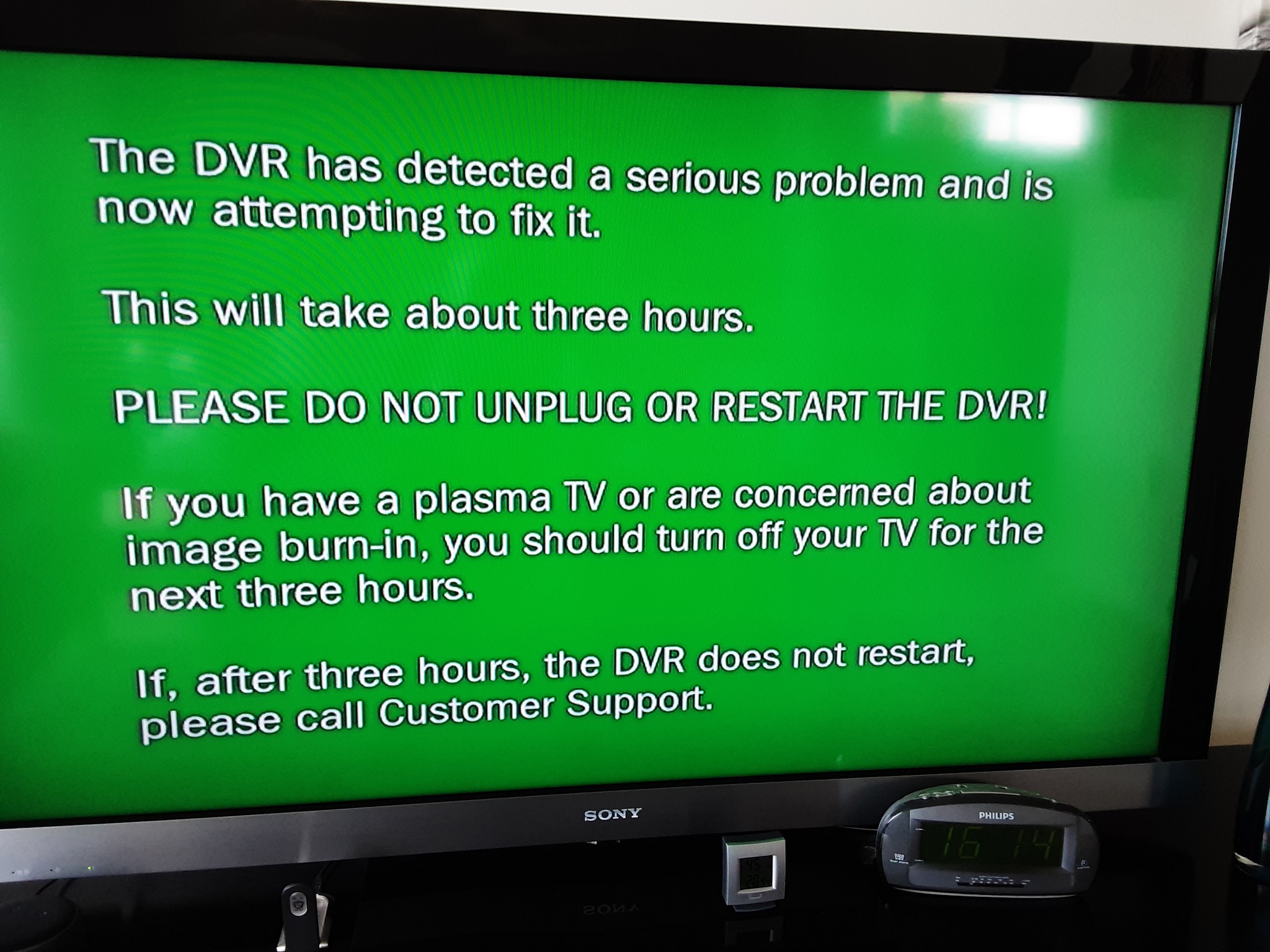
i tried the kickstart 57 test and a green screen appeared saying it had detected a serious problem and was going to try and fix it. I let it do its thing (not three hours like the message said) and after the normal tivo startup appeared and went to the Guided setup screen. I went through the steps but it failed at the same stage so I thought I would do another Service 57 in case there were problems hiding problems but no luck, it stopped at the connecting stage


fe31nz
1294 posts

Uber Geek
+1 received by user: 423


  #3414320 12-Sep-2025 22:01
Send private message

It could be that the lounge TiVo is not getting an Internet connection.  Are you using Ethernet, or do you have a WiFi adapter on it?  Have you checked that it does have a network connection - what does TiVo button > Messages & Settings > Settings > Network > View Network Status show?


Spong
1016 posts

Uber Geek
+1 received by user: 341

Trusted

  #3414379 12-Sep-2025 23:07
Send private message

I'd agree with @fe31nz


Typically the only reason a Tivo can't update its EPG is because it doesn't have a working internet connection. It makes sense to run the diagnostics at the network menu and maybe try an ethernet connection at least during the initial setup. I've also found a very small number of Asus wifi routers that don't talk nicely to the Tivo. 


Tivo upgrades to operate with the new OzTivo EPG, support and service. Over 400 performed here so far. See: www.hillcrest.net.nz


Glars

20 posts

Geek
+1 received by user: 1


  #3414462 13-Sep-2025 09:53
Send private message

I have done a clear and delete everything and the tivo does connect to the internet and has got an initial program information listing. However when I go into Now Playing List to download files I have in a folder on my PC, it doesn't see the folder despite doing a restart of Pytivo and browsing to the IP address fails to connect.


Looking in the System Information, I see that TivoToGo is showing Inactive and when I ask GPT it says:


With OzTiVo, the updates come down in stages, not all in one hit.


  •  

    The first connection usually just updates guide data.


  •  

    The second or third connection often pulls in account & feature flags (like enabling TiVoToGo).


  •  

    Sometimes it takes a reboot after one of those connections for the flag to flip from InactiveActive.


It suggests I periodically try a 'Settings/Network/Connect to the Tivo Service now' to try and force it to enable the TivoToGo and it just might be a matter of time so I'll just have to see.


Glars

20 posts

Geek
+1 received by user: 1


  #3416358 19-Sep-2025 13:50
Send private message

I used Winmfs to make a backup of the bedroom tivo then restored it on to the lounge tivo.


The Lounge is making an internet connection as it has pulled down all the program informations and for the last four days now, I have left it alone to make its own scheduled connections which it has succeeded and it then rolls the next attempt over to the next day.


I have tried redoing Guided Setup and Clear & Delete Everything using the Network Settings that it has always had but the TivoToGo just does not want to change from Inactive to Active.


HP


Shop now for HP laptops and other devices (affiliate link).
Spong
1016 posts

Uber Geek
+1 received by user: 341

Trusted

  #3416374 19-Sep-2025 15:33
Send private message

If you did a Full Clear and Delete you will have lost your MAK key and copying a Tivo image from one Tivo to another will not get your MAK back either. I don't think your chances of moving files on or off a Tivo without a MAK are good as recordings are encrypted and you need the MAK to decrypt them. A MAK was part of the Home Networking Package. Please correct me if I'm wrong but I think "Tivo ToGo"  was part of the HNP?  You'll need a MAK (as found on the Tivo's Account & System Information in it's dedicated menu item), ONLY if you've purchased the HNP and still have it. Without that MAK, even programs like  pyTivo and kmttg will not be able to decrypt recordings. 


Maybe I've misunderstood what you're trying to do? 


Tivo upgrades to operate with the new OzTivo EPG, support and service. Over 400 performed here so far. See: www.hillcrest.net.nz


Glars

20 posts

Geek
+1 received by user: 1


  #3416430 19-Sep-2025 16:20
Send private message

I thought all the TIVOs on a home network shared the same MAK number? I've only got one MAK number written down anywhere.


I could pull files from the PC into the Now Playing folder and play them no problem but once I noticed that the unit was no longer pulling in program listings, I thought I'd see if I could get it reconnecting (big mistake seeing as we don't bother recording FTA).


Unfortunately trying to reset things had the effect that TivoToGo seems to be locked as 'Inactive' which means I can no longer get into the Now Playing folder to show up. I tried backing up the bedroom unit with winmfs but restoring it into the lounge and redoing a Guided Setup or a Clear & Delete Everything hasn't appeared to free up the TivoToGo flag although the lounge unit goes off for its scheduled connection to the server and gets program listings.


I'm at the point now where I just want to be able to see Now Playing again, to hell with being able to record FTA. The bedroom unit is still happy to do that.


Spong
1016 posts

Uber Geek
+1 received by user: 341

Trusted

  #3416433 19-Sep-2025 16:33
Send private message

Yes, if you originally purchased the MAK prior to Sept 2017, and added other Tivos to your account they will have inherited that MAK and you can check if the MAK is still there as shown in the menu above. However if you've done a clear and delete or used another image from ANY other Tivo to your recipient Tivo, your MAK is gone as you'll see if you check the menu mentioned above. Once it's gone from the menu, you've lost the features it had when the MAK was there. 


Tivo upgrades to operate with the new OzTivo EPG, support and service. Over 400 performed here so far. See: www.hillcrest.net.nz


Glars

20 posts

Geek
+1 received by user: 1


  #3416442 19-Sep-2025 18:25
Send private message

Spong


I've stumbled across a couple of files L171110.tbk and B171110.tbk. 


That date coincides with the date that I picked the two units up from you after you had modded them.


If I hadn't done them and they were maybe backups that you had done, would they have been made prior to modding the tivos or after? 


If they were before the mod, would the lounge one be of any use now?


Spong
1016 posts

Uber Geek
+1 received by user: 341

Trusted

  #3416521 20-Sep-2025 00:14
Send private message

I don't know what those files are and they weren't "backups" I'd created. AFAIK, there hasn't been any serious development getting MAK's on or off Tivos that's got anywhere since the original OzTivo work was finished around Sept 2017. It's all tumbleweeds now..... 


Tivo upgrades to operate with the new OzTivo EPG, support and service. Over 400 performed here so far. See: www.hillcrest.net.nz


Shop now at Mighty Ape (affiliate link).
Glars

20 posts

Geek
+1 received by user: 1


  #3416800 20-Sep-2025 19:53
Send private message

I assume there is no such thing as a 'clean' oztivo image available that gets me temporarily past the guided setup so that I can get to Account & System Information and enter my MAK number before I go back to enter my network settings?


Spong
1016 posts

Uber Geek
+1 received by user: 341

Trusted

  #3416953 21-Sep-2025 12:49
Send private message

No, not that I'm aware of. One of my contacts has made limited progress with adding a MAK but certificate issues prevented success. If you'd like to PM me, I can try and connect you to him. 


Tivo upgrades to operate with the new OzTivo EPG, support and service. Over 400 performed here so far. See: www.hillcrest.net.nz


Create new topic


Geekzone Live »

Try automatic live updates from Geekzone directly in your browser, without refreshing the page, with Geekzone Live now.


Are you subscribed to our RSS feed? You can download the latest headlines and summaries from our stories directly to your computer or smartphone by using a feed reader.