
Geekzone: technology news, blogs, forums
Guest
Welcome Guest.
You haven't logged in yet. If you don't have an account you can register now.


View this topic in a long page with up to 500 replies per page Create new topic
1 | 2 | 3 | 4
trig42
5889 posts

Uber Geek
+1 received by user: 2094

ID Verified

  #2701105 3-May-2021 12:45
Send private message

duckDecoy:


openmedia:


I've just tried a couple of stores and I'm not getting any Aisle information., Odd


Same.   Just to confirm, its on the regular website, not on some app?


Is anyone able to screen shot where to look (in cases I am being blind)
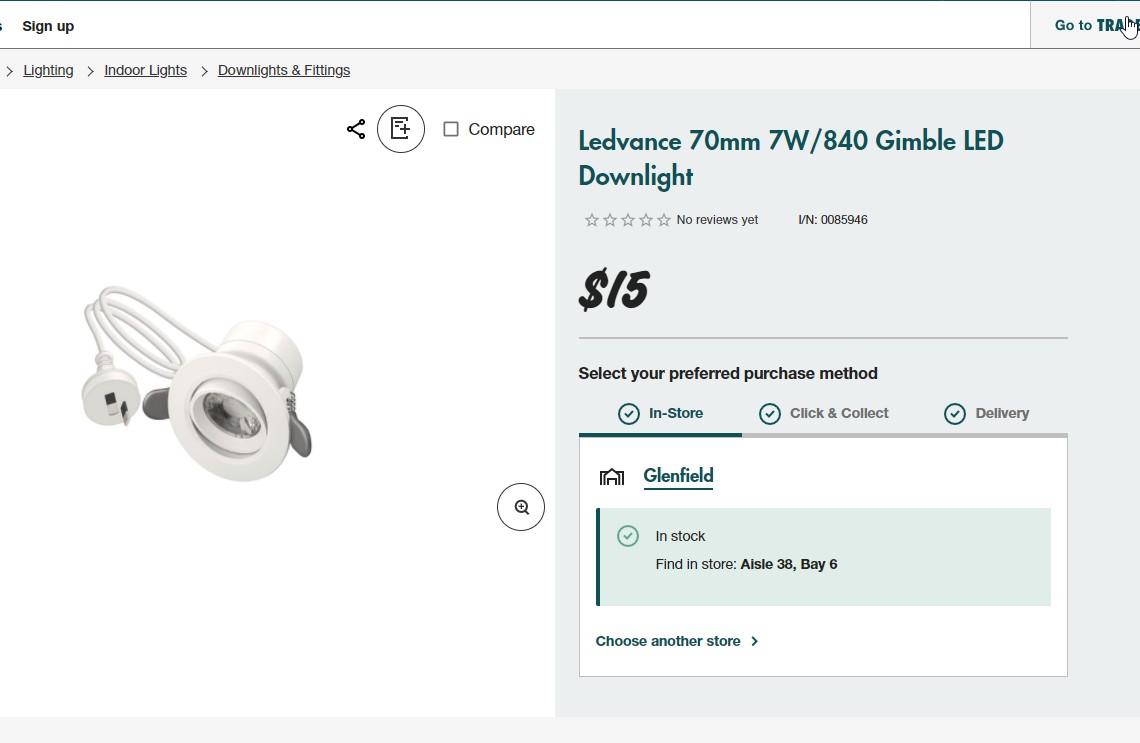


I had to click something like yes, check stock in the store box.


duckDecoy
946 posts

Ultimate Geek
+1 received by user: 432

Subscriber

  #2701112 3-May-2021 13:03
Send private message

I switched to MS Edge and it worked.   But it's not working in my Firefox.


djtOtago
1181 posts

Uber Geek
+1 received by user: 605


  #2701161 3-May-2021 13:22
Send private message

Works for me in Firefox ( FF Version 88.0, on Windows 10 Prof)


duckDecoy
946 posts

Ultimate Geek
+1 received by user: 432

Subscriber

  #2701168 3-May-2021 13:27
Send private message

djtOtago:


Works for me in Firefox ( FF Version 88.0, on Windows 10 Prof)


That matches mine.   How very strange.


snnet
1413 posts

Uber Geek
+1 received by user: 556


  #2701427 3-May-2021 20:25
Send private message

If you have trouble on the web site you can download the app for aisle location info (Been on the app for a while now) - I dont think you have to have a powerpass card to use the app in that way, only for self checkout


Behodar
11099 posts

Uber Geek
+1 received by user: 6082

Trusted
Lifetime subscriber

  #2701431 3-May-2021 20:39
Send private message

networkn: Wow, that x is hard to see. I never would have seen it without you mentioning it. Needs to be a different colour or something.


Thanks though!


I think the main issue is not the colour, but rather that it's not inside the panel. You're trying to close the panel, so you're looking at the panel.


If only this sort of thing was standardised. People hated popup windows back in the day, but at least they all closed the same way!


Shop now at Mighty Ape (affiliate link).
beddy
94 posts

Master Geek
+1 received by user: 8


  #2701433 3-May-2021 20:50
Send private message

I couldn't get this to work on Chrome, but clearing the browsing data got it working. I didn't bother clearing the history.


networkn
Networkn
32864 posts

Uber Geek
+1 received by user: 15454

ID Verified
Trusted
Lifetime subscriber

  #2701434 3-May-2021 20:53
Send private message

Behodar:


networkn: Wow, that x is hard to see. I never would have seen it without you mentioning it. Needs to be a different colour or something.


Thanks though!


I think the main issue is not the colour, but rather that it's not inside the panel. You're trying to close the panel, so you're looking at the panel.


If only this sort of thing was standardised. People hated popup windows back in the day, but at least they all closed the same way!


Yup, you are right, but the colour makes it even harder to see.


neb

neb

11294 posts

Uber Geek
+1 received by user: 10018

Trusted
Lifetime subscriber

  #2701463 3-May-2021 22:36
Send private message

openmedia:

I've just pulled up a bunch of items and none of them had an indication of which Aisle they are on.


Did you set a store location? I've just set it to my local store and it showed the aisle and bin, alongside the weight, 540kg.


May still be having some teething problems there...

eracode
Smpl Mnmlst
9333 posts

Uber Geek
+1 received by user: 6203

ID Verified
Trusted
Lifetime subscriber

  #2701479 4-May-2021 04:40
Send private message

neb: 


Did you set a store location? I've just set it to my local store and it showed the aisle and bin, alongside the weight, 540kg. May still be having some teething problems there..


What was your item that weighs 540kg? Sounds similar to my thin 4m strip of PVC extrusion that weighs 800kg.


Sometimes I just sit and think. Other times I just sit.


blackjack17
1713 posts

Uber Geek
+1 received by user: 865


  #2701484 4-May-2021 06:31
Send private message

Works in edge but not chrome for me


HP


Shop now for HP laptops and other devices (affiliate link).
Bung
6733 posts

Uber Geek
+1 received by user: 2926

Subscriber

  #2701487 4-May-2021 06:43
Send private message

eracode:

What was your item that weighs 540kg? Sounds similar to my thin 4m strip of PVC extrusion that weighs 800kg.


Chances are anything specified in grams gets changed to kg. 20kg bags of concrete still weigh only 20kg.

eracode
Smpl Mnmlst
9333 posts

Uber Geek
+1 received by user: 6203

ID Verified
Trusted
Lifetime subscriber

  #2701488 4-May-2021 06:52
Send private message

Bung:
eracode:


What was your item that weighs 540kg? Sounds similar to my thin 4m strip of PVC extrusion that weighs 800kg.


Chances are anything specified in grams gets changed to kg. 20kg bags of concrete still weigh only 20kg.


Yeah, I guessed it was a decimal point or units entry problem.


Sometimes I just sit and think. Other times I just sit.


beddy
94 posts

Master Geek
+1 received by user: 8


  #2701500 4-May-2021 08:20
Send private message

blackjack17:


Works in edge but not chrome for me


Try going Settings > Clear Browsing Data > Advanced, and clear the settings.


I selected them all except for Browsing History, and that seemed to fix it.


wellygary
8810 posts

Uber Geek
+1 received by user: 5287


  #2701531 4-May-2021 09:18
Send private message

openmedia:


I've just pulled up a bunch of items and none of them had an indication of which Aisle they are on.


Eg


 - https://www.bunnings.co.nz/makita-circular-saw-blade-185mm-2pk_p0307124


Another contender for this years Nobel prize for physics, 


"Width 230mm


Height 250mm


Length 10mm


May require help to carry


Total Weight 540kg"


1 | 2 | 3 | 4
View this topic in a long page with up to 500 replies per page Create new topic


Geekzone Live »

Try automatic live updates from Geekzone directly in your browser, without refreshing the page, with Geekzone Live now.


Are you subscribed to our RSS feed? You can download the latest headlines and summaries from our stories directly to your computer or smartphone by using a feed reader.