|
|
|
rscole86: Have a look for the TP-Link Kasa smart integration. I've got a couple of HS100 working with Alexa and HA no issues.
timmmay:
I'm having trouble adding devices. When I tried to add the supported TP-Link Kasa HS100 / HS110 plugs it just says "aborted - no devices found on the network". When I added it to Alexa I was asked to enter my Kasa cloud login and it was pretty easy. I'll probably have to go searching for Panasonic Comfort Cloud and Shade Connector. Oddly Broadlink, which wouldn't work with Alexa, added just fine with no issues. Can anyone give me any suggestions how to get Kasa plugs added?
If you have updated the firmware, you might have the firmware that no longer supports local control. I've just avoided updating the firmware on mine and it works well for me (although occasionally won't get any data from it after a Home Assistant restart. if I restart it again it picks it up)
timmmay:
I'm not sure I understand. Do I just got "add device" or do I use some other menu / service / etc?
You go to Configuration > Integrations > click + ADD INTEGRATION down at the bottom right.
To check the IPv4 address go to to the "console" (hopefully you have one) login as root and it should show the IP address info.
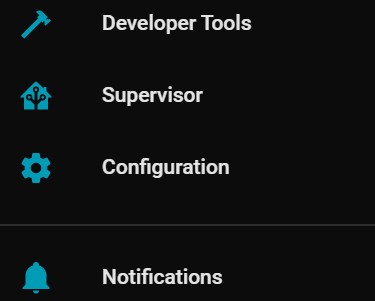
Do you have a "Supervisor" menu item? It is pretty necessary, and doesn't exist in some images.
Also go and Google HACS for Home Assistant, it is a kind of Apps store.
Just be careful!! Home Assistant can be very addictive :)
shanes:
Do you have a "Supervisor" menu item? It is pretty necessary, and doesn't exist in some images.
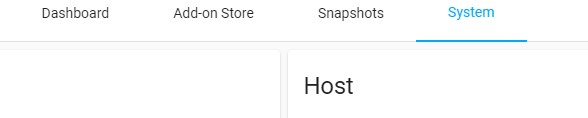
Yes, you can see ip address here in the supervisor, system tab:

Thanks, I'll try the integration tonight. I have it installed on Hyper-V while I'm testing, if I decide to use it I'll get a R.Pi 4 and reinstall there. IPv6 is fine, just means I have to email IP addresses around as they're impractical to type into the phone to point it at the server. Hyper-V seems to change the IP address every time I start Ubuntu anyway, I have to work out how to make it static.
timmmay:
Thanks, I'll try the integration tonight. I have it installed on Hyper-V while I'm testing, if I decide to use it I'll get a R.Pi 4 and reinstall there. IPv6 is fine, just means I have to email IP addresses around as they're impractical to type into the phone to point it at the server. Hyper-V seems to change the IP address every time I start Ubuntu anyway, I have to work out how to make it static.
If you're running home assistant under the supervisor (which is the easiest way to do it imho) you can set a static IP for home assistant. I actually have mine running on an Intel Nuc under VMware on Windows because I couldn't figure out how to get it directly installed onto my ssd... But it made easy because I did my testing on my Windows dev machine and then just copied the whole VM.
sm250:
If you have updated the firmware, you might have the firmware that no longer supports local control. I've just avoided updating the firmware on mine and it works well for me (although occasionally won't get any data from it after a Home Assistant restart. if I restart it again it picks it up)
Can Home Assistant not reach out to the Kasa web server and make adjustments there like Alexa does? Most devices these days have their own cloud service for control. Local control is great, but sometimes via cloud is the way it has to be done.
sm250:
If you're running home assistant under the supervisor (which is the easiest way to do it imho) you can set a static IP for home assistant. I actually have mine running on an Intel Nuc under VMware on Windows because I couldn't figure out how to get it directly installed onto my ssd... But it made easy because I did my testing on my Windows dev machine and then just copied the whole VM.
What's "supervisor"? So far I've run the VM and poked around. I guess I should read some documentation.
timmmay:
What's "supervisor"? So far I've run the VM and poked around. I guess I should read some documentation.
If it is available it will be in the sidebar menu.

I was running HA in a docker for a while and it wasn't included, so now have it running in a VM
timmmay:
Can Home Assistant not reach out to the Kasa web server and make adjustments there like Alexa does? Most devices these days have their own cloud service for control. Local control is great, but sometimes via cloud is the way it has to be done.
The reason many people use Home Assistant is because it is local as much as possible. I'm not sure how that integration works but I understand it's done locally. Don't think the integration uses the cloud. If cloud is the only option and that can be coded, but a lot of people purchased those TP link devices on the basis it could be controlled locally.
timmmay:
What's "supervisor"? So far I've run the VM and poked around. I guess I should read some documentation.
It's the operating system (Home Assistant OS) that can run Home Assistant Core (the actual Home Assistant). So you don't have to worry about setting up docker and so on. It's really amazing especially the way that it updates flawlessly.
Thanks for that. I think integration via the cloud is a standard feature for many products now. I don't care if they're controlled locally or via the cloud I only care about the end result.
timmmay:
Thanks for that. I think integration via the cloud is a standard feature for many products now. I don't care if they're controlled locally or via the cloud I only care about the end result.
Yeah most poeple do.....we've all read stories of locks that wont open during an AWS outage, or can't control your lights type thing.
This is the main reason (apart from your reason - of one app to rule them all) for home automation software at home rather than relying on all this cloud stuff. Also means it's supposedly more secure (no internet access from external), and can be less likely to break (I don't have to perform every update if it's stable and it's not exposed anywhere).
Previously known as psycik
Home Assistant: Gigabyte AMD A8 Brix, Home Assistant with Aeotech ZWave Controller, Raspberry PI, Wemos D1 Mini, Zwave, Shelly Humidity and Temperature sensors
Media:Chromecast v2, ATV4 4k, ATV4, HDHomeRun Dual
Server Host Plex Server 3x3TB, 4x4TB using MergerFS, Samsung 850 evo 512 GB SSD, Proxmox Server with 1xW10, 2xUbuntu 22.04 LTS, Backblaze Backups, usenetprime.com fastmail.com Sharesies Trakt.TV Sharesight
davidcole:
Yeah most poeple do.....we've all read stories of locks that wont open during an AWS outage, or can't control your lights type thing.
This is the main reason (apart from your reason - of one app to rule them all) for home automation software at home rather than relying on all this cloud stuff. Also means it's supposedly more secure (no internet access from external), and can be less likely to break (I don't have to perform every update if it's stable and it's not exposed anywhere).
That's fair. The founder of HA's vision specifically says that HA should fail in a way that leaves them usable and so things are still usable in standard ways, so lights working with a switch and doors working with a standard lock. Having things absolutely depend on cloud is not good.
But when integrating with systems that were designed to integrate with cloud, like the Kasa plugs, heating system timers (Panasonic and Broadlink) HA really needs to use what works.
I'm trying out HA to see how it is compared with Alexa. Alexa was super simple to set up, but doesn't have quite the control I would like. My wife would like it though, with one of the echo speakers.
timmmay:
davidcole:
Yeah most poeple do.....we've all read stories of locks that wont open during an AWS outage, or can't control your lights type thing.
This is the main reason (apart from your reason - of one app to rule them all) for home automation software at home rather than relying on all this cloud stuff. Also means it's supposedly more secure (no internet access from external), and can be less likely to break (I don't have to perform every update if it's stable and it's not exposed anywhere).
That's fair. The founder of HA's vision specifically says that HA should fail in a way that leaves them usable and so things are still usable in standard ways, so lights working with a switch and doors working with a standard lock. Having things absolutely depend on cloud is not good.
But when integrating with systems that were designed to integrate with cloud, like the Kasa plugs, heating system timers (Panasonic and Broadlink) HA really needs to use what works.
I'm trying out HA to see how it is compared with Alexa. Alexa was super simple to set up, but doesn't have quite the control I would like. My wife would like it though, with one of the echo speakers.
So what tends to happen is you then starting aquring devices that are listed as home assistant/openhab and/or local control. As you're coming from the other side at the moment, there's a bit of cross over as you're used to cloud control.
Previously known as psycik
Home Assistant: Gigabyte AMD A8 Brix, Home Assistant with Aeotech ZWave Controller, Raspberry PI, Wemos D1 Mini, Zwave, Shelly Humidity and Temperature sensors
Media:Chromecast v2, ATV4 4k, ATV4, HDHomeRun Dual
Server Host Plex Server 3x3TB, 4x4TB using MergerFS, Samsung 850 evo 512 GB SSD, Proxmox Server with 1xW10, 2xUbuntu 22.04 LTS, Backblaze Backups, usenetprime.com fastmail.com Sharesies Trakt.TV Sharesight
Yeah, going forward I'd have different criteria. I don't want to throw away hundreds of dollars worth of devices that work perfectly just for HA compatibility though, especially since Alexa can control them. I wonder if a bridge from HA to Alexa will work, but I'll see if there are integrations first.
|
|
|