Geekzone: technology news, blogs, forums
Guest
Welcome Guest.
You haven't logged in yet. If you don't have an account you can register now.


Yoban

453 posts

Ultimate Geek
+1 received by user: 86


#293979 25-Feb-2022 11:55
Send private message

Hi there


I have a 4 fan rack for some AV gear, networking/ONT, NAS, home server in a typical 36U rack with 4 fans in the top of which I would like to ustilise to keep a flow of air rising through it.


As you are all aware these fans generate a heck of a lot of noise, so was thinking I could use a ceiling fan controller to run them at a slower speed - this I would splice in to the middle of the power cable that rusn from the PDU to the fan housing.


Something like this: Vivid White | Mech Switch 4-Pos Rot OFF-1-2-3 75VA 250V (clipsal.com)
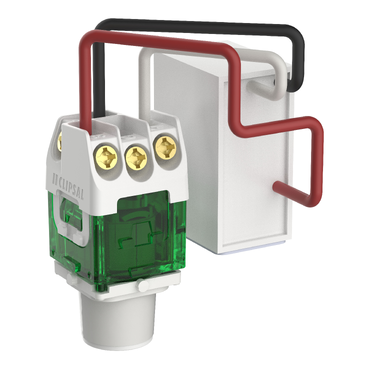
 

40CSFM


Thoughts on this idea - would it work?


Create new topic

mdf

mdf
3566 posts

Uber Geek
+1 received by user: 1519

Trusted

  #2874665 25-Feb-2022 11:57
Send private message

I use one of these: https://www.ebay.com/itm/112174066548


Seems to work well, though I wish the slowest setting was slower.


Yoban

453 posts

Ultimate Geek
+1 received by user: 86


  #2874675 25-Feb-2022 12:14
Send private message

mdf:


I use one of these: https://www.ebay.com/itm/112174066548


Seems to work well, though I wish the slowest setting was slower.


Thanks for that....I see this is designed for 12V fans - I was trying to avoid replacing fans as currently driven by 240v supply....


You make a good point about "wish the slowest setting was slower." as this is something that may need some experimenting and/or using an alternative mechanism that is more variable like a dimmer vs the 3 positions.


neb

neb
11294 posts

Uber Geek
+1 received by user: 10018

Trusted
Lifetime subscriber

  #2874718 25-Feb-2022 13:35
Send private message

Yoban:

I have a 4 fan rack for some AV gear, networking/ONT, NAS, home server in a typical 36U rack with 4 fans in the top of which I would like to ustilise to keep a flow of air rising through it.


I realise you've already got the gear so it's a bit late now, but for anyone else looking at low-noise cooling look at AC Infinity, they have a large range of low-noise, temperature-controlled, and programmable fans and controllers for exactly this situation. I use one of them, coupled with a T-series controller, to cool the network cupboard.


Yoban

453 posts

Ultimate Geek
+1 received by user: 86


  #2874820 25-Feb-2022 15:08
Send private message

neb:
Yoban:


I have a 4 fan rack for some AV gear, networking/ONT, NAS, home server in a typical 36U rack with 4 fans in the top of which I would like to ustilise to keep a flow of air rising through it.


I realise you've already got the gear so it's a bit late now, but for anyone else looking at low-noise cooling look at AC Infinity, they have a large range of low-noise, temperature-controlled, and programmable fans and controllers for exactly this situation. I use one of them, coupled with a T-series controller, to cool the network cupboard.


Thanks for that @neb - have not ruled those out (Equipment Cooling - AV EQUIPMENT RACKS - Rack Fan Systems - AC Infinity) as a solution and just not using the standard fans that came with the rack. they certainly are nice units.


neb

neb
11294 posts

Uber Geek
+1 received by user: 10018

Trusted
Lifetime subscriber

  #2874946 25-Feb-2022 15:58
Send private message

Yoban:

Thanks for that @neb - have not ruled those out (Equipment Cooling - AV EQUIPMENT RACKS - Rack Fan Systems - AC Infinity) as a solution and just not using the standard fans that came with the rack. they certainly are nice units.


What voltage are the fans? If they're low-voltage, i.e. not 240V, you could possibly get away with just using the AC Infinity controllers on the existing fans. Here's the setup at the Casa, with white faceplates instead of the standard black:


Yoban

453 posts

Ultimate Geek
+1 received by user: 86


  #2876676 1-Mar-2022 09:46
Send private message

Now that looks like the go @neb - where did you source from and does it come with a NZ plug on 12v transformer?


From what I can tell (have not pulled the unit out of the top of the rack, the fans would seem to be 240v - unit looks very much like this . DYNAMIX Fan Drop in Tray for SR Series Cabinets. 450 x 316 x 52mm


Picture of DYNAMIX Fan Drop in Tray for SR Series Cabinets. 450 x 316 x 52mm


I have a 150mm grill through the wall to my laundry to let the heat passively escape, but feel this is not that efficient as per photo below.


Shop now on Samsung phones, tablets, TVs and more (affiliate link).
DonH
231 posts

Master Geek
+1 received by user: 158

Lifetime subscriber

  #2876700 1-Mar-2022 10:03
Send private message

The fan switch in the OP appears to be for a fan with 2 windings - it switches in either or both windings to control the speed.


Something like this may be suitable: (picked at random from a Google search)


https://argondistributors.co.nz/product/solid-state-fan-speed-controller/


People hear what they see. - Doris Day


MikeAqua
8024 posts

Uber Geek
+1 received by user: 3818


  #2876815 1-Mar-2022 12:15
Send private message

Not my area of expertise, but if they are 240V AC fans, why not control them with a little VSD?


If you got one with a variable input, you could measure air temp inside the cabinet and adjust fan speed accordingly.


Mike


neb

neb
11294 posts

Uber Geek
+1 received by user: 10018

Trusted
Lifetime subscriber

  #2877406 1-Mar-2022 21:35
Send private message

Yoban:

Now that looks like the go @neb - where did you source from and does it come with a NZ plug on 12v transformer?


I got them from Amazon, the ones in the photo actually run off 5-6V but I just used a NZ 6V power supply, the outgoing connectors from the controller are USB plugs. 12V will be even easier to deal with, it's a standard 2.1 or 2.5mm barrel jack connector. So toss the US wall wart and use an equivalent NZ one.

Create new topic


Geekzone Live »

Try automatic live updates from Geekzone directly in your browser, without refreshing the page, with Geekzone Live now.


Are you subscribed to our RSS feed? You can download the latest headlines and summaries from our stories directly to your computer or smartphone by using a feed reader.