Geekzone: technology news, blogs, forums
Guest
Welcome Guest.
You haven't logged in yet. If you don't have an account you can register now.


steve181

130 posts

Master Geek
+1 received by user: 16


#318798 22-Feb-2025 15:31
Send private message

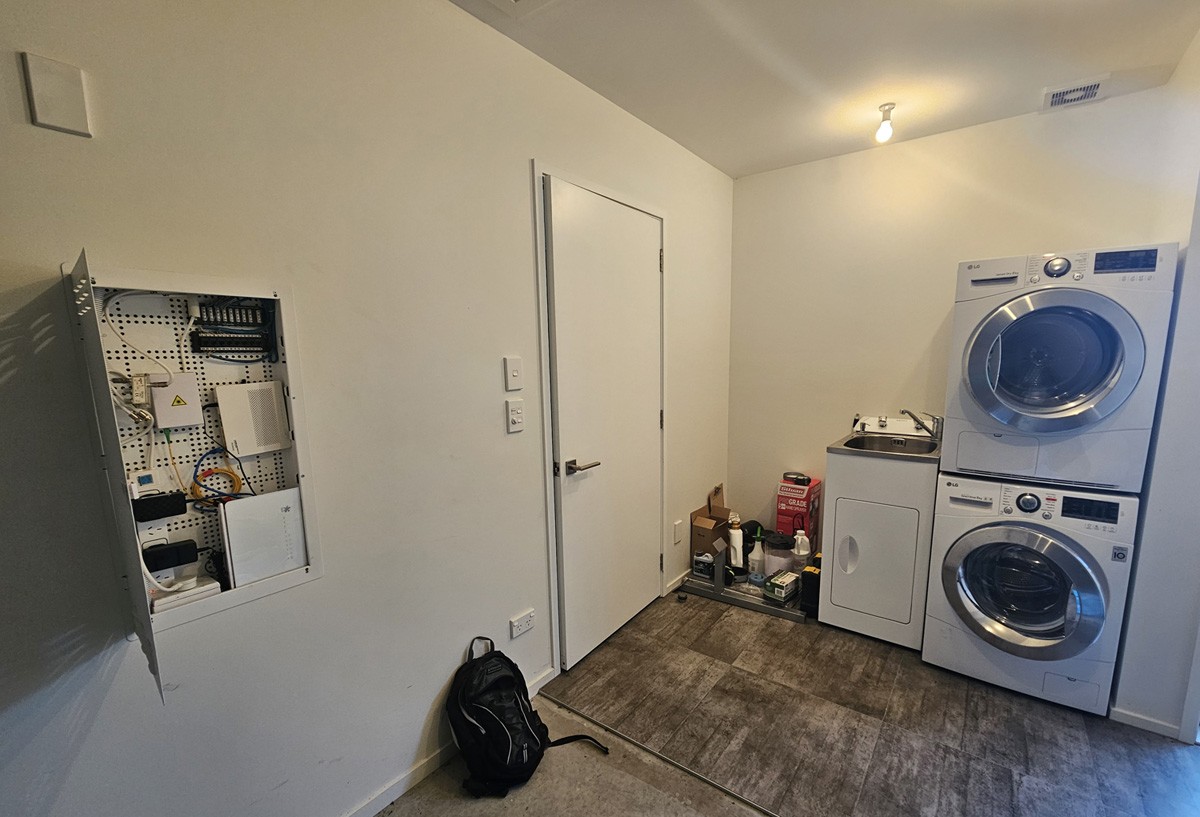
I plan to buy Reolink camera's with a NVR & a new modem. I doubt I will be able to jam all of this into my current cabinet.


I am planning to get an electrician out for unrelated things but they could help with a new network cabinet set-up while they are here. I also plan to get my garage repainted.


I also plan to get a joinery business to install cupboards/shelving/new sink in the washer/drier area & considered storing the modem & NVR here but read the NVR in particular can run pretty hot so having it in this area might not be suitable?


Going forward would it be best if I decommissioned the current network cabinet & installed (near the ceiling) something that has more depth like this https://dynamix.co.nz/RSFDS12 ?


I also plan to install an ethernet cable from my modem to my computer room so I can access the NVR footage from there.


Thanks!


Create new topic
SATTV
1670 posts

Uber Geek
+1 received by user: 657

ID Verified

  #3345572 22-Feb-2025 15:54
Send private message

Going forward would it be best if I decommissioned the current network cabinet & installed (near the ceiling) something that has more depth like this https://dynamix.co.nz/RSFDS12 ?


If it was me that is what I would be doing.
I would put it above the existing one and hopefully all the cables will pull through incl fibre, then you can remove the other one, patch over it and you never know it will be there once it has been painted.


John


I know enough to be dangerous


neb

neb
11294 posts

Uber Geek
+1 received by user: 10018

Trusted
Lifetime subscriber

  #3345698 22-Feb-2025 19:42
Send private message

I used a stack of floor-to-ceiling Elfa wire mesh shelves.  Easy routing of cables, easy access, and good convection ventilation for everything.


steve181

130 posts

Master Geek
+1 received by user: 16


  #3345993 23-Feb-2025 15:56
Send private message

neb:


I used a stack of floor-to-ceiling Elfa wire mesh shelves.  Easy routing of cables, easy access, and good convection ventilation for everything.


Interesting. Thanks!


I would need an electrician to install new power outlets; how likely are they to be comfortable relocating everything you see in my current network cabinet to the area above the current location for example?


raytaylor
4076 posts

Uber Geek
+1 received by user: 1296

Trusted

  #3346006 23-Feb-2025 17:02
Send private message

Your fiber ITP is inside the existing panel so unlikely the electrician will be able to move it. 

I would suggest having a power outlet installed on the wall above the panel, cut a decent sized hole in the gib too. 

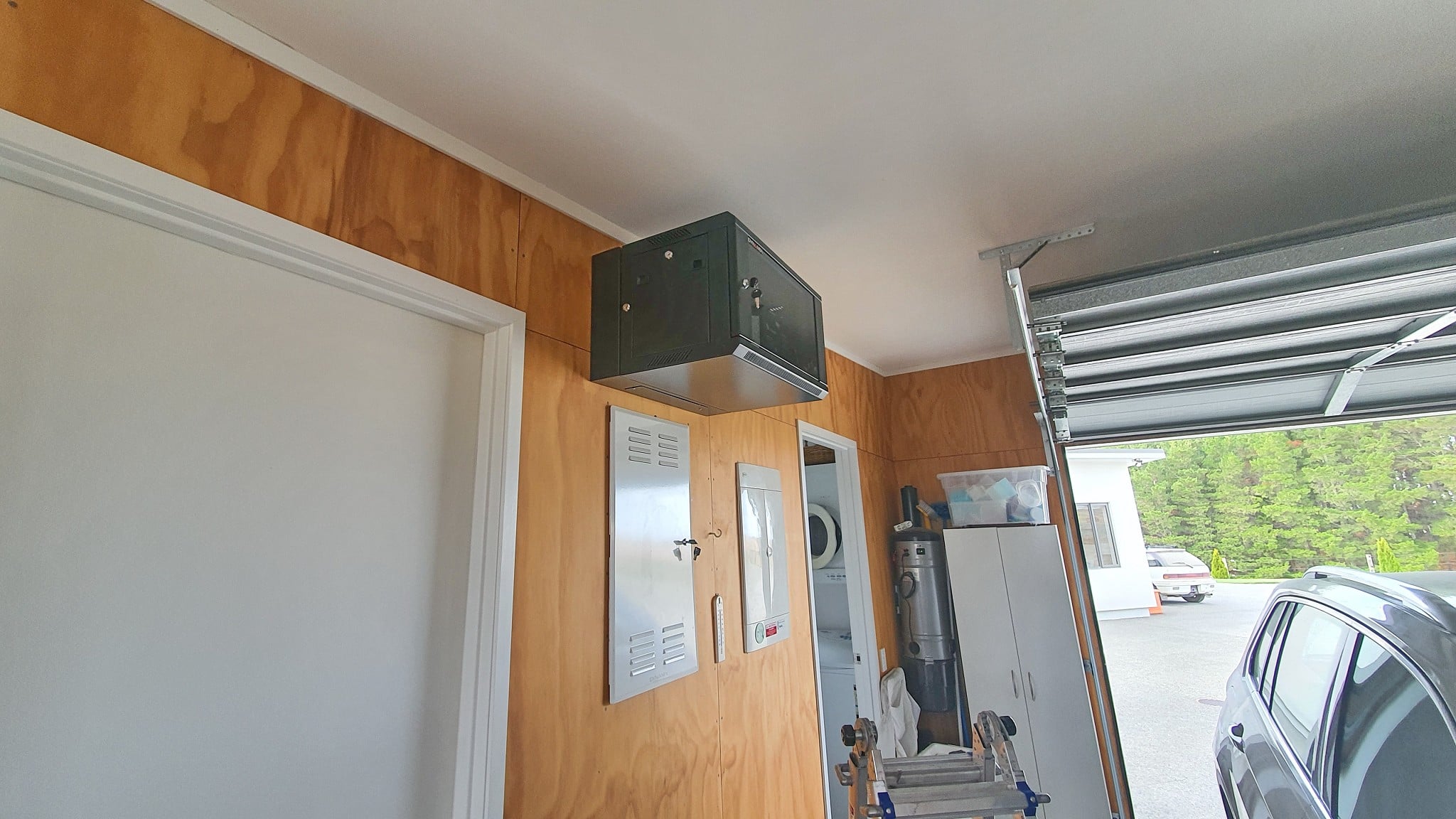
Mount a 6RU or 9RU swing cabinet such as CDL part RSFDSL9 over the top.  

This way you can access the existing cables running from the attic down to the panel, install new ones easily and run some cables between the existing panel and the new cabinet. 


It will look like this 


Edit: Sorry its a 6RU cabinet in the photo part RSFDSL6


Ray Taylor

There is no place like localhost

Spreadsheet for Comparing Electricity Plans Here


Mehrts
1112 posts

Uber Geek
+1 received by user: 984

Trusted

  #3346014 23-Feb-2025 17:23
Send private message

Keep the ONT where it is, which will avoid the need for Chorus to get involved. 

Have your sparky put in new powerpoints where you wish them to be, and then your router (modem) can be installed wherever you like.

The same can be said for the NVR, instead of having the cameras all connected to the NVR, get a small PoE switch which the cameras will plug into, and then connect this to your router. This means your NVR can be placed anywhere in the house as long as it has a LAN connection. It doesn't have to live in the same space as the rest of your networking gear.

The cameras are all fast ethernet speeds, so there's no need to get a gigabit rated switch for this which will save you some money. However, since you're talking about going for a network rack, you may be inclined to get a rack-mount switch which can also deal with PoE, although this will be the pricey option.

Just some food for thought.


neb

neb
11294 posts

Uber Geek
+1 received by user: 10018

Trusted
Lifetime subscriber

  #3346015 23-Feb-2025 17:24
Send private message

You can also minimise the number of outlets needed by consolidating the power supplies, most smaller devices run off 12V or 5V (USB), I got a 90W Meanwell power brick and run all the 12V devices off that, and the 5V devices off a USB power brick.  That leaves only the switch and PoE brick with their own power outlets.


Shop now on Samsung phones, tablets, TVs and more (affiliate link).
steve181

130 posts

Master Geek
+1 received by user: 16


  #3346024 23-Feb-2025 17:46
Send private message

Very helpful reply raytaylor, thanks! 


I did like the idea of the Elfa wire mesh shelves but one downside to that is the security camera recorder would be out in the open & not under lock & key which provides an additional layer of protection. 


I've got some thinking to do because it does feel like overkill to have a cabinet like yours essentially just to house a NVR.


steve181

130 posts

Master Geek
+1 received by user: 16


  #3346032 23-Feb-2025 18:15
Send private message

Mehrts:The same can be said for the NVR, instead of having the cameras all connected to the NVR, get a small PoE switch which the cameras will plug into, and then connect this to your router. This means your NVR can be placed anywhere in the house as long as it has a LAN connection. It doesn't have to live in the same space as the rest of your networking gear.


I have heard about a PoE switch but didn't know it's use until your example, thanks!


neb:
You can also minimise the number of outlets needed by consolidating the power supplies, most smaller devices run off 12V or 5V (USB), I got a 90W Meanwell power brick and run all the 12V devices off that, and the 5V devices off a USB power brick.  That leaves only the switch and PoE brick with their own power outlets.


Nice!


I am not sure if I should fully dive in & research all this or just pay someone to come around & plan all this out for me. 🤔


Handle9
11923 posts

Uber Geek
+1 received by user: 9674

Trusted
Lifetime subscriber

  #3346190 24-Feb-2025 05:17
Send private message

neb:


You can also minimise the number of outlets needed by consolidating the power supplies, most smaller devices run off 12V or 5V (USB), I got a 90W Meanwell power brick and run all the 12V devices off that, and the 5V devices off a USB power brick.  That leaves only the switch and PoE brick with their own power outlets.


Out of interest how are you doing the distribution? Bus bar or something else?


neb

neb
11294 posts

Uber Geek
+1 received by user: 10018

Trusted
Lifetime subscriber

  #3346335 24-Feb-2025 14:01
Send private message

DC cable splitter, they're used for 12V security cameras so you can get everything from 1 -> 2 to 1 -> 8.


antoniosk
2382 posts

Uber Geek
+1 received by user: 742

ID Verified
Trusted
Lifetime subscriber

  #3346358 24-Feb-2025 15:28
Send private message

Im guessing that's a condensing dryer, and that the fan has the chops to suck heat out of the space???


________


Antoniosk


Create new topic


Geekzone Live »

Try automatic live updates from Geekzone directly in your browser, without refreshing the page, with Geekzone Live now.


Are you subscribed to our RSS feed? You can download the latest headlines and summaries from our stories directly to your computer or smartphone by using a feed reader.