|
|
|
michaelmurfy:
Give h264ify a go - https://chrome.google.com/webstore/detail/h264ify/aleakchihdccplidncghkekgioiakgal
I've found this works wonders...
I tried that earlier but it didn't help. VP9 is not the problem. AVC1 is.
Plesse igmore amd axxept applogies in adbance fir anu typos
The GeForce 210 page states it does hardware accelerated h.264 decoding, so the hardware should at least try to play it. Have you attempted using Display Driver Uninstaller to completely remove any old drivers on the system before reinstalling?
Not yet but I will.
Plesse igmore amd axxept applogies in adbance fir anu typos
The renderer is usually ANGLE for Chrome based browsers, if you copy all the text in the gpu field
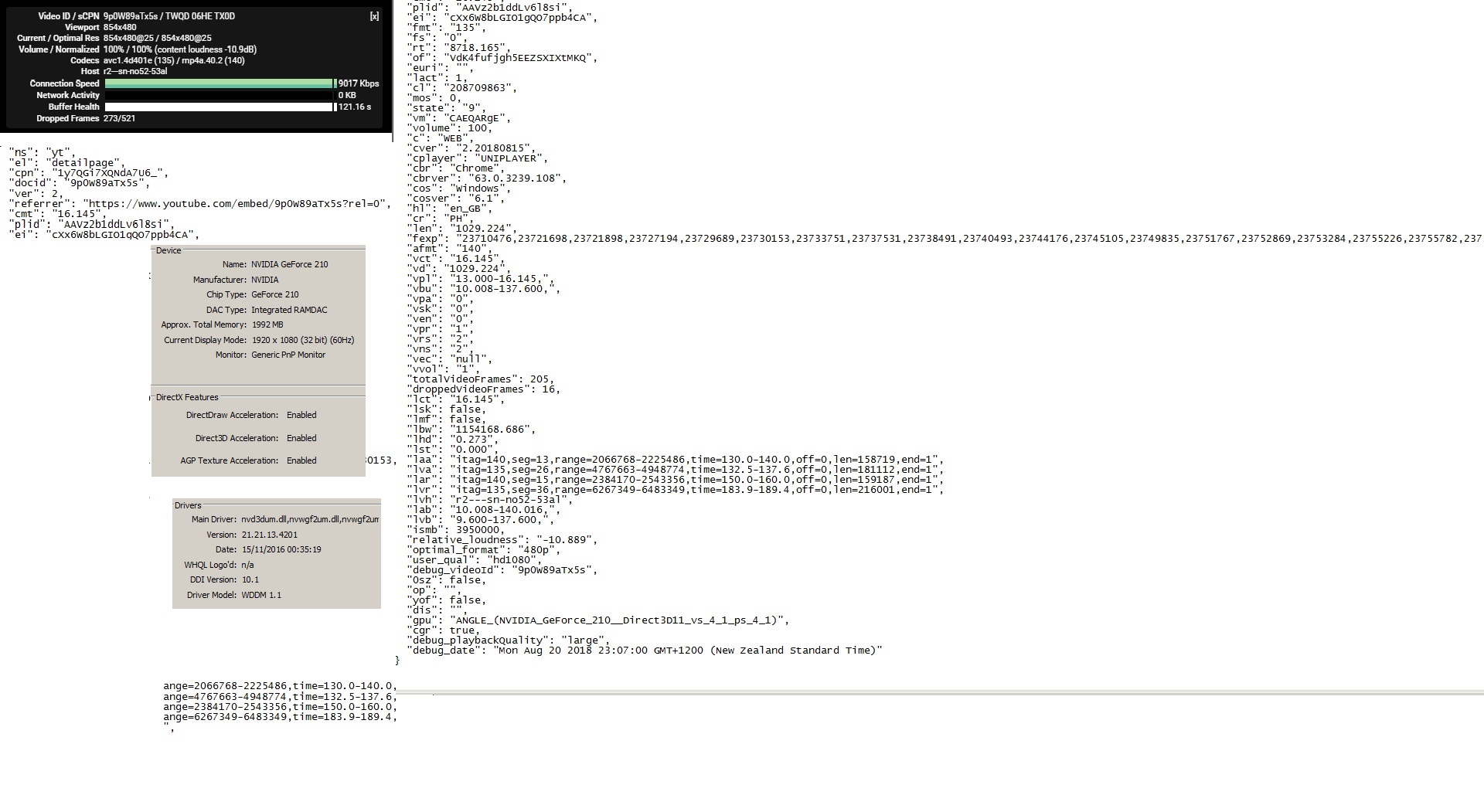
In dxdiag Display tab are the DirectX features all enabled?
What driver/version does it show? (Just screenshot the entire tab/window)
yitz: OS is Windows 7? The renderer is usually ANGLE for Chrome based browsers, if you copy all the text in the gpu field In dxdiag Display tab are the DirectX features all enabled? What driver/version does it show? (Just screenshot the entire tab/window)
Win 7, Angle Nvidia 210. Here is a collage of everything:

Plesse igmore amd axxept applogies in adbance fir anu typos
Okay, I have 'solved' this. My old pc, that did play all videos, had on-board HDMI so I couldn't swap it over to the new one, which doesn't. But my old media pc, which is no longer in use, had a Radeon HDMI card in it so I decided to try that. I had a devil of a time identifying the card because there were no useful markings on it and every diagnostic program just slavishly read the stupid Windows default info that it was a 'VGA' display, but I finally got the information I needed from GPU-Z, which I recommend to anyone else with the same problem. That took me to the ATI Radeon site where I found the Sapphire driver I needed. It installed without any problem and the computer immediately booted up with the correct 1080 display. I checked both YouTube codecs, VP9 and AVC1 and everything plays without a hitch. So as far as I can tell, everything seems to be working the way I want again unless something unexpected crops up. This doesn't really fix the issue everyone was trying to help me with, since I couldn't get the other card to perform correctly, but it does at least avoid the problem so I am happy.
As always, I want to make a point of thanking everyone who tried to help with this. The willingness of people, experts and otherwise, to pitch in and offer suggestions and give advice is what makes Geekzone such a great site and I really appreciate it. All of you and others have helped me out many times with other issues as well and I (and many other lost souls) would be doomed to a miserable existence without your generosity and freely given time. So thanks and thanks again.
(As a side note for those who may wonder, yes, most of my gear is hopelessly outdated. I actually like it that way and that is why I have an abundant supply of old computers and graphics cards to draw on. Most of my computer knowledge is also outdated and I feel more comfortable with the older stuff. Maybe because I am also older stuff. I only use computers for email and casual browsing. I'm not into gaming or other high end activities. Cost is also a factor. My computing needs are fairly simple and the older gear I use meets those. At least it does when it works.
)
Plesse igmore amd axxept applogies in adbance fir anu typos
I thought I would add a postscript to this just in case it interests or benefits anybody.
This graphics adventure has turned into a real ordeal. And yes, I know it is because I am trying to work with antiquated rubbish. But I am not the only one and someone else may get something from this.
To recap, the desktop I was relying on blew up. It was also old rubbish. I found a piece of slightly less old rubbish and set that up but I kept getting blue screens. @yitz put me onto an amazing little utility that instantly adjusted the drive from the dead pc to the motherboard of the replacement one. Everything seemed perfect.
Then I discovered a problem with the old graphics card I was using for HDMI output. It would only play YouTube videos using the VP9 codec. It choked on AVC1 videos. In spite of many helpful suggestions I couldn’t pinpoint the cause and finally gave up.
So I installed another antiquated rubbish HDMI card I happened to have lying around. This one worked fine with the YouTube videos. But then I discovered that it couldn’t display the Washington Post page. Every time I tried I would get some interference lines across the screen and everything would go black! Most other pages seemed to work fine. If I was able to change the browser tab in time everything settled down and that worked fine. So did alt-tab. But as soon as I clicked on the WP page with any browser (I tried three), I got a black screen.
I couldn’t figure that one out either, but I did nearly kill my computer trying. After working my way through every other possibility I tried dust removal and spraying the connections with isopropyl alcohol. Everything died. It just died. I couldn’t get the computer to come on or react in any way at all. But after a couple of anxious hours it started working again, presumably after the alcohol all evaporated, and at the moment it seems to be functioning normally. Only time will tell.
I had one more antiquated rubbish HDMI card in an old duo core pc that used to be my main computer but just got too slow for streaming. I keep it going for emergency backup and it has more than paid its way many times over. I was using it today after my other pc got drunk. The 2007 card in it has always worked flawlessly for the kinds of things I want. I checked an AVC1 video on it and also tried the WP page. No problem.
So I swapped that card into my old new pc and everything is working perfectly as I write this. Now I will put the card I replaced into the backup pc because I don’t have to play videos or read the newspaper on that one. I just need it so I can get on-line when the other one goes belly-up which, on the basis of my experience until now, it certainly will.
Plesse igmore amd axxept applogies in adbance fir anu typos
|
|
|