Geekzone: technology news, blogs, forums
Guest
Welcome Guest.
You haven't logged in yet. If you don't have an account you can register now.


halper86

555 posts

Ultimate Geek
+1 received by user: 156

ID Verified

#311246 28-Dec-2023 14:20
Send private message

Hi all, it’s that time of the year - camping in remote areas of our beautiful country, and with that the want for some tunes to end off the day.

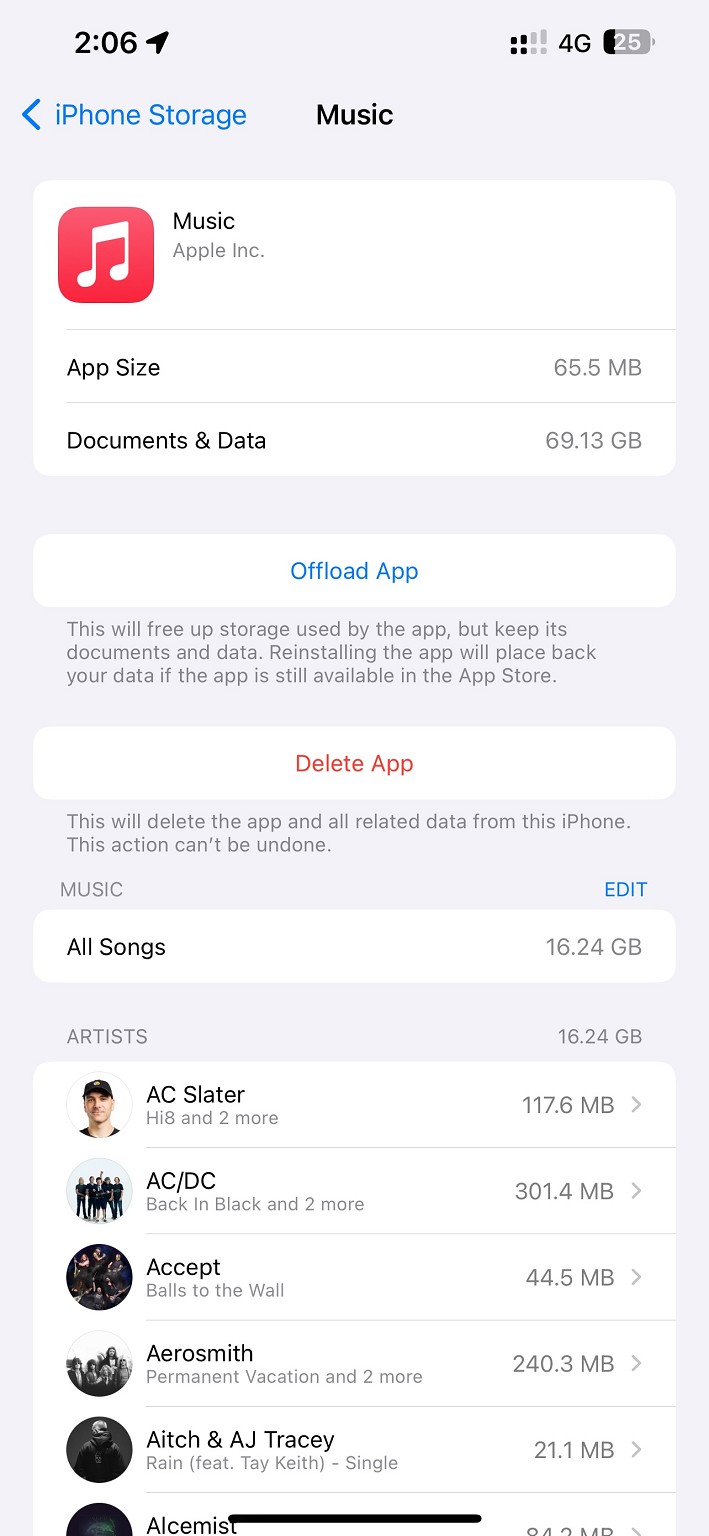
I had some music downloaded from earlier in the year (a few GB’s lol) and deleted them to make space for a new playlist. They disappeared from my library however have decided to stick around as I’m presuming a cache. iOS being easily controlled (not 🙄) has no way to delete app cache so instead I have deleted the app and force reset the phone with no avail.

Now the dreaded ‘iPhone Storage Full’ message keeps pestering me and I have run out of options and patience.

Any Ideas?


Create new topic
FineWine
3111 posts

Uber Geek
+1 received by user: 2440

Trusted
Nurse (R)
Lifetime subscriber

  #3176008 28-Dec-2023 14:58
Send private message

Have a look here on your phone: Settings > General > About. Also: Settings > General > iPhone Storage. For graphical storage bar. Now scroll down and tap on Music. It will now inform you of total songs storage size and then size per song.


Whilst the difficult we can do immediately, the impossible takes a bit longer. However, miracles you will have to wait for.


DeepBlueSky
549 posts

Ultimate Geek
+1 received by user: 67


  #3176009 28-Dec-2023 15:00
Send private message

Two things come to mind go to settings > music then look at sync library and downloaded music. Maybe turn off the sync then delete the downloads. Once you get the space back redownlload what you want for your trip. Also look at other apps eg Apple Photos if you have iCloud you maybe able to nuke some local stored photos / videos

halper86

555 posts

Ultimate Geek
+1 received by user: 156

ID Verified

  #3176028 28-Dec-2023 16:28
Send private message

FineWine:


Have a look here on your phone: Settings > General > About. Also: Settings > General > iPhone Storage. For graphical storage bar. Now scroll down and tap on Music. It will now inform you of total songs storage size and then size per song.


Yes that's the funny thing, still says app taking up 70GB however below it says 16GB of songs are downloaded. When I delete the app the 70GB moves to 'System Files'. I am puzzled at where it goes. I was trying to upload a screenshot however my photos library is not downloading as storage full.


As we speak my phone is now in recovery mode after it got stuck on a black screen with spinning wheel for over 30 minutes. Might have to restore the phone yet as got stuck in boot loop. Will keep you guys posted.


Restoring the phone from a previous backup may even fix the problem me thinks??


DeepBlueSky:


Two things come to mind go to settings > music then look at sync library and downloaded music. Maybe turn off the sync then delete the downloads. Once you get the space back redownlload what you want for your trip. Also look at other apps eg Apple Photos if you have iCloud you maybe able to nuke some local stored photos / videos


Just got home from a 1 nighter so it's a bit late for that one haha, and yes ive tried that then deleted the app and still don't seem to have any luck. Refer to reply on quote above as then that 70GB was moved to 'System Files'.


halper86

555 posts

Ultimate Geek
+1 received by user: 156

ID Verified

  #3176030 28-Dec-2023 16:32
Send private message

Found it on my Mac photos library:


Create new topic


Geekzone Live »

Try automatic live updates from Geekzone directly in your browser, without refreshing the page, with Geekzone Live now.


Are you subscribed to our RSS feed? You can download the latest headlines and summaries from our stories directly to your computer or smartphone by using a feed reader.