Geekzone: technology news, blogs, forums
Guest
Welcome Guest.
You haven't logged in yet. If you don't have an account you can register now.


Filter this topic showing only the reply marked as answer View this topic in a long page with up to 500 replies per page Create new topic
1 | ... | 65 | 66 | 67 | 68 | 69 | 70 | 71 | 72 | 73 | 74 | 75 | ... | 104
dclegg
2806 posts

Uber Geek
+1 received by user: 810

Trusted

  #2625538 22-Dec-2020 16:02
Send private message

Groucho:


Have to say I've noticed a lag in scanning on my Nokia 6.1 (Android 10) since the Bluetooth update.  Half the time it's pretty prompt, the other half I find after trying different angles if I point the camera elsewhere and point it back it usually scans first time.  Almost like it recalibrates then it's good to go.


Scanning has definitely become more persnickety for me since the Bluetooth update. Running on an iPhone 11. 


nzkiwiman
2585 posts

Uber Geek
+1 received by user: 390

Subscriber

  #2625699 23-Dec-2020 08:28
Send private message

Over the past few weeks I have been flashing my phone with various official Pixel builds trying to determine the cause of an unrelated issue; naturally every time I wipe the phone, I lose any history of my scans.


I've also noticed how slow scanning QR codes is since they removed the requirement to sign in; open the app .. wait, wait, wait .. wait for camera, wait, wait, then line up the QR code and wait some more.
It used to be really quick to fire up the app and get a scan even at an awkward angle or with things not perfectly aligned 


Benjip
978 posts

Ultimate Geek
+1 received by user: 524

ID Verified

  #2625709 23-Dec-2020 08:50
Send private message

iPhone 12 mini here. Definitely finding the scanning slower and more pedantic since the Bluetooth update (version 3?). It used to be a case of the QR codes scanning before they were even fully in frame, it would work even on just the edge of the QR code.

Now I find myself having to stop and focus my camera to get a decent read.


Darny
2 posts

Wannabe Geek


  #2625960 23-Dec-2020 16:48
Send private message

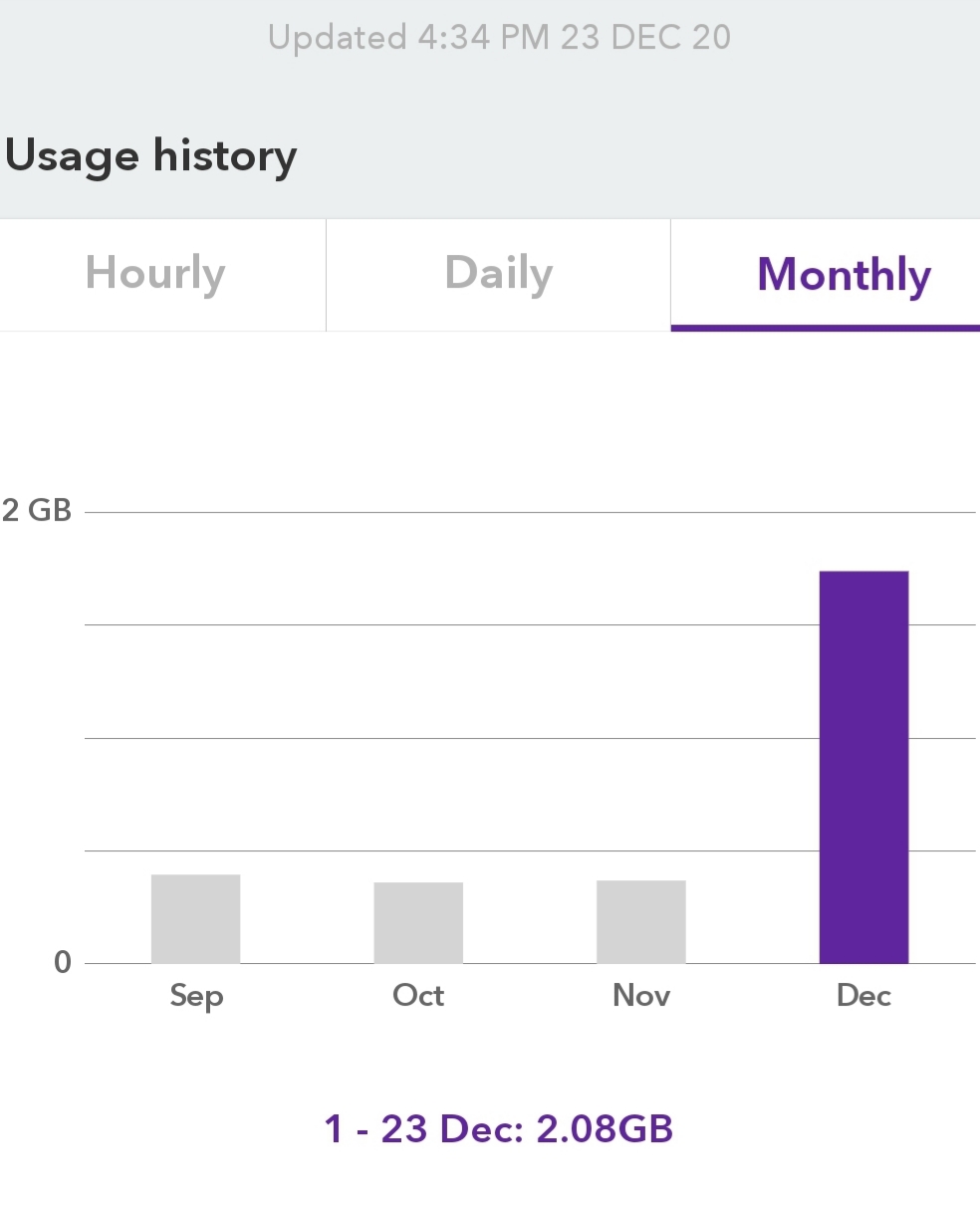
freitasm:


@neb this will be in your phone settings:


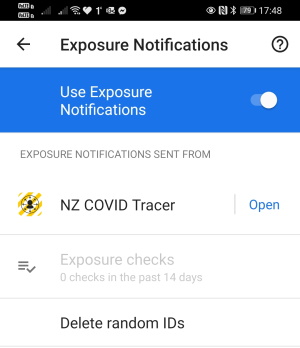
Thank you I had no idea the amount of data the  "checking exposure keys" running all the time uses. I have turned my data off today after discovering this months usage as I have a pay as you go cell. I will look for the Exposure Notifications now and turn it off. 


Click to see full size


KiwiSurfer
1725 posts

Uber Geek
+1 received by user: 994

ID Verified
Lifetime subscriber

  #2625982 23-Dec-2020 18:08
Send private message

Pretty sure it's not the COVID app. My phone shows the app using only 1.3MB in the past month.


Jase2985
13735 posts

Uber Geek
+1 received by user: 6216

ID Verified
Lifetime subscriber

  #2625999 23-Dec-2020 18:24
Send private message

KiwiSurfer:


Pretty sure it's not the COVID app. My phone shows the app using only 1.3MB in the past month.


mine has used 16MB since the 2nd of September


Shop now for Lenovo laptops and other devices (affiliate link).
MadEngineer
4591 posts

Uber Geek
+1 received by user: 2570

Trusted

  #2626002 23-Dec-2020 18:31
Send private message

The speed of the barcode scanning function in this app and others with such a function blows my mind everytime.  Just sayin.


You're not on Atlantis anymore, Duncan Idaho.

RunningMan
9189 posts

Uber Geek
+1 received by user: 4842


  #2626007 23-Dec-2020 18:53
Send private message

Using about 1MB / week on iOS. That's scanning QRs and BT on.


jlittle
200 posts

Master Geek
+1 received by user: 76

ID Verified
Subscriber

  #2626032 23-Dec-2020 20:45
Send private message

My Vodafone branded ZTE now usually takes 10 seconds from starting the app till the camera comes on, then usually several seconds to read the code.

My wife has a new phone, a Moto G8, I think, and it's a lot faster.


Regards, John Little


cddt
1970 posts

Uber Geek
+1 received by user: 1905


  #2626396 24-Dec-2020 13:57
Send private message

Apple just released iOS 12.5 to enable exposure notifications on older phones. Unfortunately it seems as though the NZ Covid Tracer app is not picking this up, and is perhaps working with a whitelist of operating systems which hasn't been updated yet.


Dratsab
3964 posts

Uber Geek
+1 received by user: 1728

Trusted
Lifetime subscriber

  #2626412 24-Dec-2020 15:10
Send private message

freitasm: I use it everywhere on my Huawei P30 Pro and 100% read. Sometimes don't even have to stop to scan.


Same phone, mostly same experience. Places that have laminated their QR codes can cause me to slow down and adjust the camera angle a time or two due to reflections. But generally, very fast.


Shop now on AliExpress (affiliate link).
alasta
6891 posts

Uber Geek
+1 received by user: 3365

Trusted
Subscriber

  #2626438 24-Dec-2020 16:51
Send private message

cddt:


Apple just released iOS 12.5 to enable exposure notifications on older phones. Unfortunately it seems as though the NZ Covid Tracer app is not picking this up, and is perhaps working with a whitelist of operating systems which hasn't been updated yet.


That is a real nuisance. I was hoping to update my mother's iPhone 6 to get the bluetooth tracing working.


andrewchen
29 posts

Geek
+1 received by user: 25

Trusted

  #2626444 24-Dec-2020 17:05
Send private message

cddt:


Apple just released iOS 12.5 to enable exposure notifications on older phones. Unfortunately it seems as though the NZ Covid Tracer app is not picking this up, and is perhaps working with a whitelist of operating systems which hasn't been updated yet.


I suspect that it's not "not picking this up yet" rather than not picking this up ever. The change requires a different version of the Exposure Notification Framework (v2) which means a bunch of changes in how the app and servers work. The current NZ implementation is based on Ireland's, so I suspect that there will need to be some more communal effort between various jurisdictions to get v2 working.


Research Fellow, Koi Tu: The Centre for Informed Futures, The University of Auckland
I know a bit about the NZ COVID Tracer app, but I don't work for Ministry of Health


neb

neb
11294 posts

Uber Geek
+1 received by user: 10018

Trusted
Lifetime subscriber

  #2627930 29-Dec-2020 19:05
Send private message

... aaaand the "Checking exposure notification" is back again, it's been going for two days solid now despite Bluetooth being turned off, Exposure Checking disabled in System settings, and Bluetooth tracking turned off in the app. The recommendation in /r/NewZealand is uninstall the app. Great job, MoH, an app that nags people into removing it.


(Rebooting the phone also seems to clear it, but I don't know how long that'll last since it's re-enabled itself since I last disabled it).


Edited to add: Emailed the MoH support address again with a somewhat less polite message than two weeks ago when I first reported the problem and they helpfully responded "um, yeah, nah, we're looking into it".

BarTender
3629 posts

Uber Geek
+1 received by user: 2572

ID Verified
Trusted
Lifetime subscriber

  #2627935 29-Dec-2020 19:41
Send private message

alasta:

cddt:


Apple just released iOS 12.5 to enable exposure notifications on older phones. Unfortunately it seems as though the NZ Covid Tracer app is not picking this up, and is perhaps working with a whitelist of operating systems which hasn't been updated yet.


That is a real nuisance. I was hoping to update my mother's iPhone 6 to get the bluetooth tracing working.


But does mother want the government tracking her?? 😀

1 | ... | 65 | 66 | 67 | 68 | 69 | 70 | 71 | 72 | 73 | 74 | 75 | ... | 104
Filter this topic showing only the reply marked as answer View this topic in a long page with up to 500 replies per page Create new topic


Geekzone Live »

Try automatic live updates from Geekzone directly in your browser, without refreshing the page, with Geekzone Live now.


Are you subscribed to our RSS feed? You can download the latest headlines and summaries from our stories directly to your computer or smartphone by using a feed reader.