Geekzone: technology news, blogs, forums
Guest
Welcome Guest.
You haven't logged in yet. If you don't have an account you can register now.


breadone

6 posts

Wannabe Geek
+1 received by user: 4


#304595 18-May-2023 12:31
Send private message quote this post

So, I recently bought a Japan-imported Honda Fit, and it came with a Japanese Gathers VXM-175 VFEi head unit. 


It has a button to switch to CarPlay in the audio source menu, but it is always greyed out, no matter what I try.


I've tried changing the settings from iPod to Carplay, connecting to bluetooth, disconnecting from bluetooth, plenty of different lightning cables, went into the "dealership settings" and tried re-enabling carplay, even changed the region on my phone to japan, still nothing. the carplay button just does not become clickable no matter what i try


Anyone got any experience with this sort of stuff? Just enabling carplay would save me the $600 ish it'll cost me to change the head unit entirely


Filter this topic showing only the reply marked as answer Create new topic
gehenna
8667 posts

Uber Geek
+1 received by user: 3883

Moderator
Trusted
Lifetime subscriber

  #3077481 18-May-2023 12:35
Send private message quote this post

Is CarPlay enabled on your phone?  Once it is, and once the cable is connected to the appropriate USB port in the car, it should all happen automatically.  Shouldn't be a need for bluetooth etc, it's all cabled.


breadone

6 posts

Wannabe Geek
+1 received by user: 4


  #3077485 18-May-2023 12:47
Send private message quote this post

Is there something specific I need to do to enable carplay? I can't find any toggle for it, under settings>general>carplay it scans for wireless carplay devices it seems


breadone

6 posts

Wannabe Geek
+1 received by user: 4


  #3077490 18-May-2023 13:04
Send private message quote this post

Uploaded some photos, this is what shows when I plug my phone in, and the carplay button still greyed out


https://imgur.com/a/ezeA9A4


gehenna
8667 posts

Uber Geek
+1 received by user: 3883

Moderator
Trusted
Lifetime subscriber

  #3077544 18-May-2023 14:12
Send private message quote this post

There used to be a toggle but perhaps not anymore.  It also needs Siri to be active, is yours enabled?  Also how many usb ports are in your car, and where are you plugging into?  I have two ports in mine, one is just for charging, and the other is for charging and head unit projection.  So if I don't plug into the right one, projection fails...


You might end up being less frustrated with a new head unit.  Those foreign ones have always had something that causes problems for me in the past.  Whether it's needing a band expander, or not having the ability to update maps, or general language issues, it's just more frustration than it's worth (for me personally).


Gurezaemon
~HONYAKKER!~
1417 posts

Uber Geek
+1 received by user: 1566

ID Verified
Lifetime subscriber

  #3077548 18-May-2023 14:28
Send private message quote this post

breadone:


Uploaded some photos, this is what shows when I plug my phone in, and the carplay button still greyed out


https://imgur.com/a/ezeA9A4


FWIW, it's telling you to check connected USB devices, and that you should remove all connected devices and try connecting them again.


This would suggest an issue on the phone end, but I know next to nothing about carplay, so YMMV.


Get your business seen overseas - Nexus Translations


gehenna
8667 posts

Uber Geek
+1 received by user: 3883

Moderator
Trusted
Lifetime subscriber

  #3077551 18-May-2023 14:43
Send private message quote this post

or an issue with the head unit recognising the cable, or even whether the usb port is physically connected to the head unit is an unanswered question.


Support Geekzone with one-off or recurring donations Donate via PressPatron.
breadone

6 posts

Wannabe Geek
+1 received by user: 4


  #3077553 18-May-2023 15:00
Send private message quote this post

gehenna:


There used to be a toggle but perhaps not anymore.  It also needs Siri to be active, is yours enabled?  Also how many usb ports are in your car, and where are you plugging into?  I have two ports in mine, one is just for charging, and the other is for charging and head unit projection.  So if I don't plug into the right one, projection fails...


You might end up being less frustrated with a new head unit.  Those foreign ones have always had something that causes problems for me in the past.  Whether it's needing a band expander, or not having the ability to update maps, or general language issues, it's just more frustration than it's worth (for me personally).


Yep Siri is enabled. There aren't any builtin USB ports, there's only one and I'm pretty sure its from the head unit itself? its just a female USB cable that goes into a panel below the unit.


Honestly good point, I'd much rather save that money but if it's this much of a headache I'm not sure it's worth it


breadone

6 posts

Wannabe Geek
+1 received by user: 4


  #3077555 18-May-2023 15:02
Send private message quote this post

Gurezaemon:


FWIW, it's telling you to check connected USB devices, and that you should remove all connected devices and try connecting them again.


This would suggest an issue on the phone end, but I know next to nothing about carplay, so YMMV.


The phone's only a couple months old, I would hope that's not the issue 😅


I did also try another phone which had the exact same issue


hbngan
89 posts

Master Geek
+1 received by user: 10

ID Verified

  #3078087 20-May-2023 16:41
Send private message quote this post

Did a search on google, some stuff on youtube


See https://www.youtube.com/watch?v=JbDr8oBY6p4


have you tested the phone on another car with carplay?


hbngan


breadone

6 posts

Wannabe Geek
+1 received by user: 4


  #3469673 13-Mar-2026 12:40
Send private message quote this post

An update after three years! It's now working beautifully with just a cheap cable :)


I used this cable from amazon jp https://www.amazon.co.jp/dp/B06XG2VZZ6.


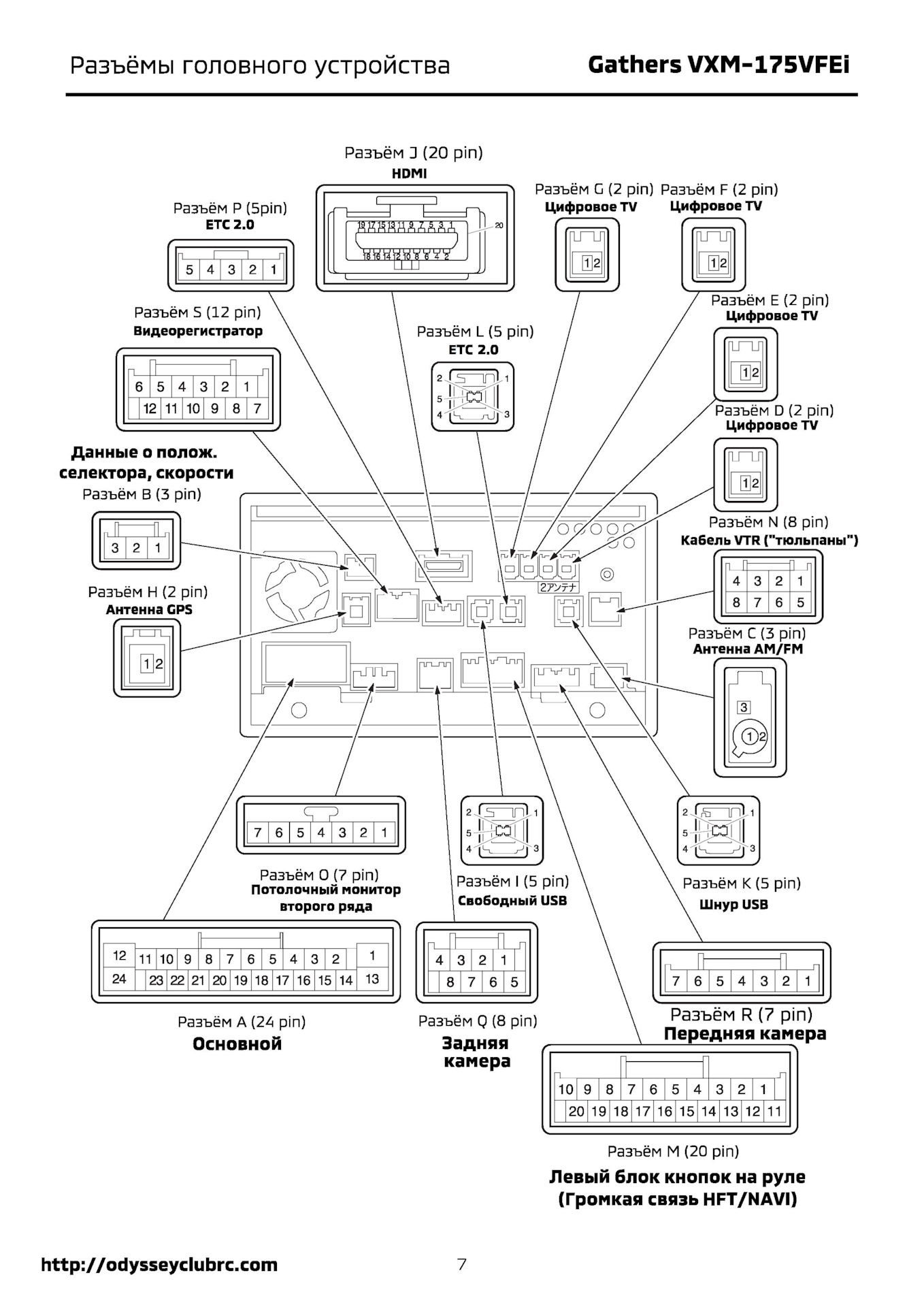
Pictured below is the wiring diagram for the head unit. Basically you need to plug the cable into Connector K. You can disassemble half the car to get the head unit out, but I managed to reach the back of it and plug in the cable by feel just from taking the glove box assembly out, which didn't even need a single screw taken out. Super easy and I did the mod in under 10 mins.


The quality of the USB cable seemed to matter a lot, generic no-name cables were cutting out frequently but using a genuine Anker one gave me no issues at all.


Honda Gathers wiring diagram


mudguard
2327 posts

Uber Geek
+1 received by user: 1250


  #3469679 13-Mar-2026 13:28
Send private message quote this post

breadone:


An update after three years! It's now working beautifully with just a cheap cable :)


The quality of the USB cable seemed to matter a lot, generic no-name cables were cutting out frequently but using a genuine Anker one gave me no issues at all.


Excellent forum etiquette! Yeah I've had a few dodgy USB cables, if anything the Anker ones last longer too. 


Shop now for Dell laptops and other devices (affiliate link).
MikeAqua
8024 posts

Uber Geek
+1 received by user: 3818


  #3470914 16-Mar-2026 15:20
Send private message quote this post

Wife has Apple and I have Android.  Both using USB-A to USB-C cables.  Apple/Carplay seems to be more sensitive to cable type and condition than Android/Auto.  That's based on the same vehicle, port and cable.


Mike


Filter this topic showing only the reply marked as answer Create new topic


Geekzone Live »

Try automatic live updates from Geekzone directly in your browser, without refreshing the page, with Geekzone Live now.


Are you subscribed to our RSS feed? You can download the latest headlines and summaries from our stories directly to your computer or smartphone by using a feed reader.