Geekzone: technology news, blogs, forums
Guest
Welcome Guest.
You haven't logged in yet. If you don't have an account you can register now.


afe66

3181 posts

Uber Geek
+1 received by user: 1678

Lifetime subscriber

#268459 20-Mar-2020 14:50
Send private message

Flying in morning with toddler son. How do I get his boarding pass to appear on my anz app?

Last time family flew we had all our boarding passes on the app so I swipped through them all

I just got the checkin email and confirmed both tickets but my son still not appear on my app.

What am missing ?

Create new topic
PeterReader
6028 posts

Uber Geek
+1 received by user: 461

Trusted
Geekzone
Lifetime subscriber

  #2442234 20-Mar-2020 14:50
Send private message

Allow me to introduce you folks to our new travel community: TravelTalk NZ.


We hope to see you there!


I am the Geekzone Robot and I am here to help. I am from the Internet. I do not interact. Do not expect other replies from me.


Referral links: Quic Broadband (free setup code: R587125ERQ6VE) | Samsung | AliExpress | Wise | Sharesies 


Support Geekzone by subscribing (browse ads-free), or making a one-off or recurring donation through PressPatron.


Goosey
3014 posts

Uber Geek
+1 received by user: 867

Subscriber

  #2442333 20-Mar-2020 17:39
Send private message

its there somewhere.....there used to be a button somewhere... i dont know what happened to it. 


But if you are the same booking reference then when you scan it at the airport it will recognise. 


amiga500
1484 posts

Uber Geek
+1 received by user: 422
Inactive user


  #2442395 20-Mar-2020 18:19
Send private message

If you have time use a kiosk and see if it prints out all the passes you need?


nickb800
2735 posts

Uber Geek
+1 received by user: 829

Trusted

  #2442398 20-Mar-2020 18:26
Send private message

Is your son under 2 years old? And have you checked in?

afe66

3181 posts

Uber Geek
+1 received by user: 1678

Lifetime subscriber

  #2442447 20-Mar-2020 20:22
Send private message

nickb800: Is your son under 2 years old? And have you checked in?


Over 2 with own seat emailed boarding pass etc.
I have memories of being able to select all passes to appear on the app but for the life if ne cant find it now.

Oh well I'll just show the pdf bar code for his pass and I'll use the app. Had whole family on the app previously

Thanks for your thought

A.

gajan
305 posts

Ultimate Geek
+1 received by user: 211

Trusted
Spark NZ
Lifetime subscriber

  #2442453 20-Mar-2020 20:32
Send private message

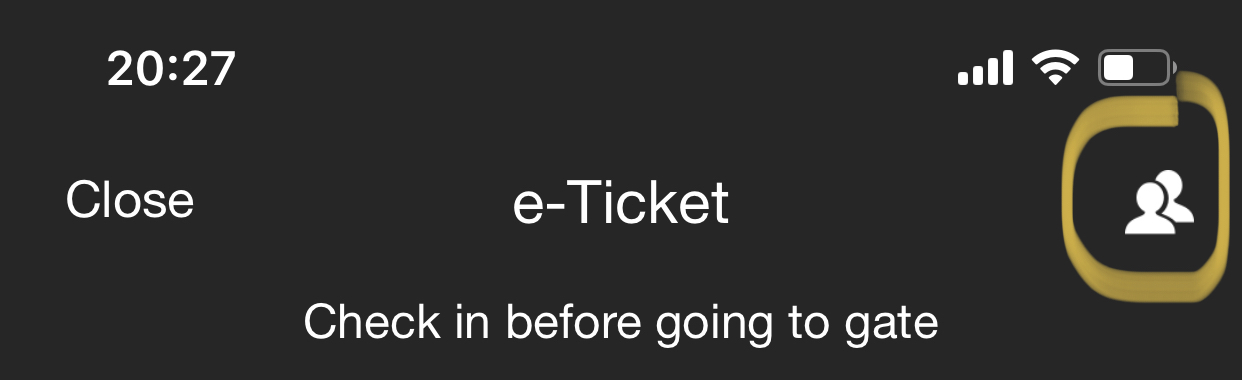
Yes you still can do it.

Open the eticket or boarding pass and it should be top right corner -

Click to see full size


My comments and remarks are not necessarily of my employer.


Shop now at Mighty Ape (affiliate link).
ubernoob
576 posts

Ultimate Geek
+1 received by user: 84

Trusted
Lifetime subscriber

  #2442617 21-Mar-2020 07:31
Send private message

I just clicked on "ask Oscar" and asked your question.
You have to be checked in, then you can see your and others boarding passes. You have to click on and open yours to be able to add others from the 'people" icon at the top

sbiddle
30853 posts

Uber Geek
+1 received by user: 9996

Retired Mod
Trusted
Biddle Corp
Lifetime subscriber

  #2442928 21-Mar-2020 13:15
Send private message

Once you have checked in you'll see your boarding pass. Then click on the little "person" icon at the top (a few posts above) to allow it to show others on the same PNR.


afe66

3181 posts

Uber Geek
+1 received by user: 1678

Lifetime subscriber

  #2442951 21-Mar-2020 13:47
Send private message

Thanks for replays.

First leg done so I'll try again on return.

Didnt see the oscar link as was hidden under a red Covid banner which I didnt think to swipe away.

I'll look for the people icon when I checkin for the return leg in a couple of days.

gajan
305 posts

Ultimate Geek
+1 received by user: 211

Trusted
Spark NZ
Lifetime subscriber

  #2443084 21-Mar-2020 16:01
Send private message

You should see the multi-person icon for “un-checked” in flights as well (I.e the eTickets). Above screenshot is for a flight of ours in the future and I can see all eTickets, prior to check in.


My comments and remarks are not necessarily of my employer.


Create new topic


Geekzone Live »

Try automatic live updates from Geekzone directly in your browser, without refreshing the page, with Geekzone Live now.


Are you subscribed to our RSS feed? You can download the latest headlines and summaries from our stories directly to your computer or smartphone by using a feed reader.