Geekzone: technology news, blogs, forums
Guest
Welcome Guest.
You haven't logged in yet. If you don't have an account you can register now.


larknz

1978 posts

Uber Geek
+1 received by user: 382

ID Verified
Lifetime subscriber

#311919 26-Feb-2024 18:04
Send private message

Is anyone else having trouble connecting to the Air NZ website using MFA and Chrome on Windows. I can get in using Edge, but not Chrome.


Chrome appears to fail to handle MFA. I have updated Chrome to the latest version.


Filter this topic showing only the reply marked as answer Create new topic
farcus
1626 posts

Uber Geek
+1 received by user: 437


  #3200308 26-Feb-2024 18:27
Send private message

I can get in fine using chrome.
Are we talking about the same kind of MFA? When I log in I then get a txt to my phone with a code to complete login.
I simply enter this and the login finalises.


Chrome: Version 121.0.6167.184 (Official Build) (64-bit)


edit: -just switched my AirNZ MFA to Authy.
This also works fine for me in Chrome


larknz

1978 posts

Uber Geek
+1 received by user: 382

ID Verified
Lifetime subscriber

  #3200316 26-Feb-2024 18:55
Send private message

It tries to make me use MS Authenticator or a PIN number and then just locks up. It doesn't allow me to use a txt or email.


larknz

1978 posts

Uber Geek
+1 received by user: 382

ID Verified
Lifetime subscriber

  #3200317 26-Feb-2024 18:57
Send private message

Authenticator works fine with Edge.


djtOtago
1181 posts

Uber Geek
+1 received by user: 605


  #3200331 26-Feb-2024 19:21
Send private message

Chrome (122.0.6261.69) with MS Authentication works for me on Windows 11


larknz

1978 posts

Uber Geek
+1 received by user: 382

ID Verified
Lifetime subscriber

  #3200335 26-Feb-2024 19:43
Send private message

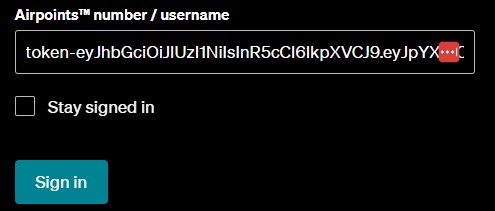
I'm using Chrome 122.0.6261.70 and this is as far as I get and it doesn't go any further. It works fine on Edge.


freitasm
BDFL - Memuneh
80658 posts

Uber Geek
+1 received by user: 41070

Administrator
ID Verified
Trusted
Geekzone
Lifetime subscriber

  #3200342 26-Feb-2024 21:03
Send private message

That token shouldn't be in that field. Are you using a password manager?


Referral links: Quic Broadband (free setup code: R587125ERQ6VE) | Samsung | AliExpress | Wise | Sharesies 


Support Geekzone by subscribing (browse ads-free), or making a one-off or recurring donation through PressPatron.



Shop now on AliExpress (affiliate link).
larknz

1978 posts

Uber Geek
+1 received by user: 382

ID Verified
Lifetime subscriber

  #3200344 26-Feb-2024 21:22
Send private message

Yes I am, Lastpass


elpenguino
3577 posts

Uber Geek
+1 received by user: 2939


  #3200346 26-Feb-2024 21:43
Send private message

Not sure if this is related but I just received an Air NZ MFA SMS code on my phone, which is unexpected since I'm not planning to fly anywhere.


Most of the posters in this thread are just like chimpanzees on MDMA, full of feelings of bonhomie, joy, and optimism. Fred99 8/4/21


snj

snj
305 posts

Ultimate Geek
+1 received by user: 221


  #3200347 26-Feb-2024 22:05
Send private message

larknz:


Yes I am, Lastpass


When I used to use Lastpass I had it doing weird stuff with OTP fields/etc in the past, I'd try disabling the extension and trying again. If you do isolate it to Lastpass, then I'd say most likely if you edit the login you'll find there are some non-username/password fields defined somewhere, with one having that token- string as the value.


Edit: Alternatively I think you can disable autofill for some logins, so that might be an alternative/easier thing to do. So long since I've used Lastpass that I can't remember though.


larknz

1978 posts

Uber Geek
+1 received by user: 382

ID Verified
Lifetime subscriber

  #3200349 26-Feb-2024 22:32
Send private message

snj:


larknz:


Yes I am, Lastpass


When I used to use Lastpass I had it doing weird stuff with OTP fields/etc in the past, I'd try disabling the extension and trying again. If you do isolate it to Lastpass, then I'd say most likely if you edit the login you'll find there are some non-username/password fields defined somewhere, with one having that token- string as the value.


Edit: Alternatively I think you can disable autofill for some logins, so that might be an alternative/easier thing to do. So long since I've used Lastpass that I can't remember though.


I'll try disabling autofill


freitasm
BDFL - Memuneh
80658 posts

Uber Geek
+1 received by user: 41070

Administrator
ID Verified
Trusted
Geekzone
Lifetime subscriber

  #3200374 27-Feb-2024 07:48
Send private message

It looks like LastPass is filling the wrong fields then.


Referral links: Quic Broadband (free setup code: R587125ERQ6VE) | Samsung | AliExpress | Wise | Sharesies 


Support Geekzone by subscribing (browse ads-free), or making a one-off or recurring donation through PressPatron.


Shop now on AliExpress (affiliate link).
ANglEAUT
altered-ego
2436 posts

Uber Geek
+1 received by user: 842

Trusted
Lifetime subscriber

  #3200403 27-Feb-2024 09:34
Send private message

larknz: ... I get and it doesn't go any further. It works fine on Edge.


Or you can simply wipe the currently displayed text in the "Airpoints number / username" field & fill in the correct value.


Please keep this GZ community vibrant by contributing in a constructive & respectful manner.


larknz

1978 posts

Uber Geek
+1 received by user: 382

ID Verified
Lifetime subscriber

  #3200635 27-Feb-2024 21:44
Send private message

Thanks everyone for their suggestions. In the end I uninstalled and reinstalled Chrome and it seems to be working now with Windows Hello.


Filter this topic showing only the reply marked as answer Create new topic


Geekzone Live »

Try automatic live updates from Geekzone directly in your browser, without refreshing the page, with Geekzone Live now.


Are you subscribed to our RSS feed? You can download the latest headlines and summaries from our stories directly to your computer or smartphone by using a feed reader.