Geekzone: technology news, blogs, forums
Guest
Welcome Guest.
You haven't logged in yet. If you don't have an account you can register now.


View this topic in a long page with up to 500 replies per page Create new topic
1 | 2 | 3
Jase2985

13772 posts

Uber Geek
+1 received by user: 6254

ID Verified
Lifetime subscriber

  #2565778 16-Sep-2020 11:33
Send private message

Ive just tested on a different computer(W10 Laptop) and browser chrome this time, via ethernet and im seeing the same thing. massive increase in upload speed overseas with the VPN on.


LA Atlantic Metro 450/116 and with the VPN on im seeing 620/350


New York Atlantic Metro 384/80 and with the VPN on im seeing 592/383


Ill pull out my other router (NF8AC) and see how it goes.


Jase2985

13772 posts

Uber Geek
+1 received by user: 6254

ID Verified
Lifetime subscriber

  #2565779 16-Sep-2020 11:34
Send private message

@VygrNetworkMonkey what MTU/MSS settings should i be using?


VygrNetworkMonkey
181 posts

Master Geek
+1 received by user: 193

Trusted
Voyager
Lifetime subscriber

  #2565783 16-Sep-2020 11:39
Send private message

mdf:


This is well over my head, but just thought I'd chime in to see whether you're using IPv6 or not.


I was having some really weird issues in some circumstances with Voyager and IPv6 turned on. Went away when I disabled IPv6. I am entirely willing to chalk these issues up to my (in)ability to configure IPv6 correctly however.


While potentially leading to 'off the original topic reply' .... 😄


For IPv6 traffic, make sure your MSS is set to 1432 .... v6 has a 20byte overhead vs v4. (you can, and should, still keep v4 at 1452 MSS)
A number of routers either don't allow you to set, or are ignorant to it.


Voyager Internet - Network Monkey


VygrNetworkMonkey
181 posts

Master Geek
+1 received by user: 193

Trusted
Voyager
Lifetime subscriber

  #2565784 16-Sep-2020 11:42
Send private message

Jase2985:


@VygrNetworkMonkey what MTU/MSS settings should i be using?


IPv4 Settings


MTU: 1492
MSS: 1452


IPv6 Settings (for those that are using it)


MTU: 1492
MSS: 1432


Make sure these setting are applied in both directions on the interface (can also be called MRU for inbound)


Voyager Internet - Network Monkey

Jase2985

13772 posts

Uber Geek
+1 received by user: 6254

ID Verified
Lifetime subscriber

  #2565963 16-Sep-2020 13:38
Send private message

Tried with the netcomm NF8AC and i was getting about 800/430 locally to chorus fiber labs.


but seeing exactly the same thing to overseas destinations, by using the VPN my upload increases by 2-4x that of the straight Voyager connection


This is especially noticeable when uploading large files offshore for backup.


VygrNetworkMonkey
181 posts

Master Geek
+1 received by user: 193

Trusted
Voyager
Lifetime subscriber

  #2566001 16-Sep-2020 14:18
Send private message

Thanks @Jase2985,


Here's what I've garnered from your info:


  • You've shown that you can get the required speeds domestically - This indicates that the speeds of the fibre service is correct.
  • You are still not able to get the international upload speeds, even after changing the CPE, and even when using 2D for the international portion (as indications by the 2D LA tests) - This tells me it's not a Voyager international carrier issue.
  • I'm not able to reproduce the issue on any of our test services - they all gain much higher upstream, even when testing from CHC to the same endpoints.

I'm not sure what it is, but it sounds like it's going to need some further testing .. possibly on the PC/LAN side of things? (again, taking stabs here, as a lot if info is unknown)
Do you have any other devices in the mix? Switching etc, that may be worth taking out.


~ C


Voyager Internet - Network Monkey


Shop on-line at New World now for your groceries (affiliate link).
Jase2985

13772 posts

Uber Geek
+1 received by user: 6254

ID Verified
Lifetime subscriber

  #2566041 16-Sep-2020 15:33
Send private message

No extra devices in the mix, was straight to the router


Im not sure what else i can do on my end? the computers (3 of) have all proven capable of a 900/500 connection ive tried 2 different routers all are giving the same results.


@ssamjh @allio @surfisup1000 would you mind testing to Atlantic Metro in New York and posting the results please?


ssamjh
360 posts

Ultimate Geek
+1 received by user: 176

ID Verified
Trusted

  #2566058 16-Sep-2020 16:01
Send private message

Jase2985:


No extra devices in the mix, was straight to the router


Im not sure what else i can do on my end? the computers (3 of) have all proven capable of a 900/500 connection ive tried 2 different routers all are giving the same results.


@ssamjh @allio @surfisup1000 would you mind testing to Atlantic Metro in New York and posting the results please?


Sure thing Jase!


Speedtest done via Windows 10 App (server ID is wrong due to a bug in the app)


Speedtest/s done via Chrome to Atlantic Metro in New York (took a few tests to see if speed was faster in some cases)


Whitianga, Coromandel - Quic Rocket1G - Ref (free setup): R893192EGADLZ


Smokeping: Quic / Voyager / Starlink


Coromandel Webcam Network


VygrNetworkMonkey
181 posts

Master Geek
+1 received by user: 193

Trusted
Voyager
Lifetime subscriber

  #2566104 16-Sep-2020 17:22
Send private message

Heya @ssamjh


I can reproduce those numbers, however, rather than add another endpoint to the troubleshooting, can you re-run the Speedtest to Atlantic Metro in Los Angeles - as this was the original server we are troubleshooting to.


Can you also run 2Degrees - LA too? - just to check 2x sites I can't replicate @Jase2985 with.


Thanks!


Voyager Internet - Network Monkey

Jase2985

13772 posts

Uber Geek
+1 received by user: 6254

ID Verified
Lifetime subscriber

  #2566115 16-Sep-2020 17:56
Send private message

ssamjh's results mimic mine to Atlantic Metro New York.


Jase2985

13772 posts

Uber Geek
+1 received by user: 6254

ID Verified
Lifetime subscriber

  #2566124 16-Sep-2020 18:28
Send private message

2Degrees LA


Atlantic Metro LA


Atlantic Metro NY


Shop now on Samsung phones, tablets, TVs and more (affiliate link).
Jase2985

13772 posts

Uber Geek
+1 received by user: 6254

ID Verified
Lifetime subscriber

  #2566168 16-Sep-2020 18:38
Send private message

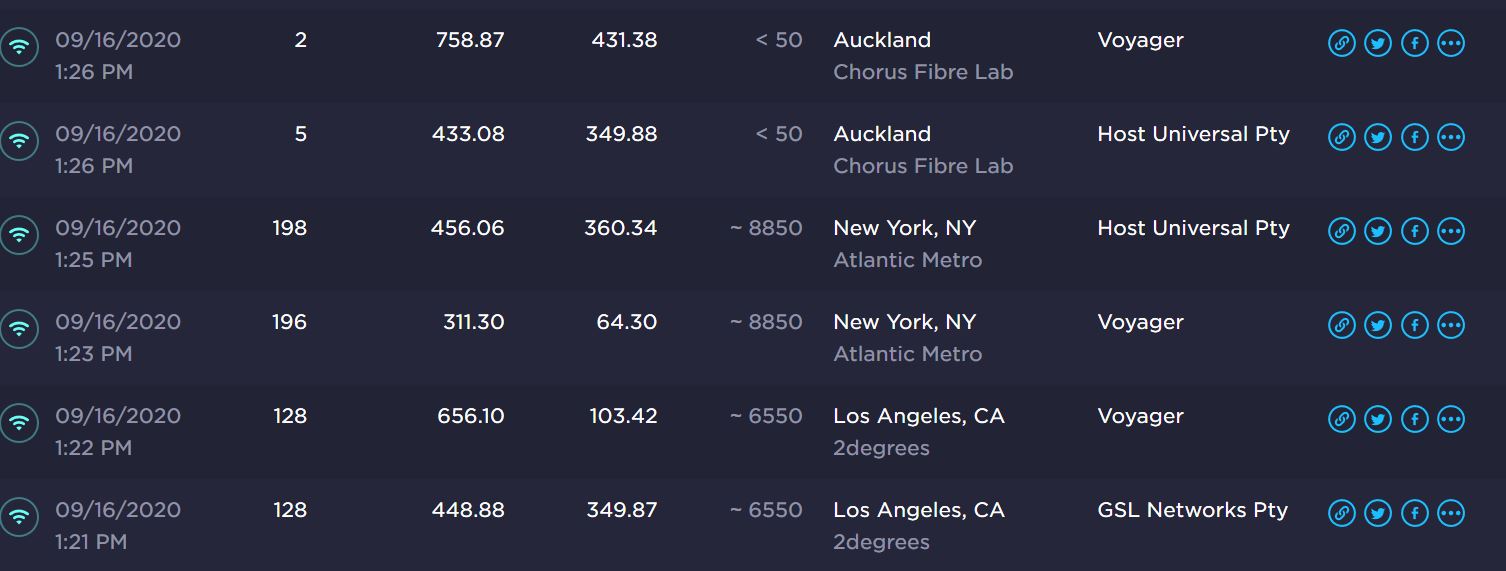
VPN On with the end point on Auckland. note 300mbps is about where the VPN maxes out.


2Degrees LA


Atlantic Metro LA


Atlantic Metro NY


yitz
2277 posts

Uber Geek
+1 received by user: 608


  #2566175 16-Sep-2020 18:54
Send private message

What about router running bridged Ethernet mode with PPPoE dialler on Windows?


That seems to be a similar interface to VPN connections on Windows, see if you get similar results compared to your VPN.


ssamjh
360 posts

Ultimate Geek
+1 received by user: 176

ID Verified
Trusted

  #2566179 16-Sep-2020 19:02
Send private message

VygrNetworkMonkey:


Heya @ssamjh


I can reproduce those numbers, however, rather than add another endpoint to the troubleshooting, can you re-run the Speedtest to Atlantic Metro in Los Angeles - as this was the original server we are troubleshooting to.


Can you also run 2Degrees - LA too? - just to check 2x sites I can't replicate @Jase2985 with.


Thanks!


Running an ER-4 with gigabit networking to my PC.


Seeing some intermittent results, however this is peak time:


Whitianga, Coromandel - Quic Rocket1G - Ref (free setup): R893192EGADLZ


Smokeping: Quic / Voyager / Starlink


Coromandel Webcam Network


hio77
'That VDSL Cat'
13044 posts

Uber Geek
+1 received by user: 3901

ID Verified
Trusted
Lizard Networks
Subscriber

  #2566220 16-Sep-2020 20:23
Send private message

VygrNetworkMonkey:


can you re-run the Speedtest to Atlantic Metro in Los Angeles - as this was the original server we are troubleshooting to.


watchout for that multi test option, it doesn't show in the results but will impact any troubleshooting you do to a single server.


#include <std_disclaimer>


Any comments made are personal opinion and do not reflect directly on the position my current or past employers may have. 


1 | 2 | 3
View this topic in a long page with up to 500 replies per page Create new topic


Geekzone Live »

Try automatic live updates from Geekzone directly in your browser, without refreshing the page, with Geekzone Live now.


Are you subscribed to our RSS feed? You can download the latest headlines and summaries from our stories directly to your computer or smartphone by using a feed reader.