Geekzone: technology news, blogs, forums
Guest
Welcome Guest.
You haven't logged in yet. If you don't have an account you can register now.


View this topic in a long page with up to 500 replies per page Create new topic
1 | 2 
moosee

28 posts

Geek
+1 received by user: 9


  #2922516 4-Jun-2022 11:11
Send private message

Thanks heaps for your advice, I really appreciate all the help you are giving.


Have deleted all the profiles, created a new one and entered the settings advised as per screenshots but have now got a message "Invalid PVC" when trying to save the new profile. 


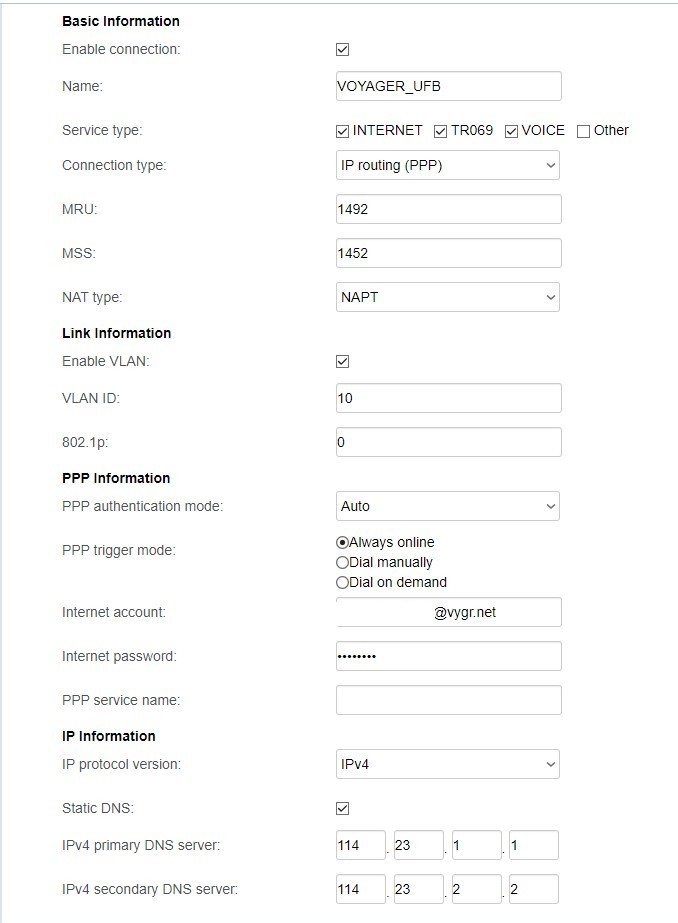
Have also attached a screenshot of my Voyager modem's settings - I see that the IPv4 setting is static with DNS server numbers which I believe is required but the Vodafone modem will not let me select the static setting for IPv4, only the PPPoE is permitted. I have no idea how to change this.


Voyager modem setting below:


Spyware
3818 posts

Uber Geek
+1 received by user: 1366

Lifetime subscriber

  #2922521 4-Jun-2022 11:21
Send private message

Invalid PVC refers to the fact that you have ATM uplink as the access type. This is not correct as ATM uplink refers to the ADSL interface. You would need to refer to the Ethernet interface - which is the Ethernet WAN interface that connects the router to the ONT.


Spark Max Fibre using Mikrotik CCR1009-8G-1S-1S+, CRS125-24G-1S, Unifi UAP, U6-Pro, UAP-AC-M-Pro, Apple TV 4K (2022), Apple TV 4K (2017), iPad Air 1st gen, iPad Air 4th gen, iPhone 13, SkyNZ3151 (the white box). If it doesn't move then it's data cabled.


cyril7
9073 posts

Uber Geek
+1 received by user: 2499

ID Verified
Trusted
Subscriber

  #2922571 4-Jun-2022 11:53
Send private message

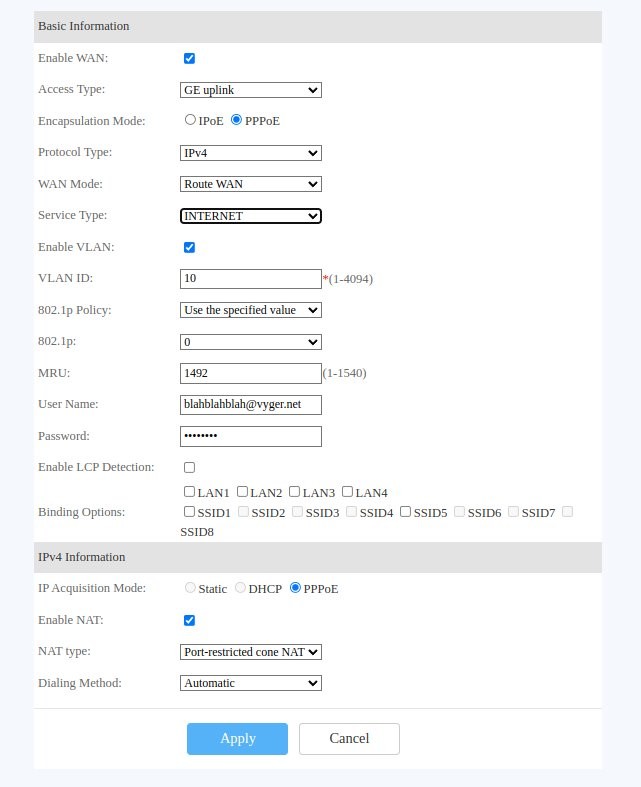
Yep access method is ATM which is for ADSL, you need to adjust that to Ge wired or whatever it shows as. Can I suggest you replicate what is in the third preset for GE not the first for ADSL but use pppoe not IPoE for access method and IP4 acquisition.


Cyril


Edit, here just logged into one I have at a clients place and created a profile that should work, not tested, but should get you 99% of the way there


Cyril


[Mod edit (MF): resized image]


moosee

28 posts

Geek
+1 received by user: 9


  #2922753 4-Jun-2022 16:48
Send private message

Thanks heaps, it is now working!! I copied the settings as in Cyril's post and it connected immediately.  😊😊😊


One final question -- I notice that in the Management section under ACS Configuration there is a Vodafone address for ACS URL and Vodafone ACS User Name. It seems that this is to do with ISP remote management, should I leave those settings alone or change them to the same as my Voyager modem and contact Voyager to find out what the passwords are? If I leave them as is will Vodafone be able to access my modem remotely?


Am really grateful for the help provided. 😊


MaxineN
Max
2049 posts

Uber Geek
+1 received by user: 1662

ID Verified
Trusted
Subscriber

  #2922757 4-Jun-2022 16:58
Send private message

That part doesn't work but for piece of mind you can just blank them out.


Ramblings from a mysterious lady who's into tech. Warning I may often create zingers.


1 | 2 
View this topic in a long page with up to 500 replies per page Create new topic


Geekzone Live »

Try automatic live updates from Geekzone directly in your browser, without refreshing the page, with Geekzone Live now.


Are you subscribed to our RSS feed? You can download the latest headlines and summaries from our stories directly to your computer or smartphone by using a feed reader.