Geekzone: technology news, blogs, forums
Guest
Welcome Guest.
You haven't logged in yet. If you don't have an account you can register now.


Fuzzi9986

52 posts

Master Geek
+1 received by user: 26

ID Verified
Trusted

#289591 14-Sep-2021 20:11

I recently moved to a new place my old ISP was MyRepublic and my new flatmates already had a Voyager connection.

My plex server now no longer works for others off network or occasionally works but says insecure connection or limited connection.

I'm trying to figure out why this is happening but have ruled out their connections as they can access other plex servers just not my one.

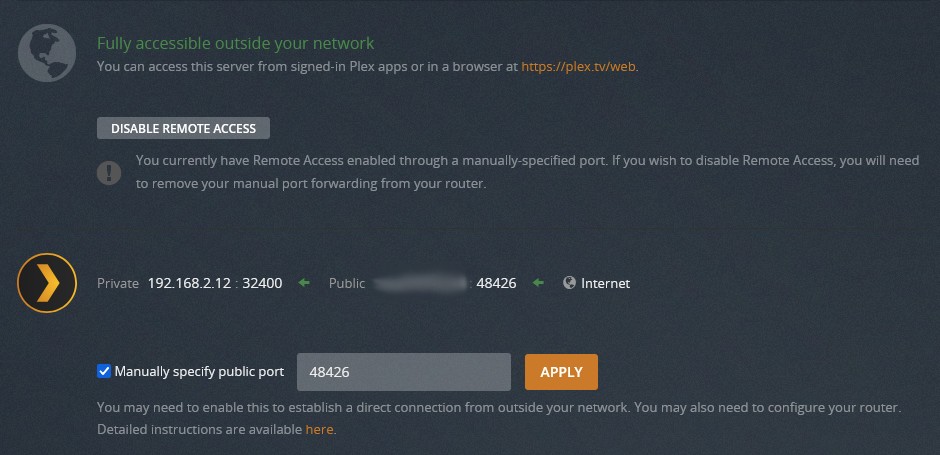
As shown here plex says it's fully accessible outside my network but it's not working

(Edit) and yes I have set up a static IP for the server and a port fwding rule

Filter this topic showing only the reply marked as answer Create new topic
chevrolux
4962 posts

Uber Geek
+1 received by user: 2638
Inactive user


  #2778454 14-Sep-2021 20:34
Send private message

And the only other stupid question... your external users are trying to connect to the new Vygr IP right? Not the old MyRebublic one?

Or if they are connecting to a domain name, the DNS record has been updated?


Fuzzi9986

52 posts

Master Geek
+1 received by user: 26

ID Verified
Trusted

  #2778455 14-Sep-2021 20:37

They're using the default plex app not going to my ip address or url

davidcole
6099 posts

Uber Geek
+1 received by user: 1465

Trusted

  #2778465 14-Sep-2021 20:55
Send private message

Voyager using cgnat? Not sure if Plex will work through that.


Previously known as psycik

Home Assistant: Gigabyte AMD A8 Brix, Home Assistant with Aeotech ZWave Controller, Raspberry PI, Wemos D1 Mini, Zwave, Shelly Humidity and Temperature sensors
Media:Chromecast v2, ATV4 4k, ATV4, HDHomeRun Dual
Server
Host Plex Server 3x3TB, 4x4TB using MergerFS, Samsung 850 evo 512 GB SSD, Proxmox Server with 1xW10, 2xUbuntu 22.04 LTS, Backblaze Backups, usenetprime.com fastmail.com Sharesies Trakt.TV Sharesight 


Fuzzi9986

52 posts

Master Geek
+1 received by user: 26

ID Verified
Trusted

  #2778468 14-Sep-2021 20:56

davidcole: Voyager using cgnat? Not sure if Plex will work through that.


We have a static IP

davidcole
6099 posts

Uber Geek
+1 received by user: 1465

Trusted

  #2778478 14-Sep-2021 21:19
Send private message

Can you access your server via app.Plex.tv. (Ie via browser and/or using the lex app). But maybe over 4g


Previously known as psycik

Home Assistant: Gigabyte AMD A8 Brix, Home Assistant with Aeotech ZWave Controller, Raspberry PI, Wemos D1 Mini, Zwave, Shelly Humidity and Temperature sensors
Media:Chromecast v2, ATV4 4k, ATV4, HDHomeRun Dual
Server
Host Plex Server 3x3TB, 4x4TB using MergerFS, Samsung 850 evo 512 GB SSD, Proxmox Server with 1xW10, 2xUbuntu 22.04 LTS, Backblaze Backups, usenetprime.com fastmail.com Sharesies Trakt.TV Sharesight 


hio77
'That VDSL Cat'
13036 posts

Uber Geek
+1 received by user: 3896

ID Verified
Trusted
Lizard Networks
Subscriber

  #2778479 14-Sep-2021 21:20
Send private message

davidcole: Voyager using cgnat? Not sure if Plex will work through that.


voyager do not do cgnat.


#include <std_disclaimer>


Any comments made are personal opinion and do not reflect directly on the position my current or past employers may have. 


Shop now for Dell laptops and other devices (affiliate link).
Fuzzi9986

52 posts

Master Geek
+1 received by user: 26

ID Verified
Trusted

  #2778480 14-Sep-2021 21:22

davidcole: Can you access your server via app.Plex.tv. (Ie via browser and/or using the lex app). But maybe over 4g


I can internally using the app and app.plex.tv but on my 4g I can't access any server not just mine, however on wifi elsewhere I can access other servers just not mine

davidcole
6099 posts

Uber Geek
+1 received by user: 1465

Trusted

  #2778482 14-Sep-2021 21:25
Send private message

Ever tried changing the Plex port away from 32400 and updating the port forward rule. Even just for a test


Previously known as psycik

Home Assistant: Gigabyte AMD A8 Brix, Home Assistant with Aeotech ZWave Controller, Raspberry PI, Wemos D1 Mini, Zwave, Shelly Humidity and Temperature sensors
Media:Chromecast v2, ATV4 4k, ATV4, HDHomeRun Dual
Server
Host Plex Server 3x3TB, 4x4TB using MergerFS, Samsung 850 evo 512 GB SSD, Proxmox Server with 1xW10, 2xUbuntu 22.04 LTS, Backblaze Backups, usenetprime.com fastmail.com Sharesies Trakt.TV Sharesight 


allan
2073 posts

Uber Geek
+1 received by user: 899

ID Verified
Lifetime subscriber

  #2778509 14-Sep-2021 22:28
Send private message

Voyager router definitely does have port 32400 forwarded to your Plex server?


Edited because I realised that's pretty much what the previous poster was asking.


Fuzzi9986

52 posts

Master Geek
+1 received by user: 26

ID Verified
Trusted

  #2778512 14-Sep-2021 22:47

allan:

Voyager router definitely does have port 32400 forwarded to your Plex server?


The router does have the correct port fwded to the correct device yes

I haven't tried a different port but shall do so when I wake up and test when out tomorrow

surfisup1000
5288 posts

Uber Geek
+1 received by user: 2159


  #2778520 14-Sep-2021 23:18
Send private message

If it helps, if at least to prove the problem is not voyager, I have fritzbox 7490, on voyager fiber, 32400 port forwarded to the server , and plex plays perfectly well from outside the network. It didn't work right away for some reason I cannot recall. 


Maybe I had to signout/sign in from the server? I can't recall what specifically changed to make it work.... it could have been the DNS rebind protection rules that got it working....in the fritzbox i have this setup....


DNS Rebind Protection


Your FRITZ!Box suppresses DNS responses that refer to IP addresses in its own home network (DNS rebind protection). Here you can specify exceptions for which DNS rebind protection should not apply. Do this by entering the complete name of the host (domain name including the subdomain) in the list.


Host name exceptions:


plex.direct
plex.tv
plexapp.com
plex.server


Want to support Geekzone and browse the site without the ads? Subscribe to Geekzone now (monthly, annual and lifetime options).
michaelmurfy
meow
13580 posts

Uber Geek
+1 received by user: 10910

Moderator
ID Verified
Trusted
Lifetime subscriber

  #2778532 15-Sep-2021 01:10
Send private message

How sure are you that the port is forwarded correctly?


Normally with Plex and most ISP provided routers the port forward happens via UPnP but I think you're looking into this the wrong way. You have not also told us what platform you're using (I am going to assume Windows). With Windows, if you change your router then Windows will mark your network by default as a "Public Network" which does have firewall rules enabled to make your computer invisible so ensure you've taken care of your local firewall first.


Second, your port forwarding rule is always back to 32400 - so in my case, I operate my server on a non-standard port like so:


On my Mikrotik I have a forward from 48426 to 192.168.2.12 port 32400 (TCP).


Lastly, what router are you using? This is something else you have not mentioned. People are assuming you're using the Huawei router that comes with a Voyager connection.


But the conclusion - you 100% have not got the port forward correctly set. First try automatic rules to see if UPnP will forward automatically and failing that do a port forward. Use https://www.canyouseeme.org/ to verify your port is live to the rest of the internet.


Michael Murphy | https://murfy.nz
Referral Links: Quic Broadband (use R122101E7CV7Q for free setup)

Are you happy with what you get from Geekzone? Please consider supporting us by subscribing.
Opinions are my own and not the views of my employer.


Fuzzi9986

52 posts

Master Geek
+1 received by user: 26

ID Verified
Trusted

  #2778566 15-Sep-2021 07:02

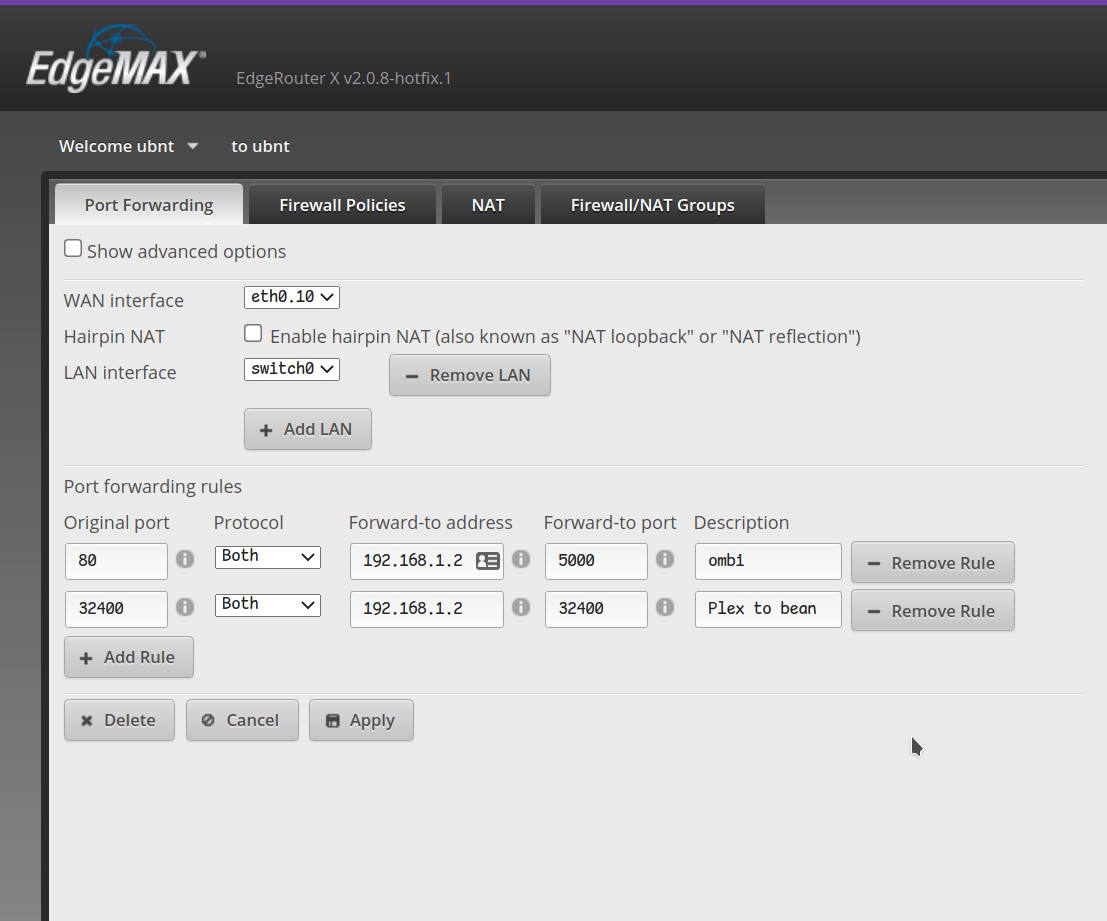
It's running on Ubuntu Server, the router is an Ubiquity Edge router


here are the port fwding rules with the internal ip address of the server


Fuzzi9986

52 posts

Master Geek
+1 received by user: 26

ID Verified
Trusted

  #2778569 15-Sep-2021 07:13

canyouseeme was saying it couldn't find, changed the wan interface from the Ethernet port that goes to the ONT to pppoe and now it's working.


Thanks for pointing out it's my fwding rules


xpd

xpd
Geek of Coastguard
14116 posts

Uber Geek
+1 received by user: 4579

Retired Mod
ID Verified
Trusted
Lifetime subscriber

  #2778596 15-Sep-2021 08:25
Send private message

michaelmurfy:


Second, your port forwarding rule is always back to 32400 - so in my case, I operate my server on a non-standard port like so:


I tried setting mine to a custom port when I was on static IP etc, and it always refused to connect. Set it manually to the default port and bingo, worked every time. Dont know why it did that, but suspect router forwarding for some reason.


XPD / Gavin


LinkTree


Filter this topic showing only the reply marked as answer Create new topic


Geekzone Live »

Try automatic live updates from Geekzone directly in your browser, without refreshing the page, with Geekzone Live now.


Are you subscribed to our RSS feed? You can download the latest headlines and summaries from our stories directly to your computer or smartphone by using a feed reader.