Geekzone: technology news, blogs, forums
Guest
Welcome Guest.
You haven't logged in yet. If you don't have an account you can register now.
Please note this sub-forum does not provide professional finance advice. You should seek advice from a licensed financial advisor.

To post in this sub-forum you must have made 100 posts or have Trust status or have completed our ID Verification.

If investing please consider our affiliate link for new accounts: Sharesies.


View this topic in a long page with up to 500 replies per page Create new topic
1 | 2 | 3 | 4 | 5 | 6 | 7 | 8 | 9 | 10 | 11 | 12 | ... | 13
kingjj
1731 posts

Uber Geek
+1 received by user: 450

ID Verified
Trusted

  #1450470 15-Dec-2015 07:38
Send private message

Had my first failures yesterday with payment. Full 4G signal in the middle of a mall, twice failed to pay. No error message at the time, a couple of minutes later I got a message about a 'connection error'. Works well in the work café though so the morning snack is assured.


teamyoyo
58 posts

Master Geek
+1 received by user: 15


  #1450590 15-Dec-2015 09:35
Send private message

PBomb: For those with root or non-supported devices, I wrote a Xposed module for ANZ GoMoney (as someone here asked earlier if there was one). Its on the Xposed repo so search for it there. Source code is out (so you can see im not storing your information). Hopefully it works for you! cheers. it sucks that they block root users, but its justified.


I tried your module last night. I rebooted, cleared data multiple times and even reinstalled Xposed but I couldn't get it to work. The module definitely cloaks root but doesn't appear to correctly spoof. I have a LG G3 running Cloudy 2.5 - a stock based ROM. I've been meaning to upgrade the ROM for a while so I'll do that this weekend and give it another go.


You don't choose a book by its cover but it does determine which ones you read.

lchiu7
6521 posts

Uber Geek
+1 received by user: 543

Trusted

  #1450679 15-Dec-2015 11:15
Send private message

kingjj: Had my first failures yesterday with payment. Full 4G signal in the middle of a mall, twice failed to pay. No error message at the time, a couple of minutes later I got a message about a 'connection error'. Works well in the work café though so the morning snack is assured.


That's strange since I thought I had read in this thread that the app doesn't need network connectivity It just stores a token on the phone like the credit card. But perhaps every now and then you have to call home to refresh it?

Certainly it doesn't refresh your ANZ transactions when you use it but that could be an issue with the ANZ credit card online system not updating in real time. And there is no app based transaction list which could be either a future function or not possible given the design of the app where it only provides authentication of the "card" and the terminal does all the transaction processing like a regular CC.


Staying in Wellington. Check out my AirBnB in the Wellington CBD.  https://www.airbnb.co.nz/h/wellycbd  PM me and mention GZ to get a 15% discount and no AirBnB charges.


PBomb
8 posts

Wannabe Geek
+1 received by user: 1


  #1451081 15-Dec-2015 19:38
Send private message

teamyoyo:
I tried your module last night. I rebooted, cleared data multiple times and even reinstalled Xposed but I couldn't get it to work. The module definitely cloaks root but doesn't appear to correctly spoof. I have a LG G3 running Cloudy 2.5 - a stock based ROM. I've been meaning to upgrade the ROM for a while so I'll do that this weekend and give it another go.


Its still a work in progress so bare that in mind (actually my first android application)

So I recently added more method hooks to attempt to make the spoof device feature work so update the to v1.1 in xposed. If it says your already have v1.1 uninstall it and reinstall the module and tell me the results. I tried it on my old GS3 and the "Spoof Device" option will now display the "enable wallet" option to appear but crashes on attempt to enable it (though this is because the GS3 doesn't actually support NFC payment) so please try it with your Nexus 6P and tell me if you can enable it or if it crashes like my GS3.

 I feel like im going off track with this thread so i might not reply to further messages here. I don't want to get banned for going out of stretch of this thread.

clinty
1201 posts

Uber Geek
+1 received by user: 402

Lifetime subscriber

  #1451717 16-Dec-2015 16:43
Send private message

Looks like the Nexus 6P is enabled now :) Just set it up, now will have to test

xlinknz
1141 posts

Uber Geek
+1 received by user: 168

Trusted

  #1453173 18-Dec-2015 18:26
Send private message

clinty: Looks like the Nexus 6P is enabled now :) Just set it up, now will have to test


Did it work ?

I ask as I am disappointed that ANz have whitelisted the exact device models [or so they have told me]

For example a SM-G360G is listed but not a SM-G360F

Has anyone got a stock handset to work that is not on the list ?


Shop on-line at New World now for your groceries (affiliate link).
wanghou168
453 posts

Ultimate Geek
+1 received by user: 10


  #1453202 18-Dec-2015 20:00
Send private message

Surprise just found out my Nexus 6 is enabled :)


MOBILE: Huawei P30
OTHER: Thinkpad E14 + Asus Vivobook + Intel NUC5i3 + A family of Raspberry Pi x 9 + Amazon Echo


lchiu7
6521 posts

Uber Geek
+1 received by user: 543

Trusted

  #1455891 23-Dec-2015 11:25
Send private message

Well I haven't had a fail yeat (apart from entering the wrong pin number several times before I realised the PIN on the phone app is not necessarily the same as on the CC).

But apart from the novelty of doing it, I can't see much other benefit. I always carry a wallet with me so my CC is at hand. And the app doesn't store the transactions and ANZ's online isn't online so that transactions done at the POS don't show up until at least the day after.

What do others think about this? I know some people say it saves having to carry a wallet with them but a credit card won't run out of battery life just when you need to do some transaction!


Staying in Wellington. Check out my AirBnB in the Wellington CBD.  https://www.airbnb.co.nz/h/wellycbd  PM me and mention GZ to get a 15% discount and no AirBnB charges.


richms
29104 posts

Uber Geek
+1 received by user: 10219

Trusted
Lifetime subscriber

  #1455922 23-Dec-2015 11:45
Send private message

The biggest hope I had with semble was being able to not have to carry so many cards to access all the different accounts. Then they go and limit it to 1 visa credit and 1 visa debit from ASB. I cant even have both my personal credit cards on there with them.

It was a huge hassle for little benifit, new sim, making a new account with semble, the whole labourous card loading process etc.

Whereas ANZ its just an app. I would be much more likly to suggest people bother turning an option on in an app vs having to stuff around with a sim swap. At least the shops have a clue what it is now, unlike launch day for semble when I did the sim swaps and they were all "eeeer what?"


Richard rich.ms

kingjj
1731 posts

Uber Geek
+1 received by user: 450

ID Verified
Trusted

  #1455931 23-Dec-2015 12:03
Send private message

lchiu7: Well I haven't had a fail yeat (apart from entering the wrong pin number several times before I realised the PIN on the phone app is not necessarily the same as on the CC).

But apart from the novelty of doing it, I can't see much other benefit. I always carry a wallet with me so my CC is at hand. And the app doesn't store the transactions and ANZ's online isn't online so that transactions done at the POS don't show up until at least the day after.

What do others think about this? I know some people say it saves having to carry a wallet with them but a credit card won't run out of battery life just when you need to do some transaction!


I've had two failures since launch, on one occasion it failed twice due to a connection error (full 4G) so I used a card and on the other it didn't even register the phone (that may have been phone related though as I've had the ANZ app crash several times at random).

The biggest use I've had and will continue to have is at the work cafe, it hasn't failed there yet and the staff are still happy for me to fluff around getting it to the 'sweet spot' for their terminal. If it did fail at the work cafe they'd let me return later to pay so it wouldn't be a biggie. I prefer not to carry a wallet at work so thats where this wins out. Otherwise I am really still using it elsewhere for the novelty factor if I'm honest. It's nice to have it as a backup though and like many here I keep my phone well charged so it should always be available.

lchiu7
6521 posts

Uber Geek
+1 received by user: 543

Trusted

  #1456342 23-Dec-2015 23:05
Send private message

Well I am off to the US after Christmas and I also have Android Pay installed on my phone, tied to my US credit card.

I am going to try a couple of experiments there.

1. See if I can pay using Android Pay charged to my US credit card. I will have to go into the phone settings and Tap & Pay and change the default from gMoney NZ to Android Pay. When I first had Google Wallet updated to Android Pay I have to agree to a huge list of T&C's and then was offered to attach my existing CC from Google Wallet to Android Pay. But no matter how many times I tried it would always fail and suggest I contact my CC provider who do support Android Pay. Well it must have fixed itself in the interim. When I last used Google Wallet the transaction appeared in Google Wallet immediately whereas with ANZ's goMoney it doesn't.

2. See if I can use ANZ gMoney on a US NFC POS device. This is purely for GZ'ers only :-)  I have no intention of using my NZ CC at all overseas since you get hit with poor exchange rates and transaction fees. I find it's for me anyway it's better to buy a stock of USD before I go, use my US card and then pay back the card account using the USD I have taken over.


Staying in Wellington. Check out my AirBnB in the Wellington CBD.  https://www.airbnb.co.nz/h/wellycbd  PM me and mention GZ to get a 15% discount and no AirBnB charges.


Shop now for Dyson appliances (affiliate link).
xlinknz
1141 posts

Uber Geek
+1 received by user: 168

Trusted

  #1457777 27-Dec-2015 16:14
Send private message

Anyone successfully got it working with a galaxy core prime or grand ?

If so what was the model of the handset ?

lchiu7
6521 posts

Uber Geek
+1 received by user: 543

Trusted

  #1459481 31-Dec-2015 12:57
Send private message

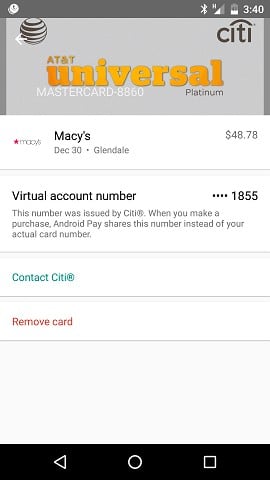
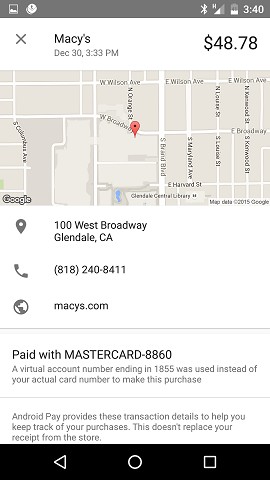
Here is my experience using Android Pay on my Nexus 5

First screen.


Then after the transaction was processed


Bit more information that ANZb provides.

Next step buy something using fans NFC readers but using
The ANZ card as the payment method rather than my US chest card.


Staying in Wellington. Check out my AirBnB in the Wellington CBD.  https://www.airbnb.co.nz/h/wellycbd  PM me and mention GZ to get a 15% discount and no AirBnB charges.


lchiu7
6521 posts

Uber Geek
+1 received by user: 543

Trusted

  #1460549 3-Jan-2016 11:30
Send private message

Went to use Android Pay again and noticed that because I had used it before 31Dec Google had given me a $20 gift card from Best Buy. Nice:-)

I found something useful to redeem the card for.


Staying in Wellington. Check out my AirBnB in the Wellington CBD.  https://www.airbnb.co.nz/h/wellycbd  PM me and mention GZ to get a 15% discount and no AirBnB charges.


freitasm
BDFL - Memuneh
80657 posts

Uber Geek
+1 received by user: 41065

Administrator
ID Verified
Trusted
Geekzone
Lifetime subscriber

  #1460600 3-Jan-2016 13:41
Send private message

Always nice...


Referral links: Quic Broadband (free setup code: R587125ERQ6VE) | Samsung | AliExpress | Wise | Sharesies 


Support Geekzone by subscribing (browse ads-free), or making a one-off or recurring donation through PressPatron.



1 | 2 | 3 | 4 | 5 | 6 | 7 | 8 | 9 | 10 | 11 | 12 | ... | 13
View this topic in a long page with up to 500 replies per page Create new topic


Geekzone Live »

Try automatic live updates from Geekzone directly in your browser, without refreshing the page, with Geekzone Live now.


Are you subscribed to our RSS feed? You can download the latest headlines and summaries from our stories directly to your computer or smartphone by using a feed reader.